What Does Kvisoft Data Recovery Do?
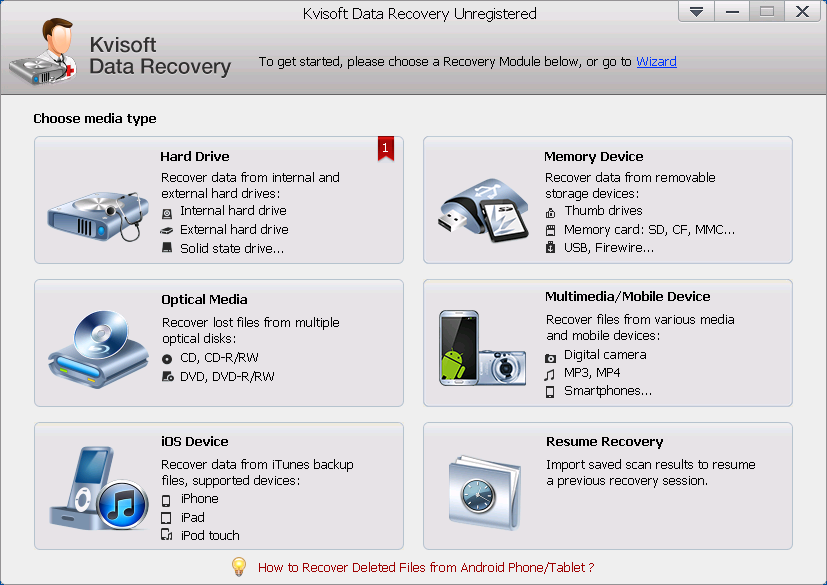
Kvisoft Data Recovery is a utility designed for Windows users to retrieve lost or deleted digital assets across a wide range of storage mediums. The software facilitates the restoration of images, videos, audio files, documents, and archives. It supports internal hard drives, external disks, USB flash drives, and memory cards, as well as optical media such as CDs and DVDs. Mobile device support extends to Android handsets and the retrieval of iOS backup files from iPhones and iPads.
The application operates on several common file systems, including FAT16, FAT32, exFAT, and NTFS. Users can select between two recovery paths: Standard Recovery, which scans for all file types on a partition, and Wizard Recovery, which targets specific file categories for faster results. For scanning efficiency, the software offers a Quick Recovery mode for recently deleted files and a Deep Scan option for comprehensive retrieval from formatted or corrupted storage devices.
Before committing to a restoration, the tool provides preview functionality for documents, music, and video files to ensure data integrity. Users can utilize filters to sort scan results by file size, extension, or modification date. Additionally, the software supports importing previously saved scanning results, allowing users to resume the recovery process without performing a new scan.
Top 5 Reasons To Download Kvisoft Data Recovery
- Unmatched Device Compatibility: Recover data from internal hard drives, external USBs, SD cards, mobile phones, and even optical discs like CDs and DVDs.
- Universal File Type Support: Whether it is a family photo, a professional PDF, a high-definition movie, or a critical archive file, this software handles virtually every format.
- Tailored Recovery Modes: Choose between the Wizard mode for beginners or the Standard mode for pros, combined with Quick and Deep scan options for maximum efficiency.
- Smart Preview and Filtering: See your files before you restore them and use advanced filters to find exactly what you are looking for without wasting time.
- Versatile Loss Scenario Coverage: From accidental "Shift+Delete" errors to formatted drives and system crashes, it addresses nearly every cause of data loss.
Introduction: The Digital Safety Net You Cannot Afford to Miss
We have all been there. That heart-stopping moment when you realize you accidentally deleted a folder of irreplaceable photos, or the sinking feeling when your external hard drive refuses to open, claiming it needs to be formatted. In our modern digital lives, our data is our history, our work, and our memories. Losing it feels like losing a piece of ourselves. This is exactly why a robust data recovery tool is not just a "nice-to-have" utility—it is an absolute essential for anyone who uses a computer.
Today, I am looking at a piece of software that has been making waves for its simplicity and sheer power: Kvisoft Data Recovery. If you are looking for a reason to jump on this giveaway, look no further. This isn't just another utility gathering dust in your downloads folder; it is a comprehensive, all-in-one insurance policy for your digital life. As a tech reviewer, I see hundreds of apps, but few offer the immediate, life-saving value that a high-quality data recovery suite provides. Let’s dive deep into why Kvisoft Data Recovery should be your next download.
1. Unmatched Device Compatibility
One of the biggest frustrations with many data recovery tools is their limited scope. Some only work with internal hard drives, while others struggle to recognize modern mobile devices. Kvisoft Data Recovery breaks these barriers by offering support for a staggering array of storage mediums. It is designed to be the only recovery tool you will ever need, regardless of where your data was stored.
First and foremost, it handles the basics with ease. Whether you are running a standard Windows-powered PC with an internal HDD or a modern SSD, the software integrates seamlessly with the file system. But it goes so much further. Think about all the external devices you use daily. USB flash drives, SD cards from your DSLR camera, compact flash cards, and memory sticks are all supported. If you have an old stash of CD-Rs or DVDs that have become unreadable over the years, Kvisoft can even attempt to pull data from those aging optical discs.
The mobile support is where this software truly shines in the modern era. We live on our phones, yet they are incredibly vulnerable to data loss. This software supports a wide range of mobile devices including Blackberry, Nokia, Samsung, HTC, and various other Android-powered smartphones. Perhaps most impressively for many users is the support for Mac iOS mediums. It can help recover iOS backup files from your iPad, iPod, and iPhone, ensuring that even your Apple ecosystem data has a safety net on your Windows machine. By supporting FAT16, FAT32, exFAT, and NTFS file systems, it ensures that no matter how your drive was formatted, the software speaks its language.
2. Universal File Type Support
A recovery tool is only as good as the files it can actually "see" and "reconstruct." Some bargain-bin software can find a deleted file but fails to restore it in a usable format. Kvisoft Data Recovery stands out because of its extensive library of supported file signatures. It doesn't just look for "deleted data"; it looks for specific structures that define the files you care about.
For the creative types, the image and graphics support is exhaustive. It handles the standard JPG and JPEG formats, but also PNG, BMP, GIF, and TIF. Whether you are a professional photographer or just someone with a lot of family vacation photos, your visual memories are in good hands. The same applies to multimedia. In an age of vlogging and digital streaming, losing a video file can mean losing hours of work. This software supports AVI, MOV, MP4, M4V, MPG, SWF, RMVB, 3GP, and FLV. Music lovers aren't left out either, with support for MP3, WAV, WMV, and various other audio recordings.
For the professionals and students, the document support is a lifesaver. We are talking about the full Microsoft Office suite—Word, Excel, PowerPoint—alongside PDFs and plain text files. But Kvisoft goes even deeper by supporting archive files like ZIP, RAR, and 7Z. One of the most underrated features, however, is the email recovery support. If you have ever lost a PST or DBX file from Outlook, you know how devastating it can be to lose your entire communication history. Kvisoft’s ability to target these specific database files makes it a powerhouse for business users.
3. Tailored Recovery Modes for Every User
Technology should be accessible, and Kvisoft understands that not everyone is a data forensics expert. This is why the software offers two distinct recovery modes: Standard and Wizard. The Wizard Recovery mode is perfect for beginners or anyone in a rush. It guides you through a simple step-by-step process where you simply tell the software what type of file you are looking for. It narrows the focus, making the process feel less like a technical chore and more like a guided search.
For the power users who want more control, the Standard Recovery mode allows you to scan all file types from a selected device or partition. This is ideal when you aren't quite sure what was lost or if you are trying to perform a total sweep of a corrupted drive. This flexibility ensures that the software grows with you; as you become more comfortable with data management, the tool remains just as useful.
Furthermore, the software offers two scanning depths. The Quick Recovery mode is a time-saving miracle. It specifically targets recently deleted files that haven't been overwritten yet. If you just realized you emptied the recycle bin by mistake, this scan takes seconds and gets the job done. However, if you are dealing with a formatted drive or a more complex data loss event, the Deep Scan mode is your best friend. It digs into the raw sectors of your storage medium. While it takes longer, its thoroughness is unmatched, often finding files that other software might miss entirely.
4. Smart Preview and Filtering Technology
One of the biggest headaches in data recovery is the "needle in a haystack" problem. After a deep scan, you might be presented with thousands of files, many with cryptic names like "FILE001.jpg." How do you know which one is the photo you actually need? Kvisoft solves this with a robust Preview feature. Before you even click the "Recover" button, you can preview images, documents (under 10MB), and even watch video clips or listen to audio files. This ensures that you are only spending time and disk space on the files that actually matter.
In addition to previews, the Easy Filter system is a game-changer for productivity. You can sort through the scan results by folder structure, file type, size, or even the date the file was created or modified. If you know you lost a document last Tuesday that was roughly 500KB, you can set those parameters and find it instantly among the thousands of other results. This level of organization is what separates professional-grade software from amateur tools.
Another "pro" feature included in this giveaway is the Resume Recovery option. Large scans can take time, especially on multi-terabyte drives. If you need to stop your work and come back later, Kvisoft allows you to save your scanning results. You can import these results later and pick up exactly where you left off without having to re-scan the entire drive. This shows a level of respect for the user's time that is rare in the software world.
5. Versatile Loss Scenario Coverage
The "how" of data loss is often just as important as the "what." Many basic recovery tools only work if a file was simply deleted. But what if the loss was more catastrophic? Kvisoft Data Recovery is built to handle the messy reality of computer errors. It addresses Human Errors such as accidental USB ejection during a write cycle or a wrong partition command. These are common mistakes that usually result in a "drive not recognized" error, but Kvisoft can see past the partition errors to the data beneath.
The software is also a beast when it comes to Formatted Files. Many people believe that once a drive is formatted, the data is gone forever. In reality, the data often remains on the disk; the "map" to the data is just gone. Kvisoft acts as a new map-maker, finding those formatted files on hard disks, USBs, and SD cards. It also provides a shield against Environmental and System Factors. Whether your data was lost due to a sudden power failure, a malicious virus attack, a system crash, or a physical hard disk malfunction, this software provides a fighting chance to get your files back.
By covering such a wide range of scenarios, the software removes the guesswork. You don't have to wonder "will it work for a virus?" or "will it work for a formatted card?" The answer is almost always a resounding yes. This versatility makes it the ultimate "just in case" tool to have in your digital arsenal.
Conclusion: Why You Should Act Now
In the world of tech, we often talk about "must-have" apps, but Kvisoft Data Recovery truly earns that title. It is a rare combination of power, versatility, and ease of use. It doesn't matter if you are a tech-savvy professional managing a server or a grandmother trying to save photos of her grandkids; the intuitive interface and powerful scanning engine cater to everyone.
The beauty of this giveaway is that it provides peace of mind. Data loss isn't a matter of "if," but "when." Hard drives fail, software glitches, and humans make mistakes. Having this software installed and ready to go means that when that inevitable moment happens, you won't be panicking. You will simply open Kvisoft, run a scan, and watch your "lost" files reappear as if by magic.
With its ability to handle everything from the latest Android phones to old-school CDs, and its support for every file type from emails to high-end video, Kvisoft Data Recovery is the gold standard for file restoration. Don't wait until you are staring at an empty folder and a deadline. Download this giveaway today, get familiar with its clean interface, and rest easy knowing that your digital life is protected by one of the most effective recovery tools on the market. It is easy, it is effective, and most importantly, it works when you need it most. Grab it now and secure your data once and for all.

Reviews for Kvisoft Data Recovery
Click Here to Read Reviews for Kvisoft Data Recovery >> Click Here to Submit Reviews for Kvisoft Data Recovery >>