What Does Leawo Tunes Cleaner Do?
Leawo Tunes Cleaner is a Windows-based utility designed to organize and repair digital music libraries. The software functions primarily as an automated tool for iTunes, though its capabilities extend to local music folders stored in directories like MP4 libraries. Its core functionality involves scanning collections to detect and remove duplicate tracks, which helps streamline library navigation and reclaim storage space.
Beyond deduplication, the application retrieves missing metadata for music files. It automatically downloads album artwork and populates missing tags, including song titles, artists, album names, and release years. For tracks with incomplete or incorrect data, the program provides a manual editing interface, allowing users to input specific details themselves. If certain files cannot be identified during an initial scan, they can be saved within the interface for later adjustment.
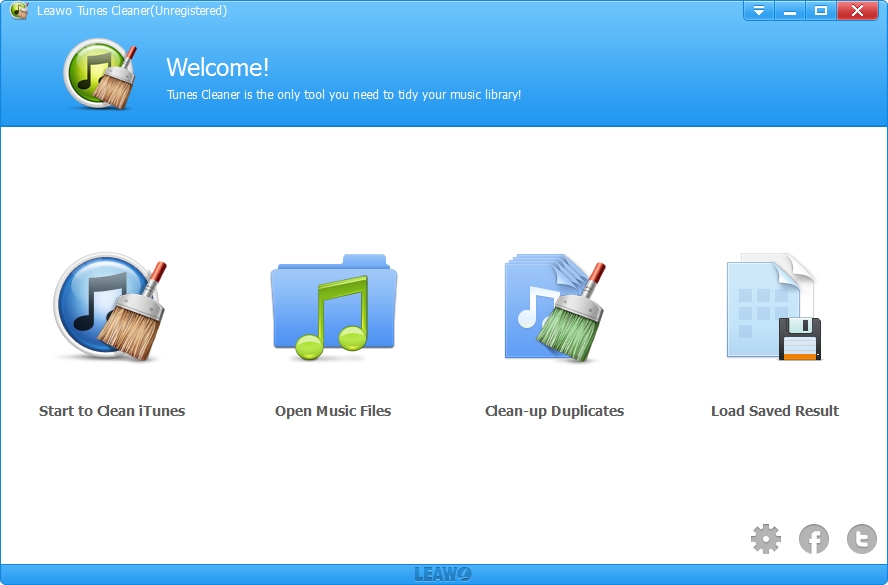
The utility supports a one-click synchronization feature, allowing users to apply all metadata updates and cleanup actions directly to the original music folders or the iTunes database. This ensures that the organized data remains consistent across the user’s file system and media players. Key features include:
- Automated detection and removal of song duplicates.
- Automatic retrieval of album artwork for iTunes and local files.
- Downloading and embedding music tags such as artist, album, and year.
- Manual metadata editing for customized library management.
Top 5 Reasons To Download Leawo Tunes Cleaner
- Smart Duplicate Detection and Removal: Effortlessly reclaim your storage space and eliminate the frustration of hearing the same song twice by identifying and deleting redundant files with surgical precision.
- Automated Metadata and Album Art Retrieval: Transform a messy library of "Unknown Artists" and generic icons into a professional, visually stunning gallery by automatically downloading missing tags and high-quality artwork.
- Precision Manual Editing for Power Users: Take absolute control over your music collection with built-in editing tools that allow you to fine-tune every detail, from song titles to release years.
- Comprehensive Local Library Support: It is not just for iTunes anymore; this tool extends its powerful cleaning capabilities to your local music folders and MP4 libraries, ensuring your entire PC stays organized.
- Streamlined One-Click Optimization: Experience a "set it and forget it" workflow where fixed music files can be applied to your library instantly, making professional-grade organization accessible to everyone.
If you are anything like me, your music library is a digital reflection of your life. It is a collection of memories, moods, and late-night discoveries spanning years, if not decades. But let’s be honest: over time, that collection starts to look less like a curated gallery and more like a digital junk drawer. We have all been there—scrolling through iTunes only to find five different versions of the same song, or seeing a sea of gray icons where beautiful album art should be. It is frustrating, it is messy, and it makes the act of listening to music feel like a chore. This is exactly where Leawo Tunes Cleaner steps in, and if you have been looking for a reason to finally get your digital house in order, this giveaway is the perfect opportunity.
As a tech reviewer, I see hundreds of utilities that promise to "optimize" your life, but few address a problem as universal as the cluttered music library. Leawo Tunes Cleaner is a Windows-based powerhouse designed specifically to handle the heavy lifting of music organization. It is not just a simple deletion tool; it is a sophisticated management suite that uses intelligent algorithms to scrub your library clean. Whether you are dealing with a massive iTunes database or a scattered folder of MP4s on your hard drive, this software is designed to bring order to the chaos. Let’s dive deep into why this specific tool is an essential download for any music lover.
1. Smart Duplicate Detection and Removal
The first and perhaps most vital reason to download Leawo Tunes Cleaner is its ability to handle duplicates. We often underestimate how much space duplicate files take up. Between importing CDs multiple times, accidental downloads, and moving files between devices, it is incredibly easy to end up with three or four copies of the same track. This doesn’t just waste precious gigabytes on your SSD; it ruins the listening experience. Imagine putting your favorite playlist on shuffle, only to hear the same track back-to-back. It breaks the flow and highlights the lack of organization in your system.
What sets this tool apart from generic file cleaners is its "smart" detection. It doesn't just look at file names, which can often be misleading. It analyzes the metadata and file characteristics to determine if two files are truly the same. This means it can catch duplicates even if they are named differently or stored in separate folders. Once the scan is complete, the software presents you with a clear list of what it found, allowing you to delete the extras with a single click. It is a surgical approach to cleaning that saves you hours of manual searching and ensures that your library contains only the highest quality version of every song you own.
2. Automated Metadata and Album Art Retrieval
We have all seen it: the dreaded "Track 01" by "Unknown Artist" on an album called "Unknown." It is the bane of any organized person’s existence. When your music files are missing tags, they become impossible to search for and even harder to enjoy. Furthermore, a library without album art feels sterile and unfinished. Modern music players are designed to be visual experiences, and without those vibrant covers, the interface looks broken. Leawo Tunes Cleaner solves this by acting as a digital librarian.
The software connects to vast online databases to automatically identify your music. By analyzing the data it does have, it can fill in the blanks, downloading song names, artists, album titles, genres, and release years. But the real "wow" factor is the album artwork retrieval. It searches for high-resolution covers and embeds them directly into your files. The transformation is instant—your iTunes library goes from a list of text to a professional-looking digital record store. This automation is a massive time-saver for anyone with a collection larger than a few dozen songs, turning a task that would take days of manual labor into a process that takes mere minutes.
3. Precision Manual Editing for Power Users
While automation is incredible, there are times when you want a human touch. Perhaps you have a rare bootleg recording, a local indie band that isn't in the global databases, or you simply prefer a specific naming convention for your classical music. A common complaint with automated cleaners is that they can sometimes get it wrong or force a format you don't like. Leawo Tunes Cleaner respects the "power user" by including a robust manual editing mode. This is where the software really shines for those who are meticulous about their curation.
If the automated search doesn't find the exact match you are looking for, you can jump into the editor and change every tag manually. You can tweak the artist name, adjust the year, or even upload your own custom album art from your computer. This hybrid approach—automated for the masses and manual for the specifics—ensures that your library is exactly how you want it. It gives you the flexibility to be as hands-on or hands-off as you like. For the perfectionists among us, this level of control is the difference between a "good" library and a "perfect" one.
4. Comprehensive Local Library Support
One of the biggest misconceptions about this software is that it is strictly for iTunes. While the name implies an iTunes focus, Leawo Tunes Cleaner is actually a versatile music management tool for your entire Windows environment. Many of us have transitioned away from using iTunes exclusively, opting instead for local folders of MP4, MP3, or WAV files that we play through various third-party apps. If your music is scattered across your "Downloads" folder, "My Music" directory, or an external hard drive, this tool has you covered.
The "Clean Up Local Music Folders" feature is a game-changer. It allows you to point the software at any directory on your computer, and it will apply the same rigorous cleaning standards it uses for iTunes. It will find duplicates in your local folders and fix the metadata of your raw files. This is particularly useful for users who manage large MP4 music video libraries or high-fidelity audio collections. By centralizing your cleaning process, Leawo ensures that no matter where your music lives, it remains organized, tagged, and ready for playback. This versatility makes it an indispensable tool for the modern digital audiophile who isn't tethered to a single ecosystem.
5. Streamlined One-Click Optimization
In the world of software, complexity is often the enemy of productivity. If a tool is too difficult to use, it simply won't get used. Leawo clearly understood this when designing the user interface for Tunes Cleaner. The entire philosophy of the app is built around the "one-click" fix. From the moment you launch the program, you are guided through a logical flow: scan, fix, and apply. The interface is clean, intuitive, and doesn't bury its best features under layers of confusing menus.
One of the most impressive features is the "Save Unfixed" option. Sometimes, you might be in the middle of a massive library cleanup and realize you need to step away or check a specific detail before committing to a change. Instead of losing your progress, you can save the current state of your "unfixed" music files and return to them later. Once you are satisfied with the corrections the software has suggested, applying those changes to your actual iTunes library or local folders is instantaneous. There is no messy file moving or complicated syncing required. It is an efficient, stress-free workflow that makes the daunting task of music organization feel manageable, even for those who aren't tech-savvy.
Conclusion
We live in an age of digital abundance, but that abundance often leads to digital clutter. Our music collections deserve better than to be a disorganized mess of duplicates and missing information. Leawo Tunes Cleaner provides a professional-grade solution that is both powerful enough for the enthusiast and simple enough for the casual listener. It addresses the core pain points of music management—storage waste, missing metadata, and lack of visual appeal—with an elegant, automated system.
By downloading this giveaway, you aren't just getting a piece of software; you are getting a dedicated digital librarian. You are reclaiming your hard drive space, enhancing the visual beauty of your music player, and ensuring that every time you hit "play," you are having the best possible experience. Don't let your music library remain a chaotic mess. Take advantage of this opportunity to download a tool that will truly transform how you interact with your favorite songs. In the world of tech utilities, this is one download that pays for itself in time saved and frustration avoided. Your music collection will thank you.


Reviews for Leawo Tunes Cleaner
Click Here to Read Reviews for Leawo Tunes Cleaner >> Click Here to Submit Reviews for Leawo Tunes Cleaner >>