What Does Makeup Guide Do?
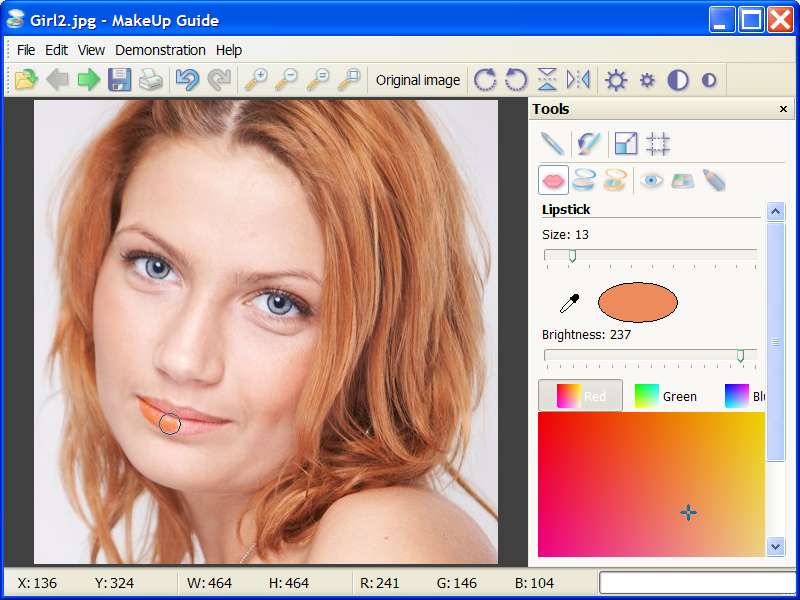
Makeup Guide is a specialized image editing utility designed for post-production cosmetic retouching. The software provides a virtual toolkit for modifying facial features in digital photographs, allowing users to apply or correct makeup after a photo session is complete. It serves as a focused alternative to complex graphic design suites by streamlining the specific process of portrait enhancement.
The application includes several dedicated tools for facial modification, each targeting a specific area of the portrait:
- Lipstick: A tool intended for applying or changing the color and saturation levels of the lips.
- Powder: This feature allows users to apply a digital powder finish to the skin, which helps to mask blemishes and reduce unwanted highlights.
- Rouge: Designed for skin makeup, this tool adds color and contour to the cheek area for improved definition.
- Eye Color: This function enables the user to change the pigment of the iris or intensify the natural eye color.
- Eye Shadow: A digital brush for applying various shades to the eyelids to complement the subject’s features.
- Eye Liner: This tool adds definition to the perimeter of the eyes, which can be utilized to make the eyes appear larger or more prominent.
By providing these specific cosmetic overlays, Makeup Guide allows for precise aesthetic adjustments without the need for manual layer masking or the advanced color grading techniques typically found in professional photo editors.
Top 5 Reasons To Download Makeup Guide
Before we dive into the nitty-gritty details of why this software is a mandatory addition to your digital toolkit, let's look at the highlights. If you are someone who takes photos—whether for social media, professional portfolios, or personal memories—you cannot afford to miss out on Makeup Guide. Here are the top five reasons why you need to download this giveaway right now:
- Seamless Post-Production Correction: Never worry about forgotten makeup or smudged eyeliner again; you can fix it all after the shutter clicks.
- A Complete Virtual Makeup Bag: You get a full suite of tools including Lipstick, Powder, Rouge, Eye Color, Shadow, and Liner in one lightweight package.
- Realistic Eye Enhancement: From changing eye color to adding depth with eyeliner, the software offers precision tools that look natural and professional.
- User-Friendly Professionalism: You do not need to be a Photoshop expert to achieve magazine-quality results; the interface is intuitive for everyone.
- Creative Experimentation: It serves as a risk-free testing ground to see how different makeup styles and colors look on your face before you try them in real life.
The Power of Digital Beauty at Your Fingertips
We have all been there. You spend an hour getting ready for a special event, the lighting is perfect, the background is scenic, and you snap what you think is the perfect photo. But then, you look at the screen and realize the camera flash washed out your complexion, or perhaps you forgot to apply that specific shade of lipstick that ties your whole outfit together. In the past, that photo would have been destined for the recycle bin. Today, thanks to Makeup Guide, that "ruined" photo is actually a masterpiece in the making.
As a tech reviewer, I see hundreds of photo editing apps. Most of them are bloated with filters that make you look like a plastic doll or a cartoon character. What makes Makeup Guide stand out is its commitment to subtle, realistic enhancement. It treats your photo not as a canvas for a filter, but as a portrait that requires the delicate touch of a makeup artist. This giveaway is your chance to own a virtual makeup bag that is more versatile than the physical one sitting on your vanity.
Reason 1: Seamless Post-Production Correction
The first and perhaps most practical reason to download Makeup Guide is the ability to correct mistakes that were missed during the actual photo shoot. We live in a fast-paced world where "candid" moments are captured in seconds. You don't always have the luxury of checking your makeup in a mirror before someone snaps a picture of you at a wedding, a birthday party, or a professional networking event.
With this software, "forgetting" to tint your lips or eyelids is no longer a permanent mistake. The software allows you to go back in time, metaphorically speaking, and apply those finishing touches. This is particularly useful for those photos where the lighting was less than ideal. Often, a camera's flash can "eat" the color on your face, making you look pale or washed out. By using the digital tools provided in this giveaway, you can restore the vibrancy of your look, ensuring that you look exactly how you felt in that moment—vibrant, polished, and confident.
Reason 2: A Complete Virtual Makeup Bag
When you download Makeup Guide, you aren't just getting a one-trick pony. You are getting a comprehensive suite of tools designed to handle every aspect of facial aesthetics. Let’s break down what is included in this virtual kit:
- Lipstick: This isn't just a "fill color" tool. It is designed to follow the natural contours of your lips, allowing you to add color, shine, and definition where it is needed most.
- Powder: This tool is a lifesaver for anyone dealing with "shiny" skin in photos. It helps in marking powder to create a matte, smooth finish that looks like high-end foundation.
- Rouge: If your skin looks a bit sallow or tired, the Rouge tool adds that healthy, youthful glow back into your cheeks, mimicking the natural flush of skin makeup.
- Eye Color: This is one of the most fun tools in the kit. Whether you want to enhance your natural hue or see what you’d look like with a completely different eye color, this tool handles the transition with incredible realism.
- Eye Shadow: You can choose shades that complement your natural beauty, adding depth and drama to the eyelids without the mess of real-world application.
- Eye Liner: A well-placed line can make even the smallest eyes appear larger and more expressive. This tool allows for precision that is often hard to achieve with a physical pencil.
Having all these tools in one place means you don't have to jump between different apps to finish a single photo. It is a centralized hub for digital beauty.
Reason 3: Realistic Eye Enhancement
They say the eyes are the windows to the soul, and in photography, they are often the focal point of the entire image. If the eyes don't look right, the whole photo feels off. Makeup Guide places a heavy emphasis on eye tools because the developers understand this fundamental rule of portraiture.
Changing eye color in post-production is notoriously difficult to do well. Most apps simply overlay a circle of color that looks fake and "glitchy." However, the Eye Color tool in this software is designed to respect the reflections and textures of the iris. Furthermore, the Eye Liner and Eye Shadow tools allow you to frame the eyes in a way that directs the viewer's attention. Whether you want a subtle daytime look or a dramatic evening "smokey eye," the precision of these tools ensures that the result looks like it was applied by a pro, not a computer program. For anyone who feels their eyes "disappear" in photos, these tools are an absolute game-changer.
Reason 4: User-Friendly Professionalism
One of the biggest barriers to photo editing is the steep learning curve associated with professional software. Most people don't have the time to watch dozens of hours of tutorials just to learn how to change their lipstick color. This is where Makeup Guide truly shines. It provides professional-grade results without the professional-grade complexity.
The interface is streamlined and focused. Every tool is clearly labeled, and the application process is intuitive. You select your tool, choose your color or intensity, and apply it directly to the photo. The software handles the complex blending and edge-detection in the background, so you don't have to worry about "painting outside the lines." It is sophisticated enough for a pro who wants a quick fix, but simple enough for a beginner who has never edited a photo in their life. By downloading this giveaway, you are essentially skipping the learning curve and going straight to the results.
Reason 5: Creative Experimentation
Finally, we have to talk about the "fun" factor. Makeup Guide isn't just for fixing mistakes; it is for exploration. Have you ever wondered if you could pull off a bold red lipstick, but were too afraid to spend $30 on a tube only to find out it doesn't suit your skin tone? Or have you wanted to see how you’d look with green eyes or dark purple eyeshadow?
This software acts as a risk-free testing ground. You can experiment with different looks, colors, and styles on your own face in a matter of seconds. It’s an incredible tool for planning your look for a future event or simply discovering a new side of your aesthetic. Because it is digital, there is no makeup remover required, no stained skin, and no wasted money. You can try a hundred different combinations until you find the one that makes you feel the most beautiful. This creative freedom is perhaps the most underrated benefit of the software.
Why This Specific Software?
You might be asking, "Why should I choose Makeup Guide over the hundreds of mobile apps available?" The answer lies in the precision of the desktop environment. While mobile apps are great for a quick "beautify" button, they lack the fine-motor control you get with a mouse or a tablet on a computer. When you are working on something as delicate as eyeliner or lip contours, every pixel matters.
Makeup Guide is built for those who care about the details. It allows you to zoom in, refine your strokes, and ensure that the digital makeup blends perfectly with the texture of your skin. Mobile apps often "blur" the skin to hide imperfections, which results in a loss of detail and a fake appearance. This software, however, aims to preserve the natural texture of your skin while simply adding the "pigment" of the makeup on top of it. It is the difference between a cheap mask and a professional makeover.
Breaking Down the Tools
Let's take a closer look at how these tools actually function within the software to give you an idea of the power you'll have once you download this giveaway.
The Lipstick tool is more than just a color picker. It allows for various levels of opacity. This means you can apply a sheer tint for a "natural" look, or a heavy, opaque layer for a high-fashion statement. Because it interacts with the underlying light and shadow of your lips, the result maintains the natural 3D shape of your mouth, preventing that flat, "painted-on" look that plagues lesser apps.
The Powder and Rouge tools are essential for skin correction. The Powder tool is specifically designed to target those areas of the face that catch too much light—the forehead, the nose, and the chin. By applying a digital "matte" layer, you can eliminate distracting highlights and make the skin look velvety and even. The Rouge tool, on the other hand, allows you to define your cheekbones. By selecting the right shade and using a light touch, you can "contour" your face digitally, giving yourself a more defined and lifted appearance.
The Eye Shadows and Eye Liners are where you can get truly creative. The software offers shades that complement your natural beauty, but the true power lies in the application. The eyeliner tool can be used to subtly darken the lash line, making lashes look thicker and fuller, or it can be used to create a sharp "cat-eye" flick that adds an element of high drama to your portrait. Because you can control the thickness and the softness of the line, you have total control over the "mood" of the photo.
A Reviewer’s Final Verdict
In the world of tech, we often talk about "friction." Friction is anything that stands between a user and their desired outcome. If you want a great photo, the friction is usually the time it takes to apply makeup, the cost of the products, the skill required to apply them, and the technical knowledge needed to edit the photo afterward.
Makeup Guide is a "friction-killer." It removes every one of those barriers. It saves you time, it saves you money, and it bridges the gap between a novice and a professional editor. It turns the "I wish I looked better in this" thought into "I look amazing in this."
Whether you are a professional photographer looking for a quick way to touch up a client's portrait, a social media influencer who needs to stay on-brand, or just someone who wants their family vacation photos to look their absolute best, this software is an essential download. It is a virtual makeup bag that never runs out, never expires, and always delivers perfect results.
Don't let this giveaway pass you by. The ability to transform your photos with such ease and precision is a rare find. Download Makeup Guide today and start seeing your photos in a whole new light. You’ve already got the natural beauty—now you have the tools to make it shine.
Final Thought: In an era where our digital presence is often the first impression we make on the world, having a tool like Makeup Guide isn't just a luxury—it's a smart strategic move. Take control of your image, experiment with your style, and never let a "bad makeup day" ruin a great memory again. This is the giveaway your hard drive, and your photos, have been waiting for.


Reviews for Makeup Guide
Click Here to Read Reviews for Makeup Guide >> Click Here to Submit Reviews for Makeup Guide >>