What Does Power Sound Editor Deluxe Do?
Power Sound Editor Deluxe is a comprehensive audio processing suite designed for recording, editing, and mastering digital sound. The software functions as a central hub for digitizing analog media, allowing users to capture audio from external sources like tapes, LPs, and live performances, or internal sources such as internet radio and video playback. The recording module includes a timer function, silence detection, and adjustable sample rates without file size restrictions.
For post-production, the application provides a visual waveform interface with drag-and-drop support and an unlimited undo/redo history. Users can perform standard editing tasks including cutting, copying, and mixing multiple tracks into a single file. The toolkit also features dozens of filters, noise reduction solutions, and volume normalization tools to enhance audio quality. Advanced functions include a text-to-speech engine and frequency analysis for detailed signal research.
The software supports a wide array of formats, including WAV, MP3, MP2, Ogg Vorbis, WMA, and VOX. Beyond basic editing, the suite integrates a built-in CD ripper with ID3 tag support and a CD burner for creating physical media. It also includes a disc eraser and a library of format presets enables the output of audio optimized for various hardware devices.
Top 5 Reasons To Download Power Sound Editor Deluxe
- A Comprehensive, All-In-One Recording Powerhouse: Capture high-quality audio from any internal or external source with professional precision.
- Professional-Grade Editing and Artistic Effects: Access a massive library of filters, noise reduction tools, and precise editing functions to transform raw audio into a masterpiece.
- Ultimate Workflow Efficiency and Ease of Use: Experience a streamlined interface featuring drag-and-drop functionality, visual waveform editing, and unlimited undo/redo commands.
- Integrated Disc Management Suite: Rip audio tracks, burn custom CDs for your car or home stereo, and erase rewritable discs without needing third-party software.
- Extensive Format Support and Advanced Metadata Tools: Seamlessly work with MP3, WAV, OGG, and WMA files while utilizing built-in ID3 tagging and unique Text-to-Speech technology.
In the fast-paced world of digital media, audio is often the element that separates a mediocre project from a professional one. Whether you are a budding podcaster, a musician looking to polish your latest track, or simply a nostalgic soul trying to digitize a collection of dusty cassette tapes and LPs, the tools you use matter. We have all been there—struggling with clunky, over-complicated software that feels like it requires a PhD in sound engineering just to trim a few seconds off a recording. That is why, as a tech reviewer, I am always on the lookout for that "sweet spot" software: something that offers professional-grade power without the steep learning curve. Enter Power Sound Editor Deluxe. This isn't just another audio tool; it is a full-scale laboratory for your ears. If you have been looking for a reason to upgrade your digital toolkit, look no further. Here is a deep dive into why you absolutely need to download this giveaway today.
1. A Comprehensive, All-In-One Recording Powerhouse
The first thing any serious audio enthusiast needs is a reliable way to get sound into their computer. Power Sound Editor Deluxe excels here by offering an intuitive recording function that is as flexible as it is powerful. Most basic recording apps limit you to just your microphone, but this software opens the doors to every sound source your hardware can touch. We are talking about transferring old tapes, capturing the warm crackle of LPs, recording live performances through an interface, or even grabbing audio from Internet radio, TV, and DVDs.
What sets this apart from the pack is the "No Limitation" philosophy. You can make high-quality recordings without worrying about arbitrary file size caps. If you want to record a three-hour live concert or a marathon radio broadcast, go for it. The software handles it with ease. Furthermore, the inclusion of a Timer Record function is a total game-changer. Imagine being able to schedule your recording to start exactly when your favorite radio show begins, even if you aren't at your desk. It is like having a DVR for your audio world.
For those who care about the technical nitty-gritty, you have detailed options for sample rates and channels, ensuring your recordings meet the exact specifications you need for your project. And let’s not forget the "Recording without silence" feature. This is an absolute lifesaver for anyone digitizing old media; it automatically detects gaps in the audio, saving you from having to go back and manually delete minutes of dead air. It’s smart, it’s efficient, and it’s built into the core of the experience.
2. Professional-Grade Editing and Artistic Effects
Recording the audio is only half the battle; the real magic happens in the edit. Power Sound Editor Deluxe provides a suite of flexible editing operations that make you feel like a studio pro. You have your conventional cut, copy, and paste functions, of course, but it goes so much deeper. The selection tools allow you to isolate parts of an audio file with surgical precision. If you are working on a complex project, the Bookmark Tool and Region Manager allow you to keep track of various segments across a long file, making discontinuous selections a breeze.
But where this software truly shines is in its Powerful Sound Quality Enhancement. We have all dealt with recordings that have a bit of unwanted "hiss" or background hum. The abundant noise-reducing solutions included here allow you to clean up those tracks, making them sound crisp and clear. Once your audio is clean, you can dive into the library of dozens of amazing artistic effects and filters. Want to add a professional reverb to a vocal track? Need to shift the pitch or add a flange effect for something more experimental? It’s all there.
Crucially, the software includes a Normalizer and Amplifier. These tools are vital for ensuring your audio levels are consistent. No one likes a podcast where one person is whispering and the next is deafeningly loud. With these tools, you have precise control over the volume and dynamics of your file. Finally, if you are unsure about technical output requirements, the library of format presets allows you to optimize your audio for specific devices, ensuring your work sounds great whether it’s played on a high-end stereo or a smartphone speaker.
3. Ultimate Workflow Efficiency and Ease of Use
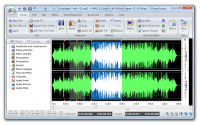
One of the biggest hurdles in tech is the "UI barrier." If a program is too hard to navigate, you won't use it. The developers of Power Sound Editor Deluxe clearly understood this, as the software is built around Extreme Ease of Use. The interface is well-organized and stays out of your way, allowing you to focus on the sound itself. The centerpiece is the Waveform Window, which provides a visual representation of your audio data. This makes it incredibly easy to see where a beat drops, where a speaker pauses, or where a noise spike occurs.
For the "power users" out there, the software is packed with keyboard shortcuts for almost every editing function. Once you learn these, your workflow will move at the speed of thought. The Drag-and-Drop function is another highlight, allowing you to pull files directly from your folders into the editor without digging through complex menu trees. This might seem like a small detail, but in a long editing session, it’s a massive time-saver.
Perhaps the most "human-friendly" feature is the Unlimited Undo/Redo function. Audio editing is often a process of trial and error. You might apply an effect, realize it doesn’t quite fit, and want to go back. With this software, you have a fully revertible edit history. You can experiment boldly, knowing that you can always step back to a previous version of your work. Combined with easy playback for instant inspection, this creates a stress-free environment where creativity can flourish.
4. Integrated Disc Management Suite
In an era of streaming, you might think the age of the CD is over—but talk to any audiophile or car enthusiast, and they will tell you otherwise. Power Sound Editor Deluxe recognizes that physical media still has a place in our lives, which is why it includes a robust CD Burner, CD Ripper, and Disc Eraser right inside the application. You don’t need to export your files and open a separate burning program; everything is integrated into one seamless workflow.
The Audio CD Ripper is particularly impressive. It allows you to extract tracks from unprotected audio CDs and save them in popular formats like MP3, WMA, OGG, or WAV. It even supports CDDB and ID3 Tags, meaning it can automatically look up the artist, album, and track names for you, keeping your library perfectly organized. This is the perfect tool for finally getting that old CD collection onto your hard drive or phone.
On the flip side, the Audio CD Burner lets you create custom high-quality CDs from your favorite digital files. Whether you are making a mixtape for a friend or a high-fidelity backup of your own recordings, the process is incredibly simple—just a couple of clicks and you are ready to go. And for those using rewritable media, the Disc Eraser is a quick and efficient utility to clear out unwanted content and start fresh. Having these tools integrated into your sound editor saves system resources and makes your digital life much more organized.
5. Extensive Format Support and Advanced Metadata Tools
Compatibility is the backbone of any good piece of software. There is nothing more frustrating than trying to open a file only to be told the format is "unsupported." Power Sound Editor Deluxe avoids this headache by offering a wide support range for audio formats. Whether you are working with standard WAV and MP3 files, or more niche formats like Ogg Vorbis, Windows Media Audio (WMA), or even Dialogic VOX, this software can handle it. This flexibility makes it an essential tool for anyone who deals with audio from various sources and eras.
Beyond just opening and saving files, the software helps you manage your music. The detailed ID3 Tag and WMA Info editing tools allow you to embed metadata directly into your files. This means that when you play your song on any device, the correct artist name, album art, and track title will appear. It’s the difference between a folder full of files named "Track 01" and a professional, searchable music library.
But wait, there’s more. This software includes some truly "bonus" features that you won't find in your average editor. First, there is a Text-to-Speech Engine. You can actually type out words and have the software "speak" them, then insert that voiceover directly into your audio project. This is fantastic for creating quick narrations or experimental vocal tracks. Additionally, for the real tech nerds and researchers, the software provides Audio Frequency Analysis. This allows you to perform deep research into the spectral properties of your sound, which is invaluable for professional mixing and mastering. It’s these extra touches that elevate the software from a simple editor to a comprehensive audio suite.
Power Sound Editor Deluxe is a rare find in the software world. It manages to pack an incredible amount of professional power into a package that is genuinely easy for anyone to use. Whether you are performing "discontinuous selections" with the region manager or simply dragging a file into the window to trim it for a ringtone, the experience is smooth and rewarding. By downloading this giveaway, you are giving yourself the ability to record from any source, edit with precision, apply stunning effects, manage your physical disc collection, and organize your digital library—all from one single, well-organized interface.
Don’t let your audio projects suffer from subpar tools. Take control of your sound today. Whether you are preserving history by digitizing old tapes or creating the future with your own music and podcasts, this software provides the foundation you need. It is efficient, it is powerful, and most importantly, it is designed with the user in mind. This is one download you definitely do not want to miss out on!


Reviews for Power Sound Editor Deluxe
Click Here to Read Reviews for Power Sound Editor Deluxe >> Click Here to Submit Reviews for Power Sound Editor Deluxe >>