What Does Quietzone Do?
Quietzone™ is a privacy utility designed to give users granular control over their digital footprint and local system data. The software operates through a straightforward toggle interface, allowing users to determine exactly when their personal information is tracked or recorded during active sessions. When enabled, the tool prevents websites and third-party software from logging internet activity or leaving persistent tracking modules on the host device.
Beyond basic browser privacy, the application functions as a security layer intended to complement traditional antivirus software. While standard protection suites target known threats, Quietzone™ addresses the risk of persistent malware and spyware by forensically removing every system change made during a session. Once a session is terminated, the software wipes all session data, events, and temporary software installations, ensuring that no malicious code or tracking artifacts remain on the hardware.
The service also focuses on local data hygiene for users handling sensitive documentation. Modern operating systems frequently store fragments of confidential files in caches, temporary folders, and system memory. Quietzone™ automates the eradication of these traces, ensuring that copies of private data do not persist on the hard drive after a task is completed. Users retain the ability to choose what is explicitly saved, while the application handles the permanent removal of all secondary digital artifacts.
Top 5 Reasons To Download Quietzone
- Total Autonomy Over Your Digital Footprint: You gain the absolute power to decide who sees your data and when they see it with a simple toggle switch.
- Closing the 40% Security Gap: Traditional antivirus software only catches a portion of threats, but Quietzone acts as a secondary shield to eliminate the malware that slips through the cracks.
- Forensic-Level System Restoration: Every single change made to your PC during a session is forensically removed, ensuring your device returns to its pristine state every time you finish.
- Elimination of Confidential "Ghost Files": Quietzone prevents sensitive documents from leaving behind traces in temp files, caches, or memory, protecting your professional and personal secrets.
- Anti-Tracking and Stealth Browsing: It stops websites and predatory software from fingerprinting your device or recording your internet activity, providing true privacy that standard browsers cannot match.
In the modern digital landscape, the concept of privacy has become something of a myth. We are constantly told that using a private browser window or clearing our history is enough to keep us safe, but as any seasoned tech enthusiast will tell you, that is barely scratching the surface. The reality is that every time you click a link, open a document, or even just hover your mouse over an ad, your computer is leaking information. It creates temp files, it caches images, and it leaves a breadcrumb trail that sophisticated trackers and malware can follow right back to your front door. This is exactly why Quietzone Ultimate Privacy Features is a mandatory download for anyone who takes their digital security seriously. This is not just another utility; it is a foundational shift in how you interact with your PC.
I have spent years reviewing privacy tools, and most of them fall into one of two categories: they are either too complex for the average user to manage, or they are too shallow to provide real protection. Quietzone manages to hit that elusive "sweet spot" by providing enterprise-grade forensic cleaning wrapped in a user interface that anyone can understand. If you are tired of feeling like your own computer is working against you, here is an in-depth look at why you need to grab this giveaway right now.
1. Total Autonomy Over Your Digital Footprint
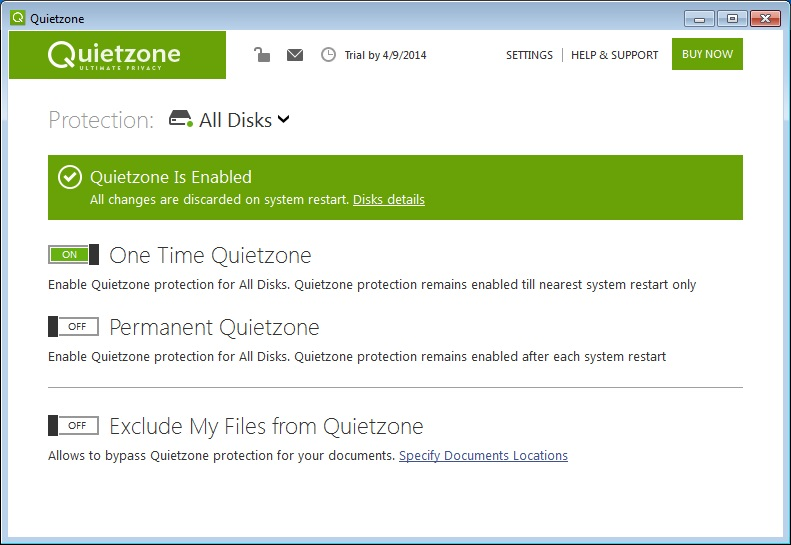
The first and perhaps most compelling reason to download Quietzone is the sheer level of control it grants the user. We live in an era of "opt-out" privacy, where companies assume they have the right to your data unless you jump through a dozen hoops to stop them. Quietzone flips the script. It gives you a literal on and off switch for your privacy. When the software is engaged, you are essentially entering a "ghost mode" where your personal data is no longer up for grabs.
Think about how much data you inadvertently share every day. Your location, your hardware specifications, your browsing habits, and even the way you move your mouse can be used to build a profile of you. Quietzone puts a wall between you and those who want to harvest that profile. You get to decide Who can see and record What and When. By simply switching the Quietzone button to ON, you are taking back the keys to your digital life. It is the ultimate expression of digital autonomy, and it is handled with such simplicity that you do not need a degree in computer science to feel secure.
This "Simplicity of Control" cannot be overstated. Most high-end security suites require you to navigate complex menus, set up firewall rules, and manage exceptions. With this tool, the power is concentrated into a single, intuitive action. If you are doing something sensitive, you turn it on. If you are just playing a game or doing something routine, you can turn it off. It is privacy on your terms, and that is a rare commodity in today's software market.
2. Closing the 40% Security Gap
One of the most sobering statistics in the world of cybersecurity is the failure rate of traditional antivirus software. Even the best, most expensive antivirus programs on the market generally only catch about 60% to 70% of threats. That leaves a massive 30% to 40% gap where "zero-day" exploits, sophisticated spyware, and polymorphic malware can hide. These are the threats that are designed to bypass standard detection methods, and they are exactly what Quietzone is built to handle.
Quietzone does not replace your antivirus; it completes it. It acts as an additional layer of security that operates on a different logic. Instead of trying to "detect" every single piece of bad code, it focuses on the *environment*. By creating a protected session, it ensures that even if a piece of malware manages to slip past your initial defenses and land on your machine, it cannot "persist." Persistence is the goal of every hacker; they want their code to stay on your machine after a reboot. Quietzone makes that impossible. At the end of your session, the software wipes the slate clean. This proactive approach to security is the only way to truly protect yourself against that dangerous 40% of threats that your current software is likely missing.
By using this tool, you are essentially giving yourself a safety net. If you accidentally click a malicious link in a phishing email or visit a compromised website, you don't have to panic. Because you are in a Quietzone session, that malware has no place to take root. It is like being able to walk through a rainstorm without getting a single drop of water on your skin.
3. Forensic-Level System Restoration
When most people think about "cleaning" their computer, they think about deleting files or clearing the browser cache. However, the Windows operating system is incredibly complex. Every time you open a program, the OS makes changes to the registry, creates temporary storage files, and logs events. Even if you "delete" a file, the data often remains on the hard drive until it is overwritten. This is where forensic removal comes into play, and it is a standout feature of the Quietzone Ultimate Privacy suite.
When you finish a session with Quietzone, it doesn't just "delete" your history. It forensically removes every possible change made to your system during that time. This includes session data, software remnants, tracking modules, and even system events that would normally be logged. Your system is returned to the exact state it was in before you turned the software on. This is the level of cleaning usually reserved for government agencies or high-level corporate security teams, but now it is available to you in this giveaway.
This feature is a godsend for maintaining the long-term health of your PC. Over time, computers tend to slow down because of "system rot"—the accumulation of junk files and registry errors from daily use. By using Quietzone for your internet sessions, you are preventing that rot from ever occurring. Your PC stays as fast and clean as the day you bought it because you aren't allowing unnecessary data to pile up in the background. It is as much a maintenance tool as it is a privacy tool.
4. Elimination of Confidential "Ghost Files"
If you have ever worked on a sensitive document—perhaps a legal contract, a medical record, or a confidential business proposal—you might think that saving it to an encrypted drive or deleting it when you are done is enough. Unfortunately, your PC is constantly creating "ghost copies" of your work. It creates autosave files in hidden directories, it stores snippets of data in your RAM, and it caches thumbnails of documents. These traces are technically complex to find and even harder to remove manually.
This poses a significant security risk, especially if your device is ever lost, stolen, or accessed by someone else. Quietzone addresses this by ensuring that absolutely no copies of your confidential data persist after you have finished your session. It manages where data is saved and ensures that the "digital exhaust" created by your productivity software is scrubbed clean. You choose what is saved and where it goes; everything else is eradicated.
For freelancers, remote workers, or anyone handling sensitive personal information, this is the peace of mind you have been looking for. You can open a confidential PDF, review it, and close it, knowing for a fact that there isn't a temporary copy of that file sitting in a hidden Windows folder waiting for a hacker to find it. This feature turns your computer into a digital vault that only keeps what you explicitly tell it to keep.
5. Anti-Tracking and Stealth Browsing
Finally, we have to talk about the predatory nature of modern web tracking. It is no longer just about "cookies." Modern websites use sophisticated scripts to track your browser's fingerprint, which can identify you even if you use a VPN or change your IP address. They track your device's battery level, your screen resolution, and the fonts you have installed. This information is sold to advertisers and data brokers to build an incredibly intimate picture of your life.
Quietzone is designed to break this cycle of surveillance. When it is switched ON, it creates a barrier that prevents websites and software from examining your PC. It stops the tracking modules from being left on your device in the first place. Instead of trying to hide from trackers, you are making yourself invisible to them. This is "Stealth Browsing" in its truest form. You aren't just wearing a mask; you are becoming a shadow.
The beauty of this is that it doesn't break your browsing experience. You can still use the web as you normally would, but without the feeling that someone is constantly looking over your shoulder. You won't see ads for a product you just researched follow you across every social media platform. You won't have to worry about your personal data being harvested by every site you visit. It restores the internet to what it was supposed to be: a place for information and exploration, not a surveillance trap.
Conclusion: Why You Should Download This Now
We are currently at a crossroads when it comes to personal technology. We can either accept that our devices are constantly monitoring us, or we can take active steps to protect our digital sovereignty. Quietzone Ultimate Privacy Features is one of the most effective tools I have seen for those who choose the latter. It is rare to find a software giveaway that offers this much value, especially one that addresses the critical 30-40% gap in traditional security.
From the forensic cleaning of your system to the simple, one-click interface, this app is built for the modern user. It respects your time, it respects your privacy, and most importantly, it gives you back the control you didn't even realize you had lost. Whether you are a professional handling sensitive data or a casual user who is simply tired of being tracked, this is a download you cannot afford to miss. Grab it while this giveaway lasts, and start experiencing what it feels like to use a PC that is truly yours again. You will notice the difference the moment you flip that switch to ON, and once you have experienced that level of security, you will never want to go back to "normal" browsing again. This is the gold standard of privacy, and it is ready for you to download today.
Final Thought for the Power User: Even if you think your current setup is "secure enough," I challenge you to run a session with Quietzone and see how much cleaner your system feels afterward. The lack of background noise, the absence of tracking cookies, and the knowledge that your session is being forensically wiped provides a psychological sense of security that is just as valuable as the technical protection itself. Do yourself a favor—protect your data, protect your PC, and download this giveaway immediately.

Reviews for Quietzone
Click Here to Read Reviews for Quietzone >> Click Here to Submit Reviews for Quietzone >>