What Does Start Screen Unlimited Deluxe Do?
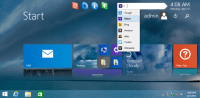
Start Screen Unlimited is a utility designed to expand the functionality of the Windows 8 Start Screen by integrating a suite of digital gadgets directly into the tile-based interface. The software allows users to access system tools and information without needing to transition to the traditional desktop environment.
The core feature set includes the following capabilities:
- Power Menu: Provides immediate access to shutdown, restart, sleep, and hibernation commands.
- Direct Web Search: Features a dedicated bar for performing web queries directly from the Start Screen.
- Digital Clock: Adds a persistent time display integrated into the interface.
- 3D Menus: Employs an interactive navigation system for managing various gadgets.
- Automatic Updates: Includes a system to ensure users receive the latest features and stability patches automatically.
From a technical perspective, Start Screen Unlimited centralizes system controls and search functions into a single location. By placing functional widgets within the Modern UI, the software aims to reduce the number of clicks required for common tasks. This utility is geared toward users seeking a more efficient workflow within the Windows 8 environment, providing customizable tools that were not natively present in the standard operating system release.
Top 5 Reasons To Download Start Screen Unlimited Deluxe
- Instant Power Management: No more digging through hidden menus; shut down or restart directly from your Start Screen.
- Integrated Global Search: A dedicated Google search bar right on your interface to bypass the browser-first workflow.
- Real-Time Information Display: A sleek, persistent digital clock that keeps you on schedule without switching views.
- Advanced 3D Visual Navigation: Elevate the aesthetics of your OS with immersive 3D menus that make navigation feel futuristic.
- Priority Access to Innovation: Benefit from the "New Features First" philosophy and automatic updates to stay ahead of the curve.
When Windows 8 first hit the scene, it was nothing short of a digital earthquake. For years, we had been accustomed to the classic desktop environment—the familiar taskbar, the iconic Start button, and a predictable workflow. Suddenly, we were thrust into a world of "Live Tiles" and a full-screen "Modern UI" that seemed designed more for tablets than for the power users who actually keep the world running. While the vision was bold, many of us felt like we were wandering through a beautiful, tiled labyrinth without a map. We lost the direct control we once loved, and essential functions became buried under swipes and "charms."
Enter Start Screen Unlimited. This isn't just a simple modification; it is a fundamental restoration of power. If you have ever felt that the Windows 8 Start Screen was missing that "special something" to make it truly productive, this is the tool you have been waiting for. It bridges the gap between the sleek, modern aesthetic of Windows 8 and the high-utility functionality that professional users demand. In this review, I am going to break down exactly why this giveaway is a must-download for anyone still rocking Windows 8 or those looking to squeeze every drop of potential out of their interface.
1. Instant Power Management: Fixing the Biggest Flaw
Let’s be honest with each other: the way Windows 8 handled power options was a usability nightmare. In the classic versions of Windows, turning off your computer was a two-click affair. In Windows 8, you had to find the "Charms Bar," click settings, find the power icon, and then select your option. It felt like the operating system didn't actually want you to leave. Start Screen Unlimited fixes this "missing button" syndrome by placing a robust Power Menu directly on your Start Screen.
With this tool, you get dedicated gadgets for Shut Down, Restart, Sleep, and Hibernate. Think about the cumulative time you save every day. More importantly, think about the reduction in frustration. By integrating these power controls into the very fabric of your Start Screen, the software transforms a clumsy UI oversight into a streamlined utility. It makes your computer feel like a tool again, rather than a puzzle. For anyone who values their time and sanity, this feature alone is worth the download.
Furthermore, the placement of these controls is intuitive. You can arrange them in a way that fits your specific ergonomic needs. Whether you prefer them tucked in a corner or front and center for quick access at the end of a long workday, Start Screen Unlimited gives you that choice. It’s about taking back control of your hardware and making the software work for you, not the other way around.
2. Integrated Global Search: Efficiency Redefined
In the modern digital age, the web is an extension of our local file system. However, the traditional way to search the web involves several steps: finding your browser, opening a new tab, waiting for the homepage to load, and then finally typing your query. Start Screen Unlimited eliminates these middleman steps by providing a Direct Web Search gadget right on your Start Screen. This is a game-changer for workflow continuity.
Imagine you are looking at your schedule on your Start Screen and suddenly realize you need to look up a client's website or a technical specification. Instead of breaking your flow and jumping into a different application environment, you simply type your query into the Google search bar integrated into your screen. It’s fast, it’s responsive, and it feels like a natural part of the operating system. This level of integration is what we always wanted from a "connected" OS.
This feature caters to the "power searcher." By having a persistent search bar, you are always one click away from the vast knowledge of the internet. It turns your Start Screen from a simple launcher into a command center. You aren't just launching apps; you are interacting with information. This shift in perspective is what elevates Start Screen Unlimited from a "tweak" to an essential productivity suite.
3. Real-Time Information Display: The Return of the Gadget
One of the most mourned losses in the transition from Windows 7 to Windows 8 was the disappearance of desktop gadgets. We loved our little clocks, weather monitors, and system gauges. Start Screen Unlimited brings that spirit back but adapts it for the new tile-based world. The inclusion of a dedicated Digital Clock gadget might seem simple, but in practice, it is transformative.
The standard Windows 8 Start Screen is notoriously devoid of a persistent clock unless you open the Charms bar or go back to the Desktop. By adding a digital clock gadget, Start Screen Unlimited allows you to keep track of time while you are organizing your tiles or checking your notifications. It adds a sense of "home" to the interface. You no longer feel like you are in a vacuum; you are in a functional workspace where time is visible and accounted for.
But it doesn't stop at just the clock. The software is designed to be a platform for gadgets. It "empowers" your screen with various digital tools that provide information at a glance. This "at-a-glance" utility is the core philosophy of the product. You shouldn't have to work to find basic information. Your operating system should serve it to you on a silver platter, and that is exactly what these gadgets do. It turns the static, sometimes boring Start Screen into a dynamic, living dashboard.
4. Advanced 3D Visual Navigation: A Feast for the Eyes
We use our computers for hours every day, so why shouldn't they look incredible? One of the most exciting technical features of Start Screen Unlimited is the implementation of 3D Menus. This isn't just about "eye candy"—though it certainly provides plenty of that—it’s about depth and spatial awareness in a digital environment. Most user interfaces are flat and two-dimensional, which can feel restrictive and dull over time.
The 3D menus in Start Screen Unlimited add a layer of sophistication that makes your computer feel like something out of a high-budget sci-fi film. It provides a sense of "tactile" feedback as you navigate through your options. When you interact with the gadgets and menus, there is a fluidity and a visual weight to them that the standard Windows UI lacks. It transforms the act of navigating your computer into an enjoyable, immersive experience.
For the tech enthusiasts who take pride in their setup, the 3D menus are a major selling point. It’s about customization and personality. With this software, you aren't stuck with the "stock" experience that everyone else has. You have a unique, visually stunning interface that reflects your style. It makes the Start Screen feel less like a mobile phone layout and more like a powerful, three-dimensional workspace designed for a desktop or a high-end laptop.
5. Priority Access and Future-Proofing: Staying on the Cutting Edge
Software is never truly "finished"; it is an evolving organism. One of the best reasons to jump on this giveaway is the "New Features First" promise. By downloading Start Screen Unlimited, you are positioning yourself at the front of the line for future innovations. The developers are clearly passionate about the Windows 8 ecosystem, and they are constantly dreaming up new ways to push the boundaries of what the Start Screen can do.
The Automatic Update feature ensures that you never have to worry about manual maintenance. As the developers refine the code, add new gadgets, or improve the 3D engine, your software will evolve silently in the background. This "set it and forget it" approach is perfect for users who want the latest tech without the headache of constant manual downloads. You get the peace of mind knowing that your system is always running the most optimized version of the software.
Furthermore, the "Unlimited" in the name isn't just marketing fluff. It represents a commitment to versatility. As you use the software, you’ll find that it encourages you to experiment. With the "New Features First" philosophy, you’ll be among the first to see how the Start Screen can be further integrated with web services, system monitoring, and even social media. It’s an investment in the future of your user experience. Why settle for the features Microsoft gave you when you can have the features that a community of dedicated developers is building for you?
Final Thoughts: Why You Need This Now
In the world of software, we often see tools that try to do too much and end up doing nothing well. Start Screen Unlimited is the rare exception. It identifies the specific pain points of the Windows 8 interface—the lack of easy power controls, the disconnect from web search, and the sterile visual environment—and it solves them with elegant, lightweight gadgets. It doesn't replace the Start Screen; it *unlocks* it.
Think about your current workflow. How many times a day do you find yourself annoyed by the extra clicks required to shut down? How often do you wish you had a simple clock visible without having to leave your current view? How many times have you felt that the Start Screen was a wasted space of large, static tiles? If the answer to any of these is "often," then you owe it to yourself to download this giveaway. It is a massive quality-of-life upgrade for your PC.
The beauty of this software lies in its name: Unlimited. It is about removing the artificial barriers that the default OS places on you. It’s about imagination. It’s about taking a controversial interface like the Windows 8 Start Screen and turning it into something that you actually *want* to use every single day. The 3D menus provide the style, the power menu provides the control, the search bar provides the speed, and the gadgets provide the information. Together, they create a cohesive, powerful, and beautiful environment.
As a reviewer, I see a lot of "utility" apps that are quickly forgotten. Start Screen Unlimited is different because it addresses the core way we interact with our computers. It makes the "front door" of your PC more welcoming and more capable. Don't let your Start Screen remain a grid of static boxes. Unleash its full potential, embrace the 3D revolution, and take back the control you deserve. Download this giveaway today and transform your Windows 8 experience into something truly spectacular.
Remember: This is a limited-time opportunity to grab a tool that fundamentally changes how you use your computer. Whether you are a casual user who wants a prettier screen or a power user who needs maximum efficiency, Start Screen Unlimited delivers. Your imagination is the only limit, so why wait? Empower your OS and join the thousands of users who have already discovered a better way to Windows.


Reviews for Start Screen Unlimited Deluxe
Click Here to Read Reviews for Start Screen Unlimited Deluxe >> Click Here to Submit Reviews for Start Screen Unlimited Deluxe >>