What Does SuperEasy SpeedUp 2 Do?
SuperEasy SpeedUp 2 is a performance-optimization suite designed to restore system efficiency through a series of automated maintenance modules. Positioned as a direct alternative to higher-priced tuning utilities, the software targets common factors that contribute to hardware slowdowns, such as fragmented data, redundant background processes, and accumulated system junk.
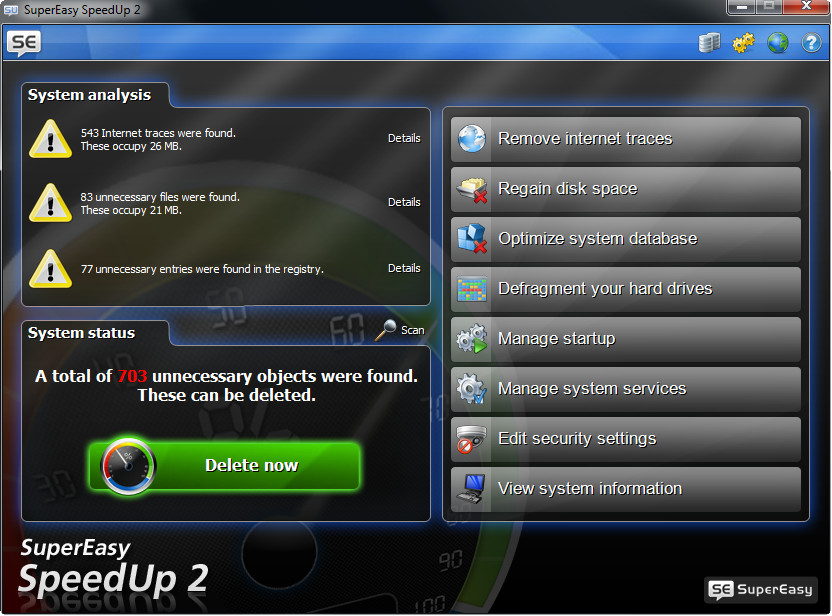
The core functionality revolves around a 1-click PC clean-up feature, which automates the identification and removal of temporary files to regain disk space. Beyond general maintenance, the suite includes specialized tools for removing internet traces and optimizing the system database. For hardware-level management, the software provides a defragmentation module to reorganize data on hard drives for faster access speeds.
Users can further refine system performance by managing startup applications and system services, allowing for faster boot times and reduced memory overhead. SpeedUp 2 also includes features to edit security settings and view detailed system information reports. By consolidating these utilities into a single interface, the software provides a centralized solution for maintaining OS responsiveness and reclaiming storage capacity. This giveaway provides access to the full suite of tools intended to mitigate both premature and present efficiency drops in Windows environments.
Top 5 Reasons To Download SuperEasy SpeedUp 2
Before we dive into the nitty-gritty details of how this software can revolutionize your computing experience, let’s look at the highlights. If you are looking for a reason to hit that download button right now, here are the top five reasons why SuperEasy SpeedUp 2 belongs on your hard drive:
- Effortless One-Click PC Maintenance: The ability to fully optimize your entire system with a single click, removing the need for manual troubleshooting.
- Massive Disk Space Recovery: Advanced scanning modules that identify and eliminate junk files, system bloat, and redundant data that clog up your storage.
- Complete Registry and Database Optimization: A deep-cleaning approach to the Windows Registry that restores stability and prevents system crashes.
- Total Control Over Startup and Background Services: A streamlined management interface that allows you to stop resource-heavy applications from slowing down your boot time.
- Ironclad Privacy Protection: Specialized tools to wipe internet traces and sensitive security footprints, ensuring your digital life remains private.
If you have been using your computer for more than a few months, you have likely noticed that "sluggish" feeling. It happens to the best of us. Whether you are a hardcore gamer, a creative professional, or someone who just uses their laptop for browsing and emails, the accumulation of digital debris is an unavoidable reality of the modern computing world. This is where SuperEasy SpeedUp 2 steps in. As a tech reviewer who has seen dozens of "optimization" tools come and go, I can tell you that finding a suite that balances power with simplicity is rare. Most tools are either too basic to be effective or too complex for the average user to navigate without breaking something. This software hits the sweet spot. Let’s break down exactly why this giveaway is a must-have for your toolkit.
1. Effortless One-Click PC Maintenance
We live in a fast-paced world, and frankly, nobody has the time to spend three hours on a Saturday morning manually deleting temporary files, clearing caches, and running disk checks. The 1-click PC clean-up feature in SuperEasy SpeedUp 2 is, quite honestly, a game-changer for the casual user and the busy professional alike. When you launch the application, you aren't greeted by a wall of confusing technical jargon. Instead, you are presented with a clear, modern interface that prioritizes your time.
What happens behind the scenes during that one click is truly impressive. The software initiates a comprehensive sweep of your entire operating system. It looks for everything from broken shortcuts to orphaned files left behind by uninstalled programs. It examines your browser caches, your system logs, and those pesky temporary folders that Windows loves to fill up but hates to empty. By consolidating all these maintenance tasks into a single action, the software ensures that your PC stays in peak condition without you having to become an IT expert. It is preventative medicine for your computer, stopping small issues from ballooning into system-wide failures.
For those who are worried about "automated" tools doing too much, the beauty of this suite is its precision. The modules are carefully programmed to recognize what is junk and what is vital. It doesn't just blindly delete; it intelligently identifies. This gives you the peace of mind that while your computer is getting faster, your important data remains exactly where it should be. In the world of tech optimization, efficiency is king, and nothing is more efficient than a one-click solution that actually works.
2. Massive Disk Space Recovery
Storage space is a finite resource. Even with the advent of massive multi-terabyte hard drives and lightning-fast SSDs, we manage to fill them up faster than ever. High-resolution photos, 4K videos, and massive software updates all take their toll. But often, it isn't your personal files taking up the space—it's the digital "dust" that settles in the corners of your operating system. SuperEasy SpeedUp 2 excels at reclaiming this lost territory.
The "Regain disk space" module is one of the most powerful features in this suite. It digs deeper than the standard Windows "Disk Cleanup" tool. It looks for hidden shadows of files, old Windows update backups that are no longer needed, and temporary installation files that have outstayed their welcome. For users running on smaller SSDs—where every gigabyte counts—this tool can literally feel like you’ve just installed a new drive. It’s not uncommon for a first-time scan to find several gigabytes of waste that the user didn't even know existed.
Beyond just deleting junk, the software also includes a defragmentation module. While many believe defragging is a relic of the past, it remains a vital maintenance task for traditional mechanical hard drives (HDDs). By reorganizing how data is physically stored on the disk, SuperEasy SpeedUp 2 reduces the physical distance the drive head has to travel to read a file. This results in faster file opening times and a more responsive system overall. By combining junk removal with disk optimization, you aren't just getting more space; you're getting better space.
3. Complete Registry and Database Optimization
The Windows Registry is often described as the "brain" of the operating system. It is a massive database that stores settings, hardware configurations, and user preferences. Every time you install a program, a new entry is created. Every time you change a setting, the registry is updated. The problem is that when you uninstall software, those registry entries often stay behind, like ghost limbs. Over time, the registry becomes bloated, fragmented, and filled with errors. This leads to the dreaded "Blue Screen of Death," application crashes, and general system instability.
Optimizing the system database is a core strength of SuperEasy SpeedUp 2. Many budget tuning suites shy away from the registry because it is a delicate area—one wrong move can break the OS. However, this software uses highly refined modules that safely scan for obsolete or corrupted entries. It cleans up the mess and then "compacts" the database. This process, often called registry hive optimization, ensures that Windows can find the information it needs in milliseconds rather than hunting through a cluttered mess of dead links.
When your registry is lean and healthy, the entire "feel" of the computer changes. Windows boots smoother, menus pop open faster, and the frequency of mysterious error messages drops significantly. This isn't just about speed; it's about stability. If you want a computer that doesn't just run fast, but runs reliably, this is the module you’ll appreciate the most. It provides the kind of deep-level maintenance that usually requires an expensive technician, but here, it’s included in a sleek, user-friendly package.
4. Total Control Over Startup and Background Services
One of the most frustrating experiences for any computer user is a slow boot-up. You turn on your PC, and then you sit there... and wait... and wait. This usually happens because far too many applications think they are important enough to start the moment you log in. From chat apps to update checkers and "helper" utilities, these programs eat up your RAM and CPU cycles before you've even opened a browser. SuperEasy SpeedUp 2 gives you the power to fight back.
The "Manage startup" and "Manage system service" tools provide a transparent look at everything running under the hood. Most users are shocked to find out how many processes are active in the background. This software categorizes these items and allows you to disable the ones you don't need with ease. Unlike the native Windows Task Manager, which can be intimidating for beginners, this suite provides clear information about what each service does, helping you make informed decisions about what to turn off.
By trimming down your startup list, you aren't just saving time during the initial boot; you are freeing up system resources for the tasks you actually want to do. If you're a gamer, this means more power for your frame rates. If you're a video editor, this means more memory for your rendering. It’s about taking back control of your hardware. You bought your computer to serve you, not to serve dozens of background apps that you never use. This giveaway provides the surgical precision needed to reclaim your CPU and RAM from the "bloatware" that bogs down your daily workflow.
5. Ironclad Privacy Protection and System Security
In today's digital landscape, privacy is not a luxury—it is a necessity. Every website you visit, every video you watch, and every search query you type leaves a trail of breadcrumbs on your computer. These "internet traces" are not just a privacy concern; they can also be exploited by malicious software or used by advertisers to build a profile on you. SuperEasy SpeedUp 2 includes a dedicated module to remove internet traces, ensuring that your browsing history, cookies, and temporary internet files are thoroughly scrubbed.
But the software goes a step further than just clearing your browser history. It includes a feature to edit security settings. This is a brilliant addition for a tuning suite. It allows users to toggle specific Windows security features that are often buried deep within the Control Panel or Group Policy Editor. Whether it’s adjusting how the system handles certain types of data or tightening up user account controls, this tool puts security back in the hands of the user.
Furthermore, the View system information feature provides a comprehensive overview of your hardware and software environment. Knowledge is power, and knowing exactly what hardware is in your machine and what its current status is can help you identify potential security vulnerabilities or hardware failures before they happen. By combining privacy scrubbing with security hardening, SuperEasy SpeedUp 2 offers a holistic approach to PC health. It doesn't just make your computer run like new; it helps keep your personal data safe from prying eyes. In an era where data breaches are common, having a tool that makes privacy maintenance "SuperEasy" is an absolute win.
Conclusion: Why You Should Download This Now
When you look at the total package, SuperEasy SpeedUp 2 isn't just another utility; it’s an all-in-one insurance policy for your PC. We often spend hundreds or thousands of dollars on our hardware, yet we frequently neglect the software maintenance required to keep that hardware running efficiently. This giveaway represents a unique opportunity to acquire a premium tuning suite that competes directly with much more expensive alternatives.
The "modern and particularly capable" design ensures that you won't be staring at an interface from 2005. It feels current, it acts fast, and it delivers on its promises. Whether you are dealing with a "premature" drop in efficiency on a new machine or you are trying to breathe life back into an old desktop that has seen better days, the tools provided here are up to the task. From the 1-click clean-up to the granular control of system services, it covers every base.
As a tech reviewer, my recommendation is simple: Don't wait until your computer starts crashing or slows to a crawl before you take action. Maintenance is always easier (and cheaper) than repair. By downloading this giveaway today, you are giving your PC the tools it needs to stay lean, mean, and fast. The modules are carefully programmed, the results are tangible, and the price—thanks to this giveaway—is unbeatable. Clear out the junk, optimize your database, and reclaim your speed. Your computer will thank you, and you’ll wonder how you ever managed without it. Download SuperEasy SpeedUp 2 today and experience the difference of a truly optimized system.
Final Pro Tip: Once you’ve installed the software, run the defragmentation and registry optimization first. These are the "heavy hitters" that provide the most noticeable immediate improvement in system responsiveness. After that, make the 1-click clean-up a part of your weekly routine, and you’ll likely never have to worry about a slow PC again!

Reviews for SuperEasy SpeedUp 2
Click Here to Read Reviews for SuperEasy SpeedUp 2 >> Click Here to Submit Reviews for SuperEasy SpeedUp 2 >>