
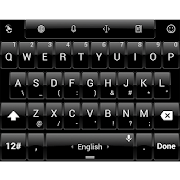
---- Dusk Pure Black theme skin for TouchPal X app ---
Gives your keyboard a dark and gloss black look.
--- Must have TouchPal X installed to use this theme ---
This theme only works if you already have installed TouchPal X keyboard application.
INSTALL
1. Exit from Play Store.
2. Open TouchPal Keyboard Settings: open the keyboard and press the button on the top left
3. Go to Theme tab, select the theme and press the check mark.
or
Go to the Android Settings -> Language & Input/Keyboard -> TouchPal X -> General Settings -> Themes
SUPPORT
Any suggestions/problems? Please email us at anytime!
Gives your keyboard a dark and gloss black look.
--- Must have TouchPal X installed to use this theme ---
This theme only works if you already have installed TouchPal X keyboard application.
INSTALL
1. Exit from Play Store.
2. Open TouchPal Keyboard Settings: open the keyboard and press the button on the top left
3. Go to Theme tab, select the theme and press the check mark.
or
Go to the Android Settings -> Language & Input/Keyboard -> TouchPal X -> General Settings -> Themes
SUPPORT
Any suggestions/problems? Please email us at anytime!
Reviews for Theme TouchPal Dusk Pure Black
Click Here to Read Reviews for Theme TouchPal Dusk Pure Black >> Click Here to Submit Reviews for Theme TouchPal Dusk Pure Black >>