What Does LinkCollector Do?
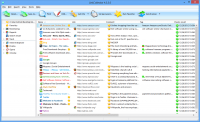
LinkCollector is a browser-independent bookmark management utility designed to centralize and synchronize web links across multiple platforms. The software integrates with major Windows browsers, including Microsoft Internet Explorer, Mozilla Firefox, Opera, and Google Chrome, allowing users to consolidate their navigation data into a single, unified interface.
The core functionality focuses on cross-browser synchronization and database maintenance. Users can import existing links from installed browsers or standalone HTML files and sync them between different computers or portable browser versions. The utility includes automated tools to verify the status of bookmarks, allowing for the quick identification and removal of dead links or duplicate entries to maintain an organized collection.
Management features include a search system that filters links by text, tags, or specific domains. The application also tracks usage statistics, such as most-visited links. For users concerned with privacy, LinkCollector provides encryption capabilities. By specifying a master password, users can encrypt their bookmark list, ensuring that protected folders remain inaccessible without authorization. This creates a secure, portable database of web shortcuts that functions independently of the primary web browser.
Top 5 Reasons To Download LinkCollector
- Universal Browser Independence and Compatibility
- One-Click Synchronization Across All Platforms
- Advanced Bookmark Verification and Cleanup Tools
- Military-Grade Encryption for Your Private Links
- Centralized Backup and Database Management
Introduction: Why Your Browser Is Holding You Captive
If you are anything like the average power user today, your digital life is scattered across a dozen different tabs, three different browsers, and at least two separate computers. We live in an era where we jump from Google Chrome for work, to Mozilla Firefox for privacy-focused browsing, and perhaps Opera or Microsoft Edge for specific tasks. While the browsers themselves have become incredibly fast, they share one massive, frustrating flaw: they don't talk to each other.
Your bookmarks are essentially trapped in silos. If you save a crucial research link in Firefox at the office, you have to jump through hoops to access it on your Chrome setup at home. Browser sync tools provided by Google or Mozilla only work within their own ecosystems, forcing you to choose a side. This is where LinkCollector steps in. This is not just another utility; it is a fundamental shift in how you manage your online information. As a tech reviewer who has seen hundreds of "productivity tools" come and go, I can tell you that LinkCollector is the bridge that finally connects your fragmented digital world. Let’s dive deep into the top five reasons why this giveaway is an essential download for anyone who takes their web browsing seriously.
1. Universal Browser Independence and Compatibility
The first and most compelling reason to grab LinkCollector is the sheer freedom it offers. Most bookmark managers are extensions. They live inside your browser, which means they are limited by that browser's architecture. LinkCollector is different. It is a browser-independent tool. This means it sits outside of the browser environment, acting as a high-level manager that can interact with every major player in the market.
Whether you are using Internet Explorer for legacy applications, Mozilla Firefox for its extension ecosystem, Opera for its unique sidebar features, or Google Chrome for its speed, LinkCollector treats them all as equals. It can import bookmarks from all of these sources simultaneously. This is a game-changer for people who find themselves switching browsers because of performance issues or specific feature needs. You no longer have to worry about "losing" your digital footprint when you decide to try a new browser. LinkCollector bridges the gap between the big four—and even supports HTML files for those who have legacy backups from years ago. In the style of a true power user, you want a tool that adapts to you, rather than forcing you to adapt to the limitations of a single software developer.
Furthermore, because it is independent, it doesn't slow down your browser’s startup time. We all know that having fifty extensions in Chrome makes it crawl. By moving your bookmark management to LinkCollector, you keep your browsers lean and fast while maintaining a robust, external library of every important URL you have ever encountered.
2. One-Click Synchronization Across All Platforms
Synchronization is the "holy grail" of modern computing, but it is surprisingly difficult to get right when it involves different software manufacturers. LinkCollector solves this with an elegant, one-click synchronization system. It allows you to synchronize bookmarks between different browsers on the same machine, or even between different computers entirely. Imagine adding a bookmark in Chrome and, with a single action, having it available in your Firefox installation on your laptop. That is the level of efficiency we are talking about here.
But where LinkCollector truly shines for the tech-savvy user is its support for portable browsers. Many of us carry a "toolkit" on a USB drive—portable versions of Firefox or Opera that we use on public computers or at client sites. Keeping these portable bookmarks in sync with your home base is usually a manual nightmare. LinkCollector automates this process. It can synchronize URLs between installed browsers and their portable counterparts seamlessly. This ensures that no matter where you are or what device you are using, your most important resources are always at your fingertips. It eliminates the "Where did I save that link?" moment that kills productivity and causes unnecessary stress.
This synchronization isn't just about moving data; it's about maintaining consistency. When you sync, LinkCollector ensures that the folder structures and naming conventions remain intact across all platforms. It’s like having a master librarian who follows you from room to room, ensuring every book is exactly where you expect it to be, regardless of which "room" (browser) you happen to be standing in.
3. Advanced Bookmark Verification and Cleanup Tools
We are all guilty of "bookmark hoarding." We save articles to read later, tools we might need one day, and reference sites for projects. Over time, this leads to a cluttered mess of hundreds, if not thousands, of links. The problem is that the web is dynamic. Websites go dark, URLs change, and domains expire. A standard browser bookmark manager will happily let you keep a "dead link" for years, only for you to find out it’s a 404 error when you finally need it most.
LinkCollector includes a powerful verification engine that is worth the download price alone. It can scan your entire database to identify dead links. This saves you the frustration of clicking through your favorites only to find broken pages. But it goes a step further: it identifies duplicates. If you’ve saved the same Wikipedia article three times in different folders over the last six months, LinkCollector will find them and help you consolidate. This cleanup process isn't just about aesthetics; it’s about data integrity. By removing the "noise" of dead links and duplicates, your search results become more accurate and your database stays manageable.
The search functionality within LinkCollector is also significantly more advanced than what you find in a standard browser. You can search by specific text, by the domain name, or even by tags. You can even filter your view to show only the "most visited" links, giving you a clear picture of your actual browsing habits. This level of analytical insight into your own data is something a standard browser simply cannot provide. It turns a static list of links into a dynamic, searchable, and clean knowledge base.
4. Ironclad Security through Encryption
In an age where privacy is constantly under threat, not all bookmarks are created equal. You might have links to sensitive financial portals, private research projects, or personal accounts that you don't want anyone else using your computer to see. Standard browsers offer almost no protection for your bookmarks; if someone can open your browser, they can see exactly where you spend your time and what accounts you hold.
LinkCollector addresses this security gap by allowing you to encrypt your bookmark list. You can specify a password to protect the program's database, and even better, you can create protected folders. These folders cannot be opened or viewed without the correct password. This adds a vital layer of security for the "professional" side of your digital life. If you share a computer with family members or colleagues, you can keep your work-related or private bookmarks completely hidden from prying eyes.
The encryption used by LinkCollector ensures that even if your database file were somehow accessed, the URLs within it remain unreadable without the master key. For anyone concerned about digital footprints and privacy, this feature is a massive upgrade over the "open book" policy of Chrome or Firefox. It gives you peace of mind, knowing that your curated list of resources is for your eyes only. This is professional-grade link management that treats your data with the respect it deserves.
5. Centralized Backup and Database Management
Finally, we have to talk about the "catastrophe factor." Browsers crash, profiles get corrupted, and sometimes an "update" goes wrong and wipes out your settings. If you rely solely on your browser to store your bookmarks, you are putting all your eggs in a very fragile basket. LinkCollector allows you to create your own independent bookmark database. This database exists separately from your browser's internal files.
By using LinkCollector, you are essentially creating a permanent backup of your digital life. If you decide to perform a clean install of Windows, or if your browser profile becomes unusable, your bookmarks are safe. You simply open LinkCollector, and all your links are there, ready to be exported back into whatever browser you choose to install. It acts as a "vault" for your favorite corners of the internet. You can store bookmarks imported from multiple browsers into one master file, ensuring that your collection grows over time rather than being reset every time you switch hardware or software.
The ability to manage this database—to organize it, tag it, and back it up to an external drive or cloud storage—is a level of control that most users didn't even know they were missing. It moves the concept of "bookmarks" from a temporary browser feature to a permanent personal asset. This is why LinkCollector is such a vital tool for researchers, students, and professionals alike. It ensures that the knowledge you have gathered over years of web surfing is never more than a few clicks away, no matter what happens to your primary software or hardware.
Conclusion: Don't Miss Out on This Productivity Powerhouse
As a reviewer, I see a lot of software that claims to "revolutionize" your workflow, but LinkCollector actually delivers by solving a problem we all face every day. The fragmentation of the web is real, and the tools we use to navigate it are often too limited to help us stay organized. By providing browser independence, effortless synchronization, deep cleaning tools, high-level encryption, and a secure backup system, LinkCollector establishes itself as the definitive solution for link management.
Think about how much time you spend looking for that one specific article you read three weeks ago. Think about the annoyance of finding a dead link when you're in the middle of a project. Think about the security risk of having your financial logins sitting in an unprotected browser folder. LinkCollector solves all of these issues in one sleek, easy-to-use package. This giveaway is a rare opportunity to get a professional-grade utility that will immediately improve your digital organization and security. Do not wait—download LinkCollector today and take full control of your web experience. You’ll wonder how you ever managed your digital life without it.
LinkCollector is more than just a manager; it is your personal librarian for the infinite library of the internet. Grab this giveaway now and experience the freedom of a truly synchronized, clean, and secure browsing life.


Reviews for LinkCollector
Click Here to Read Reviews for LinkCollector >> Click Here to Submit Reviews for LinkCollector >>