What Does FileMarker.NET Pro Do?
FileMarker.NET Pro is a Windows utility designed to categorize and organize digital assets by modifying individual file icons. The software allows users to apply color codes and status overlays directly to files, providing a visual representation of priority, completeness, or information type. By integrating into the Windows context menu, the tool enables users to update file appearances instantly without launching a standalone interface.
The Pro version offers several advanced features tailored for professional environments:
- Bulk Customization: Users can apply icon changes or color labels to a single file or multiple files simultaneously.
- Extended Icon Library: The software includes 16 professional office icons and 36 alphanumeric marks for detailed labeling.
- Visual Status Tracking: Files can be marked as done, planned, or pending to track project workflows.
- Color Management: The tool provides 33 color variations, including normal, dark, and light states for precise file management.
Users can organize files by priority levels—high, normal, or low—or distinguish between work, private, and temporary files. Because the software modifies the file attributes, customized icons are preserved when files are moved or copied to other systems where FileMarker.NET is installed. This functionality transforms standard directory listings into a functional project progress dashboard, allowing for the rapid identification of critical tasks and deadlines within the Windows environment.
Top 5 Reasons To Download FileMarker.NET Pro
- Instant Visual Recognition and Cognitive Efficiency
- Seamless Workflow Integration via the Windows Context Menu
- Professional-Grade Project Tracking and Status Indicators
- Massive Customization with 33 Color Variations and Specialized Icons
- Enterprise-Ready Portability and Licensing
If you are anything like me, your Windows desktop and document folders are a chaotic sea of yellow icons and nondescript filenames. We live in an era where we are managing more data than ever before, yet the way we navigate our file systems has remained largely unchanged for decades. We rely on reading text labels to find what we need, which is a slow, archaic process that drains our mental energy. Every time you have to squint at a list of forty PDFs to find the one you were working on yesterday, you are losing time. This is exactly why FileMarker.NET is a total game-changer for anyone who takes their digital organization seriously. This isn't just a "pretty" utility; it is a productivity powerhouse designed to overhaul the way you interact with your data. Today, I am going to dive deep into why this specific giveaway is the one you absolutely cannot afford to miss.
1. Instant Visual Recognition and Cognitive Efficiency
The primary reason you need to download FileMarker.NET right now is the sheer speed it adds to your daily workflow through visual cues. Human beings are evolved to process visual information—colors, shapes, and symbols—significantly faster than we process text. When you open a folder filled with fifty different "Project_Report" files, your brain has to manually scan each string of text to identify the right one. With FileMarker.NET, that cognitive load is virtually eliminated.
Imagine being able to glance at a folder and immediately know that the red files are urgent, the green files are completed, and the blue files are reference materials. You aren't "reading" your file system anymore; you are "seeing" it. This tool allows you to arbitrarily change separate file icon images, turning your directory into a color-coded map. Whether you are a student managing different subjects, a developer tracking various branches of a project, or a photographer sorting through thousands of raw images, the ability to mark files with distinct colors provides an organizational clarity that the standard Windows interface simply cannot match.
By using color-marking, you reduce the time spent searching and increase the time spent doing. In a professional environment, those saved seconds add up to hours of reclaimed productivity over a month. It creates a "visual hierarchy" where the most important files stand out, ensuring that you never miss a deadline because a file was buried in a pile of identical-looking icons. This is the ultimate "quality of life" upgrade for any power user.
2. Seamless Workflow Integration via the Windows Context Menu
One of the biggest hurdles with organizational software is "friction." If a tool is difficult to use or requires you to break your workflow to open a separate application, you eventually stop using it. This is where FileMarker.NET Pro truly shines as a piece of software design. It doesn't force you to manage your files within a proprietary interface. Instead, it integrates itself directly into the Windows Context Menu.
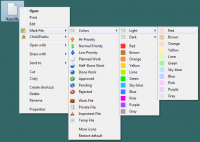
What does this mean for you? It means that marking a file is as simple as a right-click. You don't need to launch a heavy program, import files, or navigate complex menus. You simply right-click the file you are currently looking at, hover over the FileMarker.NET option, and select the color or icon you want. The change is applied immediately. This "zero-friction" approach ensures that you will actually use the tool consistently.
The customizable nature of this context menu means you can keep your most-used marks within easy reach. If you frequently mark files as "Pending," you can have 그 option right there at the top. This seamless integration makes the software feel like a native part of the Windows operating system—a feature that Microsoft should have included years ago. For a tech reviewer like myself, the hallmark of a great utility is its ability to stay out of the way until it is needed, and FileMarker.NET executes this perfectly.
3. Professional-Grade Project Tracking and Status Indicators
While the basic version of many tools allows for simple color changes, FileMarker.NET Pro goes much further by offering functional icons that act as multi-functional project progress indicators. This isn't just about aesthetics; it's about project management. The Pro version includes 16 professional icons specifically designed for office work, along with 36 marks featuring letters and numbers.
The real power lies in the specific categories of marks available. You can mark files by Priority (high, normal, low), which is essential when you have a mountain of tasks and need to stay focused on what matters most. You can mark by Degree of Completion (done, half-done, planned), giving you an instant dashboard of your progress without ever opening a spreadsheet. Furthermore, you can mark by Work Status (approved, rejected, pending). This is a lifesaver for collaborative environments where you need to know exactly where a document stands in the pipeline.
Additionally, you can categorize by the Type of Information contained within the file, such as "work files," "important," "temp," or "private." This level of granular detail allows you to turn a standard Windows folder into a sophisticated project management hub. If you are a freelancer working with multiple clients, you could assign a specific letter or color to each client, making it impossible to accidentally send the wrong file to the wrong person. The Pro version turns your file explorer into a dynamic workspace that reflects the reality of your busy professional life.
4. Massive Customization with 33 Color Variations and Specialized Icons
Generic organization tools often limit you to the basic "rainbow" of colors—Red, Blue, Green, Yellow. FileMarker.NET Pro blows this limitation out of the water by offering 33 color variations. This includes normal, dark, and light states for each color. This depth of customization is vital for users who need a more complex organizational system.
For example, you might use "Light Blue" for files that are in the initial research phase, "Standard Blue" for files currently being drafted, and "Dark Blue" for files that are in the final review stage. This nuanced approach allows for a level of organization that is both sophisticated and intuitive. You aren't just limited to colors, either; you can combine a color-mark with a label or icon, creating a hybrid system that is tailored exactly to your specific needs.
The inclusion of 36 marks with letters and numbers is another massive benefit. Perhaps you want to alphabetize your files by department (A for Accounting, M for Marketing) or number them based on the phase of a project. The flexibility here is endless. As a reviewer, I appreciate software that provides options without being overwhelming. FileMarker.NET Pro gives you the professional-grade tools to build a system that works for you, rather than forcing you to adapt to a rigid, pre-defined structure. Whether you want a minimalist setup or a highly detailed, multi-layered categorization system, this software provides the palette for you to create it.
5. Enterprise-Ready Portability and Licensing
One of the most impressive "under the hood" features of FileMarker.NET Pro is how it handles the files once you have customized them. A common fear with this type of software is that the customization is "stuck" on your local machine. However, FileMarker.NET allows you to copy or move files with customized icons to another system. As long as that system also has a copy of the program installed, the original appearance of the files—colors, marks, and all—will be completely preserved.
This feature is absolutely critical for teams and offices. If you are working on a shared network drive or sending files via a company server, your colleagues can see the statuses you have assigned. Imagine a manager marking a file as "Approved" with a green checkmark icon, and the employee instantly seeing that visual cue on their own workstation. It facilitates a silent, efficient form of communication that reduces the need for constant "status update" emails.
Furthermore, the Pro license specifically allows for use in an office environment. Many "giveaway" versions of software are restricted to personal, non-commercial use, but FileMarker.NET Pro is built for the professional world. It also allows for batch processing, meaning you can customize one file or a thousand files simultaneously. This scalability is what separates a mere "tweak" utility from a professional tool. Whether you are a solo entrepreneur or part of a large corporate team, the ability to maintain consistency across systems and process files in bulk makes this download an essential addition to your professional toolkit.
In conclusion, FileMarker.NET Pro is more than just an icon changer. It is a comprehensive visual filing system that addresses the fundamental weaknesses of the Windows file management experience. By downloading this giveaway, you are giving yourself the gift of time, clarity, and organization. You are moving away from the "search and find" method of working and moving toward a "see and act" workflow. The ease of use provided by the context menu, the depth of the Pro status indicators, the massive variety of color options, and the enterprise-ready portability make this a "must-have" for any serious PC user. Don't let your files remain a disorganized mess—grab this giveaway and start seeing your work in a whole new light.
By implementing FileMarker.NET Pro today, you are setting yourself up for a more streamlined future. Whether you use it to manage your taxes, your latest novel, your coding projects, or your client deliverables, the result is the same: a cleaner desktop, a clearer mind, and a much more efficient workday. This is the kind of tool that, once you start using it, you will wonder how you ever managed without it. Download it now and experience the difference that professional file marking can make.


Reviews for FileMarker.NET Pro
Click Here to Read Reviews for FileMarker.NET Pro >> Click Here to Submit Reviews for FileMarker.NET Pro >>