What Does 4WinKey Do?
4WinKey is a specialized Windows password recovery utility designed to restore access to locked local accounts without requiring a full system reinstallation. For users who have lost or forgotten their login credentials, the software provides a non-destructive method to regain administrator and standard user-level privileges across a broad spectrum of Microsoft operating systems.
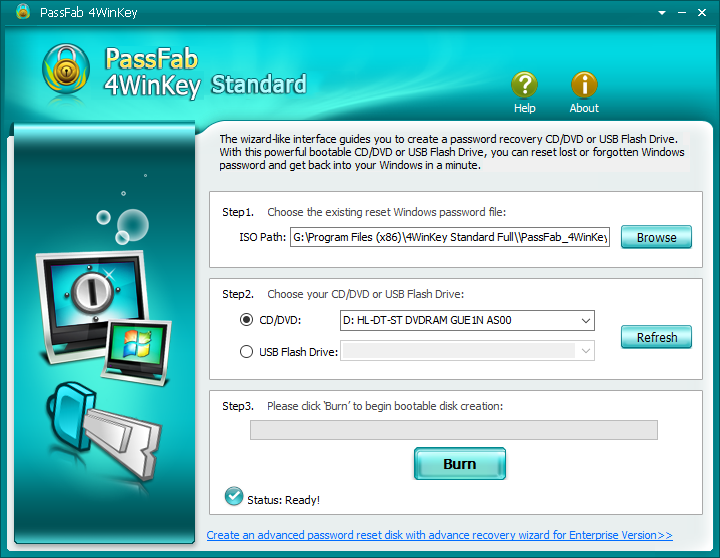
The core functionality of the tool revolves around the creation of bootable recovery media. Users can burn the software onto a CD or DVD, which is then used to boot the target computer. This process bypasses the standard Windows login security, allowing the user to select the specific account and reset the password within a dedicated recovery environment.
Key features and capabilities include:
- The ability to reset lost local administrator and standard user passwords directly.
- Broad compatibility with various OS versions, including Windows 10, 8.1, 8, 7, XP, and Vista.
- Data preservation, as the tool functions without the need to reformat hard drives or erase existing files.
- Support for a wide range of hardware configurations and older legacy systems.
By utilizing 4WinKey, users can effectively manage account lockout scenarios while maintaining the integrity of their system settings and personal data. It serves as a technical solution for emergency recovery when traditional password hints or secondary login methods are unavailable.
Top 5 Reasons To Download 4WinKey
If you have ever been staring at a Windows login screen, racking your brain for a password that simply won't come to mind, you know the sinking feeling of digital isolation. It is a moment of pure frustration that usually ends in a costly trip to a repair shop or the "nuclear option" of wiping your hard drive. But what if there was a better way? That is where 4WinKey comes in. Here are the top five reasons why you need to download this giveaway today:
- Instant Recovery Without Data Loss: Reset your password without the fear of losing your precious photos, documents, or settings.
- Universal Compatibility: Whether you are running Windows 10, 8.1, 8, 7, Vista, or even the classic XP, this tool handles it all.
- Zero Technical Expertise Required: A streamlined, intuitive process that guides you through creating a bootable disk and resetting your account in minutes.
- No Need for System Reinstallation: Avoid the hours of work involved in reformatting your drive and reinstalling all your software.
- Flexible Bootable Media Options: Create your recovery tool using a CD, DVD, or a simple USB flash drive, depending on what you have on hand.
Now, let's dive deep into why 4WinKey is the ultimate "get out of jail free" card for your PC and why it deserves a permanent spot in your digital emergency kit.
1. Instant Recovery Without Data Loss
Let's talk about the nightmare scenario. You have months of work, years of family photos, and a complex web of software configurations on your laptop. You decide to change your password for security reasons, or perhaps you haven't used that specific device in a few months. Suddenly, you are locked out. In the "old days" of tech support, the standard advice was often to perform a factory reset. This meant saying goodbye to everything that wasn't backed up to the cloud. It was a digital "scorched earth" policy that left users devastated.
The number one reason 4WinKey is a mandatory download is that it completely bypasses the need for data destruction. This software doesn't just bypass the lock; it intelligently interacts with the Windows Security Accounts Manager (SAM) database to reset or remove the password. Because it operates from a bootable environment—meaning it runs before the Windows operating system actually starts—it can safely modify the necessary credentials without touching your personal files. Your desktop icons will be exactly where you left them, your browser history remains intact, and your taxes are still in that folder you hid three levels deep. It is a non-invasive surgery for your operating system, and in the world of tech recovery, that is the "holy grail."
When we talk about efficiency in a tech review, this is exactly what we mean. You aren't just saving a password; you are saving your digital life. The peace of mind that comes with knowing a forgotten string of characters won't lead to the loss of a decade of memories is worth the download alone. It turns a potential week-long catastrophe into a five-minute minor inconvenience.
2. Universal Compatibility Across the Windows Ecosystem
One of the most annoying things about modern software is the "version trap." You find a tool you love, only to realize it doesn't support your older laptop running Windows 7, or it hasn't been updated for the latest build of Windows 10. 4WinKey earns its stripes by being a true "jack of all trades." It doesn't matter if you are trying to get into a cutting-edge workstation or an old "dinosaur" PC you found in the attic; this tool is built to handle the entire spectrum of the Windows environment.
We often forget how fragmented our hardware can be. Many of us have a primary Windows 10 machine, but maybe your business still relies on a specific piece of software that only runs on Windows 7. Or perhaps you are helping a grandparent who refuses to let go of their Windows XP machine. 4WinKey covers Windows 10, 8.1, 8, 7, Vista, and XP. This level of backward and forward compatibility is incredibly rare in the utility software space. It is like having a skeleton key that fits every door in a massive mansion, regardless of whether the door was built yesterday or twenty years ago.
Furthermore, it doesn't just work on local user accounts. It is powerful enough to handle Administrator accounts, which often have higher levels of encryption and protection. If you have ever inherited a computer from a friend or purchased one at an estate sale only to find the "Admin" account locked tight, you know how vital this feature is. 4WinKey treats every version of Windows with the same level of effectiveness, ensuring that no matter the age of your hardware, you are never truly locked out.
3. Zero Technical Expertise Required
There is a segment of the tech world that loves using "command prompts" and "registry hacks" to fix problems. For the average user, however, those things are terrifying. One wrong keystroke in a BIOS menu or a command line can turn your computer into a very expensive paperweight. 4WinKey is designed for the person who wants results without having to earn a computer science degree first.
The user interface is the star of the show here. From the moment you open the application on a secondary computer, you are met with a clean, step-by-step wizard. The software guides you through the process of selecting your media—whether that’s a CD or a USB stick—and burning the recovery environment onto it. Once the "key" is created, the instructions for booting from that media are clear and concise. You aren't left guessing which "F-key" to mash during startup; the tool provides the guidance you need.
Think of it as the difference between trying to pick a lock with a paperclip and using a high-tech keycard. 4WinKey does all the heavy lifting in the background. It identifies the Windows installation, lists the users found on the system, and gives you a simple button to "Reset Password." It is a click-and-forget solution. In my years of reviewing software, I’ve found that the best tools are the ones that hide their complexity behind a friendly face. 4WinKey does this perfectly, making it accessible to students, parents, and even the most "tech-phobic" users.
4. Avoid the "Nuclear Option" of Reinstallation
We touched on this briefly with data loss, but the time aspect of reinstalling Windows deserves its own category. If you lose your password and don't have a tool like 4WinKey, your only official recourse is often a clean install. Let's walk through what that actually looks like for the average user. First, you have to find your installation media. Then, you spend an hour waiting for the OS to install. Then come the updates—hours and hours of "Checking for Updates" and "Restarting."
But the real pain is the software. You have to find the license keys for your office suite, reinstall your photo editors, re-download your games, and re-configure your printer drivers. For a professional, this can represent two or three days of lost productivity. It is a nightmare of "getting back to where I was." When you use 4WinKey, you skip this entire ordeal. You reset the password, you log in, and you are immediately back to work. Everything is exactly where you left it.
As a tech reviewer, I always look for tools that respect the user's time. Time is the one resource we can't get back. By choosing to download this giveaway, you are essentially buying yourself insurance against a massive time-sink. Instead of a weekend spent looking at progress bars and typing in product keys, you spend five minutes resetting a password and getting on with your life. It is the ultimate productivity hack for the most stressful situation a PC user can face.
5. Flexible Bootable Media Options
One of the biggest hurdles with system recovery tools is often the hardware requirements. Some tools only work with specific types of USB drives, or they require you to have an external DVD burner. 4WinKey is impressively flexible in how it allows you to create your recovery "key." If you have an old spindle of blank CDs in the closet, you can use those. If you have a drawer full of promotional USB sticks, those will work too.
This flexibility is crucial because you never know what kind of situation you will be in when a lockout occurs. Maybe you are using a modern ultrabook that doesn't have a disc drive—USB is your savior. Maybe you are working on an older desktop that won't boot from USB but has a reliable DVD-ROM drive. 4WinKey doesn't limit your options. The software includes its own ISO burning engine, so you don't even need third-party software to create your bootable media. It is a self-contained ecosystem.
Furthermore, the bootable environment created by 4WinKey is lightweight and fast. It doesn't require a powerful system to run. It loads into the RAM, performs its task, and lets you get out. This versatility ensures that no matter what your hardware setup looks like, you have a path to recovery. It is this attention to the practical reality of modern computing—where we use a mix of old and new tech—that makes 4WinKey a standout service.
Final Thoughts from the Reviewer: Let’s be honest, we all think a lockout won't happen to us until it does. We rely on our memory, or we rely on that one piece of paper we hid in a desk drawer. But systems glitch, memories fade, and papers get lost. 4WinKey isn't just a "utility"; it is an essential safety net. It is the digital equivalent of keeping a spare tire in your trunk. You hope you never have to use it, but when you find yourself on the side of the road with a flat, you will be infinitely grateful that you had the foresight to put it there.
This giveaway is an incredible opportunity to secure your digital access for the long haul. Between its non-destructive nature, its wide-ranging compatibility, and its extreme ease of use, there is simply no reason not to have this in your toolkit. Don't wait until you are staring at a "Wrong Password" screen to start looking for a solution. Download it now, create your recovery media, and rest easy knowing that you are the master of your own machine, no matter what happens to your password.
In the world of tech, we see a lot of "bloatware"—apps that promise the world and deliver nothing but system slowdowns. 4WinKey is the opposite. It is a surgical tool: precise, powerful, and effective. It does one thing, and it does it better than almost anything else on the market. If you value your data, your time, and your sanity, this is one download you cannot afford to miss.
Remember: The best time to prepare for a computer emergency is while your computer is still working. Take advantage of this giveaway, follow the simple steps to create your bootable recovery disk, and tuck it away in a safe place. Your future self will thank you.
Whether you are a professional managing multiple workstations or a home user with a single family PC, the peace of mind offered by 4WinKey is universal. It turns the "impossible" task of breaking back into your own encrypted system into a routine maintenance task. It is fast, it is reliable, and most importantly, it puts the control back into your hands. Don't get locked out—get 4WinKey.


Reviews for 4WinKey
Click Here to Read Reviews for 4WinKey >> Click Here to Submit Reviews for 4WinKey >>