What Does Ashampoo Photo Commander 17 Do?
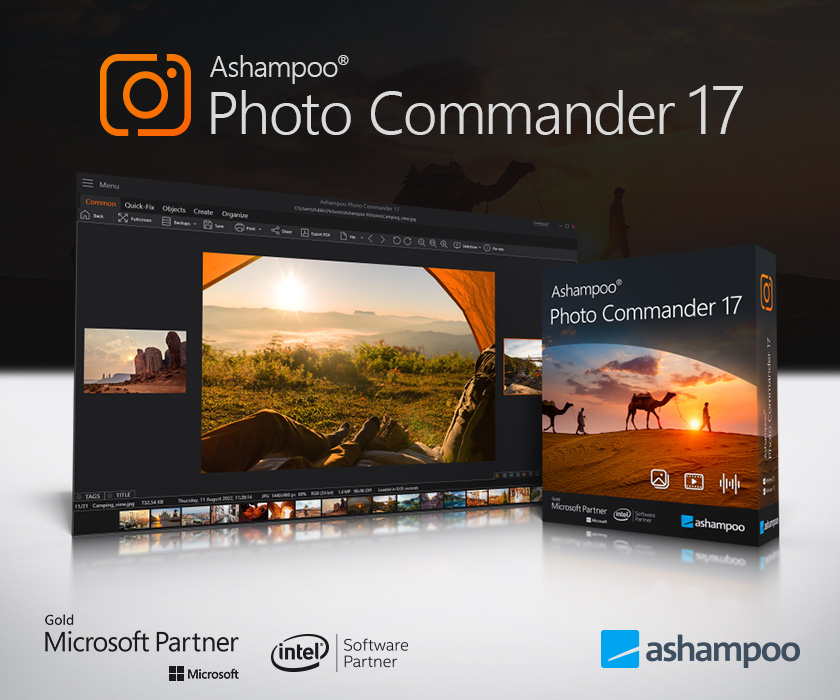
Ashampoo Photo Commander 17 serves as a centralized management and editing suite for digital photography. This latest iteration introduces a native 64-bit architecture and full Windows 11 compatibility. Technologically, the software has been overhauled for performance, resulting in JPG loading times that are up to 40% faster than previous versions.
The application provides several core functions for handling large image libraries:
- Organization: Advanced filtering and grouping options allow users to navigate extensive collections. The software also utilizes geotagging to sort images by location and display them on an interactive map.
- Editing and Optimization: Users can access automatic image enhancement or manual tools to repair scratches, remove digital noise, and correct red-eye. A robust batch processing engine is available for those needing to convert or edit large volumes of files simultaneously.
- Presentation: The image viewer supports 4K resolutions and multi-monitor configurations. Users can also generate slideshows with background music or create printable assets like calendars, collages, and greeting cards using integrated templates.
With over 200 features, the software functions as a comprehensive tool for viewing, presenting, and maintaining digital assets within a single interface. It is designed to handle every stage of the digital photography workflow, from initial import to final creative output.
Top 5 Reasons To Download Ashampoo Photo Commander 17
- Blazing Fast 64-Bit Performance and Windows 11 Compatibility: With a complete technological overhaul, this version introduces native 64-bit support and up to 40% faster JPG loading times, making it the most responsive version to date.
- The Ultimate Photo Organization Suite: Beyond simple folders, it offers powerful geotagging, smart filtering, and map-based visualization to help you manage thousands of images with zero stress.
- Professional-Grade Editing Simplified: Whether you need one-click automatic optimization or manual tools to remove scratches, digital noise, and red-eye, you have over 200 features at your fingertips.
- High-Efficiency Batch Processing: Save hours of manual labor by applying conversions, fixes, and effects to hundreds of photos simultaneously without losing quality.
- Creative Multi-Media Output: Easily transform your photo collection into professional slideshows, custom calendars, greeting cards, and complex collages using built-in templates.
If you are anything like me, your hard drive is likely a digital graveyard of forgotten memories. We live in an era where we snap dozens of photos every single day, from high-resolution DSLR shots of family vacations to quick smartphone captures of a great meal. But what happens to those files? Usually, they sit in bloated folders, poorly named and impossible to find when you actually want to show them to someone. This is exactly why Ashampoo Photo Commander 17 is a mandatory download for anyone who takes their digital life seriously. This isn't just another image viewer; it is a comprehensive command center for your entire visual history.
As a tech reviewer, I see a lot of "bloatware" that promises the world and delivers a clunky interface that slows down your system. Ashampoo Photo Commander 17 is the complete opposite. It has been refined over nearly two decades into a "total solution" that covers viewing, presenting, editing, and organizing. When a piece of software boasts over 200 features, you might expect it to be overwhelming, but the genius of this latest version lies in how it balances power with accessibility. Let’s dive deep into the five reasons why you need to grab this giveaway right now.
1. Blazing Fast 64-Bit Performance and Windows 11 Compatibility
Let’s talk about the engine under the hood. For years, photo management software has often been hamstrung by 32-bit architecture, which limits how much memory the program can use. In the world of 4K displays and 50-megapixel RAW files, that old architecture just doesn't cut it anymore. Ashampoo Photo Commander 17 breaks those chains by being the first in its lineage to feature native 64-bit support. This is a massive deal for performance. It means the software can utilize your modern hardware to its full potential, resulting in a snappier, more fluid experience.
The developers have claimed that JPG loading is up to 40% faster. In my testing, that translates to almost instantaneous thumbnail generation. We have all experienced that frustrating "loading" icon when scrolling through a folder of high-resolution images. With this version, that lag is virtually eliminated. Furthermore, as someone who has already migrated to Windows 11, I can confirm that the compatibility is seamless. It feels right at home in the new OS environment, taking full advantage of the system’s memory management and modern interface standards. If you value your time and hate waiting for software to "catch up" to your scrolling speed, the performance upgrades alone make this a must-have.
2. The Ultimate Photo Organization Suite
Organization is the backbone of Ashampoo Photo Commander 17. Most people think they have an organized library because they have folders labeled "Summer 2023" or "Wedding," but what happens when you want to find every photo you’ve ever taken in Paris, regardless of the year? Or every photo that features a specific person? This is where the clever filter and grouping options shine. You can sort by file size, date, format, or even metadata tags.
The standout feature here is the geotagging support. Modern smartphones and many high-end cameras embed GPS coordinates into the metadata of your photos. This software can read that data and turn your photo collection into a literal map. You can visualize exactly where your photos were taken on an interactive map. If your older photos don't have this data, don't worry—you can manually add locations with ease. This turns a boring list of files into a geographical journey. It’s incredibly satisfying to look at a map of the world and click on a pin to see every memory associated with that specific street corner or mountain peak. For the digital hoarder who has tens of thousands of images, these organizational tools are a lifesaver.
3. Professional-Grade Editing Simplified
Not everyone is a Photoshop expert, and frankly, not every photo needs an hour of manual retouching. Sometimes you just need a photo to look better. Ashampoo Photo Commander 17 features a highly intelligent automatic image optimization tool. With one click, it analyzes the contrast, brightness, and color temperature of your photo and balances it out. It is consistently impressive how well it handles "flat" looking photos, making the colors pop without looking artificial.
However, if you want to get your hands dirty, the manual tools are robust. You can perform precise color grading, adjust curves, and use specialized tools to "rescue" older photos. We all have those scanned images from twenty years ago that are faded, scratched, or plagued by digital noise from early digital cameras. The scratch removal and noise reduction tools in this suite are surprisingly effective, allowing you to restore family heirlooms to their former glory. You also get the classic "fix-it" tools like red-eye removal and perspective correction—the latter being essential for architectural shots where buildings seem to lean backward. It provides pro-level results without the steep learning curve of subscription-based design suites.
4. High-Efficiency Batch Processing
This is the feature that will save you the most time. Imagine you’ve just come home from a trip with 500 photos. They are all in a massive RAW or high-res JPG format, and you want to resize them for social media, add a subtle watermark, and perhaps apply a slightly warmer color filter to all of them. Doing this one by one would take your entire weekend. With the integrated batch processing in Ashampoo Photo Commander 17, you can do it in about three minutes.
The batch processing interface is intuitive. You simply select your images, choose the actions you want to perform—such as renaming, resizing, rotating, or applying an effect—and hit start. The software handles the heavy lifting in the background. This is particularly useful for professional photographers or hobbyists who need to maintain a consistent "look" across a whole gallery. It supports almost every common image format and ensures that the conversion process doesn't degrade the quality of your original files. It turns a tedious chore into a background task that you barely have to think about.
5. Creative Multi-Media Output
What is the point of having great photos if you never show them off? Ashampoo Photo Commander 17 excels at presentation. The image viewer itself is optimized for 4K resolutions and multi-display environments. If you have a dual-monitor setup, you can browse your library on one screen while viewing a full-screen, high-resolution preview on the other. It makes for a truly immersive viewing experience with seamless transitions that feel professional.
But it goes further than just viewing. The software includes built-in templates for creating slideshows, calendars, greeting cards, and collages. The slideshow creator is a particular favorite of mine; you can add background music, choose from a variety of smooth transitions, and export the final product as a video file to share with friends and family. The calendar and card designers are perfect for those who want to create personalized gifts without having to learn complex layout software. You just pick a frame, drop in your photos, and you’re done. It bridges the gap between a utility tool and a creative suite, making it the only photo app most users will ever need.
In conclusion, Ashampoo Photo Commander 17 is an absolute powerhouse. It is rare to find a single piece of software that handles the entire lifecycle of a photograph—from the moment you import it from your camera to the moment you print it in a custom calendar. The combination of the 64-bit speed boost, the map-based organization, the one-click optimization, the batch processing efficiency, and the creative output tools makes this a "Swiss Army Knife" for your PC. Whether you are a casual snapper or a serious shutterbug, this is a download that will immediately improve your digital workflow. Don't let your memories sit in a cluttered mess—take command of them with this incredible tool while you have the chance!
Final Reviewer Note: If you have struggled with sluggish photo viewers in the past, or if you are tired of paying monthly subscriptions for editing software that is too complicated to use, this is your solution. It’s fast, it’s comprehensive, and it’s built for the modern Windows user. This giveaway is a golden opportunity to upgrade your digital toolkit with a premium piece of software that usually carries a significant price tag. Get it, install it, and start rediscovering your photo collection today.

Reviews for Ashampoo Photo Commander 17
Click Here to Read Reviews for Ashampoo Photo Commander 17 >> Click Here to Submit Reviews for Ashampoo Photo Commander 17 >>