What Does Cinch Tunarrange Do?
Tunarrange is a dedicated Windows desktop utility engineered for the auditing, repair, and organization of local music libraries. Rather than functioning as a playback engine, the software focuses on the technical integrity of audio files and their directory structures. It serves users looking to standardize a large collection of disparate files into a cohesive, searchable system.
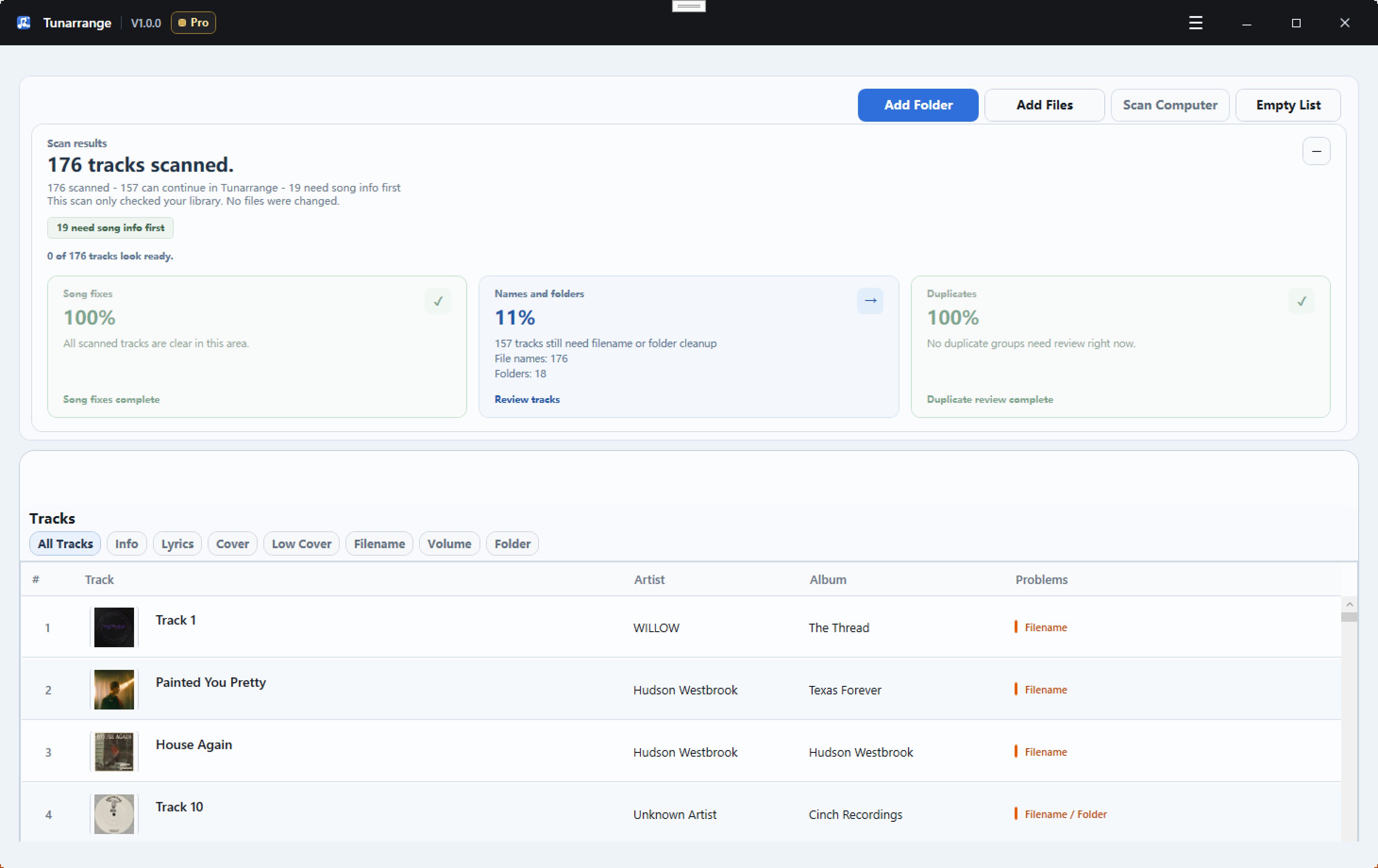
The application provides a comprehensive scanning engine that identifies missing metadata, including artist tags, lyrics, and high-quality cover art. Beyond simple tagging, it addresses file-level issues such as volume inconsistencies and duplicate entries. A central component of the workflow is the preview-first control, which allows users to inspect all proposed metadata changes and folder restructures before they are permanently written to the storage drive.
Key capabilities include:
- Metadata Correction: Users can batch-fix weak or missing information and improve low-resolution artwork across thousands of tracks simultaneously.
- File Management: The tool automatically renames files and reorganizes folder hierarchies using consistent, user-defined naming conventions.
- Duplicate Review: The software isolates potential duplicates for manual inspection, preventing the accidental loss of data associated with blind automated deletion.
- Export Options: It generates compatible copies for specific hardware use cases, including Audio CD formats and CD-ready WAV files with CUE output.
Tunarrange ensures that local collections remain legible across different hardware and software environments by enforcing strict organizational rules and repairing broken file headers.
Top 5 Reasons To Download Cinch Tunarrange
If you are anything like me, your local music library is a digital archaeological dig. It is a chaotic mix of MP3s ripped from CDs in the early 2000s, high-resolution FLAC files purchased from online boutiques, random live bootlegs, and tracks with filenames like "Track 01" or "Unknown Artist - Track 12." In an era dominated by streaming, those of us who still cherish local music files know how frustrating it is to look at a disorganized, messy media folder. It ruins the aesthetic when you import it into your media player, and finding that one specific track becomes an absolute chore.
Enter Tunarrange by Cinch. First, let us get one crucial detail out of the way: this is not another media player. It does not play your music. Instead, it serves as the ultimate behind-the-scenes digital custodian. Tunarrange is a dedicated Windows desktop application designed to scan, analyze, repair, and organize your chaotic local music library. It is designed to turn your digital mess into a structured, clean, and beautiful archive. Because this software is currently available as a special giveaway, there has never been a better time to grab it. If you want to finally take control of your music collection, here are the top five reasons you need to download this giveaway immediately.
- Absolute Safety with Preview-First Control: You can inspect every single metadata edit, tag repair, and file rename in a side-by-side comparison before any actual changes are written to your hard drive.
- Deep, Automated Metadata Repair: Tunarrange automatically scans your folders to find and fix missing tags, embed missing lyrics, and fetch high-quality album artwork to replace weak or blank thumbnails.
- Dynamic File Renaming and Folder Restructuring: It allows you to create highly consistent, custom rules to automatically reorganize random files into clean, nested directory structures (like Artist/Album/Track).
- Smart, Non-Destructive Duplicate Management: Instead of blindly deleting duplicate files and risking the loss of rare live tracks or high-res versions, the software isolates duplicates for manual side-by-side comparison.
- Audiophile-Grade Exporting and CD Mastering: The software easily handles advanced exporting needs, including normalizing track volumes and generating CD-ready WAV files paired with accurate CUE sheet outputs.
Now, let us dive deep into each of these features to understand why Tunarrange is an essential addition to your Windows utility kit, and why you should take advantage of this giveaway today.
1. Absolute Safety with Preview-First Control
We have all been burned by automated cleanup tools in the past. You download a promising "automatic tagger," point it at your music folder, hit a big button, and watch in horror as it misidentifies half of your rare acoustic tracks, overwrites your carefully curated comments, and messes up your file structures. By the time the process finishes, your library is in worse shape than when you started, and there is no "undo" button to save you.
Tunarrange completely eliminates this anxiety with its brilliant preview-first control philosophy. When you load your music library into the app, it runs its advanced scans and presents you with a detailed, interactive map of what it plans to do. You get to see the "before" and "after" states of your files side-by-side. If the app suggests an album art update or a tag change that you do not agree with, you can simply uncheck it or modify it before committing.
This level of granular control is incredibly empowering. It transforms the process of organizing your music from a nerve-wracking gamble into a precise, satisfying curation project. You are always in the driver’s seat. Only when you are 100% satisfied with the proposed repairs does the software write the changes to your actual files. For anyone who values the integrity of their music archive, this safety net alone makes Tunarrange worth the download.
2. Deep, Automated Metadata Repair
The core of any great digital music collection is its metadata. Metadata is the invisible data embedded within your audio files that tells your phone, car stereo, or home server who sings the song, what album it belongs to, what year it was released, and what track number it is. When metadata is missing or corrupted, your media players fail. Albums get split into multiple entries, tracks appear out of order, and the dreaded "Unknown Artist" placeholder clutters your screen.
Tunarrange is built to tackle this metadata nightmare head-on. It scans your files and identifies missing ID3 tags, empty fields, and mismatched information. It then cross-references your files with vast online databases to automatically fill in the blanks. It does not stop at basic tags like Artist and Title, either. Tunarrange will locate and embed missing song lyrics directly into the file tags, allowing you to view lyrics on compatible modern players.
Furthermore, it addresses one of the most visually frustrating aspects of local music libraries: missing or low-resolution album artwork. There is nothing worse than looking at a gorgeous high-resolution display only to see a generic musical note icon or a blurry 200x200 pixel image next to your favorite song. Tunarrange finds high-quality cover art and embeds it directly into the files, ensuring your library looks stunning on any device. By batch-fixing these issues, it saves you hundreds of hours of manual copy-pasting.
3. Dynamic File Renaming and Folder Restructuring
Even if your files have decent metadata, the physical folders on your hard drive might still be a disaster. Over years of downloading and copying files, you end up with some folders named "Artist - Album," others named "Year - Album," and some tracks sitting loose in your root directory. Searching through your Windows File Explorer in this state is a nightmare.
Tunarrange solves this with a highly customizable renaming and restructuring engine. Once your metadata is clean and accurate, you can tell Tunarrange exactly how you want your physical folders structured. For example, you can set a rule that instructs the software to organize everything into a nested tree: Music Folder / Artist / [Year] Album / Track Number - Track Title.
Once you set your preferences, Tunarrange goes to work, physically moving and renaming files to fit your system perfectly. It eliminates double spaces, fixes weird capitalization issues, and removes illegal characters that can cause transfer errors when moving files to external drives or mobile devices. The result is a clean, logical folder structure that makes backing up, browsing, and migrating your music library incredibly easy. It brings a level of neatness that is deeply satisfying to look at.
4. Smart, Non-Destructive Duplicate Management
Duplicate files are the bane of any large digital archive. They eat up valuable hard drive space, clutter your search results, and ruin your listening experience when the same song plays twice in a row on shuffle. However, identifying and removing duplicates is a highly delicate task that most automated duplicate finders handle poorly.
Standard duplicate detectors usually look only at filenames or basic file sizes. If they find two files named "Yesterday.mp3," they might assume they are duplicates and delete one. But what if one is the studio version and the other is a rare live acoustic recording? What if one is a high-fidelity FLAC rip and the other is a low-quality, compressed MP3? Blindly deleting duplicates can result in losing irreplaceable files.
Tunarrange handles duplicates with the intelligence and nuance of a professional archivist. It isolates suspected duplicates and presents them to you in a dedicated review panel. It shows you the file format, bit rate, file size, and duration of each track side-by-side. This allows you to easily see which file is the superior copy. You can keep the high-resolution version, discard the compressed duplicate, or choose to keep both if they are actually different performances. This safe, non-destructive approach guarantees you will never accidentally delete a cherished track.
5. Audiophile-Grade Exporting and CD Mastering
While Tunarrange is exceptional at cleaning up your existing directory, it also shines when you need to share or export your music. Many music lovers still enjoy physical media, whether they are burning custom mixes for older car stereos, archiving albums for physical safekeeping, or preparing tracks for DJ equipment. Tunarrange caters directly to these audiophile and vintage-hardware needs.
First, it includes volume scanning and normalization assistance. It is incredibly annoying to listen to a custom playlist where one track is whisper-quiet and the next is deafeningly loud. Tunarrange scans for volume discrepancies, helping you ensure a consistent listening experience across your entire collection.
Second, it offers specialized export options, including the ability to generate CD-ready WAV files paired with highly accurate CUE sheet outputs. For those unfamiliar, a CUE sheet is a metadata file that describes how the tracks of an optical disc are laid out. This allows you to burn gapless audio CDs with perfect transitions, CD-Text data, and index points. Whether you are preserving analog audio, mastering a custom project, or preparing files for a high-end physical transport system, Tunarrange bridges the gap between digital convenience and physical high-fidelity media.
Why You Should Download This Giveaway Today
In the tech world, we often see utility apps that try to do too much. They try to be a music player, a streaming portal, a social media sharing tool, and an organizer all at once. Usually, they end up doing none of those things particularly well. Tunarrange stands out because it knows exactly what it is, and it focuses entirely on executing its core purpose with precision. It does not waste system resources trying to play your music; it dedicates all its power to making sure your music files are perfect.
If you have a collection of local music files sitting on your Windows PC, you owe it to yourself to keep it clean. A disorganized music library is a source of subtle, constant frustration. Every time you see a missing album cover, a misspelled artist name, or an unplayable duplicate track, it degrades your connection to your music. Cleaning it manually is a monumental task that most of us simply do not have the time to tackle.
Tunarrange automates the tedious, painful parts of library curation while giving you the ultimate veto power over every change. It is safe, efficient, highly intelligent, and beautifully designed. Because this powerful utility is currently being offered as a giveaway, you have absolutely nothing to lose and a pristine, gorgeous music library to gain. Do not let your digital music collection sit in chaos any longer. Download the Tunarrange giveaway today, run your first scan, and experience the immense satisfaction of a perfectly organized local music library.

Reviews for Cinch Tunarrange
Click Here to Read Reviews for Cinch Tunarrange >> Click Here to Submit Reviews for Cinch Tunarrange >>