What Does Log Analyzer Do?
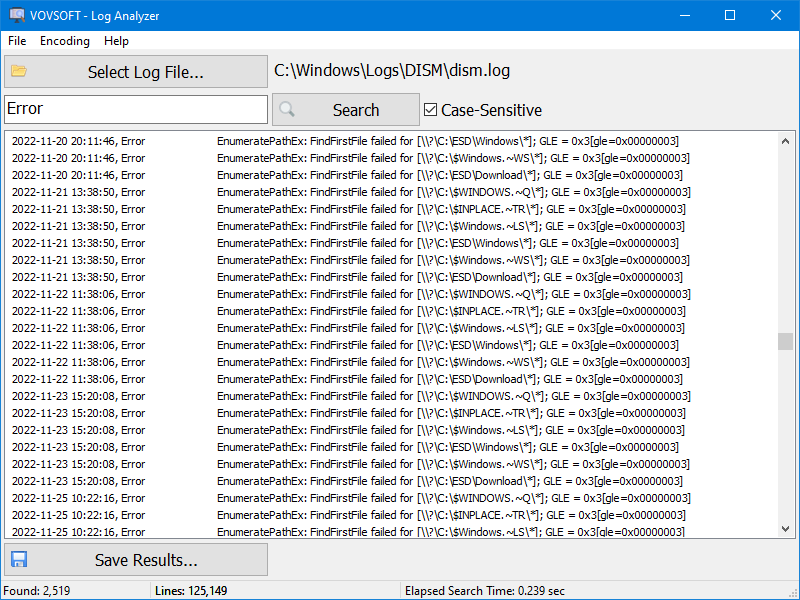
Log Analyzer is a high-performance utility engineered to view, search, and monitor massive multi-gigabyte text files that typically exceed the capabilities of standard text editors. While common software often freezes or crashes when attempting to open files larger than 1GB, this tool uses advanced technologies to maintain responsiveness and stability.
The application is designed with several technical features to facilitate deep file inspection:
- Memory Efficiency: By utilizing buffered file streaming and memory caching, the software reads data directly from the disk, minimizing system RAM consumption even when handling enormous datasets.
- Scalability: The interface is optimized to display up to 100,000,000 lines of text without performance degradation.
- Live File Access: Users can safely open and monitor logs that are currently being written to in real-time by servers or other applications.
- Encoding Compatibility: It supports multiple character formats, including Raw (No Encoding), ANSI, UTF-8, and Unicode.
For IT professionals, system administrators, and developers, Log Analyzer provides a reliable environment for troubleshooting system errors, examining database dumps, and monitoring server health. The built-in search functionality allows for rapid navigation through chronological records, such as error messages and network activity. By prioritizing low memory overhead, the software ensures that critical diagnostic data remains accessible regardless of file size.
Top 5 Reasons To Download Log Analyzer
Every developer, system administrator, and IT professional has faced that terrifying moment when a critical production server goes down at 2:00 AM. You rush to open the system error log to diagnose the problem, double-click the massive text file, and then watch in horror as your text editor freezes, turns opaque white, and throws up the dreaded Not Responding window. Traditional text editing applications simply were not engineered to handle the massive volumes of text data that modern enterprise applications, operating systems, and network servers produce on a daily basis.
Enter Log Analyzer, a specialized, high-performance text viewing utility designed specifically to conquer massive multi-gigabyte log files with blistering speed and absolute reliability. If you want a lightweight, rock-solid utility that turns agonizing log troubleshooting into a smooth, instantaneous workflow, this limited-time giveaway is an absolute must-have addition to your software toolkit. Here is a quick breakdown of the top five reasons you need to download Log Analyzer today, followed by an in-depth look at what makes this software so extraordinary.
- Effortless Multi-Gigabyte File Handling: Seamlessly open and navigate massive files containing up to 100,000,000 lines without freezing or crashing your operating system.
- Ultra-Low System Resource Consumption: Advanced memory caching and buffered file stream technologies ensure smooth performance without consuming your system RAM.
- Real-Time Live Log Access: Safely view, inspect, and monitor active log files that are currently locked or being written to by running applications.
- Comprehensive Multi-Encoding Support: Universal compatibility across ANSI, UTF-8, Unicode, and Raw (No Encoding) formats eliminates unreadable text and corrupted character errors.
- Rapid Search and Efficient Monitoring: Instantly locate critical system errors, network anomalies, and user interactions hidden deep inside enormous database dumps and server records.
Now, let us take a deep dive into each of these compelling features to show you why downloading this giveaway will forever change the way you interact with large text files and diagnostic logs.
1. Effortless Multi-Gigabyte File Handling
If you have ever attempted to open a 2GB, 5GB, or 10GB log file using standard tools like Notepad, WordPad, or even popular code editors, you already know how painful the experience can be. Most general-purpose text editors attempt to process the entire file at once, choking on huge line counts and forcing you to wait minutes—or even hours—just to view basic text. In critical downtime situations, every second spent waiting for an editor to respond is money lost and stress gained.
Log Analyzer solves this fundamental problem by completely reinventing how huge text files are loaded and displayed. Built specifically for extreme workloads, this application is capable of smoothly rendering up to 100,000,000 lines of text without missing a beat. Whether you are opening a massive Apache or Nginx access log, an expansive SQL database dump, or a gigantic Windows Event system log, Log Analyzer opens the file virtually instantly.
Instead of staring at a locked screen or a spinning cursor, you get instant visibility into your data. You can freely scroll through millions of entries, drag the scrollbar top to bottom, and inspect deeply nested entries with zero input lag. For anyone dealing with modern software systems that dump continuous operational records onto the hard drive, this capability alone makes downloading this giveaway an absolute no-brainer.
2. Ultra-Low System Resource Consumption
The primary reason standard text editors crash when opening huge files is simple: bad memory management. Conventional editors try to load the entire contents of a text document straight into your system RAM. When a file exceeds available memory—or hits the 32-bit address space limits of older editors—the system is forced to swap memory to the disk, resulting in severe system slowdowns, high CPU usage, and catastrophic program crashes.
Log Analyzer takes a radically different engineering approach. Instead of dumping multi-gigabyte files directly into system RAM, the software utilizes cutting-edge buffered file stream and specialized memory caching architecture. By reading data dynamically in localized streams directly from your hard drive or solid-state drive, Log Analyzer consumes only a fraction of your computer's memory, regardless of how big the target file actually is.
This efficient resource allocation means you can comfortably view a massive 20GB log file on a modest laptop or work machine without hogging your system RAM. Your web browser, virtual machines, and development tools will continue running smoothly in the background while Log Analyzer operates cleanly in its own minimal footprint. If you value system speed, lean background execution, and efficient hardware utilization, this software is a brilliant showcase of optimized software design.
3. Real-Time Live Log Access
One of the single most frustrating aspects of system administration and software debugging is dealing with active lock files. When a server program, background service, or database management system is running, it continually locks its active log files to write incoming operational data. If you try to open these active files using regular text viewers, Windows will often pop up an error message stating that the file is locked by another process, preventing you from viewing the contents entirely.
Log Analyzer completely bypasses this limitation by offering true, non-intrusive real-time live access. It safely opens and inspects active log files while they are being actively written to by running processes, all without corrupting the file, interfering with the background application, or triggering system lock conflicts.
This means you can actively monitor live server events, inspect web applications while users are actively interacting with them, and track down intermittent background errors as they occur in real-time. You no longer have to stop services, duplicate giant files into temporary folders, or restart applications just to see what was logged five seconds ago. Downloading this giveaway gives you live, unfiltered, real-time insight into your system's heartbeat whenever you need it.
4. Comprehensive Multi-Encoding Support
Text files are not all created equal. Depending on the operating system, programming language, server environment, or legacy framework that created the log, the text may be formatted using wildly different character encodings. Opening a file saved in an unsupported format often results in total gibberish—a mess of broken symbols, unreadable characters, and mangled text layout that makes analysis impossible.
To eliminate this headache, Log Analyzer comes fully equipped with comprehensive multi-encoding support right out of the box. The software can effortlessly read and parse various formatting standards, including:
- No Encoding (Raw): Ideal for inspecting raw binary streams, unformatted output, or unstandardized log output.
- ANSI: Perfect for legacy Windows applications, older server environments, and standard desktop software output.
- UTF-8: The undisputed standard for modern web development, Linux/Unix servers, and cloud platform logging.
- Unicode: Full support for double-byte character sets, internationalized log systems, and enterprise software suites.
By automatically interpreting these varied character sets accurately, Log Analyzer ensures that your text is rendered cleanly and legibly every single time. You will never have to waste precious time manually converting file formats or guessing character sets again. It simply opens the file and presents the text exactly as it was meant to be read.
5. Rapid Search and Efficient Monitoring
Having instant access to a multi-gigabyte log file is fantastic, but finding a specific error code, IP address, or timestamp inside millions of lines of raw text is like finding a needle in a colossal haystack. A log viewer is only as good as its search engine, and this is where Log Analyzer truly shines as a power tool for professionals.
The utility features a practical, high-speed text search engine optimized to scan through massive, multi-million-line documents in a matter of seconds. Whether you are searching for critical error codes like HTTP 500, scanning for specific user IDs, or auditing security events based on dynamic timestamps, Log Analyzer navigates directly to the target entries without delay.
This rapid searching capability dramatically speeds up your daily monitoring and diagnostic routines. System administrators can track down server failure causes instantly, security teams can audit suspicious network activity across massive access logs, and software developers can quickly inspect stack traces across thousands of execution cycles. By transforming hours of tedious manual searching into a quick, effortless query, Log Analyzer pays for itself in saved time on day one.
Conclusion: Why You Need To Grab This Giveaway Right Now
In the fast-paced modern tech ecosystem, efficiency and reliability are everything. Spending hours fighting sluggish text editors, waiting for frozen screens to unfreeze, or fighting file locking errors is a massive drain on productivity. You need tools that work as fast as you do, designed specifically to tackle the extreme demands of modern multi-gigabyte data logging.
Log Analyzer delivers exactly what power users need: unmatched performance, ultra-low memory overhead, live real-time access, universal encoding compatibility, and lightning-fast search functionality. It replaces fragile, heavy text editors with a sleek, razor-sharp utility built to handle massive 100,000,000 line text files with complete ease.
Whether you are a seasoned system engineer managing cluster servers, a web developer debugging live cloud platforms, a database administrator scanning massive SQL dumps, or simply a tech enthusiast who wants a reliable text viewer that never crashes, this giveaway is an absolute essential. Do not wait for your next server crash or frozen text editor incident to realize you need a better tool—download this powerful giveaway today and upgrade your software toolkit with the ultimate big-text viewer!

Reviews for Log Analyzer
Click Here to Read Reviews for Log Analyzer >> Click Here to Submit Reviews for Log Analyzer >>