What Does Lazesoft Recover My Password Professional Edition Do?
Lazesoft Recover My Password Professional Edition is a specialized utility designed to regain access to Windows systems when login credentials have been lost or forgotten. The software provides a method to reset both local administrator and standard user passwords without the need for a full operating system reinstallation or disk reformatting.
The application functions by creating a bootable recovery environment using its integrated WinPE Recovery Builder. Once booted from a CD, DVD, or USB drive, users can interact with an interface to unlock or enable accounts that have been disabled or locked out by the system security policy. Additionally, the tool allows for the retrieval of product keys from unbootable Windows installations, ensuring that license information is preserved during recovery efforts.
Technical specifications and core features include:
- Support for Windows 2000, XP, Vista, 7, and 8 workstations.
- Compatibility with both 32-bit and 64-bit Windows architectures.
- The ability to disable password expiry options during the reset process.
- Automatic detection of multiple operating systems installed on a single computer.
- Hardware support for major laptop and desktop brands including Dell, IBM, and Toshiba.
- Creation of bootable password reset media via CD, DVD, or USB flash drives.
By utilizing this tool, users can resolve lockout scenarios and recover critical system license data through a factual, guided process that eliminates the need for manual technical intervention or system wipes.
Top 5 Reasons To Download Lazesoft Recover My Password Professional Edition
Before we dive into the nitty-gritty details of why this software is a must-have for any PC user, let’s look at the highlights. Here are the top five reasons why you should download Lazesoft Recover My Password Professional Edition today:
- Guaranteed Access with a 100% Recovery Rate: Never worry about being locked out of your system again, as this tool ensures you can reset any local or administrator password with absolute certainty.
- Data Integrity and Safety: You can regain access to your files without the need to reformat your hard drive or reinstall Windows, keeping your precious photos, documents, and settings perfectly intact.
- Rescue "Unbootable" Systems and Product Keys: Beyond just passwords, this software can extract your Windows product keys from systems that won’t even boot, saving you hundreds of dollars in licensing fees.
- Universal Hardware and OS Support: Whether you are running an old Windows XP machine or a modern Windows 8 workstation, and regardless of whether it is a Dell, Toshiba, or IBM laptop, this tool is fully compatible.
- User-Friendly WinPE Bootable Media: You don't need to be a tech genius; the software includes a built-in builder to create a bootable CD, DVD, or USB drive that does the heavy lifting for you through a clear, intuitive interface.
In the world of personal computing, there are few moments more gut-wrenching than the realization that you have forgotten your Windows login password. It usually happens at the worst possible time—perhaps you haven't used an old laptop in months and suddenly need a file stored on it, or maybe you changed your password for security reasons and the new one simply slipped your mind. Traditionally, the "solution" to this problem was either a costly trip to a computer repair shop or the nuclear option: reformatting your entire hard drive and losing every piece of data you own. However, Lazesoft Recover My Password Professional Edition changes the game entirely. As a tech reviewer, I’ve seen many "system rescue" tools, but few offer the robust simplicity and reliability found here. This isn't just a utility; it is an insurance policy for your digital life.
1. Guaranteed Access with a 100% Recovery Rate
When you are looking for a password recovery solution, the most important metric is reliability. There is nothing more frustrating than downloading a tool, spending time setting it up, and then finding out it can’t actually penetrate the security of your specific system. Lazesoft Recover My Password Professional Edition boasts a 100% recovery rate. This is a bold claim, but it is backed by the software’s sophisticated ability to interact directly with the Windows Security Accounts Manager (SAM) database.
Instead of using "brute force" methods—which can take days or even weeks to guess a complex password—this tool simply resets or clears the password instantly. It doesn't matter how long or complex your forgotten password was. It could have been 20 characters with symbols and numbers; Lazesoft treats it the same way. By booting into its own specialized environment, the software bypasses the active Windows operating system and modifies the necessary files to grant you entry. This professional-grade reliability is exactly why IT departments often keep this specific tool in their digital "first aid kits." When you download this giveaway, you are getting that same level of professional assurance for your own home or business devices.
Furthermore, it isn't just about the primary user account. Many users find themselves locked out of the Administrator account, which is often hidden or disabled by default. This software allows you to recover the administrator's password with just a few clicks. If you’ve inherited a computer or bought a used one and find yourself restricted by permissions, this tool is your key to total ownership of the hardware.
2. Data Integrity and Safety: No Reformatting Required
For most users, the password isn't the most valuable thing on the computer—the data is. If you take a locked computer to a standard "big box" retail repair desk, their standard operating procedure is often to wipe the drive and reinstall the operating system. This is a tragedy for anyone who hasn't backed up their family photos, tax documents, or work projects. The second major reason to download Lazesoft Recover My Password Professional Edition is that it eliminates the need for the "nuke and pave" approach.
By using this software, you are opting for a non-destructive solution. It doesn't touch your files, it doesn't move your folders, and it certainly doesn't require a reformat. You are simply editing a tiny piece of the system configuration to allow yourself back in. Once the password is reset, you boot back into Windows exactly as you left it. All your desktop icons are in the same place, your browser history is intact, and your software remains installed.
The peace of mind that comes with this cannot be overstated. Knowing that you can solve a catastrophic lockout without the risk of data loss is why this tool is considered a "must-download." It transforms a potential multi-day disaster into a five-minute task. You don’t need to call a technician, and you don’t need to spend hours reinstalling your favorite applications and drivers. It is the ultimate time-saver for anyone who values their digital workspace.
3. Rescue "Unbootable" Systems and Product Keys
One of the most impressive "hidden" features of the Professional Edition is its ability to retrieve product keys from unbootable Windows installations. Sometimes, a computer doesn't just have a password problem; it has a system failure that prevents it from loading Windows at all. In these scenarios, many users assume that their Windows license—which can cost upwards of $100 to $200—is gone forever if they can't find the original sticker or digital receipt.
Lazesoft Recover My Password Professional Edition goes above and beyond simple password resetting. It can reach into the registry of a "dead" Windows installation and pull out the product keys for the OS itself and other installed software. This is a lifesaver if you are planning to move your license to a new machine or if you finally decide to perform a clean install but don't want to pay for a new license.
Additionally, the software provides tools to unlock and enable user accounts. Sometimes a password is correct, but the account has been disabled by a system administrator or a security policy (like too many failed login attempts). Lazesoft can flip the "enabled" switch back on or disable the "password expiry" flag that might be locking you out in a corporate environment. This level of control over the user account database is usually reserved for high-end forensics tools, yet here it is presented in a way that any home user can navigate.
4. Universal Hardware and OS Support
Compatibility is often the Achilles' heel of system recovery software. Many tools work on desktop PCs but fail on laptops, or work on 32-bit systems but crash on 64-bit ones. Lazesoft has spent years refining their engine to ensure it works across the entire spectrum of Windows hardware. This Professional Edition supports Windows 8, 7, Vista, XP, and even legacy 2000 workstations. This makes it an essential tool for those of us who maintain "legacy" machines for retro gaming or specific old-school software.
In terms of hardware, the software is brand-agnostic. It has been tested and verified to work on laptops and desktops from all major manufacturers, including Dell, HP, Toshiba, IBM, Lenovo, and Legend. Whether you are dealing with a high-end workstation or a budget netbook, the software’s drivers are robust enough to recognize your disk controllers and hardware components.
Furthermore, the support for both 32-bit and 64-bit architectures is crucial. As we transitioned from older to newer systems, many recovery tools became obsolete. Lazesoft remains relevant by bridging that gap. If you have a variety of computers in your home or office, you don't need five different tools; you just need this one. It is the Swiss Army knife of password recovery, designed to handle the quirks of different BIOS and UEFI configurations that often trip up lesser software.
5. User-Friendly WinPE Bootable Media
The most sophisticated tool in the world is useless if it requires a PhD in Computer Science to operate. This is where Lazesoft Recover My Password Professional Edition truly shines. The software includes a WinPE Recovery CD/DVD Builder. For those who aren't familiar, WinPE (Windows Preinstallation Environment) is a lightweight version of Windows used for deployments and recovery. Lazesoft builds this environment for you automatically.
The interface is "handy and clear," guiding you through the process of creating a bootable CD, DVD, or USB drive. You don't have to worry about "burning ISOs" manually or configuring complex boot parameters. The wizard-driven interface handles the technical details. Once you've created your bootable media, you simply plug it into the locked computer, restart, and boot from the USB or CD.
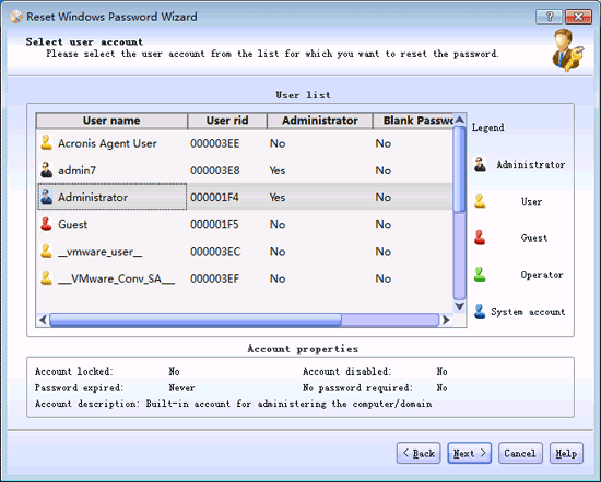
From there, you are greeted with a graphical user interface that looks and feels like a standard Windows application. There is no confusing command-line prompt or archaic DOS-style menus. You simply select the Windows installation that the software automatically detects, choose the user account you want to modify, and click "Reset/Unlock." It is a point-and-click solution to a high-level security problem. This ease of use is what makes it so convincing—it empowers the average user to take control of their hardware without needing to hire outside help. It turns a "technician-only" job into something you can do yourself while finishing a cup of coffee.
Conclusion: Why You Should Grab This Now
In the tech world, we often talk about "essential" software, but Lazesoft Recover My Password Professional Edition truly earns that title. It is the kind of tool that you might not need today, or even tomorrow, but when you do need it, it is the most valuable thing on your hard drive. Most people don't think about password recovery until they are staring at a login screen they can't get past, feeling the heat of a deadline or the sting of potential data loss. By downloading this giveaway now, you are preparing yourself for that eventual "what if" scenario.
Think about the alternatives. You could pay a local computer shop $100 or more to do exactly what this software does. You could spend a whole weekend trying to remember a password, getting increasingly frustrated. Or, you could have a bootable Lazesoft USB drive sitting in your desk drawer, ready to solve the problem in under ten minutes. The ability to reset any password, unlock disabled accounts, and even rescue product keys from a dying machine makes this a versatile powerhouse.
The Professional Edition offers a level of polish and compatibility that free alternatives simply cannot match. With its 100% recovery rate, support for all major hardware brands, and its incredibly intuitive WinPE builder, it removes the fear factor from Windows security. You are not just downloading a program; you are downloading the ability to bypass one of the most stressful hurdles in modern computing. Do not wait until you are locked out to look for a solution. Be proactive, download this giveaway, and rest easy knowing that you hold the keys to your digital kingdom, no matter what happens to your memory.
In summary, Lazesoft Recover My Password Professional Edition is robust, reliable, and remarkably easy to use. It’s a professional-grade utility designed for everyone from the casual home user to the seasoned IT pro. If you value your time, your data, and your sanity, this is one download you definitely want to have in your digital toolkit. It is effective, it is efficient, and most importantly, it works when everything else fails. Don't miss out on the chance to secure this powerful utility—it’s the ultimate safety net for any Windows user.

Reviews for Lazesoft Recover My Password Professional Edition
Click Here to Read Reviews for Lazesoft Recover My Password Professional Edition >> Click Here to Submit Reviews for Lazesoft Recover My Password Professional Edition >>