What Does Wonderfulshare PDF Secure Do?
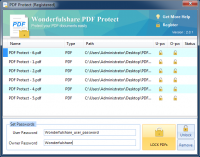
Wonderfulshare PDF Secure is a dedicated utility designed to restrict access and manage usage permissions for PDF documents. The software implements standard security measures by allowing users to apply two distinct levels of protection: a user password and an owner password. The user password acts as a primary gatekeeper, preventing unauthorized parties from opening or viewing the file contents entirely.
Beyond basic access control, the tool provides granular permission management via the owner password. Administrators can specify whether secondary users are permitted to print, copy text, or modify the document. These restrictions ensure that even if a document is distributed, the integrity and usage of the content remain under the creator's control. The application utilizes 128-bit encryption to secure the underlying data.
Key features of the software include:
- Batch Processing: Multiple PDF files can be locked or unlocked simultaneously to save time.
- Permission Customization: Specific authorities can be toggled to allow or deny document interactions.
- Automated Export: Encrypted files are generated and exported quickly after the security parameters are set.
- Streamlined Workflow: The interface is designed for a minimal-click process, requiring no advanced technical knowledge to operate.
This software is tailored for users who require a factual, straightforward method to harden document security and prevent data leakage without navigating complex enterprise management suites.
Top 5 Reasons To Download Wonderfulshare PDF Secure
In the digital age, your data is your most valuable asset, and often, that data is stored in PDF files. Whether it is a sensitive legal contract, a proprietary business plan, or a personal financial statement, keeping that information away from prying eyes is non-negotiable. That is where Wonderfulshare PDF Secure comes into play. If you have been looking for a way to lock down your documents without the headache of complex enterprise software, this is the solution you have been waiting for. Here are the top five reasons why you need to download this giveaway right now:
- Robust 128-Bit Encryption Standards: It provides military-grade protection that ensures your files remain unreadable to anyone without the proper authorization.
- Dual-Layer Password Protection: The software allows for both User and Owner passwords, giving you granular control over who can open a file versus who can edit or print it.
- High-Efficiency Batch Processing: You can secure dozens or even hundreds of PDF files simultaneously, saving hours of manual labor.
- Streamlined, Intuitive User Interface: Designed for speed and ease of use, the software requires zero technical expertise to master.
- Total Control Over Document Permissions: Beyond just locking the file, you can specifically restrict printing, copying, and modifications to maintain the integrity of your work.
Now, let us dive deep into why these features make Wonderfulshare PDF Secure an essential addition to your digital toolkit. As a tech reviewer who has seen countless security apps come and go, I can tell you that the best tools are the ones that do one thing perfectly. This app focuses on PDF security, and it does so with a level of finesse that is rare in the utility market.
1. Robust 128-Bit Encryption Standards
When we talk about digital security, the word "encryption" gets thrown around a lot, but not all encryption is created equal. Wonderfulshare PDF Secure utilizes 128-bit encryption, which is widely recognized as a gold standard for securing personal and corporate documents. To put this in perspective, 128-bit encryption is so strong that even with modern supercomputers, it would take billions of years to crack through brute force. When you apply this level of protection to your PDFs, you are essentially placing your documents inside a digital vault that is virtually impenetrable.
For the average user, this means peace of mind. Think about the documents you send over email or store in the cloud. Tax returns, medical records, and scanned copies of your ID are all magnets for identity thieves. If one of those files is intercepted or if your cloud storage is compromised, an unencrypted PDF is an open book. However, a file encrypted by this software is a useless jumble of code to anyone who doesn't have the key. By downloading this giveaway, you are equipping yourself with a professional-grade shield that keeps your private life private.
Furthermore, the encryption process within the app is optimized for speed. Often, high-level encryption can slow down a computer or take several minutes to process a single file. Wonderfulshare PDF Secure is built on a high-performance engine that handles the heavy lifting in the background. You get top-tier security without the performance lag, which is a massive win for anyone working on a deadline.
2. Dual-Layer Password Protection
One of the standout features that sets Wonderfulshare PDF Secure apart from basic PDF creators is its dual-layer password system. Most people think a password is just a password, but in the world of professional document management, you need more nuance. This software distinguishes between a User Password and an Owner Password, and understanding this distinction is key to why you need this tool.
The User Password, often referred to as an "Open Password," is exactly what it sounds like. If you set this, no one can even view the contents of the PDF without entering the correct code. This is your first line of defense. But what if you want someone to read the document, but you don't want them changing the text or printing it out to share with others? That is where the Owner Password comes in. This second layer of security allows you to restrict specific permissions.
Imagine you are a freelancer sending a draft to a client. You want them to review the work, but you don't want them to be able to copy the text into their own document or print it until the final payment is made. By using the Owner Password feature, you can disable the "Copy" and "Print" functions while still allowing the client to view the file. This level of granular control is usually reserved for expensive, bloated software suites, but here it is presented in a lightweight, accessible package. It puts the power back in your hands, ensuring that your intellectual property is used only in the ways you permit.
3. High-Efficiency Batch Processing
We have all been there: you have a folder containing fifty different invoices or reports, and you realize they all need to be password-protected before they can be archived or sent out. If you were to do this manually, opening each file, setting the security, and saving it, you would lose an entire afternoon. This is where Wonderfulshare PDF Secure truly shines for the power user. Its batch processing capability is a total game-changer.
The "Multiple PDF files could be locked or unlocked" feature mentioned in the description is a massive productivity booster. You simply drag and drop your entire collection of files into the interface, set your desired security parameters once, and let the software do the rest. It processes the entire queue automatically, applying your encryption and password settings to every single file in seconds. This is the kind of workflow optimization that separates "good" software from "essential" software.
In a professional environment, time is money. Whether you are an accountant handling dozens of client files or a researcher managing hundreds of papers, the ability to bulk-encrypt is non-negotiable. This software doesn't just protect your data; it protects your schedule. The export process is fast and automatic, meaning you can set it and forget it. Once the process is finished, your newly secured files are ready for distribution or storage, and you haven't wasted a single unnecessary click.
4. Streamlined, Intuitive User Interface
There is a common misconception in the tech world that for a program to be "powerful," it must be complicated. We have all seen those interfaces that look like the cockpit of a fighter jet, with hundreds of buttons and hidden menus. Wonderfulshare PDF Secure takes the opposite approach. It embraces a "Simple and straightforward design" that makes it accessible to everyone, from tech-savvy developers to those who only use their computers for basic tasks.
As a reviewer, I always look for the "Time-to-Value" metric—how long does it take for a new user to achieve their goal? With this software, that time is measured in seconds. The UI is clean, modern, and uncluttered. There are no confusing sidebars or intrusive advertisements. You open the app, you see exactly where to add your files, you see exactly where to type your passwords, and you see the "Process" button. It is a refreshing departure from the "feature creep" that ruins so many other utility apps.
This simplicity is actually a security feature in itself. When software is too complex, users often make mistakes—they might forget to check a box or accidentally leave a file unencrypted because they didn't understand the menu. By making the process "Effortless" with "only several clicks," Wonderfulshare PDF Secure ensures that you get the job done right every single time. It takes the guesswork out of document security, which is exactly what you want when your sensitive information is on the line.
5. Total Control Over Document Permissions
Lastly, we need to talk about the "Permissions" aspect of this tool. Protection isn't just about keeping people out; it's about managing what they do once they are in. Wonderfulshare PDF Secure allows you to toggle specific permissions on and off, which is vital for maintaining the integrity of your documents. If you have ever sent a PDF only to find out someone edited the numbers or "borrowed" your images, you know how frustrating it can be.
With this software, you can deny the permission to modify the document. This ensures that the PDF remains a "source of truth"—it cannot be altered, forged, or tampered with. You can also disable the ability to extract text or images. This is particularly useful for photographers, designers, or writers who want to share their portfolio but don't want their work stolen with a simple Ctrl+C, Ctrl+V command. You can even restrict printing, preventing your digital documents from becoming physical copies that could be left on a desk or leaked in a paper format.
This level of control is essential for anyone who works in a collaborative environment. It allows you to share information with confidence, knowing that the recipient can interact with the file exactly how you intended, and not a bit more. When you combine this with the 128-bit encryption and the dual-password system, you have a comprehensive security solution that covers every possible angle of document vulnerability.
The Final Verdict
In conclusion, Wonderfulshare PDF Secure is a rare find in the world of software giveaways. It doesn't try to be a PDF editor, a converter, and a reader all at once. Instead, it focuses on being the best possible tool for securing your files. It is lightweight, incredibly fast, and utilizes professional-grade encryption that you can actually trust. In an age where digital privacy is constantly under threat, having a tool like this is not just a luxury—it is a necessity.
Whether you are protecting your personal tax returns or securing high-stakes corporate data, this software provides the robustness you need without the complexity you fear. The batch processing saves you time, the dual-password system gives you flexibility, and the intuitive design ensures you never feel lost. This is a polished, professional utility that delivers on every promise it makes.
Don't wait until you have a security breach to start thinking about PDF protection. By then, it is often too late. Take advantage of this giveaway and give your documents the 128-bit armor they deserve. It is quick, it is easy, and it is a total no-brainer for anyone who takes their digital security seriously. Download it, install it, and experience the peace of mind that comes with knowing your PDF files are truly secure. This is one download you definitely do not want to skip.
Remember, your data is only as secure as the tools you use to protect it. With Wonderfulshare PDF Secure, you are choosing one of the most reliable and user-friendly options on the market today. Get it now and lock down your digital life with confidence!


Reviews for Wonderfulshare PDF Secure
Click Here to Read Reviews for Wonderfulshare PDF Secure >> Click Here to Submit Reviews for Wonderfulshare PDF Secure >>