What Does Writed Do?
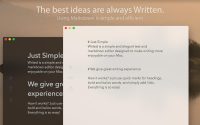
Writed is a streamlined text editor developed specifically for the macOS platform, prioritizing a minimalist aesthetic and Markdown functionality. The application aims to reduce interface clutter, providing users with a distraction-free environment for content creation. By utilizing Markdown, the software allows writers to format text without navigating complex menus or utilizing traditional toolbars.
The core functionality centers on the use of simplified syntax, often referred to as quick marks. Users can apply various formatting styles directly through keyboard inputs to maintain a continuous workflow. Key features include:
- Defining structural headings for document organization.
- Applying italics and bold styling to emphasize specific text.
- Integrating hyperlinks and references within the body of the document.
The software renders these plain-text markers into formatted elements, maintaining a balance between a code-centric environment and a visual output. This approach is intended to accelerate the drafting process for web content, documentation, and creative writing. Writed focuses on a responsive experience, offering a native Mac interface where the primary objective is the fluid and efficient production of written work.
Top 5 Reasons To Download Writed
- Minimalist Design and Distraction-Free Environment: A clean, elegant interface that removes digital clutter so you can focus entirely on your words.
- Intuitive Markdown Integration: Effortless formatting using simple syntax, allowing you to style headings, bold text, and italics without ever lifting your hands from the keyboard.
- Optimized Specifically for Mac: A native experience that feels right at home on macOS, utilizing the system's strengths for a smooth, high-performance writing session.
- Enhanced Creative Flow: By stripping away complex menus and bloat, the app facilitates a "flow state" where ideas transition seamlessly from mind to screen.
- Future-Proof Portability: Your work is saved in universal formats, ensuring your writing remains accessible, editable, and compatible across all platforms for years to come.
1. Minimalist Design and Distraction-Free Environment
In the modern age of computing, we are constantly bombarded by notifications, complex ribbons, and a sea of buttons that we rarely use. When it comes to writing, this "feature bloat" is the ultimate enemy of productivity. The first and perhaps most compelling reason to download Writed is its commitment to minimalism. This app isn't just a text editor; it is a digital sanctuary for your thoughts. Many word processors today look more like flight simulators than writing tools, but Writed takes the opposite approach. It embraces the philosophy that less is more.
When you open the app, you aren't greeted by a complex set of formatting palettes or a dozen different font selection menus. Instead, you are given a beautiful, clean canvas. This elegance is intentional. By removing the visual noise that plagues traditional software, the app allows your brain to settle into a focused state. As a tech reviewer, I have seen countless apps try to "reimagine" writing by adding more features, but Writed understands that the best way to improve the writing experience is to get out of the writer’s way. The interface is designed to disappear, leaving only you and your prose.
This sense of elegance extends to the typography and the layout. Every pixel has been considered to ensure that the act of staring at the screen for hours on end is not a chore, but a pleasure. The white space is balanced, the font rendering is crisp, and the overall aesthetic is one of calm sophistication. For anyone who has ever felt overwhelmed by the "wall of icons" in Microsoft Word or the structural complexity of Notion, downloading this giveaway will feel like a breath of fresh air. It is about reclaiming your mental bandwidth and putting the focus back where it belongs: on the story you are trying to tell.
2. Intuitive Markdown Integration
If you are still using a mouse to highlight text and click a "B" button to make it bold, you are working harder than you need to. The second major reason to grab this giveaway is its stellar implementation of Markdown. Markdown is a lightweight markup language that allows you to format text using simple symbols. In Writed, this experience is elevated to an art form. It is designed to make writing feel as fast as you can think. By using "quick marks," you can transform your document in real-time without ever breaking your rhythm.
Want a heading? Just type a hash symbol. Want to emphasize a point with italics or bold? A few asterisks are all it takes. The beauty of this app’s markdown editor is how it handles these marks. It doesn't feel like you are coding; it feels like you are sculpting your text. The app provides immediate visual feedback, showing you exactly how your document looks while keeping the underlying syntax clean and accessible. This is the bridge between raw text and a finished product, and Writed crosses it perfectly. It makes adding links, lists, and quotes so easy that you will wonder why you ever did it any other way.
For professional writers, bloggers, and students, speed is everything. Every time you move your hand to the mouse, you lose a fraction of a second and a bit of your concentration. By mastering the quick marks within this app, you stay in the "keyboard zone." This leads to faster drafting, easier editing, and a much more rhythmic writing process. The app's markdown editor is smart enough to be powerful for power users, yet simple enough that a beginner can pick it up in minutes. It is the ultimate tool for anyone who wants their digital writing to feel as fluid as a pen on paper.
3. Optimized Specifically for Mac
We have all used "cross-platform" apps that feel clunky or out of place. They don't scroll quite right, the shortcuts are weird, and they hog system resources. Writed is different because it was designed from the ground up specifically for the Mac. This is a crucial distinction and a primary reason why you need to download this giveaway. When an app is built for macOS, it inherits the DNA of the operating system. It feels "native" because it is. This means it respects the design language of your MacBook or iMac, offering a level of polish that web-based or ported apps simply cannot match.
The performance benefits of a native Mac app are significant. Writed is incredibly lightweight, meaning it launches instantly and handles even the longest manuscripts without a hint of lag. The scrolling is buttery smooth, taking full advantage of the high-refresh-rate displays and precision trackpads that Mac users love. Furthermore, the app integrates beautifully with macOS features like Dark Mode, ensuring that if you are a late-night writer, your eyes are protected by a gorgeous, low-contrast interface that shifts seamlessly with your system settings.
Being a Mac-centric app also means that the keyboard shortcuts and navigation feel intuitive. You don't have to relearn how to interact with your computer to use this software. It feels like an extension of the operating system—a tool that Apple itself might have designed if they wanted to create the perfect writing environment. For those who take pride in their Mac setup and want their software to be as high-quality as their hardware, this app is the missing piece of the puzzle. It isn't just a tool; it is a premium experience tailored for the discerning Mac user.
4. Enhanced Creative Workflow
The fourth reason to jump on this giveaway is the profound impact it will have on your creative workflow. Writing is not just about putting words on a page; it is about the transition of an idea from a vague thought to a structured argument or story. Most apps make this transition difficult by forcing you to worry about page margins, font sizes, and paragraph spacing before you’ve even finished your first draft. This app reverses that trend. It is designed to make writing enjoyable, which is a rare feat in the world of software.
Because the app is so simple and the markdown is so intuitive, your workflow becomes streamlined. You spend less time "managing" your document and more time creating it. This leads to a higher output and, more importantly, a higher quality of work. When you aren't fighting with your tools, you are free to explore your creativity. The app acts as a catalyst for the "flow state"—that magical moment where time disappears and the words seem to write themselves. This is the goal of every serious writer, and this app is built to help you get there more often.
Furthermore, the simplicity of the app makes it versatile. Whether you are writing a quick daily journal entry, a complex technical article, or a long-form novel, the environment adapts to your needs. It doesn't force a specific methodology on you. Instead, it provides a flexible, elegant space where your ideas can grow. By downloading this giveaway, you are investing in your own creative potential. You are giving yourself a professional-grade tool that respects your time and your talent, ensuring that every writing session is productive and satisfying.
5. Future-Proof Portability
Finally, we must talk about the long-term value of your work. One of the biggest risks with modern software is "vendor lock-in." When you write in proprietary formats, you are at the mercy of the company that made the software. If they change their pricing, go out of business, or stop updating the app, your files could become inaccessible. The fifth reason to download this giveaway is that it uses Markdown and plain text, which are the most portable and future-proof formats in existence. Your writing remains yours, forever.
Because the app saves files in a way that is readable by any text editor, you have total control over your data. You can open your files in twenty years on a computer that hasn't been invented yet, and your words will still be there, perfectly preserved. This portability also makes it incredibly easy to move your work between different apps or platforms if you ever need to. You can write your draft in this elegant Mac app and then easily export it to a website, a PDF, or a professional publishing suite. It is the ultimate "open" workflow.
In a world where we are increasingly forced into subscription models and proprietary clouds, having a tool that prioritizes your ownership of your work is refreshing. This app gives you the best of both worlds: a high-end, modern interface for the act of writing, combined with a rock-solid, traditional foundation for storing your work. It is a tool for the long haul. When you download this giveaway, you aren't just getting a cool app for today; you are adopting a better, more secure way to manage your intellectual property for the rest of your life.
Final Thoughts
As a tech reviewer, I see hundreds of apps every year. Most are forgettable. Many are overly complicated. Only a few truly understand the needs of the user. Writed is one of those rare gems. It takes the complex task of digital writing and simplifies it into something beautiful, fast, and incredibly rewarding. By focusing on minimalism, markdown, and Mac-native performance, it provides a writing experience that is second to none.
Whether you are a professional author who needs a distraction-free space to finish a manuscript, a developer who wants a clean editor for documentation, or just someone who enjoys journaling at the end of the day, this app is for you. It removes the barriers between your thoughts and the screen, making the process of writing feel like the creative joy it was always meant to be. Don't let this giveaway pass you by. Download it, open it up, and see how much better your writing life can be when you have the right tool in your hands. Happy writing!


Reviews for Writed
Click Here to Read Reviews for Writed >> Click Here to Submit Reviews for Writed >>