What Does 1Tree Basic Do?
1Tree is a disk space analyzer designed for Windows that provides a comprehensive overview of directory sizes within a single tree interface. Functioning as a graphical equivalent to the UNIX/Linux du command, it automates the process of calculating folder sizes to facilitate manual disk cleanup and storage management.
Upon loading a drive or directory, the software automatically sorts all contained files and folders by size. It employs intelligent unit conversion and decimal formatting to ensure that data remains legible across various storage capacities, from megabytes to terabytes. This allows users to navigate the file hierarchy and identify storage bottlenecks quickly without the need to manually inspect individual folder properties.
Beyond visualization, 1Tree integrates essential file management tools directly into its interface. Users can perform common operations such as Move to or Delete from the tree view. Specialized commands, such as the ability to copy the full path of a resource, are included to assist with administrative tasks. The software also features a customizable interface, allowing users to adjust the display settings to suit their specific workflow requirements.
Top 5 Reasons To Download 1Tree Basic
- Instant Visual Clarity of Storage Distribution: 1Tree provides a comprehensive, sorted tree view that reveals exactly where your disk space has gone without the need to manually check properties for every folder.
- Integrated File Management for Rapid Cleaning: Unlike passive analysis tools, 1Tree allows you to execute common commands like delete and move directly within the interface, streamlining the cleanup process.
- Intelligent Unit and Decimal Scaling: The software automatically adjusts data units and decimal precision, ensuring that whether you are looking at a 1KB log file or a 1TB backup, the information is easy to read and understand.
- Specialized Power-User Commands: With features like "Copy Full Path of Resource," 1Tree bridges the gap between a simple utility and a professional administrative tool, making it perfect for developers and IT pros.
- The Windows GUI Equivalent of the UNIX 'du' Command: It offers the raw power and transparency of command-line tools but packages it in a clean, customizable, and user-friendly interface that anyone can master.
We have all been there. You are right in the middle of a project, or perhaps you are trying to download a new game, when that dreaded notification pops up in the bottom right corner of your screen: "Low Disk Space." It is a universal frustration of the modern computing age. Even as solid-state drives get larger and cheaper, our files seem to grow at an even faster rate. High-definition video, massive software suites, and years of accumulated "junk" can swallow up hundreds of gigabytes before you even realize what happened. When this happens, most users turn to the standard Windows Explorer, only to find that it is woefully unequipped for the task of deep cleaning. This is where 1Tree enters the frame, and quite frankly, it is a tool you cannot afford to pass up.
As a tech reviewer who has tested hundreds of "system optimizers" and "disk cleaners," I have learned one very important lesson: the best person to clean your computer is you. Automated tools often miss the massive folders that you actually created, or worse, they delete temporary files while leaving giant, obsolete project folders untouched. To do the job right, you need visibility. You need to see the "big picture" of your data. 1Tree is designed specifically to give you that bird's-eye view, and it does so with a level of efficiency that makes the native Windows experience look primitive. Let’s dive into the core reasons why this giveaway is a must-have for your digital toolkit.
1. Instant Visual Clarity of Storage Distribution
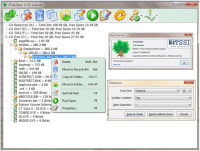
The biggest hurdle to cleaning a hard drive manually is the lack of information. In Windows Explorer, you can see the size of individual files, but folders? They remain a mystery unless you right-click each one, select properties, and wait for the system to calculate the size. If you have hundreds of folders, this is an impossible task. 1Tree solves this by loading your entire drive into a single, cohesive tree view that displays the size of every single directory and sub-directory simultaneously.
But it doesn't just show you the sizes; it sorts them by size. This is the "killer feature" that changes everything. When you open 1Tree, the biggest space-hogs rise to the top automatically. You don't have to go hunting for the bloated folders; they are presented to you on a silver platter. You can drill down from the root directory into the deepest sub-folders, following the trail of gigabytes until you find exactly what is taking up space. It transforms the tedious task of disk cleaning into a quick, visual check that takes seconds rather than hours.
2. Integrated File Management for Rapid Cleaning
Many disk analysis tools are "read-only." They show you what is wrong, but then they force you to go back to Windows Explorer to actually do something about it. This context-switching is a productivity killer. 1Tree is different because it functions as a functional file manager in its own right. Once you have identified a folder that is no longer needed—perhaps a cache from a program you uninstalled months ago or a duplicated backup—you can take action immediately.
1Tree provides all the Common Commands you expect. You can delete files (sending them to the Recycle Bin or permanently deleting them), or you can move them to a different drive if you want to archive them. Because these commands are built directly into the interface, the workflow is seamless. You find the problem, you fix the problem, and you move on to the next one. This "one-stop-shop" approach to disk management is what makes it feel like a professional tool rather than a simple hobbyist utility.
3. Intelligent Unit and Decimal Scaling
Data is hard to read when it isn't formatted correctly. There is nothing more annoying than a program that shows every file size in bytes, forcing you to do mental math to figure out if "1,073,741,824 bytes" is a lot or a little. (Spoiler: it's 1GB). 1Tree features Intelligent Unit and Intelligent Decimal systems that handle all of this for you. If a folder is small, it shows it in KB. If it's a massive video library, it shows it in GB or TB.
The "Intelligent" part of this feature means the software makes smart decisions about how to display that data so it is most readable for the human eye. By rounding decimals and choosing the most appropriate unit of measurement, 1Tree allows you to skim through your drive and instantly grasp the scale of your data. It sounds like a small detail, but when you are looking at thousands of files, this clarity is the difference between a headache and a successful cleaning session.
4. Specialized Power-User Commands
While 1Tree is simple enough for a novice to use, it packs a punch for power users, developers, and system administrators. One of the most useful features is the Copy Full Path of Resource command. If you are working on a complex project or trying to troubleshoot a system error, you often need the exact file path of a deep-seated directory. Instead of clicking through the address bar and trying to manually reconstruct the path, 1Tree lets you grab it with a single click.
This utility is a reflection of the software's philosophy: it is built to be a "GUI du" tool. For those unfamiliar, du (Disk Usage) is a legendary command-line utility in UNIX and Linux systems. It is beloved by engineers for its directness and accuracy. 1Tree brings that same philosophy to Windows but adds the convenience of a graphical user interface. It provides the "Full Path" and other special commands that make it a valuable asset for anyone who needs to do more than just delete a few photos.
5. Highly Customizable and Efficient Interface
Finally, we have to talk about the user experience. Many modern apps are bloated with unnecessary animations, heavy skins, and "telemetry" that slows down your system. 1Tree is the opposite. It is a lightweight, high-performance tool that is built for speed. It scans drives incredibly quickly, even when dealing with mechanical hard drives or massive network shares. The Customizable Interface allows you to tweak the view to suit your preferences, ensuring that the tool fits your specific workflow rather than forcing you to adapt to its layout.
The interface is clean and utilitarian. It doesn't try to be flashy; it tries to be useful. In an age where software often feels like it's trying to sell you something even after you've installed it, 1Tree’s focus on the task at hand is refreshing. It is a dedicated tool for a dedicated job, and it performs that job with surgical precision. Whether you are a minimalist who wants a clean drive or a digital hoarder who needs to organize their collection, the ability to customize how you see your data is invaluable.
Why should you download this giveaway today? Because disk bloat is inevitable. Every time you browse the web, install an update, or create a document, your hard drive gets a little bit more cluttered. Without a tool like 1Tree, that clutter is invisible. It hides in the corners of your user folders and system directories, slowly choking your computer's performance and leaving you with no room for what matters. 1Tree turns on the lights. It shows you exactly what is happening under the hood of your OS.
In conclusion, 1Tree is more than just a folder size viewer. It is a powerful, streamlined, and intelligent utility that brings order to the chaos of modern file systems. It gives you the information you need, the tools to act on that information, and a professional-grade interface that makes the whole process effortless. If you value your time and your disk space, this is one download you do not want to miss. Get it now, run it on your C: drive, and I guarantee you will be shocked at what you find hiding in your folders. Happy cleaning!


Reviews for 1Tree Basic
Click Here to Read Reviews for 1Tree Basic >> Click Here to Submit Reviews for 1Tree Basic >>