What Does 3herosoft Audio Maker Do?
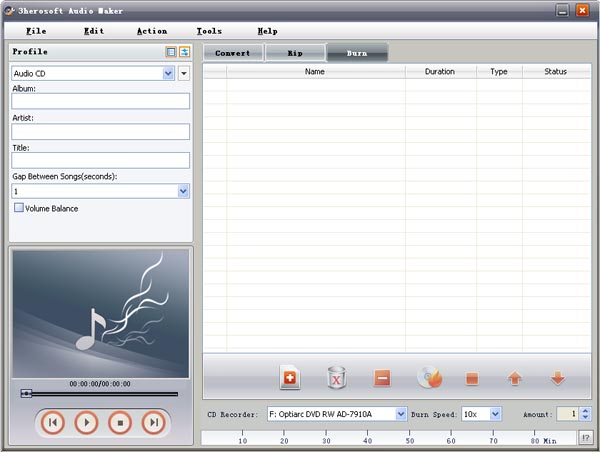
3herosoft Audio Maker is an all-in-one utility designed for audio CD production, digital ripping, and file conversion. The software allows users to create standard Audio CDs, MP3 CDs, or WMA CDs from a wide variety of source files, including high-fidelity audio formats like FLAC and M4A, as well as video containers such as AVI, MPEG, and MOV.
Beyond burning, the tool functions as a CD ripper, extracting tracks into digital formats like MP3, WAV, and AAC while fetching metadata such as artist and album titles from the internet. Users can also utilize the software as a dedicated video-to-audio converter, pulling soundtracks from formats including MPEG-4, 3GP, and WMV. The interface includes ID3 tag editing capabilities for maintaining an organized music library.
For technical users, the application offers granular control over output. You can trim specific segments by setting precise start and duration times or modify parameters including bit rate, sample rate, audio codecs, and volume levels. To optimize workflow, the software supports batch processing and multithreading, allowing it to run in the background without significant impact on system performance. Additional utility features include the ability to erase rewritable discs and configure post-task actions, such as automatically shutting down or hibernating the computer once a session is complete.
Top 5 Reasons To Download 3herosoft Audio Maker
- A Universal All-in-One Audio Toolkit: It combines CD burning, ripping, and audio conversion into a single, streamlined interface.
- High-Fidelity Video-to-Audio Extraction: Seamlessly pull audio tracks from almost any video format, including MP4, AVI, and WMV, without losing quality.
- Precision Customization and Editing: Take full control over your files with built-in trimming tools and granular technical adjustments like bit rate and sample rate.
- Automated Metadata and Library Management: Automatically fetch CD information from the internet and edit ID3 tags to keep your music collection organized.
- Optimized Performance for Power Users: Features like batch processing, multithreading, and background running ensure your workflow stays fast and efficient.
In an era where streaming services seem to dominate the landscape, many casual users might think the age of dedicated audio software is behind us. However, any true tech enthusiast or audiophile knows that ownership and control over your media are more important than ever. Whether you are a collector looking to digitize a massive stack of physical discs, a creator needing to extract high-quality audio from video projects, or a driver who still loves the reliability of a high-fidelity CD in the car, you need a tool that can do it all. That is where 3herosoft Audio Maker comes into play. This is not just another utility; it is a comprehensive workstation for anyone who takes their sound seriously. Today, we are looking at the top five reasons why you absolutely need to download this giveaway and make it a permanent part of your digital toolkit.
1. A Universal All-in-One Audio Toolkit
The primary reason why 3herosoft Audio Maker stands out in a crowded market is its sheer versatility. Usually, software developers force you to choose between a "burner," a "ripper," or a "converter." You end up with three different applications cluttering your hard drive, each with its own learning curve and interface quirks. 3herosoft shatters that model by offering a truly integrated experience. It serves as your command center for everything related to audio discs and file formats.
When we talk about burning, we aren't just talking about basic data discs. This software allows you to create standard Audio CDs that will play in any vintage or modern player, as well as MP3 and WMA CDs for devices that support compressed media. The compatibility list is staggering, supporting formats like MP3, WMA, WAV, M4A, AAC, AC3, and even the audiophile-favorite FLAC. On the flip side, the ripping capabilities are just as robust. If you have a physical library gathering dust, you can convert those tracks into high-quality digital files in seconds. Having the ability to move fluidly between physical and digital formats within one window is a massive productivity boost that cannot be overstated.
Furthermore, the conversion engine is top-tier. It handles the transition between popular formats with ease, ensuring that whether you need a lightweight MP2 for a specific device or a lossless WAV for a studio project, you can get it done without needing to search for third-party plugins. This "one-stop-shop" philosophy is the cornerstone of why this software is a must-download.
2. High-Fidelity Video-to-Audio Extraction
We have all been there: you are watching a video—perhaps a rare concert recording, an insightful interview, or a cinematic masterpiece—and you realize the audio is so good you want to listen to it on your phone or in your car. Traditionally, extracting audio from video was a technical nightmare involving complex command lines or lossy recording methods. 3herosoft Audio Maker changes the game by including a dedicated video-to-audio extraction engine.
This feature supports an impressive array of video containers, including AVI, MPEG, WMV, MP4, 3GP, MOV, and RM. The software doesn't just "record" the audio as it plays; it extracts the digital stream directly from the video file. This ensures that you maintain the highest possible fidelity. If the source video has high-definition audio, 3herosoft lets you preserve that quality in your choice of output format. This is incredibly useful for content creators who need to grab sound bites from their own footage, or for fans who want to turn their favorite movie soundtracks into portable playlists. The ability to go from a video file straight to a burned Audio CD is a streamlined workflow that few other programs can match.
3. Precision Customization and Editing
A tech reviewer’s favorite feature is always the one that grants the user control. 3herosoft Audio Maker provides a suite of "strong detailed skills" that allow you to move beyond basic conversion and into the realm of custom editing. You aren't just stuck with the file as it is; you can mold it to fit your specific needs. The trimming tool is a perfect example. By allowing users to set a specific Start Time and Duration, the software lets you isolate the perfect segment of a track. This is ideal for creating ringtones, removing long silences at the start of a live recording, or cutting out unwanted intros.
Beyond simple cutting, the software offers deep technical customization. For the enthusiasts who want to balance file size and sound quality, you can manually adjust the Bit Rate, Sample Rate, and Audio Codec. You can even toggle between Mono and Stereo channels or boost the volume of a quiet recording. This level of granularity is usually reserved for expensive digital audio workstations (DAWs), but here it is presented in an accessible, user-friendly way. It empowers the user to create the "perfect Audio CD" tailored exactly to their playback environment, whether that is a high-end home theater or a pair of budget earbuds.
4. Automated Metadata and Library Management
There is nothing more frustrating than a digital music library full of files named "Track 01" and "Unknown Artist." It makes searching for music a chore and ruins the aesthetic of modern media players. 3herosoft solves this problem with its integrated music info capture system. When you are ripping a CD, the software can reach out to the internet to grab metadata like Title, Author, Copyright, Album, Genre, and Year. This info is then automatically embedded into the files or used to label the tracks on your newly burned CD.
For those who prefer a more hands-on approach, the software includes a robust ID3 tag editor. This allows you to manually curate your library, ensuring every song has the correct information for your organization's needs. This attention to detail extends to the physical media as well. If you are using rewritable (RW) discs, the software provides a simple "erase and rewrite" function, allowing you to recycle your media and update your car's "monthly mix" without wasting money on new discs. It is these quality-of-life features that transform a utility into an essential companion for your music journey.
5. Optimized Performance for Power Users
The final reason to jump on this giveaway is the sheer speed and intelligence of the software’s backend. Many audio tools are notorious for hogging system resources, turning your computer into a sluggish paperweight while they process files. 3herosoft Audio Maker is designed with modern hardware in mind, utilizing multithreading and batch processing. This means it can handle multiple conversions or extractions simultaneously, leveraging the full power of your CPU to get the job done in a fraction of the time.
What’s even more impressive is the "Run in Background" mode. This allows the software to work its magic silently in the background while you continue with your daily tasks—be it browsing the web, working on a spreadsheet, or gaming—without experiencing lag or system conflicts. Furthermore, the software respects your time by offering "Post-Task Actions." You can set the program to automatically Hibernate, Shut Down, or Standby your computer once a long batch of conversions is finished. Imagine starting a massive conversion of 50 video files to MP3 before you go to bed and knowing that your computer will safely turn itself off the moment the task is complete. That is the kind of smart design that distinguishes professional software from amateur tools.
In summary, 3herosoft Audio Maker is an absolute powerhouse. It bridges the gap between old-school physical media and modern digital convenience, providing a suite of tools that are as powerful as they are easy to use. Between the high-fidelity extraction, the deep customization, and the intelligent workflow features, there is no reason not to take advantage of this giveaway. It is a rare opportunity to own a professional-grade audio suite that will serve your needs for years to come. Download it today and take back control of your music library!

Reviews for 3herosoft Audio Maker
Click Here to Read Reviews for 3herosoft Audio Maker >> Click Here to Submit Reviews for 3herosoft Audio Maker >>