
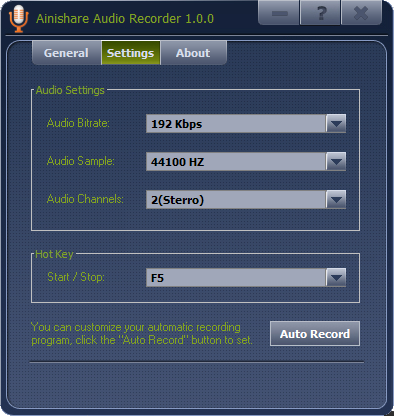
Ainishare Audio Recorder is an easy to use free software that enables you to easily record any sound you can hear on your computer, from internet radio stations to streaming music. You can set the recording audio quality, from a low quality taking minimal disk space, up to CD quality. Ainishare Audio Recorder can capture various sound input to MP3 format. The audio recording utility is capable of recording from CD player, line in, microphone, internet radio, tape cassette and anything your can hear from your computer. As a voice recorder, it can also record human voice from microphone.
Official Product Description
Overview
What Does Ainishare Audio Recorder Do?
Ainishare Audio Recorder is a utility designed to capture any audio signal processed through a computer's sound card. The software functions by intercepting live audio streams from a wide array of sources, including internet radio stations, streaming music services, and web-based media. It serves as a tool for digitizing content, allowing users to record from external hardware such as tape cassettes, CD players, and line-in inputs.
The application exports all captured sound directly into the MP3 format, ensuring broad compatibility across various hardware and software players. To balance storage requirements with audio clarity, the tool features customizable output settings. Users can toggle between low-bitrate configurations to conserve disk space and high-fidelity presets that reach CD-quality standards.
Beyond system audio, Ainishare Audio Recorder operates as a dedicated voice recording solution. By utilizing a connected microphone, the software can record human speech for purposes such as dictation, interviews, or vocal performances. The following features define the software's capabilities:
- Multiple Input Sources: Records from microphones, line-in, and any sound audible via the system.
- Format Standardization: All audio output is rendered in MP3.
- Quality Control: Bitrate options range from minimal file sizes to CD quality.
- Legacy Support: Ability to capture audio from tape cassettes and physical CD players.
Top 5 Reasons To Download Ainishare Audio Recorder
- Universal Sound Capture: If you can hear it through your speakers, you can record it, period.
- Fully Customizable Quality: Total control over audio fidelity, ranging from space-saving formats to crystal-clear CD quality.
- Comprehensive Input Support: Seamlessly switch between recording internet streams, microphones, line-in hardware, and even legacy devices like tape decks.
- Direct MP3 Encoding: Skip the conversion process with automatic, high-quality MP3 output ready for any device.
- Unrivaled Simplicity: A streamlined, "no-nonsense" interface designed for both tech-savvy users and beginners who just want results.
In the modern digital age, we are constantly bombarded with high-quality audio content. From exclusive live-streamed concerts and insightful podcasts to obscure internet radio stations and classic tracks buried on old physical media, sound is the heartbeat of our digital experience. However, there is a recurring frustration that every tech enthusiast faces: the inability to easily "grab" that audio and save it for offline listening. Whether it is a licensing restriction on a streaming site or the technical hurdle of digitizing an old cassette tape, capturing high-quality audio has traditionally been a chore involving complex Digital Audio Workstations (DAWs) or expensive hardware. Enter Ainishare Audio Recorder. This software isn't just another utility; it is a specialized tool designed to bridge the gap between "hearing" and "owning" your favorite sounds. As someone who has tested dozens of recording suites, I can tell you that finding a balance between power and simplicity is rare. This giveaway offers you a chance to secure a tool that masters that balance. Let’s dive deep into the five reasons why this software belongs in your "must-download" folder today.
1. The Magic of Universal Sound Capture
The standout feature of Ainishare Audio Recorder is its "what you hear is what you get" philosophy. Most standard recording apps are limited to specific inputs—usually just your microphone. If you want to record the audio from a YouTube video, a webinar, or a niche internet radio station, you are often left jumping through hoops with virtual cables or complex internal routing. Ainishare Audio Recorder eliminates these barriers entirely. It intercepts the audio signal as it passes through your sound card, meaning that if your computer speakers are playing it, the software is capturing it with 100% accuracy.
Imagine you are listening to a rare live performance on a streaming platform that doesn't offer a download option. With a single click, you can archive that performance in real-time. This isn't just about music, either. Think about the utility for professionals. If you are in a Zoom meeting or a Skype call and need a verbatim record of the discussion for your notes, this software acts as your digital court reporter. It captures the system audio (the person on the other end) and your microphone simultaneously if needed. This "universal" capability turns your PC into a high-end receiver and recorder, making it an essential tool for anyone who consumes media online. The freedom to build an offline library from any web-based source is a game-changer for commuters, researchers, and music lovers alike.
2. Fully Customizable Audio Quality for Every Scenario
Not all recordings are created equal, and a great piece of software knows when to prioritize file size and when to prioritize raw fidelity. One of the most impressive aspects of Ainishare Audio Recorder is the granular control it gives the user over the output quality. When you are recording a high-energy DJ set from an internet radio station, you want every high-hat and bass drop to be crisp. In those moments, you can crank the settings up to CD quality, ensuring that the bit rate and sample rate are high enough to satisfy even the most discerning audiophiles. The resulting files are rich, full-bodied, and indistinguishable from the source material.
Conversely, there are times when quality isn't the priority—storage space is. If you are using the software as a simple voice recorder to dictate a 5,000-word essay or to record a three-hour long lecture, you don't need the file to be hundreds of megabytes. You can easily toggle the settings down to a lower quality, resulting in a tiny file that can be easily emailed or synced to the cloud without eating up your data cap. This flexibility is what separates professional-grade tools from basic "toy" apps. Ainishare understands that the modern user needs options. Having the ability to choose your quality profile before you hit "record" saves you the headache of post-processing or converting files later. It puts the power of an audio engineer in the hands of the average user.
3. Comprehensive Input Support: From Modern Streams to Legacy Gear
We live in a hybrid world. While most of our media is digital, many of us still have "analog" roots. One of the coolest features of Ainishare Audio Recorder is its incredible versatility regarding input sources. It doesn't just look at your internal system sounds; it looks at everything connected to your machine. Do you have a box of old tape cassettes in the attic that haven't been heard in twenty years? By connecting a tape deck to your computer's "Line In" port, Ainishare can digitize those memories, turning fading magnetic tape into permanent digital files. The same applies to CD players and even record players (with the right preamp).
For the creators out there, the software excels as a dedicated voice recorder. If you are an aspiring podcaster or a student recording a presentation, you can select your external microphone as the primary source. Because the software is so lightweight, it won't tax your CPU, which means you won't get that annoying "fan whirring" sound in the background of your recordings that often happens with heavier recording software. Whether it is internet radio, a tape cassette, or your own human voice, this software treats every source with the same level of precision. It is truly an all-in-one workstation for audio ingestion, making it a "Swiss Army Knife" for your media collection.
4. Direct MP3 Encoding: The Gold Standard of Compatibility
There is nothing more frustrating than recording a great piece of audio only to find out it was saved in a proprietary or obscure format like WAV, OGG, or some specialized lossless format that your phone or car stereo can't play. You then have to go find a converter, which often degrades the quality or adds watermarks. Ainishare Audio Recorder avoids this entirely by encoding directly to MP3 format. As any tech reviewer will tell you, MP3 remains the gold standard for audio compatibility. It works on every smartphone, every tablet, every smart TV, and every vehicle infotainment system on the planet.
By saving directly to MP3, the software saves you an incredible amount of time. The moment you hit "stop," the file is ready to be dragged and dropped into your iTunes library, your Spotify local files, or shared via a messaging app. But don't let the term "MP3" fool you into thinking you're sacrificing quality. Because the software allows you to set the recording parameters, you can produce "high-bitrate" MP3s that provide the perfect balance between file size and audio transparency. This direct-to-MP3 workflow is a major selling point for anyone who wants a "one-click" solution. You record it, you save it, and you play it—no middleman required.
5. Unrivaled Simplicity and Ease of Use
Let’s be honest: most audio recording software is intimidating. When you open a professional DAW, you are met with timelines, tracks, mixers, plugins, and a steep learning curve that can take weeks to master. Most of us don't need that. We need a tool that does one thing and does it perfectly. Ainishare Audio Recorder is designed with a "minimalist-yet-powerful" interface. It doesn't hide its features behind nested menus or complex keyboard shortcuts. The buttons are clear, the source selection is intuitive, and the recording process is transparent.
This simplicity is actually a sophisticated design choice. It allows the user to focus on the content they are recording rather than the tool they are using. If you hear a song you like, you don't want to spend three minutes configuring your buffer size and input latency; you want to hit "Record" before the song ends. Ainishare allows for that spontaneity. It is the type of software that stays out of your way until you need it, and when you do, it works flawlessly. In an era of "feature bloat," where apps try to do everything and end up doing nothing well, Ainishare stands out by being specialized, efficient, and incredibly user-friendly. It is the perfect download for anyone from a grandparent wanting to save a radio show to a tech-savvy student archiving research materials.
In conclusion, the Ainishare Audio Recorder giveaway is an opportunity you shouldn't pass up. We often take for granted how much audio we "consume" but don't "keep." Having a reliable, high-quality, and easy-to-use utility to capture the sounds of your digital life is incredibly empowering. Whether you are archiving internet radio, digitizing old physical media, or recording your own voice for a project, this software provides all the tools you need without any of the fluff. It is lightweight, versatile, and produces professional-grade results in the most compatible format available. Download it today and start building the audio library you’ve always wanted. You’ll be surprised at how often you find yourself reaching for that record button once you have a tool this seamless at your disposal.
Final Reviewer Note: In my years of looking at utility software, I’ve found that the best programs are the ones that solve a specific problem with zero friction. Ainishare Audio Recorder solves the "audio capture" problem perfectly. Don't miss out on this giveaway; it’s a staple tool that belongs on every Windows machine.
Reviews for Ainishare Audio Recorder
Click Here to Read Reviews for Ainishare Audio Recorder >> Click Here to Submit Reviews for Ainishare Audio Recorder >>