What Does Aneesoft DVD Show Do?
Aneesoft DVD Show is a dedicated multimedia utility designed for consolidating digital photos, video clips, and audio files into integrated home movies. The software functions as a streamlined editor, allowing users to preserve personal memories through the creation of structured, professional-looking slideshows.
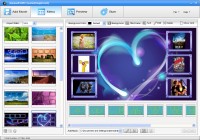
The interface provides tools to combine disparate media types, which can be customized using more than 40 built-in styles. These templates are designed to apply specific visual themes to the presentation, facilitating diverse storytelling methods based on the user's preference. Users can import high-resolution images and videos, layering them with background music to produce a polished final audiovisual product.
Output capabilities are divided between digital sharing and physical media. The software includes specific presets for exporting and uploading content directly to social platforms such as Facebook and YouTube. Additionally, it features an integrated disc authoring engine, enabling users to burn their completed projects to DVDs for playback on standard home entertainment systems. This ensures the media remains accessible across both modern web-based environments and traditional hardware setups, making it a versatile tool for long-term digital archiving.
Top 5 Reasons To Download Aneesoft DVD Show
- Seamless Multimedia Integration: Effortlessly combine high-resolution photos with HD video clips and custom soundtracks into one cohesive masterpiece.
- Professional-Grade Artistic Control: Access over 40 distinct styles and templates that transform raw footage into cinematic stories without the steep learning curve of professional editing suites.
- The Ultimate Preservation Tool: Safeguard your family’s most precious moments against "digital rot" by creating physical DVD archives and high-quality digital backups.
- Versatile Multi-Platform Exporting: Tailor your content for any audience with direct-to-social sharing for YouTube and Facebook, or traditional burning for home theater systems.
- Instant Workflow Efficiency: Move from a folder full of cluttered files to a finished, polished movie in minutes, thanks to an intuitive interface designed for speed and simplicity.
Let’s be honest for a second: we are all digital packrats. We spend our lives capturing thousands of photos and hours of video on our smartphones, digital cameras, and tablets, only to let those files sit in a dark corner of a hard drive or an unorganized cloud folder. We tell ourselves that we will "get around to it" eventually, but the reality is that raw files are rarely revisited. They are ingredients without a recipe. This is exactly why Aneesoft DVD Show is a total game-changer for anyone who values their memories. It is the bridge between a cluttered gallery and a meaningful story. As a tech reviewer who has seen hundreds of bloated, overly complicated editing programs, I can tell you that this giveaway is a breath of fresh air. It focuses on what actually matters: getting your stories told and shared as quickly and beautifully as possible.
1. Seamless Multimedia Integration
One of the biggest hurdles in modern content creation is the "media divide." Traditionally, software was either good at making photo slideshows or good at editing video files. If you wanted to do both, you often had to jump between different programs, exporting one file only to import it into another, losing quality and patience along the way. Aneesoft DVD Show eliminates this friction entirely. It treats your photos, videos, and music as equal partners in the creative process.
Imagine you just returned from a summer vacation. You have 200 photos of sunsets and landmarks, but you also have short 10-second video clips of the waves crashing or the kids laughing. In a standard slideshow, those videos are left out. In a standard video editor, those photos feel static and boring. This software allows you to weave them together seamlessly. You can place a high-resolution still image right next to a 1080p video clip, and the software handles the transitions and rendering with professional grace. This is the secret sauce of modern storytelling. By mixing mediums, you keep your audience engaged. The stills provide the detail, while the video clips provide the life and movement.
Furthermore, the music integration is top-notch. You aren't just slapping a track onto a timeline; you are scoring your life. The ability to sync your visual transitions to the beat of your favorite songs adds a level of polish that usually requires hours of manual "trimming" in high-end software. With this tool, it happens almost naturally. Whether you’re an amateur or a hobbyist, the ability to blend these three elements—stills, motion, and audio—is the first major reason you need to jump on this download immediately.
2. Professional-Grade Artistic Control
Let’s talk about the "Style Factor." Most of us aren't professional graphic designers or cinematographers. We don't have the time to spend four hours perfecting a single transition or color-grading a sequence of shots. This is where Aneesoft DVD Show shines. It comes packed with over 40 unique styles that act as an "instant director" for your project. These aren't just simple fade-ins; these are thematic templates that give your movie a specific look and feel.
Are you making a wedding video? There is a style for that, featuring soft bokeh, elegant overlays, and romantic pacing. Are you documenting a fast-paced road trip? Choose a dynamic, high-energy style that uses quick cuts and vibrant transitions. These 40+ styles allow you to experiment with the vibe of your movie without having to understand the technical minutiae of keyframes or layer masking. You simply select the style that fits your story, and the software applies the professional flourishes for you. It’s like having a boutique production house inside your computer.
What I find particularly impressive is that these styles don't feel "cookie-cutter." Because you can customize the order of your media and the specific music used, the 40+ styles serve as a foundation rather than a cage. You get the benefit of professional design with the freedom of personal expression. If you’ve ever felt intimidated by the blank timeline of a professional video editor, you will find these styles to be an absolute lifesaver. They take the guesswork out of "making it look good" so you can focus on the memories themselves.
3. The Ultimate Preservation Tool
We live in an era of "ephemeral media." We post a photo to an Instagram Story, it disappears in 24 hours, and we move on. Even the files we keep on our phones are at risk. Screens break, cloud subscriptions expire, and hard drives eventually fail. Aneesoft DVD Show offers a solution that is both nostalgic and incredibly practical: the ability to create physical DVD archives. While some might think DVDs are "old school," any tech expert will tell you that physical media remains one of the most reliable ways to preserve data for the long term.
Think about your parents or grandparents. They might not have the latest smartphone or know how to navigate a complex cloud sharing link. But they almost certainly have a DVD player or a laptop with a disc drive. By burning your slideshows and home movies to a DVD, you are creating a tangible heirloom. You are making something that can be wrapped as a gift, placed on a shelf, and watched ten years from now without worrying about whether a specific website still exists or if your file format is still supported.
Moreover, the software doesn't just "dump" files onto a disc. It helps you create a professional-looking DVD with menus and navigation, just like a movie you’d buy at the store. This makes the viewing experience special. Instead of scrolling through a file explorer, your family can sit on the couch, grab the remote, and enjoy a curated experience. This aspect of preservation and sharing is something we often overlook in our rush to be "digital-first," but it is arguably the most valuable feature this software offers. It’s about making sure your stories survive the next decade of technological shifts.
4. Versatile Multi-Platform Exporting
While I’m a big advocate for the DVD burning feature, I also recognize that we live in a connected world. You want to show off your hard work, and you want to do it where your friends are. Aneesoft DVD Show is built with this dual reality in mind. It doesn't lock you into a single format. Once you’ve finished your masterpiece, you have a wealth of output options that cover every modern use case.
Want to go viral? The software features optimized export settings for YouTube and Facebook. This is crucial because different platforms have different requirements for aspect ratios, bitrates, and file sizes. If you upload a file that isn't optimized, it might look blurry or take forever to process. This tool takes the "tech jargon" out of the equation. You select the destination, and the software ensures that your video looks crisp and professional when it hits the web. This is perfect for sharing graduation videos, holiday highlights, or even business presentations with a wider audience.
Beyond social media, the ability to export into various digital formats means your movies can live on your phone, your tablet, or your smart TV. You can create a high-definition MP4 file that you can carry in your pocket on a USB drive. This versatility is what makes the software a "complete" solution. It understands that a movie's life starts on your computer but ends on a variety of screens—from the 6-inch display of a smartphone to the 65-inch screen in your living room. Having one tool that can handle all these different "exporting personalities" is a massive time-saver.
5. Instant Workflow Efficiency
The final reason you need to download this giveaway is perhaps the most practical: Time. We are all busy. Most of us don't have thirty hours to spend editing a ten-minute video. Many software packages in this category are so bogged down with unnecessary features and confusing menus that users give up before they even start. Aneesoft DVD Show is designed with the philosophy that "instant" is better than "eventually."
The interface is remarkably clean. It follows a logical, step-by-step progression that guides you from import to export. You aren't hunting through sub-menus to find the "add music" button or struggling to figure out how to arrange your photos. It is a drag-and-drop experience that feels natural. For a tech reviewer, this is often the "make or break" point. If a piece of software is powerful but impossible to use, it's worthless to the average person. Aneesoft has managed to pack a surprising amount of power under the hood while keeping the steering wheel simple and easy to turn.
When the description says you can create shows "instantly," it’s not just marketing fluff. Because the styles are pre-configured and the multimedia integration is automated, the "heavy lifting" is done by the software's engine. You provide the creativity and the content; the software provides the technical execution. This efficiency means you’ll actually *use* the software. You’ll find yourself making movies for small events—a weekend hike, a birthday dinner, a pet’s antics—because it’s no longer a chore. It becomes a fun, creative outlet that fits into your schedule. That is the hallmark of a great app.
Final Thoughts
In a world where we are constantly bombarded with complex tools that demand our time and money, a giveaway like this is a rare opportunity. Aneesoft DVD Show isn't just a utility; it's a storytelling companion. It takes the disparate pieces of our digital lives—the random photos, the short clips, the favorite songs—and weaves them into something that has emotional weight and professional polish.
Whether you are looking to preserve your family history on a physical DVD, share your latest adventure on social media, or simply find a way to make sense of the thousands of files on your hard drive, this software provides the tools to do it with ease. The combination of its 40+ artistic styles, its seamless integration of different media types, and its user-friendly approach makes it a "must-have" for any PC user. Don’t let your memories stay locked away in a folder. Download this giveaway, pick a few of your favorite photos and videos, and see for yourself how easy it is to become the director of your own life story. You’ll be surprised at how much better your memories look when they are given the cinematic treatment they deserve.
Bottom line: This is a professional-grade tool hidden inside a simple interface. It’s efficient, it’s versatile, and most importantly, it’s designed to help you share what matters most. Don't miss out on the chance to add this powerful creative suite to your digital toolbox.


Reviews for Aneesoft DVD Show
Click Here to Read Reviews for Aneesoft DVD Show >> Click Here to Submit Reviews for Aneesoft DVD Show >>