What Does Aunsoft Final Mate Do?
Aunsoft Final Mate serves as a specialized utility designed for owners of AVCHD, MOD, and TOD camcorders. The software facilitates direct file capture via a dedicated Camcorder Wizard, which organizes footage by date and manages backups in the background. Its primary appeal lies in its ability to perform lossless merging and frame-accurate splitting of native MTS and M2TS files without requiring re-encoding, preserving the original video quality during the assembly process.
Beyond basic file management, the tool includes a timeline-oriented editor for video cropping, color correction, and audio replacement. It supports 3D effect settings for all output profiles and enables direct uploads to YouTube. To ensure processing speed, the application leverages NVIDIA CUDA and Intel Media SDK hardware acceleration. While it handles high-definition 1080p and 60p footage from manufacturers like Sony, Canon, and Panasonic, users should note it does not support files from Blu-ray discs or standard digital camera formats like MOV and MP4.
Key Features
- Lossless Merging: Join MTS, M2TS, MOD, and TOD files without quality loss or re-conversion.
- Frame-Accurate Cutting: Perform precise edits with frame-by-frame splitting capabilities.
- Hardware Acceleration: Utilizes NVIDIA CUDA and Intel Core optimization for faster processing.
- Format Compatibility: Supports high-definition 1080 60p/50p, 1080i, and 720p footage.
- 3D Effects: Integrate 3D settings and effects into various output profiles.
- Audio Extraction: Convert video soundtracks into standalone MP3, WAV, or AC3 formats.
Top 5 Reasons To Download Aunsoft Final Mate
If you own an HD camcorder, you already know the struggle. You capture beautiful, high-definition memories of your family vacations, weddings, or hobby projects, and then you plug that device into your computer only to be met with a wall of frustration. The files are in formats like MTS, M2TS, MOD, or TOD, and most standard video players or basic editors treat them like they are written in a foreign language. You try to join two clips together, and your computer spends three hours "recoding" only to give you a blurry, pixelated mess at the end. It is exhausting, and it is the primary reason why so many great videos sit on camcorder hard drives, never to be seen by anyone.
That is exactly where Aunsoft Final Mate comes in. I have spent years reviewing video software, and it is rare to find a tool that is specifically designed to solve the "camcorder headache" without requiring a degree in film editing. This isn't just another generic video converter; it is a precision-engineered assistant for anyone using Panasonic, Sony, Canon, or JVC camcorders. It bridges the gap between raw footage and a polished movie. If you have been looking for a way to manage your HD footage with professional results but entry-level ease, here are the top five reasons why you need to download this software right now.
- Zero-Loss Quality with Native Lossless Merging – Join your MTS, M2TS, MOD, and TOD files together instantly without any recoding, ensuring your final video looks exactly as crisp as the original footage.
- Frame-Accurate Splitting and Cutting – Forget about "close enough" edits; this tool allows you to cut your videos frame by frame with absolute precision, so you get exactly what you see on the screen.
- The Ultimate Camcorder Wizard for Stress-Free Backups – Automatically detect, capture, and organize your footage by year and month, making media management a background task rather than a chore.
- High-Octane Performance via Hardware Acceleration – By utilizing NVIDIA CUDA, Intel Media SDK, and second-generation Intel Core optimizations, Final Mate processes your HD video up to 50% faster than traditional software.
- A Complete Creative Toolkit with 3D Capabilities – From deinterlacing and color correction to adding 3D effects and uploading directly to YouTube, it provides everything you need to make your movies shine.
1. Zero-Loss Quality with Native Lossless Merging
The biggest enemy of high-definition video is transcoding. Every time a standard video editor "saves" or "exports" your footage, it usually compresses it again. This leads to digital artifacts, loss of color depth, and a general softening of the image. If you’ve ever wondered why your 1080p footage looks like a grainy DVD after you’ve edited it, transcoding is the culprit. Aunsoft Final Mate solves this by offering true lossless merging.
When you use the lossless merge function for your native MTS or M2TS files, the software isn't actually "rendering" a new video. Instead, it is essentially "stapling" the digital streams together. Because there is no conversion or recoding involved, there is zero loss of quality. What you filmed on your high-end Leica or Sony lens is exactly what you get in the final file. Furthermore, because the software isn't recalculating every single pixel, the process is incredibly fast. We are talking about joining several gigabytes of footage in just a few seconds. For those who want to watch their clips on an HD player like WDTV Live Plus or Popcorn Hour, you can even export to a lossless MKV container, preserving that pristine quality for your living room big screen.
This feature alone makes the software a must-have for purists. If you spent hundreds or thousands of dollars on a high-quality camcorder, the last thing you want is a software program that degrades your footage. With Final Mate, the integrity of your original recording remains untouched, giving you the perfect vision enjoyment you deserve.
2. Frame-Accurate Splitting and Cutting
If you have ever tried to trim a video in a basic editor, you have likely encountered the "jumping" problem. You try to cut the video right when a person starts speaking, but the software forces the cut to happen three seconds earlier or later. This happens because most video formats use "Groups of Pictures" (GOPs), and many editors can only cut at a "Keyframe." Aunsoft Final Mate changes the game with its frame-accurate splitting technology.
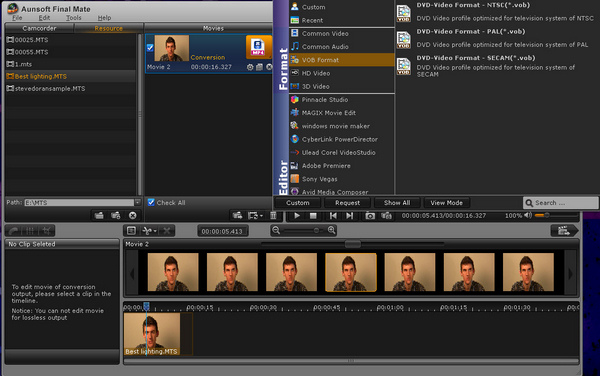
This tool allows you to scrub through your footage and pick the exact frame where you want a cut to occur. Whether you are removing a shaky start to a shot or cutting out a segment where someone walked in front of the lens, Final Mate gives you surgical precision. The software's timeline-oriented editing interface is intuitive enough for a beginner but powerful enough to satisfy someone looking for professional results. "What you get is exactly what you see" isn't just a marketing slogan here; it is a technical reality.
This frame-by-frame accuracy is essential for creating a smooth viewing experience. It allows you to create tight, professional-feeling transitions without the awkward pauses or "leftover" frames that plague lesser software. Whether you are splitting a long recording into individual scenes or trimming the fat from a day of filming, this level of control ensures your final product looks intentional and polished.
3. The Ultimate Camcorder Wizard for Stress-Free Backups
One of the most overlooked aspects of videography is the "ingestion" process—the act of getting the files off the camera and onto your computer in an organized way. Most of us just drag and drop files into a folder named "New Folder (4)," and then we can never find anything again. The Camcorder Wizard inside Final Mate is designed to end that chaos forever.
The moment you connect your camcorder, the Wizard springs into action. It offers a better management system to capture camcorder videos and can even back them up in the background while you do other things. One of the best recent updates to the software is the ability to automatically sort your videos by year and month. This might sound like a small feature, but for a parent who has three years of footage stored on a camcorder, it is a lifesaver. It turns a disorganized mountain of files into a chronological library.
This "assistant" approach is what sets Final Mate apart. It doesn't just wait for you to tell it what to do; it helps you manage your media from the moment the camera is plugged in. It supports a massive range of formats, including AVCHD, AVCHD Lite, MOD, and TOD, and is compatible with footage from 1080 60p/50p all the way down to 720p. It even detects your free disk space automatically during the process, ensuring you never run out of room in the middle of a transfer. It is like having a digital librarian for your movies.
4. High-Octane Performance via Hardware Acceleration
Working with HD video is incredibly taxing on a computer's processor. If you don't have the right software, your computer's fans will start spinning like a jet engine, and your system will crawl to a halt. Aunsoft has addressed this by implementing the latest in hardware optimization technology. Final Mate is fully optimized for NVIDIA CUDA and Intel Media SDK acceleration.
What does this mean for you? It means that the software offloads the heavy lifting from your main CPU to your graphics card (GPU) or uses specialized instructions within your Intel processor to handle the video data. This results in a massive speed boost—often 50% faster or more compared to standard converters. When you are dealing with massive 1080i or 1080p files, this speed difference is the difference between finishing a project in twenty minutes or staring at a progress bar for two hours.
Even if you are doing more than just lossless merging—perhaps you are converting your files for use in Windows Movie Maker, Sony Vegas, or Adobe Premiere—the hardware acceleration ensures that the conversion is smooth and the audio/video synchronization remains perfect. There is nothing worse than finishing a long conversion only to find that the sound doesn't match the picture. Final Mate’s synchronization technology, paired with its utilize-every-core approach, ensures that your high-definition exports are both fast and flawless.
5. A Complete Creative Toolkit with 3D Capabilities
While Final Mate is an incredible "assistant" for organizing and merging, it is also a surprisingly deep editing tool. It serves as the perfect bridge between raw footage and a professional production. If you aren't ready to dive into the steep learning curve of Adobe Premiere or Sony Vegas, you can do almost everything you need right here. You can crop videos to remove unwanted edges, adjust the volume of your clips, replace the audio entirely (perfect for adding a music bed), and even perform color correction to make your shots pop.
For those who want to stay on the cutting edge, the 3D Effects settings are a standout feature. You can apply 3D effects to all output profiles, allowing you to experiment with depth in your home movies. This is a rare feature in entry-level tools and adds a layer of "future-proofing" to your video library. Additionally, if you are a fan of old-school camcorders that produce interlaced video, the Deinterlacing Filter is a godsend. It removes those annoying horizontal lines (interlacing artifacts) that often appear during fast motion, resulting in a much smoother, progressive-scan look that is much more pleasing to the eye on modern LED and OLED screens.
Finally, once your masterpiece is done, Final Mate makes it incredibly easy to share. You can upload your output files directly to YouTube from within the interface. You don't have to worry about bitrates, codecs, or file containers; the software handles the technical details so you can focus on the creative side. Whether you are extracting audio to create an MP3 of a concert you filmed or prepping your footage for a professional editor, Final Mate acts as a "cover-all" tool that ensures you don't have to call in a favor from a tech-savvy friend just to get your movies to shine.
Conclusion
In the world of tech, we often hear that "one tool can do it all," but that is rarely true for camcorder users. Most tools are either too simple (and destroy your quality) or too complex (and take months to learn). Aunsoft Final Mate occupies that perfect "Goldilocks" zone. It respects the quality of your original HD recordings through lossless technology, provides the surgical precision of frame-accurate editing, and saves you massive amounts of time with its Camcorder Wizard and GPU acceleration.
Whether you are a hobbyist filmmaker looking to prep files for Adobe Premiere, a parent trying to organize years of family memories, or a tech enthusiast who wants to watch lossless MKV files on an HD player, this software is an essential addition to your digital toolkit. It is efficient, self-explanatory, and powerful. Don't let your beautiful HD footage sit gathering digital dust or get ruined by sub-par conversion tools. Take advantage of this giveaway, download Final Mate, and finally give your camcorder videos the professional treatment they deserve. Your memories are in high definition; your editing process should be too.
Note: Please remember that while Final Mate is a powerhouse for AVCHD, TOD, and MOD camcorders, it is specifically designed for these formats. It does not support .m2ts files directly from Blu-ray discs or mov/mpg/mp4 files from standard digital cameras as input. It is a specialized tool for specialized needs, and in that arena, it is truly king.

Reviews for Aunsoft Final Mate
Click Here to Read Reviews for Aunsoft Final Mate >> Click Here to Submit Reviews for Aunsoft Final Mate >>