What Does Bitrot Detector Do?
Bitrot Detector is a specialized Windows utility designed to combat silent data corruption, a phenomenon where files degrade over time without triggering standard system errors. The software operates by performing periodic scans of selected directories or entire storage drives to ensure the integrity of stored information.
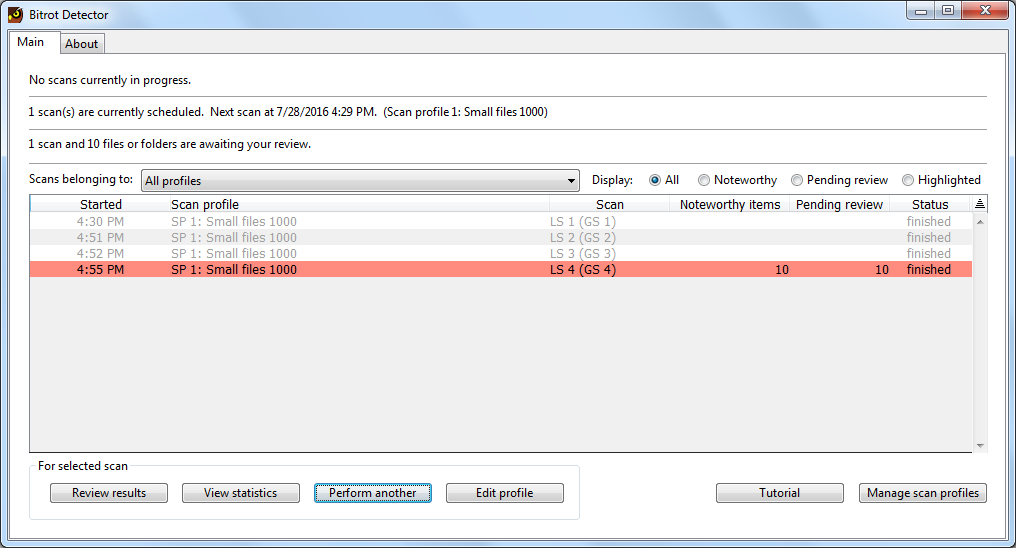
The core functionality revolves around the generation of digital fingerprints for every file's contents. During subsequent scans, the application compares current fingerprints against historical data to detect even the most minute alterations. When a discrepancy is found, Bitrot Detector alerts the user, providing a comprehensive list of changed files for review. This allows users to track modifications and identify instances of hard-to-notice data loss that standard file explorers often overlook.
Key features of the utility include:
- Automated Scanning: Users can schedule periodic checks of specific folders or all local storage volumes.
- Content Fingerprinting: The tool creates unique identifiers for every file to detect internal bit-level changes.
- Change Management: An interface for reviewing modified files and taking notes on necessary actions or repairs.
- Integrity Monitoring: Tools to pinpoint corruption before it propagates through long-term storage or backup sets.
While Bitrot Detector functions as a standalone application, it is intended to serve as a complement to a standard backup routine. By identifying corrupted data early, it assists users in recovering healthy versions of files from their existing backups before the damaged copies become the only versions available.
Top 5 Reasons To Download Bitrot Detector
If you value your digital life, from your irreplaceable family photos to your critical work documents, you need to understand one terrifying reality: your data is slowly dying. It is called bitrot, and most users have no idea it is happening until it is too late. Bitrot Detector is the specialized tool designed to stop this silent killer in its tracks. Before we dive into the deep technical reasons why this utility is a must-have for every Windows user, here are the top five reasons why you should download this giveaway today:
- Early Detection of Silent Data Corruption: It identifies "bitrot"—the microscopic corruption of files that standard antivirus and backup software often miss.
- Cryptographic Fingerprinting: The software generates unique digital "fingerprints" for every file, ensuring that even a single changed bit of data is flagged immediately.
- Automated Integrity Monitoring: With periodic, customizable scans, the app works in the background to ensure your folders remain exactly as you left them.
- Detailed Review and Verification: It provides a comprehensive interface to review changes, allowing you to distinguish between intentional edits and accidental corruption.
- The Ultimate Backup Companion: It acts as a verification layer for your backups, ensuring you aren't unknowingly backing up corrupted files and losing your only clean copies.
Now, let’s take a deep dive into why these features make Bitrot Detector one of the most important utilities you will ever install on your PC. As a tech reviewer, I see hundreds of apps, but very few address the fundamental problem of long-term data integrity like this one does.
1. Early Detection of Silent Data Corruption
We like to think that digital data is permanent. We assume that if we save a photo today, it will look exactly the same in ten years. Unfortunately, hardware is fallible. Whether it is a traditional spinning hard drive or a modern Solid State Drive (SSD), data is stored as magnetic charges or electrical states. Over time, these states can flip. A "1" becomes a "0" due to cosmic rays, electromagnetic interference, or simply the natural degradation of the storage medium. This is bitrot.
The scariest part about bitrot is that it is silent. When a hard drive fails completely, you know it. When a file is deleted, you notice it is gone. But when a single bit flips inside a high-resolution JPEG, the file might still open, but there might be a strange gray line through the image. If it happens to a compressed ZIP file or a database, the entire file might become unreadable. Bitrot Detector is specifically built to solve this. It doesn't just look to see if a file exists; it looks to see if the file is healthy. By downloading this tool, you are giving yourself an early warning system that catches these microscopic errors before they accumulate and destroy your digital legacy.
Without a tool like this, you are essentially flying blind. You might not realize a critical spreadsheet has been corrupted until months later when you try to open it for tax season. By then, the corruption might have been mirrored across all your backup drives. This utility stops that cycle by alerting you the moment a change is detected that shouldn't be there.
2. Cryptographic Fingerprinting for Absolute Accuracy
You might be wondering, "Doesn't Windows already keep track of file changes?" The answer is yes, but only on a surface level. Windows looks at metadata—the file name, the size, and the "Date Modified" stamp. However, it is entirely possible for the internal contents of a file to change due to a disk error without the "Date Modified" timestamp ever being updated. Furthermore, some malicious software or even buggy system processes can alter file contents while keeping the metadata identical.
Bitrot Detector uses a much more sophisticated method: fingerprinting. When the software scans your folders, it reads the actual contents of every file and runs them through a mathematical algorithm to produce a unique hash or "fingerprint." Think of it like a DNA test for your data. If even one single bit of information inside a 4GB video file changes, the fingerprint will be completely different.
By comparing the current fingerprint of a file against the one stored during the previous scan, the software can tell you with 100% certainty if a file has changed. This level of precision is what separates a professional-grade integrity tool from a simple file manager. For anyone who deals with sensitive data, large media libraries, or long-term archives, this fingerprinting process is the only way to guarantee that what you see is actually what you saved.
3. Automated Integrity Monitoring
The best security tools are the ones you don't have to remember to run. Life gets busy, and manually checking the integrity of thousands of files is an impossible task for a human. Bitrot Detector understands this by offering periodic scanning. You can set the software to scan your computer's folders on a schedule that works for you. Whether you want a daily check of your active work projects or a monthly deep scan of your entire archive, the utility handles it automatically.
What makes this even better is the flexibility it offers. You don't have to scan your entire hard drive if you don't want to. You can select specific, high-priority folders—like your "Documents" or "Photos" folders—to be monitored closely. This ensures that the software isn't wasting system resources on temporary files or system logs that change constantly. Instead, it focuses its power on the data that actually matters to you.
As a reviewer, I appreciate software that respects the user's time and system resources. This utility sits quietly in the background, doing the heavy lifting of reading and verifying your data, only bothering you when it finds something that requires your attention. It is "set it and forget it" protection for your most valuable digital assets.
4. Detailed Review and Verification Process
Detection is only half the battle; the other half is context. Files change for many reasons. Sometimes you edit a document, sometimes a program updates its own configuration files, and sometimes corruption occurs. A tool that just screamed "Error!" every time a file changed would be useless and annoying. Bitrot Detector excels here because it provides a clear, user-friendly interface to review those changes.
When the software detects a fingerprint mismatch, it presents the changed files to you in a list. You can then look at the list and make an informed decision. "Oh, I remember editing that photo yesterday," you might say, and you can simply tell the software to update the fingerprint to the new version. But if you see a 5-year-old video file listed as "changed" when you haven't touched it in years, that is a massive red flag.
This review process puts the power back in your hands. It helps you identify hard-to-notice data loss that would otherwise go undetected for years. It allows you to take note of changes that need to be dealt with—perhaps by moving data off a failing drive or by restoring a single specific file from an older backup. It turns a potential digital disaster into a manageable task.
5. The Ultimate Insurance Policy for your Backups
This is perhaps the most important point of all. Many users think that because they have a backup system, they are safe. But here is the "Backup Paradox": if your original file becomes corrupted by bitrot and you don't notice it, your backup software will eventually copy that corrupted file over your good backup. Now, you have two copies of a broken file, and your "clean" version is gone forever.
Bitrot Detector is the missing link in the backup chain. While it works perfectly as a standalone tool, it is most powerful when used as a complement to your backup strategy. By running this utility regularly, you can verify that your source files are healthy before you sync them to the cloud or an external drive. If the software flags a file as changed and you realize it is corruption, you can immediately go to your backup and restore the healthy version before the backup gets overwritten with the corrupted one.
Even if you don't have a formal backup system yet, this tool is invaluable. It tells you exactly which files are at risk, giving you the chance to copy them to a USB stick or email them to yourself before the storage sector fails completely. It provides a level of data awareness that simply doesn't exist in standard operating systems.
Final Thoughts: Why You Need This Now
In the tech world, we often talk about speed, resolution, and features. But none of that matters if the underlying data is rotting away. We are currently living through the first few decades of mass digital storage, and we are only now beginning to see the long-term effects of data degradation. Bitrot Detector is a proactive solution to a problem that every single computer user will eventually face.
Imagine opening your wedding album five years from now and finding half the photos are garbled. Imagine trying to open a backup of your master's thesis and finding the file is "unsupported" because a few bits changed in the file header. These are not "if" scenarios; they are "when" scenarios for unprotected data.
This utility is lightweight, focused, and incredibly effective. It doesn't try to be a media player, a browser, or a bloated system optimizer. It does one thing—protecting the integrity of your files—and it does it with mathematical precision. In an era where our memories and livelihoods are stored on fragile silicon and spinning magnets, Bitrot Detector is not just a "cool app"; it is an essential piece of digital hygiene.
The Verdict: Download this giveaway immediately. Set up your folders, run your first scan to generate your initial fingerprints, and give yourself the peace of mind that comes with knowing your digital history is secure. You wouldn't leave your physical house without locking the door; don't leave your digital house without checking that the foundation is still solid. This is a rare opportunity to get a professional-grade data integrity tool for your Windows machine—don't let it pass you by.
By using this software, you are taking the first step toward becoming a truly responsible data steward. You are moving beyond "hope" and moving toward "verification." Your future self—the one who will be able to open those old photos and documents perfectly ten years from now—will thank you for downloading this today.
Remember, data loss is only silent until you try to find the file. With Bitrot Detector, you’ll hear the warning loud and clear while there is still time to act.

Reviews for Bitrot Detector
Click Here to Read Reviews for Bitrot Detector >> Click Here to Submit Reviews for Bitrot Detector >>