What Does PC Clean Maestro Do?
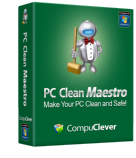
PC Clean Maestro is a system utility designed to optimize performance and enhance user privacy by targeting accumulated digital clutter. The software scans for "junk" files—including temporary data, log files, and Windows error reports—that consume disk space and can contribute to system slowdowns. By removing these remnants, the tool aims to restore PC speed and efficiency.
Beyond basic maintenance, PC Clean Maestro focuses on data security. It identifies and eliminates sensitive information stored on the hard drive, such as cached passwords, credit card numbers, and communication logs from email or instant messaging services. Users are provided with a detailed scan report to review findings at both a summary and granular level before purging the data.
The software also includes an Uninstall Tool, which removes application remnants and registry keys that standard uninstallers often leave behind. To maintain system hygiene, a built-in scheduling feature allows for automated, regular scans. By erasing internet cookies and browsing history, the utility helps mitigate the risk of identity theft and ensures private details remain confidential. The interface is designed for users of all experience levels to manage system security through a simplified Scan & Clean process.
Top 5 Reasons To Download PC Clean Maestro
- Comprehensive Identity Theft Prevention: It scrubs hidden personal data like credit card info and passwords that your PC stores without you knowing.
- Significant Performance Boost via Junk Removal: It clears out years of accumulated system "sludge," including log files and error reports, to speed up your machine.
- Professional-Grade Uninstallation Tool: It goes beyond the standard Windows uninstaller to remove "ghost" registry keys and leftover file remnants.
- Automated Privacy Safeguarding: It features a powerful scheduling tool that ensures your cookies, chat logs, and browsing history are wiped regularly.
- Extreme Ease of Use for All Skill Levels: The "Scan & Clean" interface is designed to be intuitive, giving you expert-level optimization with a single click.
In the fast-paced world of modern computing, we often take for granted the sheer amount of work our machines do behind the scenes. We browse the web, we shop, we chat with friends, and we download countless applications. But there is a hidden cost to this digital lifestyle. Every action you take leaves a footprint—a digital breadcrumb that not only slows down your system but also puts your most sensitive personal information at risk. If you have noticed that your PC is not quite as "snappy" as it was the day you unboxed it, or if you are concerned about the growing threat of identity theft, then you need a solution that is both powerful and proactive. Enter PC Clean Maestro.
As a tech reviewer, I see hundreds of "optimization" tools cross my desk every year. Most of them are nothing more than digital "snake oil," promising the world and delivering very little. However, PC Clean Maestro stands out from the pack. It is a comprehensive suite designed to tackle the two biggest problems facing computer users today: system clutter and privacy vulnerability. This isn't just a utility; it is a digital janitor and a security guard rolled into one sleek package. Let’s dive deep into the five reasons why this giveaway is an absolute must-download for anyone running a Windows machine.
1. Comprehensive Identity Theft Prevention
We live in an era where data is more valuable than gold. Every time you log into your bank account, purchase a gift online, or fill out a form, your computer is quietly caching bits of that information. While Windows does this to make your life "convenient," it creates a massive security hole. These traces of personal identity—including your passwords, credit card numbers, and social security details—are often stored in temporary folders or deep within the registry where the average user would never think to look. If your computer were ever compromised by malware or stolen, this information is essentially a roadmap for an identity thief.
PC Clean Maestro treats this as a priority. Unlike basic cleaners that only look for browser history, the Maestro engine performs a deep-tissue scan of your entire file system to locate these hidden vulnerabilities. It finds the "invisible" traces of your personal data that occur without your knowledge or consent. By downloading this tool, you are essentially building a fortress around your digital identity. It doesn't just delete files; it eliminates the digital residue that hackers love to exploit. In a world where identity theft happens every few seconds, having a tool that proactively scrubs your PC of banking and personal ID info is not just a luxury—it is a necessity.
2. Significant Performance Boost via Junk Removal
Have you ever wondered why a brand-new PC feels so fast, but three months later it starts to lag? It’s not your hardware getting old; it’s the accumulation of "junk." Every application you run, every Windows update you install, and every website you visit creates temporary files, log files, and error reports. These files are meant to be temporary, but more often than not, they stick around indefinitely. Over time, these files grow into a mountain of digital "sludge" that forces your hard drive to work harder and your processor to hunt longer for the data it actually needs.
PC Clean Maestro acts as a high-powered vacuum for your operating system. It identifies leftover file remnants from uninstalled applications, Windows error logs that serve no purpose to the user, and cache files that are simply taking up space. When you run the Scan & Clean process, you aren't just deleting files; you are optimizing your system’s workflow. By removing these roadblocks, your PC can access important data faster, boot up more quickly, and run applications with the smoothness you remember from day one. It is the easiest way to give your old PC a "new computer" feel without spending a dime on hardware upgrades.
3. Professional-Grade Uninstallation Tool
One of the most frustrating things about the Windows ecosystem is the "Add/Remove Programs" function. Most users assume that when they click "Uninstall," the program is gone forever. This is rarely the case. Standard uninstallers are notoriously lazy. They usually remove the main executable file but leave behind "ghost" folders in your Program Files, configuration files in your AppData, and hundreds of useless keys in your Windows Registry. These remnants are the primary cause of system instability and registry errors.
PC Clean Maestro includes a dedicated Uninstall Tool that is worth the download price alone. When you use this tool, it doesn't just run the basic uninstaller; it performs a post-uninstall sweep. It hunts down every last orphaned file and registry entry that the original program tried to leave behind. This ensures that your registry remains lean and your file system remains organized. If you are someone who likes to try out new software frequently, this tool is indispensable. It keeps your system "pristine," ensuring that yesterday’s software doesn’t become tomorrow’s system crash.
4. Automated Privacy Safeguarding
Privacy is a major concern, but let's be honest: very few of us have the time or the discipline to manually clear our cookies, history, and chat logs every single day. We know we should do it, but we get busy, and our "digital trail" grows longer and more revealing. Every cookie on your computer is a potential tracking device for advertisers, and every saved chat log is a transcript of your private life sitting on a hard drive.
This is where PC Clean Maestro’s scheduling feature becomes a game-changer. You can set the software to automatically scan and clean your PC on a regular basis. This "set it and forget it" approach ensures that you never leave your computer unattended for long periods without a thorough cleaning. It finds and erases all traces of Internet cookies, history data, and privacy files pertaining to email and instant messaging. Whether you’re worried about prying eyes in your own home or the broader threat of online tracking, the Maestro ensures that what happens on your PC stays on your PC. It’s peace of mind delivered through automation.
5. Extreme Ease of Use for All Skill Levels
We’ve all downloaded software that looks like it was designed for a NASA engineer. If a program is too complicated to use, most people won't use it. The developers of PC Clean Maestro clearly understood this. They have managed to pack incredibly sophisticated scanning and cleaning algorithms into an interface that anyone—from a tech-savvy teenager to a grandparent—can navigate with ease.
The Scan & Clean process is the heart of the experience. With a single click, the software performs a comprehensive audit of your system. Once the scan is complete, you aren't just told to "clean it." You are presented with a detailed Scan Report. This report is brilliant because it works on two levels: it gives you a high-level summary if you’re in a hurry, but it also allows you to dive into the nitty-gritty details if you’re the type of person who likes to know exactly what is being deleted. Once you’ve reviewed the findings, cleaning your PC is as simple as pressing a button. There is no guesswork, no confusing jargon, and no risk of accidentally deleting something important. It is powerful, effective, and, above all, simple.
Final Thoughts from the Reviewer:
We often treat our computers like appliances—we expect them to work perfectly every time we flip the switch. But a computer is more like a car; it requires maintenance to stay safe and efficient. PC Clean Maestro is the ultimate maintenance kit. It addresses the invisible junk that slows you down and the hidden data that puts you at risk. In an age where our entire lives are stored on our hard drives, leaving your system uncleaned is like leaving your front door unlocked and your engine running. Don't wait for a system crash or a notification of a compromised account. Take control of your digital environment today. This giveaway is the perfect opportunity to see exactly what PC Clean Maestro can do for your machine. Download it, run that first scan, and I promise you’ll be shocked at what your PC has been hiding.
Your PC deserves to be clean. Your family deserves to be safe. PC Clean Maestro delivers both with an elegance and efficiency that is rare in the software world. Whether you are looking to reclaim disk space, protect your credit card information, or just make your web browser feel snappy again, this tool is the answer. It is time to stop letting junk files and privacy leaks dictate your computing experience. Download PC Clean Maestro now and experience your PC the way it was meant to be: fast, clean, and completely secure.

Reviews for PC Clean Maestro
Click Here to Read Reviews for PC Clean Maestro >> Click Here to Submit Reviews for PC Clean Maestro >>