What Does Privacy Eraser Pro Do?
Privacy Eraser is a comprehensive privacy suite designed to eliminate digital footprints by scrubbing internet history and local computer activity. The software provides broad support for major web browsers, including Google Chrome, Mozilla Firefox, Internet Explorer, Safari, and Opera. With a single click, users can clear browser caches, cookies, typed URLs, autocomplete form data, and saved passwords.
Beyond web activity, the tool targets various Windows system artifacts. It facilitates the removal of temporary files, DNS caches, memory dumps, error reports, and taskbar jump lists. It also manages system-level histories, such as the Recycle Bin, clipboard data, and recent document lists, ensuring that past desktop activities remain private.
The utility's functionality is further extended through a flexible plugin architecture. It comes pre-loaded with over 200 free plugins that support popular third-party applications like Microsoft Office, Adobe Reader, WinZip, and VLC Player. Because the plugin system is open, users have the option to develop custom plugins to target specific software not included in the default library. This makes Privacy Eraser a highly customizable tool for maintaining digital hygiene across both standard system components and specialized applications.
Top 5 Reasons To Download Privacy Eraser Pro
- Unrivaled One-Click Privacy Protection: Simplifies the complex task of wiping your digital footprint into a single, effortless action.
- Extensive Browser and Windows Deep Cleaning: Goes far beyond simple history deletion by targeting hidden system files, DNS caches, and browser-specific tracking data.
- Massive Library of 200+ Free Plug-ins: Extends cleaning power to hundreds of third-party applications including Microsoft Office, VLC, and BitTorrent.
- Fully Customizable and Extensible Architecture: Allows power users to create their own plug-ins, ensuring the software evolves with your specific needs.
- Enhanced System Performance and Security: Reclaims disk space and improves PC speed while preventing sensitive data from falling into the wrong hands.
In an era where our digital lives are constantly being monitored, tracked, and indexed, the concept of privacy has moved from a luxury to an absolute necessity. Every time you open a browser, click a link, or even open a document on your computer, you are leaving behind a digital breadcrumb trail. These trails are not just harmless bits of data; they are a detailed map of your habits, interests, and personal life. If you have been looking for a way to reclaim your digital sovereignty without spending hours digging through obscure system folders, then you need to pay attention to this giveaway. Privacy Eraser is not just another utility; it is a comprehensive, all-in-one privacy suite designed to keep your private life exactly that—private.
As a tech reviewer, I see hundreds of "cleanup" tools every year. Most of them are what I call "surface cleaners." They might delete your Chrome history or clear out your Recycle Bin, but they leave the deep, underlying tracks untouched. Privacy Eraser is different. It is a surgical tool designed for the modern user who demands both efficiency and depth. It tackles everything from the obvious browser cookies to the obscure index.dat files and memory dumps that most users don't even know exist. Let’s dive into the core reasons why this software belongs on your hard drive right now.
1. Unrivaled One-Click Privacy Protection
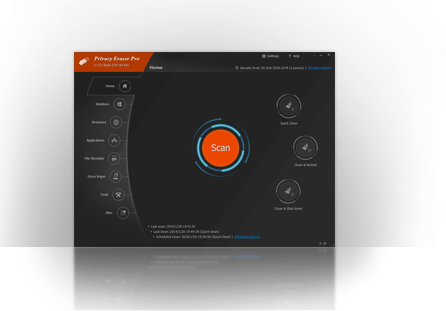
We are all busy. The average user does not have the time—or the technical inclination—to manually clear the cache of five different browsers, purge temporary Windows folders, and empty the clipboard every single day. This is where Privacy Eraser shines with its One-Click philosophy. The software is built around the idea that protecting your privacy should not be a chore. When you launch the application, you are presented with a streamlined interface that puts the power of a professional-grade cleaner behind a single button.
When you click that button, Privacy Eraser initiates a high-speed scan across your entire system. It doesn’t just look at one area; it looks everywhere simultaneously. It checks your browsers, your Windows system files, and your third-party applications. Within seconds, it identifies the "junk" and the "tracks" that are bloating your system and compromising your privacy. The beauty of this tool is that it manages to be incredibly powerful while remaining accessible to the average person. You don't need to be a system administrator to understand how to use it. You just need to know how to click a mouse.
Furthermore, the speed of the engine is worth noting. Many privacy suites can be sluggish, hogging system resources while they crawl through your files. Privacy Eraser is optimized for performance. It performs its duties in the background or at your command with minimal impact on your CPU usage. For anyone who has ever felt frustrated by a computer that gets slower the more they use it, this one-click solution is the ultimate "reset" button for your system’s cleanliness.
2. Extensive Browser and Windows Deep Cleaning
Most people think "privacy" starts and ends with their web browser. While it is true that browsers like Chrome, Firefox, Safari, and Opera are the primary gateways to the internet, they are far from the only things recording your actions. Privacy Eraser offers comprehensive support for all the major browsers, cleaning out the usual suspects: cache, cookies, browsing history, and typed URLs. But it goes much deeper than that. It targets saved passwords, autocomplete form history, and those pesky index.dat files that are notoriously difficult to remove manually.
However, the real power of this software lies in its ability to clean the Windows operating system itself. Think about your daily workflow. You use the "Run" command, you search for files in the Start menu, you open and save documents, and you use the "Recent Documents" list. Windows records every single one of these actions. Privacy Eraser scrubs your Run history, search history, and taskbar jump lists. It goes into the "under-the-hood" areas of the OS, clearing the DNS cache, log files, memory dumps, and error reporting data.
Why does this matter? Because if your computer is ever lost, stolen, or accessed by someone else, these files act as a goldmine of information. A memory dump, for instance, could contain fragments of sensitive data that was being processed at the time of a system crash. By regularly purging these files, you are ensuring that your computer isn't holding onto secrets it doesn't need to keep. This level of deep cleaning is what separates a professional privacy suite from a basic freeware tool.
3. Massive Library of 200+ Free Plug-ins
One of the biggest oversights in many privacy tools is the lack of support for third-party applications. You might have a clean browser, but what about your media player? What about your office suite? Applications like VLC Player, Windows Media Player, and Adobe Reader all keep their own "recent files" lists and internal logs. If you’ve been watching private videos or reading confidential PDF documents, your browser cleaner isn't going to help you there.
Privacy Eraser solves this problem brilliantly by including over 200 FREE plug-ins right out of the box. These plug-ins extend the software’s cleaning capabilities to a massive range of popular programs. Whether you use ACDSee for photos, WinZip or WinRAR for file compression, or Google Toolbar for searching, Privacy Eraser has a dedicated cleaning module for it. Even more specialized tools like eMule and BitTorrent are supported, which is vital for users who are conscious of their file-sharing history.
By using these plug-ins, you are creating a holistic privacy environment. You aren't just cleaning the windows of your digital house; you're scrubbing the floors, the walls, and the attic as well. This "all-in-one" approach means you don't need five different utilities to keep your various apps clean. Privacy Eraser acts as a central hub for all your privacy needs, making it an indispensable tool for anyone who uses a variety of software in their daily life.
4. Fully Customizable and Extensible Architecture
Every tech enthusiast loves a bit of customization. We don't like being told how our software should work; we want to tell the software how to work for us. Privacy Eraser is built on a flexible and open plug-in architecture that is a dream for power users. While the 200 included plug-ins cover the majority of popular apps, there is always that one niche program you might use that isn't on the list.
With Privacy Eraser, you aren't limited by what the developers have provided. You can actually create your own plug-ins. This means you can target specific folders, registry keys, or files associated with any application on your system. If you have a custom-built piece of software for work or a rare game that leaves behind traces you want gone, you can simply write a plug-in to handle it. This level of extensibility ensures that Privacy Eraser never becomes obsolete. As you install new software over the years, you can keep your privacy suite up to date by simply adding new modules.
This "exclusive" customization allows you to tailor the software to your exact workflow. You can decide exactly what gets deleted and what stays. For example, you might want to clear your cookies but keep your saved passwords for certain sites. Privacy Eraser gives you that granular control. It is a tool that grows with you, providing a bespoke privacy experience that most other programs simply cannot match. It’s the difference between a "one size fits all" suit and a custom-tailored one.
5. Enhanced System Performance and Security
While the primary focus of this software is privacy, there is a massive secondary benefit that shouldn't be overlooked: system optimization. Over time, your computer accumulates "digital sludge." Temporary files, old log files, huge memory dumps, and thousands of browser cookies take up valuable space on your hard drive. More importantly, they can slow down your system’s performance. When your OS has to sift through thousands of unnecessary files to find the data it actually needs, you experience lag and stuttering.
By using Privacy Eraser, you are essentially giving your PC a "tune-up." Clearing out the junk frees up disk space, which is especially important for users with smaller Solid State Drives (SSDs). It also speeds up your browsers; a bloated cache can often cause web pages to load incorrectly or slowly. By keeping these areas clean, you ensure that your computer remains as fast as the day you bought it.
Furthermore, there is the peace of mind factor. In the modern world, data breaches are a daily occurrence. While Privacy Eraser isn't an antivirus, it acts as a critical layer of defense. By ensuring that your sensitive information—like typed URLs and form history—is not sitting idly on your hard drive, you are significantly reducing your risk profile. If your computer is ever compromised by malware, there will be less data for that malware to steal. It’s about being proactive rather than reactive. Download this giveaway, and you aren't just getting a cleaner; you're getting a faster, more secure, and more private computer.
In conclusion, Privacy Eraser is a powerhouse of a utility that addresses the very real concerns of the modern digital age. It combines ease of use with deep-level technical cleaning, and its extensibility makes it a tool that will stay relevant for years to come. Whether you are a casual user who wants a "one-click" fix or a power user who wants to customize every aspect of their system's privacy, this software delivers. Don't leave your digital footprint to chance. Take control of your data, speed up your machine, and enjoy the peace of mind that comes with knowing your history is your own. This is a giveaway you definitely do not want to pass up.
Final Verdict: If you care about your privacy and want a cleaner, faster PC, Privacy Eraser is an essential download. Its robust feature set, massive plug-in library, and user-friendly interface make it one of the best tools in its class. Grab it while you can and start your journey toward a cleaner digital life today.

Reviews for Privacy Eraser Pro
Click Here to Read Reviews for Privacy Eraser Pro >> Click Here to Submit Reviews for Privacy Eraser Pro >>