What Does Imaging Do?
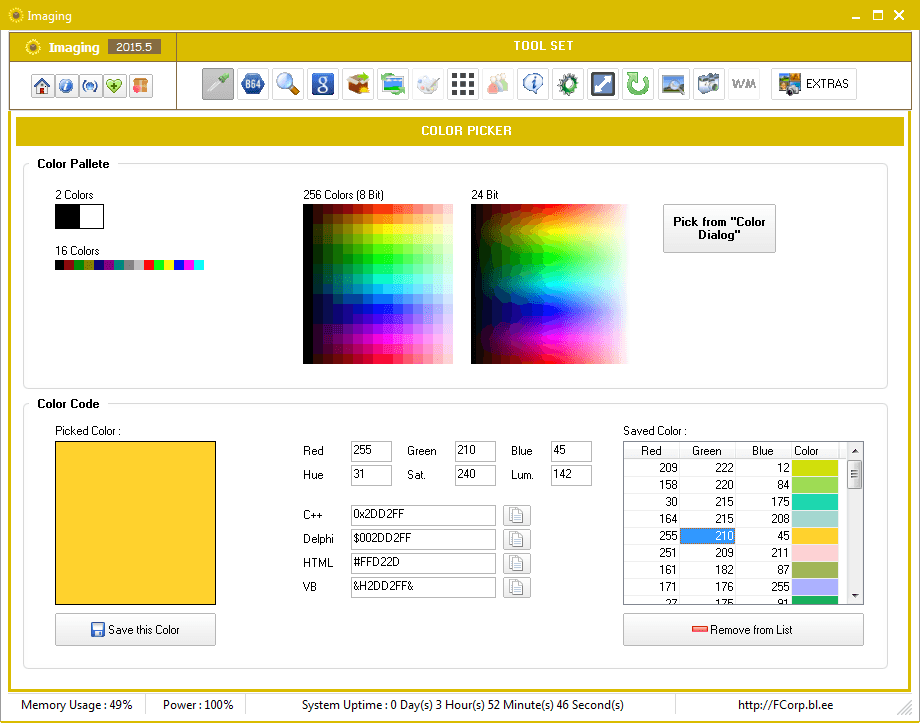
This image utility suite consolidates several specialized functions for managing, editing, and capturing digital assets. At its core, the software offers standard tools such as an Image Viewer, Image Rotator, and a Color Picker for identifying hex codes. For organization, the Duplicate Image Finder identifies redundant files, while the Image Grouper categorizes assets by metadata including size, dimensions, and date taken.
The software includes several automated processing features:
- Image Optimizer and Resizer: Reduces file footprints and adjusts resolutions for web or storage use.
- Google Image Link Generator: Compiles lists of URLs for bulk downloading via external managers.
- Image Grid: Compiles multiple thumbnails into a single composite layout.
Capture and extraction capabilities extend beyond basic file manipulation. Users can perform Screen Captures of active windows, take photos via Webcam, or use the Icon Extractor to pull cursors and icons from EXE and DLL files. Additionally, the software provides a library of Emoticons with pre-formatted HTML and forum code for web publishing. Users can also integrate External Tools to launch third-party image applications directly from the interface.
Top 5 Reasons To Download Imaging
If you have ever felt overwhelmed by the sheer volume of digital images cluttering your hard drive, or if you are tired of switching between five different apps just to resize, optimize, and organize your photos, then this is the software suite you have been waiting for. This giveaway offers a comprehensive toolkit designed to handle every facet of image management and creation. Here are the top five reasons why you need to download this package immediately:
- 1. The Ultimate All-in-One Image Utility: It replaces dozens of standalone apps by combining viewing, resizing, rotating, and optimizing into a single, cohesive interface.
- 2. Intelligent Storage Reclaiming: Between the Duplicate Image Finder and the Image Optimizer, you can save gigabytes of space without deleting the photos you actually love.
- 3. Power Tools for Web Developers and Designers: Unique features like the Icon Extractor and Google Image Link Generator provide professional-grade utility that is rarely found in consumer software.
- 4. Effortless Content Creation: Whether you are building an Image Grid for social media or using the Emoticons library for forum posts, this tool simplifies creative workflows.
- 5. Complete Customization and Extensibility: With the ability to integrate External Tools and a built-in Screen Capture utility, it becomes the central hub for all your visual projects.
Reason 1: The Ultimate All-in-One Image Utility
Let’s be honest: the modern digital workflow is broken. Most of us have one app for viewing photos, another for resizing them for email, a third for rotating those pesky vertical shots that saved horizontally, and perhaps a fourth for taking screenshots. This fragmented approach is a massive productivity killer. The primary reason you should jump on this giveaway is that it functions as a Swiss Army Knife for your digital life. It consolidates these disparate tasks into one powerful engine.
The Image Viewer is fast and responsive, allowing you to cycle through high-resolution files without the lag often associated with default operating system viewers. But viewing is just the beginning. Imagine you are looking at a photo and realize it needs a quick fix. Instead of closing the viewer and opening a heavy editor like Photoshop, you can instantly use the Image Rotator to fix the orientation or the Image Resizer to scale it down for a quick upload. It is about the seamless transition between "seeing" and "doing."
For those who deal with hundreds of images daily, this consolidation is transformative. You aren't just downloading a tool; you are downloading time. By eliminating the "app-switching tax," you can process entire galleries in minutes rather than hours. The inclusion of a Color Picker further proves that this software was designed with a "one-stop-shop" philosophy. If you see a color in an image you love, you can grab the hex code immediately. This level of integration is what separates a mediocre utility from a must-have suite.
Reason 2: Intelligent Storage Reclaiming
We live in an era of digital hoarding. High-resolution cameras and "burst mode" on smartphones mean that our hard drives are filled with thousands of files, many of which are redundant. This giveaway tackles this problem head-on with two heavy-hitting features: the Duplicate Image Finder and the Image Optimizer. These tools work in tandem to ensure your storage is used as efficiently as possible.
The Duplicate Image Finder is a revelation. It doesn’t just look for files with the same name; it analyzes the visual data to find identical or near-identical images that are eating up your space. We all have those folders where we saved "Vacation_Photo_1" and "Vacation_Photo_1_Copy." This tool identifies them instantly, allowing you to purge the dead weight. When you combine this with the Image Grouper, which allows you to categorize images by size, dimension, or date taken, you finally gain the upper hand in the war against digital clutter.
Then comes the Image Optimizer. This isn't just a simple compressor; it is a sophisticated tool designed to reduce file size while maintaining visual integrity. In a world where website load speeds and email attachment limits are constant hurdles, the ability to shrink a 10MB file down to 1MB without noticeable quality loss is essential. For many users, this feature alone justifies the download. You can optimize your entire library, reclaiming gigabytes of space on your SSD or cloud storage, which essentially saves you money on hardware upgrades or monthly subscription fees.
Reason 3: Power Tools for Web Developers and Designers
While many image suites cater to the casual home user, this giveaway includes "power user" features that will make any developer or designer's eyes light up. Specifically, the Icon Extractor and the Google Image Link Generator are game-changers. These aren't just "nice-to-have" extras; they are specialized tools that solve very specific, very annoying problems.
The Icon Extractor is a fascinating piece of tech. Have you ever wanted to use the high-quality icon of a specific software program but couldn't find the source file? This tool allows you to dive into .EXE, .DLL, or .ICL files and pull out the raw icon or cursor data. It is an incredible resource for UI/UX designers, system customizers, or anyone who needs high-quality assets that are usually locked away in system folders. It turns your existing software library into a repository of design assets.
The Google Image Link Generator is equally impressive and somewhat rare in the software world. Instead of manually right-clicking and saving dozens of images from a search result, this tool generates a clean list of links. This allows you to pipe those links directly into a Download Manager for bulk processing. If you are a researcher, a mood-board creator, or a web scraper, this feature automates a process that used to take hours of manual clicking. It is an "under-the-hood" tool that reflects a deep understanding of how power users actually interact with the web.
Reason 4: Effortless Content Creation
If you spend any time on social media, forums, or running a personal blog, you know that presenting images is just as important as the images themselves. This giveaway provides a suite of features specifically for presentation. The Image Grid tool is a perfect example. Instead of struggling with complex layers in a photo editor, you can automatically generate a beautiful grid of thumbnails. This is perfect for "year in review" posts, product showcases, or simple collage creation.
Furthermore, the Emoticons feature is a delightful addition that many might overlook. It provides access to hundreds of sets of emoticons and, more importantly, provides the HTML or forum code to use them instantly. For community managers or heavy forum users, this is a massive convenience. It bridges the gap between having a fun image and actually being able to use it in a digital conversation without jumping through hoops.
We also have to talk about the Take Photo and Screen Capture features. In the age of remote work and digital communication, being able to quickly snap a photo with your webcam or grab a screenshot of your active window is mandatory. But this software takes it a step further by integrating these captures directly into the ecosystem. Once you take a screenshot, you can immediately optimize it, resize it, or group it with other related project files. It turns "capturing" into part of a broader, more organized workflow.
Reason 5: Complete Customization and Extensibility
The final, and perhaps most compelling, reason to download this giveaway is its longevity. Many software suites feel like "black boxes"—you are stuck with the features the developer gave you. However, the External Tools feature changes that dynamic entirely. It allows you to integrate other image-related programs directly into this interface. This means that as your needs grow, the software grows with you. It acts as a command center for your entire digital creative suite.
Imagine having a workflow where you use the Duplicate Image Finder to clean up a folder, the Image Grouper to organize it, and then, with a single click, you send a specific file to an External Tool like a professional RAW editor or a specialized AI upscaler. This software doesn't try to compete with every high-end tool on the market; instead, it facilitates them. It provides the organizational backbone that high-end editors often lack.
Furthermore, the Image Optimizer and Resizer can be applied to these external workflows, ensuring that whatever you create is ready for the web or for storage immediately. It is this philosophy of extensibility that makes this giveaway so valuable. It isn't just a static app; it is a platform. Whether you are a casual user who just wants to fix a few vacation photos or a tech enthusiast looking for a robust image management system, the flexibility offered here is unmatched. This is your chance to own a tool that adapts to you, rather than forcing you to adapt to it.
In conclusion, this giveaway is a rare opportunity to secure a high-utility, multi-functional image suite that addresses the real-world problems of digital organization and content creation. From the technical precision of the Icon Extractor to the everyday convenience of the Image Viewer, every feature is designed to make your digital life easier, faster, and more organized. Don't miss out on the chance to transform your messy folders into a streamlined, optimized gallery. Download it now and take control of your visual world.

Reviews for Imaging
Click Here to Read Reviews for Imaging >> Click Here to Submit Reviews for Imaging >>