What Does FarStone TotalRecovery Pro Do?
FarStone TotalRecovery Pro is a comprehensive data backup and hard disk imaging suite designed for professional-grade system protection. The software supports MBR, GPT, BIOS, and UEFI/EFI systems, providing a range of backup types including full, incremental, and differential. It features one-click backup and restore for files, applications, and entire Windows partitions, while also offering disk defragmentation during the imaging process to optimize storage.
The utility includes advanced virtualization support, allowing for P2V and V2P conversions for VMware and Hyper-V environments. For disaster recovery, TotalRecovery Pro provides a Pre-OS Recovery Manager and a Data Rescuer tool for retrieving files from crashed drives. Users can perform bare-metal restores or utilize Universal Restore to migrate a system to entirely different hardware configurations.
Security and management tools are integrated into the package, featuring AES data encryption, data shredding, and Windows password recovery. Users can create WinPE bootable media via CD, DVD, or USB flash drives. Management capabilities include the following:
- Flexible task scheduling and offsite backup options.
- Email notifications and log history tracking.
- Backup quota management to control storage usage.
- Support for backing up open files and active databases.
Top 5 Reasons To Download FarStone TotalRecovery Pro
- Bare-Metal Disaster Recovery and Universal Restore: The ability to restore your entire system to a completely different computer, regardless of hardware differences.
- High-Performance Disk Imaging and System Cloning: A seamless way to upgrade your hard drive or migrate your entire operating system to a new SSD with one click.
- Intelligent and Efficient Backup Strategies: Advanced support for incremental and differential backups combined with disk defragmentation during the process for maximum speed.
- Comprehensive Virtualization Support (P2V & V2P): Professional-grade tools to convert physical machines to virtual environments and vice versa, perfect for testing and legacy support.
- Integrated Security and Recovery Toolkits: A "Swiss Army Knife" of utilities including Windows password recovery, military-grade data shredding, and file rescue for crashed drives.
We have all been there. You are in the middle of a major project, or perhaps you are finally getting around to organizing a decade’s worth of family photos, and suddenly—silence. The screen goes black, or worse, the dreaded "Blue Screen of Death" makes an unwelcome appearance. In that split second, the realization hits you: your data is gone. Most users think a simple cloud sync is enough, but true professionals know that a real safety net requires something much more robust. Enter FarStone TotalRecovery Pro. This isn't just another backup app; it is a comprehensive insurance policy for your digital life. As someone who has tested dozens of recovery suites, I can tell you that this giveaway is an absolute must-download for anyone who values their time and data. Let’s dive deep into the five primary reasons why you need to secure your copy of FarStone TotalRecovery Pro today.
1. Bare-Metal Disaster Recovery and Universal Restore
The term "bare-metal restore" might sound like tech jargon, but it is the single most important feature you can have in your arsenal. Imagine your motherboard fries or your laptop is stolen. You buy a brand-new machine with completely different specs—different processor, different chipset, different graphics card. Normally, trying to move a backup of your old Windows installation to this new hardware would result in a system that refuses to boot. This is where FarStone TotalRecovery Pro shines with its Dissimilar/Universal Restore technology.
This software allows you to take an image of your old system and "inject" the necessary drivers to make it compatible with your new hardware during the restoration process. It effectively makes your backup hardware-agnostic. You aren't just saving files; you are saving your entire environment—your custom settings, your installed software, your browser cookies, and your desktop layout. The Pre-OS Disaster Recovery Manager ensures that even if your Windows partition won't load, you can boot into a WinPE-based environment via CD, DVD, or USB to perform a full system rescue. This level of protection is usually reserved for enterprise-level servers, but TotalRecovery Pro brings it to the consumer desktop in a package that is incredibly easy to navigate.
Furthermore, the Bare-metal Restore from iSCSI storage support means that if you are a power user with a NAS (Network Attached Storage) setup, you can pull your recovery image directly from the network without needing to fiddle with external hard drives. It is a seamless, high-end solution for the worst-case scenario.
2. High-Performance Disk Imaging and System Cloning
If you have ever tried to upgrade your mechanical hard drive to a lightning-fast NVMe SSD, you know what a headache it can be to reinstall Windows from scratch. You have to find your license keys, download updates for hours, and reinstall every single application. FarStone TotalRecovery Pro eliminates this friction with its Disk Imaging and Drive Cloning features. It creates a "snapshot" of your entire drive, sector by sector, and can perfectly replicate it onto a new disk.
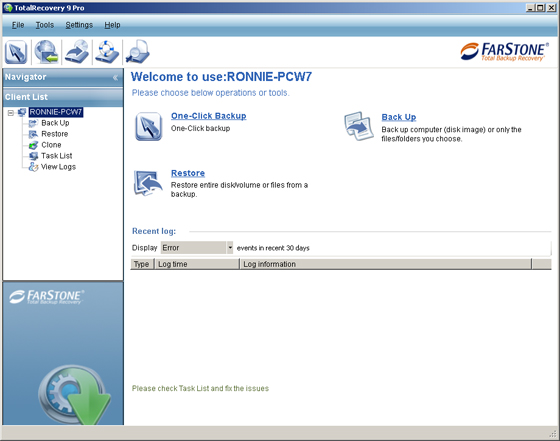
What sets this software apart from the competition is its One-Click Backup & Restore philosophy. It is designed to be intuitive. You don't need a degree in computer science to clone your drive. It supports all modern partition styles, including MBR, GPT, BIOS, and UEFI/EFI systems. This means it works on everything from older legacy towers to the newest ultra-books.
An often-overlooked but brilliant feature included here is Disk Defragmentation During Backup. Most backup software simply copies the clutter along with the data. FarStone TotalRecovery Pro actually organizes the data as it backs it up, ensuring that when you restore that image to a new drive, the system is optimized and running at peak performance. It’s like having a cleaning crew come in and organize your house while they’re moving your furniture. This attention to detail is why professional tech reviewers consistently rank FarStone near the top of the imaging category.
3. Intelligent and Efficient Backup Strategies
A backup is only useful if it is current, and it is only current if it is easy to perform. No one wants their computer to slow to a crawl for three hours every day while a backup runs. TotalRecovery Pro solves this through a sophisticated combination of Full, Incremental, and Differential backups.
Instead of copying every single file every time, the software identifies only the changes made since your last backup. This drastically reduces the time and storage space required. But the intelligence doesn't stop there. The Flexible Scheduler allows you to set it and forget it. You can program the software to run backups during your lunch break, or late at night when the PC is idle. It even features Offsite Backup capabilities, allowing you to send your data to a remote location for an extra layer of security against physical threats like fire or theft.
For those who work in demanding environments, the Backup open files and databases feature is a game-changer. Using Volume Shadow Copy technology, TotalRecovery Pro can back up files even while they are in use. This means you don't have to close your Outlook, your SQL databases, or your creative projects for the backup to succeed. It works silently in the background, ensuring that your most recent work is always protected without interrupting your workflow. The inclusion of Quota Management also ensures that your backup drive never gets full unexpectedly; the software intelligently manages old versions to make room for new ones.
4. Comprehensive Virtualization Support (P2V & V2P)
For the tech enthusiasts and professionals among us, the P2V (Physical to Virtual) and V2P (Virtual to Physical) support is perhaps the most exciting part of this package. This feature allows you to take your entire physical Windows installation and convert it into a virtual disk file that can be run in VMware or Hyper-V.
Why is this useful? Imagine you want to test a suspicious piece of software or a new Windows update, but you don't want to risk your main system. You can simply "boot" your backup in a virtual machine, try it out, and if it breaks something, your physical PC remains untouched. It is also an incredible tool for legacy support. If you have an old piece of software that only runs perfectly on your current setup, you can "virtualize" that setup to ensure you can run it on future computers years down the line.
The ability to move back and forth between virtual and physical environments (V2P) provides a level of flexibility that is rarely found in standard backup software. It effectively gives you a "digital twin" of your computer that you can carry on a thumb drive and run on any machine with a hypervisor. This is professional-grade technology made accessible to the everyday user, and it’s one of the strongest reasons to jump on this giveaway immediately.
5. Integrated Security and Recovery Toolkits
FarStone TotalRecovery Pro is more than just a backup tool; it is a full-fledged maintenance and security suite. One of the most common calls tech support receives is for forgotten Windows passwords. Included in this package is a Windows Password Recovery tool that can save you from a complete lockout without needing to format your drive.
In addition to recovery, the software also looks out for your privacy. The Data Shredding feature allows you to permanently delete sensitive files using military-grade algorithms. When you delete a file normally in Windows, it isn't actually gone; it’s just hidden. Data shredding ensures that even the most advanced forensic tools cannot recover your private information, which is essential if you are planning to sell or donate an old hard drive.
Security is further bolstered by AES Data Encryption. Your backup images contain your entire life—emails, bank statements, private photos. If your backup drive falls into the wrong hands, encryption ensures that no one can access that data without your password. Finally, the Data Rescuer feature is a specialized tool designed to scavenge and restore files from a hard disk that has already crashed or become corrupted. Even if you haven't been backing up, this tool might be the one thing that saves your data after a failure.
When you add up these "extra" features—the password recovery, the shredding, the encryption, and the data rescue—you realize that FarStone TotalRecovery Pro is replacing four or five different utility programs with one streamlined interface. It is the ultimate "Swiss Army Knife" for your PC’s health and security.
Conclusion: Why You Should Download It Now
In the world of software, we often see programs that do one thing well but fail to provide a complete solution. FarStone TotalRecovery Pro is the exception. It covers the entire lifecycle of data protection: from proactive scheduling and encryption to active cloning and imaging, and finally to reactive disaster recovery and data rescue.
The value proposition here is immense. You are getting a tool that can handle MBR and GPT partitions, manage VMware environments, and even bypass the headache of dissimilar hardware migration. Whether you are a casual user looking to protect your family memories or a power user managing complex virtual environments, this software scales to meet your needs.
Don't wait for a hard drive failure to happen before you take action. Proactive data management is the difference between a minor 15-minute inconvenience and a catastrophic loss of years of work. This giveaway offers you the chance to secure a professional-grade solution that is typically quite expensive. Between the WinPE bootable media, the one-click imaging, and the universal restore capabilities, FarStone TotalRecovery Pro is a powerhouse that deserves a permanent spot on your hard drive. Download it, create your recovery media, and rest easy knowing that your digital world is safe, no matter what happens to your hardware.

Reviews for FarStone TotalRecovery Pro
Click Here to Read Reviews for FarStone TotalRecovery Pro >> Click Here to Submit Reviews for FarStone TotalRecovery Pro >>