What Does FileSearchy Pro Do?
FileSearchy is a file discovery utility designed to replace standard system search functions with a faster, more robust indexing system. The software maintains a lightweight database of filenames, enabling near-instant results when searching by name. Unlike basic search tools, it extends its functionality to include content-based queries, allowing users to scan for specific strings within plain text, PDF, and Microsoft Office documents.
The utility features a comprehensive query engine that supports regular expressions, whole-word matches, and multiple-string searches. Users can further narrow results by excluding specific terms or filtering by file size and modification date. To streamline the review process, the application highlights found text within both the filename and the document content, removing the guesswork from search results.
Key workflow features include:
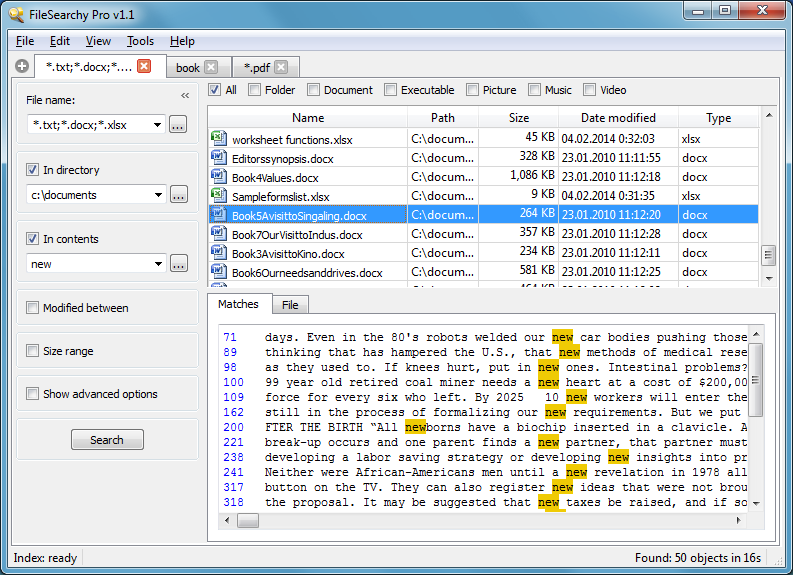
- Tabbed Interface: Manage and compare multiple searches simultaneously without losing previous parameters.
- Content Detection: An algorithm that automatically skips binary files, such as programs and videos, to focus on readable documents.
- Explorer Integration: The ability to launch specific searches directly from the folder context menu in Windows Explorer and compatible applications.
FileSearchy provides a centralized solution for users requiring advanced file management and deep data retrieval capabilities on their local storage.
Top 5 Reasons To Download FileSearchy Pro
- Instantaneous Results with Real-Time Indexing: Say goodbye to the spinning wheel of death; find any file by name in less than a second.
- Deep-Dive Content Searching: Search inside PDFs, Office documents, and text files with a smart algorithm that ignores irrelevant binary data.
- Advanced Query Logic and Regular Expressions: Use powerful filters, exclude specific terms, and utilize Regex for surgical precision in your searches.
- Effortless Multi-Tasking via Tabbed Interface: Manage multiple search queries simultaneously just like you do in a web browser.
- Seamless Explorer Integration and Visual Highlighting: Launch searches directly from your folders and see exactly why a file was found with clear text highlighting.
Let’s be honest for a second: the default search functionality built into most operating systems is, to put it mildly, a frustrating experience. We have all been there. You are looking for a specific invoice, a code snippet, or a photo from three years ago. You type the name into the search bar and wait. And wait. The little green progress bar crawls across the top of the window like a tired snail, and half the time, it tells you "No items match your search" even when you know the file is sitting right there on your hard drive. It is a massive drain on productivity and a constant source of digital friction.
This is exactly why FileSearchy is the utility you didn't know you needed, but won't be able to live without once you try it. As someone who spends all day diving through thousands of documents, scripts, and media files, I can tell you that a high-performance search tool is the backbone of an efficient workflow. Today, we are looking at why this specific giveaway is a mandatory download for anyone who wants to take back control of their file system. This isn't just another folder browser; it is a high-speed engine designed to index and retrieve your data with surgical precision. Here is a deep dive into the top five reasons why FileSearchy deserves a permanent spot on your desktop.
1. Instantaneous Results with Real-Time Indexing
The headline feature of FileSearchy, and the reason it will immediately replace your native search tool, is its sheer, unadulterated speed. Most search tools attempt to scan your entire hard drive every time you hit "Enter." This is inefficient and puts an unnecessary load on your hardware. FileSearchy takes a much smarter approach by performing a quick initial indexing of your file system. It creates a lightweight, highly optimized database of every file name on your computer.
What does this mean for you in practice? It means that searching for a file name happens in less than a second. As you type, the results appear in real-time. There is no lag, no stuttering, and no waiting for the disk to spin up. Because the database is lightweight, it doesn't hog your system resources in the background. It sits quietly, keeping track of changes, so that when you need to find "Marketing_Report_Final_v2.pdf" among ten thousand other files, it appears before you’ve even finished typing the word "Marketing."
For power users with multiple Terabytes of data, this speed is a game-changer. Whether you are using a modern NVMe SSD or an older mechanical hard drive, the indexing technology compensates for hardware limitations to deliver instant gratification. This is the "instant search" experience that we were promised years ago but rarely actually receive from standard OS tools.
2. Deep-Dive Content Searching Across Multiple Formats
Finding a file by its name is great, but what happens when you remember what is inside the file but can't remember what you named it? This is where FileSearchy truly pulls ahead of the competition. It isn't just looking at the labels; it is looking at the data. FileSearchy features a robust content search engine that can peer into the "meat" of your documents.
This utility supports a wide array of popular formats, including plain text, Microsoft Office documents (Word, Excel, etc.), and PDFs. If you are a lawyer looking for a specific clause in a mountain of legal briefs, or a student trying to find a specific quote in a folder full of research papers, this feature is your new best friend. You can search for a specific string of text, and FileSearchy will identify every document that contains that phrase.
What makes this even more impressive is the smart content detection algorithm. Many search tools get "confused" by binary files—things like system applications (.exe), music (.mp3), or video files (.mp4)—which can lead to a lot of "noise" in your search results or even cause the search to crash. FileSearchy is smart enough to skip these binary files, focusing only on the documents where your text is likely to reside. This saves time, reduces CPU usage, and ensures that your results list is clean and relevant.
3. Advanced Query Logic and Regular Expressions
Sometimes, a simple keyword search isn't enough. Sometimes, you need to be extremely specific to filter out the clutter. FileSearchy caters to both the casual user and the hardcore "data hoarder" by offering advanced query capabilities. If you have ever felt limited by a search bar that only lets you type one word at a time, you are going to love the flexibility here.
FileSearchy allows you to search for multiple strings at once. You can look for files that contain "Project Alpha" AND "Budget," or you can use the "exclude" feature to find files that contain "Invoice" but NOT "2022." This Boolean-style logic allows you to narrow down thousands of results into a handful of relevant files in seconds. Furthermore, you can toggle between searching for whole words, substrings, or exact matches.
For the true tech enthusiasts and developers out there, FileSearchy also supports Regular Expressions (Regex). This is the gold standard for pattern matching. If you need to find every file that follows a specific naming convention (like a date format or a serialized code), Regex gives you the power to write a search pattern that would be impossible with standard text. This level of control ensures that no matter how complex your file structure is, you can always find exactly what you are looking for without manual sorting.
4. Effortless Multi-Tasking via Tabbed User Interface
One of the most overlooked aspects of software design is how it handles multi-tasking. Most search utilities give you one window. If you want to search for something else, you have to clear your current search and start over. If you want to compare the results of two different searches, you're out of luck unless you open multiple instances of the program.
FileSearchy solves this by implementing a tabbed user interface, much like your favorite web browser. This is a massive boost to productivity. You can have a search for "Client X" open in one tab, a search for "Quarterly Photos" in another, and a content search for a specific "Contract ID" in a third. You can flip back and forth between them without losing your place and without having to re-run the search.
Every tab maintains its own specific parameters—size filters, date ranges, and search strings. This makes FileSearchy an incredible tool for research and data organization. You can retain results for as long as you need while you work on other tasks, making it feel less like a "utility" and more like a dedicated workspace for your files. Once you experience searching in tabs, going back to a single-window search feel incredibly restrictive.
5. Seamless Explorer Integration and Visual Highlighting
A tool is only useful if it fits naturally into your existing workflow. FileSearchy doesn't force you to change how you use your computer; it enhances it. Through its Explorer integration, you can right-click on any folder in Windows and select FileSearchy to start a search specifically within that directory. This context-aware searching is much faster than opening the app and manually navigating to the directory you want to scan.
Furthermore, FileSearchy understands that finding the file is only half the battle; you also need to know why it was found. To help with this, the app features text highlighting. When your search results appear, the specific string or keyword you searched for is highlighted within the file name and, even more impressively, within the content preview. This visual feedback is crucial. It prevents the "guessing game" of opening five different files to see which one has the information you need. You can see at a glance that "File A" was found because of a match in the title, while "File B" was found because the keyword appears in the third paragraph.
Finally, let's talk about the extra layers of filtering. Beyond just names and content, FileSearchy allows you to filter by date and size. If you know you created a document last Tuesday and it’s roughly 5MB, you can plug those parameters in to instantly ignore everything else. It’s this combination of speed, depth, and user-friendly interface design that makes FileSearchy a standout utility in its category.
The Verdict: Why You Need to Grab This Giveaway Now
In the world of software, we often see "bloatware"—apps that try to do everything and end up doing nothing well. FileSearchy is the exact opposite. It is a focused, high-performance tool that does one thing incredibly well: it finds your data. It respects your time by being fast, it respects your intelligence by providing advanced query tools, and it respects your workflow by integrating into the systems you already use.
Whether you are a professional managing a massive archive of documents, a creative with a sprawling library of assets, or just a casual user who is tired of the inefficient Windows search, this giveaway is a literal "get out of frustration free" card. You are getting a premium search experience that offers:
- Sub-second file name retrieval.
- Comprehensive document content indexing.
- Powerful logic and Regex for precision filtering.
- A modern, tabbed interface for high-level multitasking.
- Clear visual highlighting to save you from opening the wrong files.
We often forget how much time we lose to small inefficiencies. Five minutes spent searching for a file here, two minutes there—it adds up to hours of lost productivity every month. FileSearchy gives those hours back to you. It turns the chore of file management into a seamless, instantaneous process. Don’t let your files hide from you any longer. Download this utility, let it index your drives, and experience what it feels like to have the entire contents of your computer truly at your fingertips.
Final Recommendation: This is a "must-have" utility. Most people don't realize how much they need a better search tool until they actually use one. Once you've experienced the speed and the ability to search inside PDFs and Word docs with tabs, you'll wonder how you ever got by without it. Grab this giveaway while you can and upgrade your digital toolkit today!


Reviews for FileSearchy Pro
Click Here to Read Reviews for FileSearchy Pro >> Click Here to Submit Reviews for FileSearchy Pro >>