What Does Adept PDF Converter Kit Do?
Adept PDF Converter Kit is a utility suite designed to extract and repurpose content from PDF documents by transforming them into various editable formats. The toolkit supports conversion to Microsoft Word, Excel, HTML, and plain text, as well as visual formats like SWF and standard images. This allows users to recover and edit data from static documents without the necessity of manual retyping.
The software functions as a standalone application. It does not require external dependencies such as Microsoft Office, Adobe Acrobat, or Acrobat Reader to perform its conversion tasks. Its core engine is built to preserve the integrity of the original file, maintaining the placement of text, tables, and graphical elements during the export process. Users can choose to convert entire documents or isolate specific pages for more targeted data extraction.
Efficiency features included in the Adept PDF Converter Kit include:
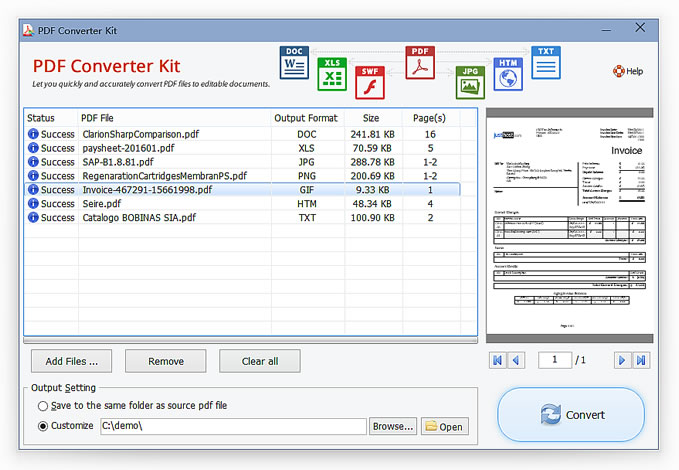
- Batch Processing: Users can export a collection of PDF files to other formats simultaneously, reducing the time spent on repetitive manual tasks.
- Drag-and-Drop Interface: The software supports direct file imports through a standard drag-and-drop workflow for faster document handling.
- Format Versatility: Comprehensive support for Word, Excel, Text, and HTML formats ensures compatibility across different productivity platforms.
- Content Preservation: The utility is designed to keep original graphics, layout structures, and text formatting intact after the conversion is complete.
Top 5 Reasons To Download Adept PDF Converter Kit
- Total Software Independence: It functions as a standalone program that does not require Microsoft Word, Excel, or Adobe Acrobat to operate.
- High-Fidelity Content Preservation: It maintains the original layout, including tables, graphics, and images, during the conversion process.
- Versatile Multi-Format Support: It converts PDF files into a wide range of formats including Word, Excel, SWF, Images, HTML, and Text.
- Powerful Batch Processing: It allows users to convert entire collections of PDF documents simultaneously with simple drag-and-drop functionality.
- Granular Control and Precision: It provides the ability to select and convert specific pages, ensuring you only process the data you actually need.
Introduction: Why You Need This Tool in Your Arsenal
We have all been there. You receive an email with a critical document attached, only to find it is a "read-only" PDF. You need to pull a table into Excel for a report, or perhaps you need to tweak a few sentences in a contract, but the file is locked behind the digital iron curtain of the PDF format. For years, the solution has been either to pay a hefty monthly subscription for Adobe’s premium suite or to rely on sketchy, privacy-invading online converters that often scramble your formatting into an unrecognizable mess. That is exactly why the Adept PDF Converter Kit is a game-changer for anyone who values their time and their data integrity.
As a tech reviewer, I see hundreds of utilities every year that claim to "simplify your workflow," but few actually deliver on that promise without tethering you to other expensive software. The Adept PDF Converter Kit is different. It is a lean, mean, conversion machine designed to give you back control over your documents. It treats the PDF format not as a final destination, but as a starting point for your creative and professional work. Whether you are a student trying to extract citations, a data analyst needing to scrape tables, or a web developer looking to turn a document into a webpage, this kit is built to handle the heavy lifting. Let’s dive deep into the five primary reasons why you need to download this giveaway today.
1. Total Software Independence: Break Free from the "Adobe Tax"
One of the most frustrating aspects of modern computing is the "dependency loop." Usually, if you want to convert a PDF to a Word document, the software you use requires you to have Microsoft Word installed on your machine so it can use Word’s internal engine to render the file. Or worse, it requires a full installation of Adobe Acrobat Pro just to function. This is what I call the "Adobe Tax"—the hidden requirement of having expensive, resource-heavy software just to run a simple utility.
The Adept PDF Converter Kit completely shatters this paradigm. It is a 100% standalone program. This means it has its own internal rendering and conversion engine. You do not need Microsoft Word. You do not need Excel. You certainly do not need Adobe Acrobat or even the free Acrobat Reader. This independence is a massive advantage for several reasons. First, it saves you money. You don't need to maintain active subscriptions to "Big Tech" software suites just to extract data from a PDF. Second, it saves system resources. We all know how much RAM Adobe and Word can hog; by using a standalone tool, you can convert files on a lightweight laptop or an older workstation without the system grinding to a halt.
Furthermore, because it doesn't rely on external APIs or third-party software "hooks," the installation is clean and the operation is incredibly stable. You aren't going to run into "Version Mismatch" errors where your converter stops working because Word updated itself overnight. It is a self-contained environment that does one job and does it exceptionally well. For the minimalist tech user or the professional on a budget, this feature alone makes the giveaway worth its weight in gold.
2. High-Fidelity Content Preservation: No More "Garbage In, Garbage Out"
If you have ever used a low-quality converter, you know the nightmare of "formatting drift." You convert a PDF to Word, and suddenly your headers are in the middle of a paragraph, your images are overlapping the text, and your tables have dissolved into a chaotic soup of tabs and spaces. This is the "Garbage In, Garbage Out" problem that plagues the PDF utility world. A PDF is essentially a digital map of where "ink" should go on a "page," and reverse-engineering that into an editable document is a massive technical challenge.
The Adept PDF Converter Kit excels here because it prioritizes content preservation. When you move a file from PDF to Excel, the software identifies the grid structure of your data and ensures that the columns and rows stay intact. When moving to Word, it recognizes the relationship between graphics and text, keeping your original layout as close to the source as possible. This is vital for professionals who are dealing with complex layouts, such as brochures, legal briefs, or technical manuals.
Think about the time you would save. Instead of spending two hours re-formatting a converted document—fixing fonts, re-aligning images, and rebuilding tables—you get a file that is ready for editing immediately. The software’s ability to "see" the original document’s intent is what sets it apart. It doesn't just scrape the text; it understands the structure. For anyone who has ever pulled their hair out trying to fix a broken table in a converted spreadsheet, this kit is the sanity-saving tool you have been looking for.
3. Versatile Multi-Format Support: The Swiss Army Knife of PDF Tools
Most converters are "one-trick ponies." They might do a decent job of turning a PDF into a Word doc, but that is where their utility ends. The Adept PDF Converter Kit is more like a Swiss Army Knife for your digital filing cabinet. It doesn't just stop at Word; it opens the door to a variety of output formats that cover almost every professional use case.
- Microsoft Excel: Perfect for financial analysts who need to pull data from annual reports.
- Images: Sometimes you don't need the text; you just need a high-quality JPEG or PNG of a specific page for a presentation. This kit handles that with ease.
- HTML: This is a hidden gem for web developers. If you have a document that needs to go live on a website, converting it directly to HTML saves hours of manual coding.
- Text (TXT): When you just need the raw data without any "fluff," the Text conversion is clean and lightning-fast.
- SWF: For those working with legacy web components or specific animation needs, the inclusion of SWF output is a rare and welcome feature.
Having all these tools in one interface means you don't have to clutter your computer with five different "single-purpose" apps. Whether you are archiving documents, preparing data for a database, or repurposing content for social media, you have the right tool for the job. It is about versatility. In a fast-paced work environment, being the person who can quickly pivot a PDF into any format requested is a major productivity win.
4. Powerful Batch Processing: Efficiency at Scale
Let's talk about the most valuable commodity in the world: time. If you have a single PDF to convert, almost any tool will do. But what if you have fifty? Or a hundred? Converting files one by one is a soul-crushing task that leads to errors and burnout. This is where the Adept PDF Converter Kit truly proves its worth through its robust batch processing capabilities.
The software features a streamlined workflow that allows you to import a collection of PDF files all at once. You can simply drag and drop your files into the interface—a UI choice that I personally love because it feels natural and keeps the workflow moving. Once your files are loaded, you can set your output preferences and let the software work its magic. While the program is churning through your documents, you can go grab a coffee or focus on more important tasks. It is "set it and forget it" technology at its finest.
In my testing, the batch engine is remarkably stable. It doesn't hang or crash when faced with a large queue, which is a common failing in lesser tools. This feature is a must-have for administrative assistants, researchers, or anyone tasked with digitizing or migrating large archives of information. It turns a project that would take an entire afternoon into a task that takes five minutes of setup.
5. Granular Control and Precision: Convert Only What You Need
Not every PDF conversion requires the entire document. Imagine you have a 500-page technical manual, but you only need the data table on page 42 and the summary on page 450. Using a standard converter would force you to process the entire 500-page file, resulting in a bloated Word document that is hard to navigate and takes up unnecessary disk space.
The Adept PDF Converter Kit offers specific page selection, providing a level of surgical precision that is often missing from competing products. You can tell the software exactly which pages or page ranges you want to extract. This not only makes the conversion process faster but also ensures that your output file is lean and focused. It eliminates the "noise" of unwanted content, allowing you to get straight to the "signal."
This granular control extends to the user experience as well. The interface is clean, avoiding the cluttered "ribbon" style of modern Office apps that often hide features behind three layers of menus. Everything you need is right there on the surface. Between the drag-and-drop support and the page-range selectors, it is clear that this software was designed by people who actually use these tools for work. It values your precision, and in a world of "dumbed-down" apps, that is a breath of fresh air.
Final Thoughts: Don't Miss Out on This Essential Utility
In the world of tech, we often focus on the "flashy" apps—the video editors, the games, the social media platforms. But the real work of the world is often done by "unseen" utilities like the Adept PDF Converter Kit. This is the "utility player" on your team—the one that doesn't seek the spotlight but is absolutely essential for winning the game. It solves a fundamental problem that we all face: the rigidity of the PDF format.
By offering a standalone, high-fidelity, multi-format, batch-ready, and precise conversion engine, Adept has created a package that is genuinely useful for almost everyone. Whether you are a "power user" who needs to process thousands of pages or a casual user who just wants to edit a PDF resume, this kit delivers. It removes the barriers between you and your data, and it does so without requiring a monthly bill from Adobe or Microsoft.
The verdict is clear: If you deal with digital documents in any capacity, this is a download you cannot afford to skip. It is efficient, it is powerful, and most importantly, it respects your time and your existing workflow. Download it, install it, and the next time someone sends you a "locked" PDF, you will be ready to break it open and get to work in seconds. This is a pro-level tool that belongs on every desktop.
Summary of Key Features:
- Convert PDF to Office files, Text, HTML and images.
- Preserve original contents like text, tables, graphics and images.
- Select and convert specific pages from PDF.
- Export a collection of PDF files to other formats at a time.
- Standalone software, MS Word, Adobe Acrobat and Reader NOT required.
- Support multiple documents conversion (Batch Processing).
- Support drag and drop PDF files for conversion.
Make sure to secure your copy of this giveaway today and transform the way you interact with your digital documents forever. You won't realize how much you needed it until you start using it.

Reviews for Adept PDF Converter Kit
Click Here to Read Reviews for Adept PDF Converter Kit >> Click Here to Submit Reviews for Adept PDF Converter Kit >>