What Does Aneesoft YouTube to MP3 Converter Do?
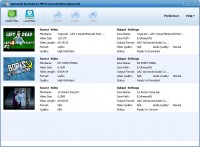
Aneesoft YouTube to MP3 Converter is a dedicated utility designed to extract audio tracks from various online video platforms. This software facilitates batch downloading from multiple sources, including YouTube, Metacafe, Blip, Break, and Bing Video. It is engineered to handle multiple tasks simultaneously, increasing efficiency when managing large media libraries.
The application provides comprehensive conversion options, allowing users to transform downloaded content into formats such as MP3, WMA, WAV, M4A, AAC, OGG, and AIFF. In addition to online downloads, the software supports the import of local video files. Users can convert existing FLV, F4V, MP4, and WEBM files into the aforementioned audio formats directly within the interface.
Technical features include the ability to specify video resolutions before saving files, with support for 480p, 720p, and 1080p HD standards. The tool is compatible with HTML5, high-definition, and standard-definition videos. For improved workflow management, the software includes a stable download manager that allows users to pause and continue downloads as needed. This ensures that the process can be managed according to available bandwidth and system resources without losing progress on active tasks.
Top 5 Reasons To Download Aneesoft YouTube to MP3 Converter
- Universal Platform Compatibility and Multi-Site Support
- Hyper-Efficient Batch Downloading and Processing
- Extensive Audio Format Versatility for Every Device
- Granular Control Over Source Video Resolution
- Seamless Local File Conversion and Management
In an era where streaming is king, you might wonder why anyone still bothers with dedicated conversion software. However, any true tech enthusiast or media junkie knows the reality: streaming is rented access, but a local file is forever. Whether you are prepping for a long-haul flight with no Wi-Fi, building a curated library for your high-end audio setup, or simply trying to save your mobile data plan from certain death, having the right tools to capture and convert online content is essential. Enter Aneesoft YouTube to MP3 Converter. This isn't just another "me-too" web wrapper; it is a robust, high-performance engine designed to bridge the gap between the chaotic world of online video and your personal media collection.
If you have been looking for a reason to upgrade your digital toolkit, this giveaway is your golden ticket. I have spent years reviewing various "downloaders" and "rippers," and most of them fall into the same traps: they are riddled with bloatware, they only support one site, or they produce audio that sounds like it was recorded inside a tin can. Aneesoft breaks that cycle by offering a streamlined, professional-grade experience that prioritizes speed, quality, and flexibility. Let’s dive deep into the five primary reasons why you need to hit that download button immediately.
1. Universal Platform Compatibility and Multi-Site Support
The most common frustration with video conversion software is the "walled garden" effect. You find a tool that works perfectly for YouTube, but the moment you want to grab a high-quality clip from Metacafe or a niche video from Blip, the software hits a brick wall. Aneesoft YouTube to MP3 Converter solves this by providing a comprehensive, multi-site architecture. While the name highlights YouTube—rightfully so, as it is the world's largest repository of media—the software is actually a Swiss Army knife for the modern web.
By supporting platforms like Metacafe, Blip, Break, and Bing Video, Aneesoft ensures that you aren't tethered to a single ecosystem. Each of these platforms has its own unique content landscape. Metacafe is often a goldmine for short-form entertainment, while Bing Video acts as a massive aggregator. Having one piece of software that can navigate the different protocols and streaming architectures of these various sites is a massive win for productivity. You no longer need five different browser extensions or three different desktop apps. You simply feed the URL into Aneesoft, and it handles the heavy lifting.
Furthermore, this multi-site support isn't just about quantity; it’s about the stability of the connection. Aneesoft has optimized its engine to recognize the specific delivery methods used by these sites, ensuring that you don't run into "failed download" errors that plague lower-tier software. For the power user who sources music and audio from across the web, this universal compatibility is the foundation of a great user experience.
2. Hyper-Efficient Batch Downloading and Processing
Let’s be honest: your time is valuable. Nobody wants to sit in front of a computer, waiting for one video to finish downloading so they can manually start the next one. This is where the batch processing capabilities of Aneesoft YouTube to MP3 Converter truly shine. This software is designed for the "set it and forget it" workflow that modern professionals and hobbyists crave.
The batch download feature allows you to queue up dozens of videos simultaneously. Whether you are trying to download an entire educational series, a full music album uploaded as individual tracks, or a collection of podcasts, you can simply paste the links and let the software work in the background. It utilizes multi-threading technology to maximize your internet bandwidth, pulling down multiple streams at once without choking your system resources.
But the efficiency doesn't stop at the download phase. Once the videos are on your drive, the batch conversion engine kicks in. You can select your entire download list and apply a single output profile—for example, converting everything to 320kbps MP3s—and the software will process them sequentially or in parallel depending on your settings. This level of automation turns a chore into a seamless background task. It transforms the app from a simple utility into a high-capacity production tool, making it an absolute must-download for anyone who deals with large volumes of media.
3. Extensive Audio Format Versatility for Every Device
The "MP3" in the name is just the tip of the iceberg. While MP3 remains the universal standard for compatibility, different hardware and use cases often require different formats. A tech reviewer like myself looks for versatility, and Aneesoft delivers in spades. This software supports conversion to MP3, WMA, WAV, M4A, AAC, OGG, and AIFF. This list covers virtually every consumer and professional audio requirement you could encounter.
Why does this matter? If you are an Apple user, you might prefer M4A or AAC for better integration with iTunes and iOS devices, offering better sound quality at lower bitrates compared to MP3. If you are an audiophile or a music producer, you might want WAV or AIFF to ensure you have an uncompressed, lossless container for your audio. Perhaps you are an open-source enthusiast who swears by OGG Vorbis. Whatever your preference, Aneesoft doesn't force you into a one-size-fits-all solution.
This format flexibility is crucial for device compatibility. You can tailor your downloads specifically for your car's stereo system, your old-school Zune (yes, WMA support is still great for that!), your smartphone, or your professional editing software. Being able to choose the specific codec and container at the point of conversion saves you the headache of using a second piece of software later to fix "unsupported file" errors.
4. Granular Control Over Source Video Resolution
A common misconception is that because you are converting to audio, the video resolution doesn't matter. This couldn't be further from the truth. In the world of online streaming, higher video resolutions (like 1080p or 720p) are almost always bundled with higher-bitrate audio streams. If you download a 360p video, the audio is often heavily compressed and "muddy." If you download the 1080p version, you are getting the cleanest possible source audio available.
Aneesoft YouTube to MP3 Converter gives you complete control over the source resolution. You can freely choose between 1080p, 720p, 480p, and more. This is a game-changer for those who care about fidelity. By selecting the highest possible resolution for the download, you ensure that the subsequent conversion to MP3 or AAC starts with the best possible data.
Additionally, the software supports HTML5 videos, HD videos, and SD videos. This ensures that regardless of how the video was uploaded or what modern web standards it uses, Aneesoft can parse the data and extract the media. The ability to "pause and continue" these downloads is another stability feature that shouldn't be overlooked. If you are downloading a massive 1080p file and your connection blips, you don't have to start from zero. The software maintains a stable "handshake" with the server, allowing you to resume and protect your progress. This level of control is what separates professional software from amateur browser scripts.
5. Seamless Local File Management and Conversion
While the primary draw is pulling content from the web, Aneesoft YouTube to MP3 Converter doubles as a powerful local file converter. We all have those folders on our hard drives filled with old FLV, F4V, MP4, or WEBM files that we’ve collected over the years. Maybe you have an old library of downloaded clips that you’d rather have as audio files to save space on your phone.
The ability to import and convert local video formats is a massive value-add. It means this software isn't just useful when you are online; it’s a permanent fixture of your offline workflow. You can drag and drop your existing video files into the interface and convert them to any of the supported audio formats mentioned earlier. This essentially turns the app into a file-management powerhouse.
Converting video to audio is also one of the best ways to reclaim storage space. A high-definition MP4 might take up hundreds of megabytes, whereas the extracted MP3 might only take up five or ten. For users looking to optimize their storage without losing their favorite content, this feature is indispensable. It bridges the gap between your "online" life and your "local" library, making Aneesoft a comprehensive solution for media lifecycle management.
Conclusion: Why You Should Act Now
In the tech world, we often talk about "friction." Friction is anything that gets in the way of you getting what you want. Most video-to-audio converters are full of friction—limitations on file size, limited site support, slow conversion speeds, or confusing interfaces. Aneesoft YouTube to MP3 Converter is designed to remove that friction. It is a streamlined, powerful, and versatile tool that handles the complex task of media extraction with an elegance that is rare in this software category.
Think about the convenience of having your favorite YouTube playlists, Metacafe clips, and Bing videos converted into high-quality audio files, ready for any device you own. Think about the time you'll save with batch processing and the quality you'll preserve by selecting the best possible source resolutions. This isn't just about "getting free music"; it's about taking control of your digital media and ensuring that you have access to the content you love, exactly how you want it, whenever you want it.
Opportunities to snag professional-grade software like this for free don't come around often. If you value your time, your storage space, and your audio quality, then this giveaway is an absolute must-download. Stop relying on shaky web-based converters that disappear tomorrow. Download Aneesoft YouTube to MP3 Converter today and experience the difference that dedicated, high-performance conversion software can make in your digital life. You won't regret adding this powerhouse to your applications folder.
Final Tip: When you start using the software, experiment with the different audio formats. Try a high-bitrate AAC file for your smartphone and see if you can hear the difference compared to a standard MP3. With Aneesoft, the power to customize your listening experience is finally in your hands!


Reviews for Aneesoft YouTube to MP3 Converter
Click Here to Read Reviews for Aneesoft YouTube to MP3 Converter >> Click Here to Submit Reviews for Aneesoft YouTube to MP3 Converter >>