What Does Ashampoo Photo Optimizer 2024 Do?
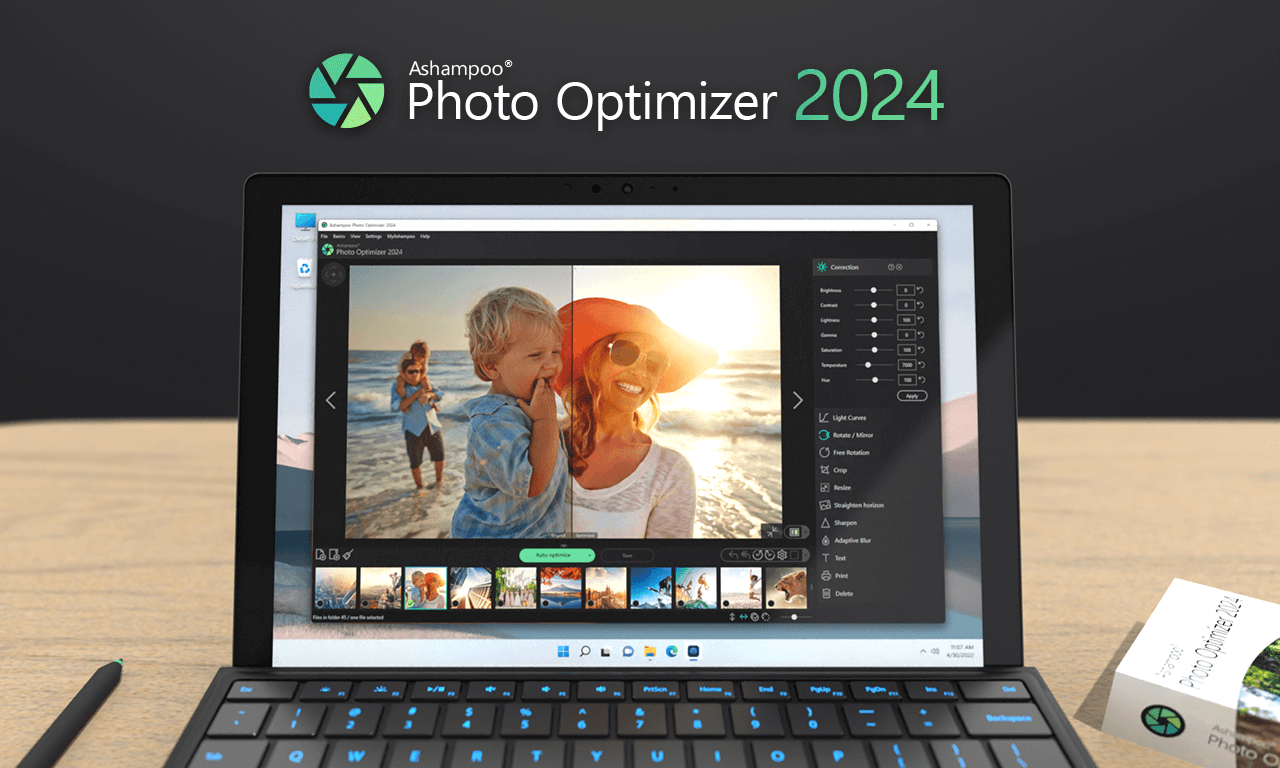
Ashampoo Photo Optimizer 2024 is a streamlined image editing utility designed for rapid photo enhancement. The software utilizes an automated analysis system that scans individual files to detect deficiencies in lighting, color temperature, and contrast. Following this assessment, a specialized algorithm recreates the image to improve vibrancy and balance, while simultaneously mitigating common technical issues such as image noise and poor contrast levels.
In addition to its one-click optimization feature, the application provides a suite of manual controls for precise fine-tuning. These include adjustments for color, brightness, contrast, and gamma, as well as the manipulation of light curves. Users can also perform standard structural edits, such as cropping, rotating, and resizing images to specific dimensions to suit different digital formats.
The 2024 version introduces several functional updates focused on perspective and personalization. The software now includes a dedicated tool to straighten image horizons, correcting alignment issues often found in handheld photography. Furthermore, it supports customizable text annotations, allowing users to add labels or personal notes directly onto their images. This combination of automated processing and manual oversight aims to simplify the editing workflow for users seeking professional results with minimal manual input.
Top 5 Reasons To Download Ashampoo Photo Optimizer 2024
- Instant One-Click Auto-Optimization: The software features a sophisticated algorithm that analyzes photos and fixes lighting, color, and contrast issues automatically.
- Comprehensive Image Rescue for Mediocre Shots: It breathes life into dull photos by removing noise and correcting washed-out colors, making them vibrant and harmonious.
- Precision Manual Editing Suite: Beyond automation, it offers deep control over brightness, contrast, gamma, and light curves for the perfectionist editor.
- Advanced Perspective and Composition Tools: The 2024 version includes horizon straightening and easy cropping to fix structural flaws in your photography.
- Customizable Personalization and Text: You can add text annotations and personal touches, making it the perfect tool for creating social media content or family albums.
In the digital age, we are all photographers. Whether it is a quick snap of our lunch, a breathtaking sunset captured from a car window, or a precious family moment, our hard drives and cloud storage are overflowing with images. However, the sheer volume of photos we take often means that many of them remain unpolished. We tell ourselves we will get around to editing them, but professional software is often too expensive, too complicated, or too slow. This is where Photo Optimizer 2024 steps in as a genuine game-changer. As a reviewer who has seen hundreds of "miracle" apps, I can tell you that finding a tool that balances power with extreme simplicity is rare. This giveaway is not just a freebie; it is an essential addition to your digital toolkit. Let’s dive deep into why you need to download this software right now.
1. The Magic of One-Click Auto-Optimization
We live in a world of instant gratification, but photo editing has traditionally been a slow, methodical process. Usually, you have to open a file, look at the histogram, adjust the levels, fiddle with the saturation, and hope you haven't over-processed the image. Photo Optimizer 2024 flips this script entirely. The standout feature—and the reason it deserves a spot on your desktop—is its sophisticated auto-optimization engine.
When you open a photo in this program, it doesn't just apply a generic filter. Instead, it performs a comprehensive analysis of the image data. It looks for weaknesses in lighting, identifies where the color temperature is "off" (perhaps too blue or too orange), and detects lack of contrast. Once the analysis is complete, a specialized algorithm recreates the photo. This isn't just a "brightness boost." It is a surgical recalibration of the image’s DNA. For the user, this happens in a single click. If you have a folder of three hundred vacation photos that look a bit "flat," you can transform them into professional-looking shots in the time it takes to make a cup of coffee. This efficiency is the hallmark of modern software design, and it is executed brilliantly here.
2. Rescuing Your "Throwaway" Shots
We’ve all been there: you take a photo of a once-in-a-lifetime moment, only to realize later that it’s dark, grainy, or "muddy." Usually, these photos end up in the digital trash bin. However, Photo Optimizer 2024 is surprisingly adept at "rescuing" these mediocre shots. The program specializes in fixing common photographic "sins" like image noise and lack of clarity.
Digital noise, that grainy texture that appears when you take photos in low light, is the enemy of a clean image. This software uses its internal logic to smooth out that noise without losing the essential details of the subject. Furthermore, it addresses the "harmony" of a photo. Sometimes a photo feels wrong, but you can’t put your finger on why. Often, it is a lack of balance between the shadows and the highlights. By automatically adjusting these parameters, the software makes the images appear more vibrant and "harmonious" to the human eye. It takes the "dullness" out of the sky and the "muddiness" out of the shadows, effectively giving you a second chance at a shot you thought was lost forever.
3. Professional Manual Controls for the Power User
While the "one-click" philosophy is the main draw, a tech reviewer would be remiss not to mention the depth available for those who want to get their hands dirty. A common critique of simple photo editors is that they are "too simple"—that they take away the user's creative agency. Photo Optimizer 2024 avoids this trap by including a robust suite of classic editing features.
Once the auto-optimization has done the heavy lifting, you can go in and fine-tune the results. You have access to color manipulation, brightness, contrast, and gamma settings. But more importantly, the software provides access to light curves. Adjusting curves is a technique usually reserved for high-end professional suites, allowing you to target specific tonal ranges for adjustment. Want the shadows to be deeper without affecting the mid-tones? You can do that. Want to brighten the highlights without blowing out the sky? The tools are right there. This balance of "automatic ease" and "manual precision" means the software grows with you. As you become more confident in your editing skills, you’ll find that the tools you need are already built-in and ready to go.
4. Fixing Perspective and Compositional Flaws
Even the best lighting in the world can't save a photo if the horizon is tilted or the subject is framed poorly. Composition is the foundation of photography, but it is also the hardest thing to get right in the heat of the moment. The 2024 version of this software introduces and refines tools that fix these structural issues with incredible ease.
The horizon straightening tool is a particular favorite. There is nothing more distracting than a beautiful ocean sunset where the water looks like it is sliding off the side of the frame. With this software, fixing a crooked horizon is a matter of seconds. Beyond that, the program supports seamless cropping and resizing. Whether you need to change a landscape shot into a portrait for a specific social media platform or you want to crop out a distracting tourist in the background, the interface makes it intuitive. It also handles perspective issues, which are common when you are photographing architecture or tall buildings from the ground. By straightening those lines, you give your photos a professional, architectural quality that looks like it was captured with a tripod and a tilt-shift lens.
5. Personalization for a Social World
Finally, we have to look at how we use photos today. We don't just look at them; we share them. We add captions, we send them as digital greeting cards, and we post them to stories. Photo Optimizer 2024 understands this shift in behavior by offering customizable text annotations.
Adding text to an image sounds simple, but many programs make it a nightmare of clunky text boxes and limited font options. In this software, the process is streamlined. You can add a personal touch, a date, a location, or a witty caption in a way that looks integrated rather than "tacked on." This makes the software an excellent tool for small business owners who need to create quick promotional graphics or for hobbyists who want to organize their digital scrapbooks. When you combine this with the classic features like image rotation and resizing, you have a complete workstation for preparing images for any destination, whether it is a high-quality print or a quick Instagram post. It’s about giving your photos a voice and a personal touch that goes beyond just the pixels.
In conclusion, Photo Optimizer 2024 is a masterclass in user-centric design. It addresses the most common frustration of modern life—having too many photos and too little time to fix them—by providing a solution that is both fast and effective. It doesn't demand that you be a professional photographer, yet it gives you the tools to produce professional-quality results. Whether you are using it for the "one-click" magic, the deep manual tweaks, or the new perspective correction tools, this software is a powerhouse.
The verdict is clear: if you care about your memories and want them to look their absolute best without spending hours behind a glowing screen, this giveaway is a must-have. It simplifies the complex, beautifies the mediocre, and puts the power of a professional darkroom right at your fingertips. Do not miss the chance to add this to your collection; your photo library will thank you.
Key Highlights of Photo Optimizer 2024:
- Speed: Edit dozens of photos in minutes rather than hours.
- Intelligent Analysis: The software learns what makes a "good" photo and applies those principles to yours.
- Versatility: Great for everything from quick social media crops to detailed curve adjustments.
- Accessibility: A clean, intuitive interface that doesn't require a manual to understand.
- Modern Features: Support for the latest formats and perspective correction needs.
When you look back at your photos five or ten years from now, you’ll want to see them in their best light. You’ll want the colors to be as vivid as the day you took the picture. Photo Optimizer 2024 ensures that your digital legacy is bright, clear, and perfectly composed. This is more than just an app; it is a caretaker for your digital memories. Download it, run your most "hopeless" photo through the auto-optimizer, and prepare to be impressed by the results. The 2024 version is the most polished iteration yet, and as a giveaway, it represents incredible value for any PC user.
Final Thought: In a sea of complicated photo editors that require monthly subscriptions and years of training, this software is a breath of fresh air. It respects your time and your intelligence, providing a straightforward path to beautiful images. If you have been looking for a reason to finally organize and edit that "Unsorted" folder on your desktop, this is it. Take advantage of this giveaway and see the difference that a specialized algorithm can make in your photography journey.

Reviews for Ashampoo Photo Optimizer 2024
Click Here to Read Reviews for Ashampoo Photo Optimizer 2024 >> Click Here to Submit Reviews for Ashampoo Photo Optimizer 2024 >>