What Does Ashampoo Photo Optimizer 9 Do?
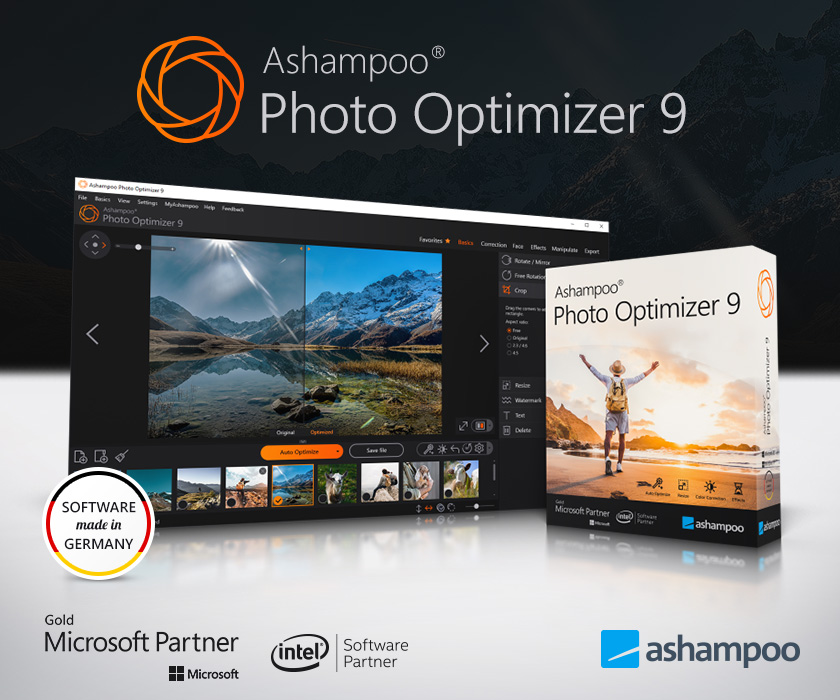
Ashampoo Photo Optimizer 9 is a streamlined image enhancement suite designed for both automated and manual photo editing. At its core, the software utilizes a sophisticated algorithm to analyze individual photos or entire folders, automatically correcting common issues such as poor lighting, color inaccuracies, and underwhelming contrast. Users can compare these changes in real-time using a built-in split-view interface, ensuring all modifications remain reversible.
Beyond automated fixes, the application provides a suite of manual adjustment tools. These include perspective correction, red-eye removal, and skin blemish retouching. Standard manipulation tools like cropping, rotating, and mirroring are included, alongside options for adding text or image-based watermarks. For creative output, the program features several artistic filters, including oil painting effects, aging, and double exposure.
The user interface in version 9 has been optimized for high contrast and is fully compatible with Windows 11. Technical improvements over previous iterations include increased processing speed and enhanced system stability. The software aims to reduce the learning curve by providing straightforward sliders for exposure, gamma, and brightness settings, making technical results accessible through a simplified, out-of-the-box workflow.
Top 5 Reasons To Download Ashampoo Photo Optimizer 9
- Sophisticated One-Click Image Optimization: The software uses a highly intelligent algorithm to analyze and fix lighting, contrast, and color errors instantly.
- Powerful Batch Processing: You can enhance entire folders of images at once, saving hours of manual labor.
- Professional Portrait Retouching Tools: Easily remove skin impurities, fix red eyes, and whiten teeth to make every subject look their best.
- Perspective Correction and Manual Fine-Tuning: Beyond automation, it offers precise controls for perspective issues and manual adjustment sliders for total creative control.
- Modern, High-Performance Interface: Fully optimized for Windows 11 with a contrast-heavy UI and lightning-fast processing speeds.
We have all been there. You spend all day at a beautiful location, snapping hundreds of photos of your family, the landscape, or a special event. You get home, load them onto your computer, and reality hits: the lighting is flat, the colors look washed out, and some of your best shots are marred by strange shadows or perspective distortion. Historically, fixing these issues meant spending hours inside a complex professional suite that requires a college degree just to navigate. But what if I told you that you could achieve professional-grade results with a single click? That is exactly why you need to jump on this giveaway for Ashampoo Photo Optimizer 9.
As a tech reviewer who has seen dozens of photo editors come and go, I am often skeptical of "one-click" solutions. Often, they are just glorified filters that slap a generic preset over your image. Ashampoo Photo Optimizer 9 is different. It is not just a filter; it is an intelligent assistant. Let’s dive deep into the five core reasons why this software belongs in your digital toolkit.
1. Sophisticated One-Click Image Optimization
The crown jewel of Ashampoo Photo Optimizer 9 is its highly sophisticated image algorithm. When you click the "Auto-Optimize" button, the software doesn't just apply a blanket setting. Instead, it performs an exhaustive analysis of the individual image. It looks for weaknesses in white balance, exposure, and color saturation. It detects where the lighting is too harsh or where the shadows have swallowed up important details.
Why is this important for you? Because most of us aren't professional photographers with ten thousand dollars in lighting equipment. We take photos in the "real world," where the sun is too bright or the room is too dark. The algorithm in this software acts like an expert editor who looks at your photo and says, "This needs more warmth in the highlights and a touch more contrast in the mid-tones." The result is a photo that looks natural, vibrant, and exactly how you remembered the scene in person. It turns mediocre snapshots into memories you actually want to print and frame.
Furthermore, the built-in split-view feature is a game-changer for this process. It allows you to see the "Before" and "After" side-by-side in real-time. You can literally see the dullness being wiped away. And because every action is instantly reversible, there is zero risk to your original files. You can experiment freely, knowing that perfection is only a click away.
2. Powerful Batch Processing
We live in an age of digital abundance. It is not uncommon to come back from a weekend getaway with five hundred photos on your SD card. The thought of opening each one individually, adjusting the levels, and saving them is enough to make anyone give up before they start. This is where the batch processing capabilities of Ashampoo Photo Optimizer 9 become an absolute lifesaver.
With this software, you can select an entire folder of images and let the optimization algorithm go to work on all of them simultaneously. It analyzes each image in the queue independently—ensuring that a dark indoor shot gets different treatment than a bright outdoor shot—while you sit back and grab a cup of coffee. This level of efficiency is usually reserved for high-end, subscription-based professional software, but here it is presented in a straightforward, accessible package.
Think about the time you will save. Whether you are a small business owner trying to clean up product photos for a website or a parent trying to organize the year's family photos, the batch processing feature transforms a daunting weekend task into a five-minute background process. It is efficiency at its finest, and for that reason alone, this giveaway is a must-download.
3. Professional Portrait Retouching Tools
Portraits are arguably the most important photos we take, but they are also the most difficult to get right. Humans are naturally attuned to noticing flaws in faces. A stray blemish, a bit of red-eye from a flash, or teeth that look slightly yellow due to indoor lighting can ruin an otherwise perfect moment. Ashampoo Photo Optimizer 9 includes a dedicated suite of portrait tools that make these "surgical" fixes incredibly easy.
Skin Impurities: The software allows you to remove spots, blemishes, and skin imperfections with surgical precision. It blends the fix with the surrounding skin texture so it looks completely natural. No more worrying about a sudden breakout ruining your new profile picture.
Red-Eye Removal: Even with modern cameras, red-eye remains a persistent problem in low-light photography. The tool in Photo Optimizer 9 identifies the red pixels and restores the natural color of the eye without making it look "dead" or artificial.
Teeth Whitening: It is a subtle touch that makes a huge difference. You can gently brighten a smile, giving your subjects a boost of confidence in the digital frame. It’s like having a digital makeup artist and lighting technician built right into your computer.
The beauty of these tools is their simplicity. You don't need to understand "layers" or "masking" or "healing brushes." You just select the tool, click the area you want to fix, and the software handles the complex math behind the scenes. It allows you to present the best version of yourself and your loved ones to the world.
4. Perspective Correction and Manual Fine-Tuning
Sometimes, the problem with a photo isn't the color or the light—it's the geometry. If you've ever stood at the foot of a tall building and pointed your camera up, you've seen perspective distortion. The building looks like it's leaning backward or narrowing at the top. This is a common issue in architectural and landscape photography. Professional photographers use expensive "tilt-shift" lenses to fix this, but Ashampoo Photo Optimizer 9 gives you a digital solution that is just as effective.
The perspective correction tool allows you to straighten lines and fix those leaning horizons with ease. It’s perfect for real estate photos, travel photography, or just making sure your vacation shots don't look like they were taken during an earthquake. Once you start using perspective correction, you’ll wonder how you ever lived without it.
But the software doesn't stop at automation. For the creative types who want to put their personal stamp on an image, there is a full suite of manual adjustments. You have precise sliders for brightness, exposure, gamma, saturation, and hue. You can add watermarks to protect your work or insert text to turn a photo into a greeting card. There are even artistic effects like oil painting filters or double exposure modes for when you want to get truly experimental. It strikes the perfect balance: it is simple enough for a beginner but deep enough for an enthusiast.
5. Modern, High-Performance Interface
Let's talk about the user experience. There is nothing worse than downloading a piece of software only to find that it looks like it was designed in 1995 and runs like a snail. Ashampoo has clearly put a massive amount of effort into the "V9" update. The interface has been completely overhauled with a new, contrast-optimized design that is easy on the eyes, even during long editing sessions.
More importantly, it is fully optimized for Windows 11. This isn't just a cosmetic badge; it means the software takes advantage of modern hardware acceleration and operating system efficiencies. It is significantly more stable and faster than previous versions. When you click a button, the change happens instantly. When you export a batch of fifty photos, it finishes in a fraction of the time you’d expect.
The learning curve is virtually non-existent. The layout is logical, with the most important tools always within reach. It doesn't overwhelm you with nested menus or cryptic icons. It is designed for "out of the box" productivity. In a world where tech can often feel frustrating and overly complicated, using a program that "just works" is a breath of fresh air. It respects your time and your computer's resources.
In conclusion, Ashampoo Photo Optimizer 9 is a rare breed of software. It bridges the gap between the "too simple" photo apps on our phones and the "too complex" professional editors on our desktops. It provides a sophisticated, AI-driven engine that does the heavy lifting for you, while still offering the manual tools you need for those special creative touches. Whether you are fixing a single cherished family heirloom or processing a thousand holiday snapshots, this program makes the process enjoyable rather than a chore.
Given that this is a giveaway, there is absolutely no reason not to add this to your collection. It is a powerful, stable, and incredibly useful tool that will immediately improve the quality of your digital life. Don't let your beautiful memories sit in a folder looking dull and uninspired. Download this giveaway, run your photos through the optimizer, and see the brilliance that was hiding in your images all along. You won't regret it.
Summary of why you should download: You get an AI-powered editor that fixes photos in seconds, a batch processor that saves you hours of time, professional-level retouching tools for perfect portraits, advanced geometric correction for architectural shots, and a modern interface that runs beautifully on the latest hardware. It is the ultimate "easy button" for high-quality photography.
Final Tip: When you first install it, try the "Auto-Optimize" on a photo you previously thought was "unsalvageable." You will be shocked at how much detail the algorithm can pull out of the shadows. It truly feels like magic.

Reviews for Ashampoo Photo Optimizer 9
Click Here to Read Reviews for Ashampoo Photo Optimizer 9 >> Click Here to Submit Reviews for Ashampoo Photo Optimizer 9 >>