What Does Auto-Duck in Real Time Do?
Auto-Duck in Real Time is a dedicated audio utility for Windows designed to automate the process of audio ducking during live streams and video recordings. The software monitors input signals—typically from a microphone or a specific application—and automatically reduces the volume of background sources like games or music when a pre-defined threshold is reached. This ensures voice clarity without requiring manual volume adjustments during a broadcast.
The application features a configurable fading module, allowing users to define the speed and smoothness of volume transitions. It supports unlimited inputs and channels, enabling complex setups where specific game sounds can be prioritized over background music while still being subject to microphone-triggered ducking. For advanced configurations, the software includes a remote-ducking feature that facilitates audio triggers across a local area network (LAN) from other computers.
Compatible with all major Windows streaming software, Auto-Duck in Real Time functions as a standalone tool that does not require complex integration. Users can activate the service via the main interface or through assigned hotkeys. The software is built to improve audio production quality for content creators by providing precise control over multi-channel audio environments without the need for external hardware mixers. The system is designed for ease of use, requiring only the press of a Start button once the initial thresholds are established.
Top 5 Reasons To Download Auto-Duck in Real Time
- Instant Professional Audio Hierarchy: Automatically prioritize your voice over game sounds and music for a broadcast-quality feel.
- Zero-Config Windows Integration: Works seamlessly with all streaming software and games with a simple "one-click" start.
- Granular Fading Control: A dedicated fading module allows you to customize exactly how smooth or sharp your audio transitions are.
- Unlimited Multi-Channel Support: Scale your production with unlimited inputs and channels, allowing for complex audio routing.
- Revolutionary LAN Remote-Ducking: Control audio levels across different computers on your network, perfect for dual-PC streaming setups.
If you have ever spent a late night editing a video or re-watching your latest live stream only to realize that your voice was completely drowned out by a loud explosion in a game or a high-energy music track, you know the frustration of poor audio balance. In the world of content creation, audio is arguably more important than video. Viewers will tolerate a grainy 720p camera, but they will click away in seconds if they can’t hear what you are saying. This is why professional broadcasters use a technique called "ducking." Traditionally, this required expensive hardware mixers or complicated software routing that could take hours to configure. Enter Auto-Duck in Real Time. This software is a game-changer for anyone looking to polish their audio without becoming a certified sound engineer. This giveaway is your ticket to a more professional, more engaging, and more streamlined production workflow. Let’s dive into the top five reasons why this is a mandatory download for your setup.
1. Instant Professional Audio Hierarchy
The first and most compelling reason to grab this software is the immediate boost it gives to your audio professionalism. When we talk about "audio hierarchy," we are talking about the order of importance of the sounds in your stream. For a YouTuber or streamer, your voice is at the top of that hierarchy. Everything else—game SFX, background music, alerts—is secondary. Auto-Duck in Real Time ensures that this hierarchy is maintained automatically and dynamically.
Think about how professional radio DJs sound. When they start talking, the music behind them instantly dips into the background, providing a subtle "bed" of sound that keeps the energy high without competing with the speech. As soon as they stop talking, the music swells back to its original volume. This is exactly what this software does for your PC audio. It monitors your microphone input and, the moment you speak, it lowers the volume of any other application you've targeted. This "ducking" effect creates a clear space for your voice, making it pop and ensuring that your audience never misses a single word of your commentary. It transforms a cluttered, noisy mess of sounds into a cohesive, professional broadcast.
The beauty of this software is that it doesn't just work on a binary "on/off" switch. It listens to the threshold of your voice. You can set it so that a quiet cough won't trigger the ducking, but your normal speaking voice will. This level of automation means you can stop worrying about your volume mixer and focus entirely on your gameplay or your audience engagement. You are essentially hiring a virtual sound technician to ride the faders for you in real-time.
2. Zero-Config Windows Integration
Tech reviewers and enthusiasts often dread the "setup phase" of new software. We have all been there: downloading a "simple" utility only to find out it requires virtual audio cables, complex MIDI routing, or third-party plugins that crash your streaming software. Auto-Duck in Real Time is the antithesis of this headache. It was built with the philosophy of "it just works."
One of the strongest selling points of this giveaway is its universal compatibility. It is designed to work with all streaming software on the Windows platform, including OBS Studio, Streamlabs, vMix, and XSplit. However, the most impressive part is that it doesn't actually require you to be streaming to work. Because it operates at the system level, it can manage your audio for Discord calls, Zoom meetings, or even just when you're recording a local gameplay clip for a later edit.
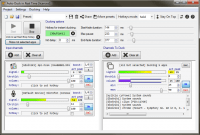
The "no setup" claim is backed by the simple interface. Once you have identified your input (usually your microphone) and the applications you want to duck (like Spotify or your game), you simply press the "Start" button. There is no need to go into your game settings and lower the master volume to 20% "just in case." You can leave your games at full volume, enjoying the immersion, while the software handles the real-time adjustments for your output. For the content creator who wants to spend more time creating and less time troubleshooting, this ease of use is an absolute godsend.
3. Granular Fading Control
Not all ducking is created equal. Many basic ducking tools or built-in filters in streaming apps are "clippy." They drop the volume too fast, creating a jarring "pop" sound, or they bring the volume back up too slowly, leaving awkward silences after you finish talking. This is where Auto-Duck in Real Time stands head and shoulders above the competition. It features a sophisticated, dedicated fading module that gives you total control over the physics of your audio.
Within the software, you can configure the ducking process to be as "smooth" or as "sharp" as you desire. If you are a high-energy "react" streamer, you might want a faster attack—where the volume drops instantly the millisecond you shout. If you are a "lo-fi" chill streamer or a podcaster, you might prefer a slow, elegant fade that feels more organic. You have control over the "Attack" (how fast it ducks), the "Release" (how fast it returns), and the "Hold" (how long it stays quiet after you stop talking).
This level of granularity allows you to "craft" your sound. You can prevent the "pumping" effect that often plagues amateur streams where the volume bounces up and down erratically. By fine-tuning these settings, you ensure that the background audio feels like a living part of the production rather than an annoyance that is being fought against. It is this attention to detail that separates a hobbyist stream from a professional production, and this software puts that power directly in your hands with an easy-to-understand visual interface.
4. Unlimited Multi-Channel Support
As your content creation journey evolves, your setup usually gets more complex. You might start with just a microphone and a game. But soon, you have a Discord chat with friends, a separate music player, soundboard alerts, and perhaps a second PC for dedicated streaming. Many audio utilities hit a wall when you try to do more than one thing at a time. Auto-Duck in Real Time is built for the power user.
The software supports unlimited inputs on unlimited channels. This means you can create highly advanced audio setups. For example, you could set up a hierarchy where your microphone ducks both your game and your music, but your Discord teammates' voices *only* duck the music, so you can still hear the game clearly while your friends are talking. You can expose certain game sounds over background music while still maintaining the primary ducking from your own microphone.
This multi-channel capability is handled with a sleekness that belies its power. You aren't limited by physical hardware inputs or the number of jacks on your motherboard. If Windows can see the audio source, Auto-Duck can control it. This flexibility is vital for YouTubers who do complex "let's plays" or for streamers who run "Just Chatting" segments with multiple guest inputs. It allows you to build a sophisticated audio environment that would normally require a physical mixer costing hundreds of dollars.
5. Revolutionary LAN Remote-Ducking
This is the "secret sauce" that makes this giveaway a must-download for serious tech enthusiasts. One of the biggest challenges for professional streamers is the "Dual PC Setup." In this configuration, one computer handles the gaming while a second computer handles the encoding and streaming. Synchronizing audio between these two machines is notoriously difficult. Often, the microphone is plugged into the streaming PC, but the game audio is on the gaming PC. How do you trigger a ducking effect on the gaming PC based on a microphone signal on the streaming PC?
Auto-Duck solves this with its Remote-Ducking feature. By leveraging your Local Area Network (LAN), the software can communicate between different computers. You can have the "Master" instance of Auto-Duck on your streaming PC (listening to your mic) send a signal over the network to a "Slave" instance on your gaming PC to lower the volume. This is a level of technological sophistication rarely seen in consumer-level software.
Even if you don't have a dual-PC setup yet, having this feature available means your software grows with your career. It eliminates the need for expensive ground-loop isolators or complex hardware mixers like the GoXLR or specialized audio interfaces. It uses the power of your network to ensure your audio is perfectly synced and balanced across your entire studio. For anyone running a multi-device setup, this feature alone is worth the download. It is a forward-thinking solution to one of the most persistent problems in high-end content creation.
Final Thoughts: Why You Need This Now
In the crowded world of digital content, standing out is about the details. We spend thousands of dollars on GPUs to get the best frame rates and hundreds on lighting to look our best on camera, but we often neglect the one thing that keeps an audience engaged: clear, balanced audio. Auto-Duck in Real Time is not just a utility; it is a polish for your digital identity.
The software is lightweight, meaning it won't eat into your CPU cycles while you are playing demanding games like Cyberpunk 2077 or Call of Duty. It is stable, it is compatible, and most importantly, it is intuitive. Whether you are using the automatic threshold triggers or mapping the ducking to a hotkey for manual control during dramatic moments, you are gaining a level of control that was previously reserved for professional TV studios.
This giveaway represents a massive opportunity to upgrade your production value for free. You are getting a tool that simplifies your workflow, improves your audience's experience, and provides advanced features like LAN ducking that you simply won't find elsewhere in this category. Don't let your voice get lost in the noise. Take control of your audio, respect your audience's ears, and download Auto-Duck in Real Time today. Your stream deserves it, and your viewers will thank you—even if they don't consciously realize why your stream suddenly sounds so much better.
Make room for your voice. Improve your quality. Download the giveaway and experience the difference that real-time, professional audio ducking can make to your content.


Reviews for Auto-Duck in Real Time
Click Here to Read Reviews for Auto-Duck in Real Time >> Click Here to Submit Reviews for Auto-Duck in Real Time >>