What Does Bitwar Image Enlarger [with AI] Do?
Bitwar Image Enlarge is an AI-driven utility designed to upscale digital imagery while maintaining visual fidelity. The software utilizes machine learning algorithms to expand image dimensions, allowing users to increase resolution from a standard 2x factor up to a maximum of 1024x. Unlike traditional interpolation methods, this tool aims to reconstruct missing data to mitigate pixelation and artifacts commonly associated with manual resizing.
The application supports a variety of source materials, including low-resolution photographs, digital illustrations, and compressed web graphics. By analyzing the original pixel structure, the AI enhances clarity and sharpens edges during the enlargement process. The user interface is built for directness, prioritizing a streamlined workflow for both individual and batch processing tasks.
Key functionalities available through this software include:
- Scalable Magnification: Users can select specific upscaling levels ranging from 2x to an expansive 1024x.
- AI Optimization: Automated algorithms work to preserve textures and fine details in complex images.
- Versatile Media Handling: The tool is optimized to process both organic photography and sharp-edged digital artwork.
This software provides a technical solution for converting legacy assets into high-definition formats suitable for modern displays or print media. It is designed for users who require high-resolution output from restricted source files without the labor-intensive process of manual recreation.
Top 5 Reasons To Download Bitwar Image Enlarger [with AI]
- Unprecedented Scaling Range: The ability to upscale images from 2x all the way to a staggering 1024x while maintaining structural integrity.
- Advanced AI-Driven Restoration: Instead of just stretching pixels, the software uses sophisticated neural networks to recreate missing details and optimize image quality.
- Streamlined Professional Workflow: A user-friendly interface that allows both beginners and professionals to achieve high-end results with just a few clicks.
- Versatility Across All Media Types: Whether it is a grainy smartphone photo, a low-resolution digital painting, or a compressed web graphic, the AI handles various textures with ease.
- Resource Efficiency and Speed: Optimized algorithms ensure that even massive upscaling tasks are completed quickly without needing a high-end server farm.
We have all been there. You find the perfect image for your project, or you dig up an old family photo from the early 2000s, only to realize it is the size of a postage stamp. In the past, trying to "blow up" that image resulted in a blurry, pixelated mess that looked more like a watercolor painting gone wrong than a high-definition photograph. For years, the "zoom and enhance" trope was nothing more than a Hollywood myth used in crime dramas. However, the era of artificial intelligence has officially turned that fiction into a reality. Today, I am looking at a tool that is a absolute game-changer for anyone who deals with visual media: Bitwar Image Enlarge. If you have the chance to grab this during a giveaway, you shouldn't just consider it—you should jump on it immediately. Let me break down exactly why this software needs a permanent spot on your hard drive.
1. Unprecedented Scaling Range
When most people talk about AI upscaling, they are usually thinking in terms of 2x or 4x. In the professional world, being able to take a 1080p image and turn it into a 4K masterpiece is already impressive. But Bitwar Image Enlarge takes this concept and pushes it to an almost unbelievable extreme. We are talking about the ability to scale images from a standard 2x all the way up to 1024x. Let that number sink in for a moment. This is not just a marginal improvement; it is a total transformation of what we consider "usable" data.
Most traditional image editors use interpolation methods like "Bicubic" or "Nearest Neighbor" to fill in the gaps when you resize an image. These methods essentially look at the existing pixels and try to guess what color should go in the new spaces by averaging the colors around them. The result is always a loss of sharpness. Bitwar’s ability to scale up to 1024x is revolutionary because it doesn't just "guess" in the traditional sense. It utilizes a deep understanding of visual geometry to expand the canvas. This means you can take a tiny icon and potentially turn it into a large-format print. For designers who work with legacy assets or photographers who need to crop into a tiny portion of a frame, this range provides a level of freedom that was previously impossible.
Imagine taking a thumbnail-sized image from an old website and scaling it up enough to use as a desktop wallpaper or even a physical poster. That is the kind of power we are dealing with here. By offering a range that far exceeds the industry standard, this software ensures that no matter how small your source material is, you have a path toward making it large, clear, and professional.
2. Advanced AI-Driven Restoration
The secret sauce behind this giveaway is the "AI" component. We use the term AI a lot these days, but in the context of Bitwar Image Enlarge, it refers to a specifically trained neural network that has "seen" millions of high-resolution images. When you ask the software to upscale a photo, it isn't just stretching the pixels; it is performing a sophisticated reconstruction. It recognizes what an eye, a leaf, a brick wall, or a piece of fabric is supposed to look like. It then "paints" those details back into the image as it enlarges it.
Optimized Image Quality is the core promise here. When you upscale an image, you often deal with "noise" or "artifacts"—those weird blocks and grains that appear in low-quality JPEGs. The AI in this software acts as a digital cleaning crew. As it increases the resolution, it simultaneously smooths out compression artifacts and sharpens edges. It differentiates between what is supposed to be "grain" (like the texture of skin) and what is "noise" (digital interference). This results in an output that often looks better than the original file ever did.
For those of us who work with AI-generated art, this is particularly vital. Many AI art generators produce stunning visuals but at relatively low resolutions. To get those images ready for a professional portfolio or print, you need a tool that understands the nuances of digital art. Bitwar’s AI is tuned to handle these complex textures, ensuring that the final result remains crisp, clear, and free of the "plastic" look that lesser upscalers often produce.
3. Streamlined Professional Workflow
As a tech reviewer, I see a lot of powerful software that is unfortunately ruined by a terrible user interface. You shouldn't need a PhD in computer science to resize a photo. One of the most compelling reasons to download Bitwar Image Enlarge is its commitment to simplicity. The developers have managed to hide the immense complexity of their algorithms behind a clean, intuitive "one-click" philosophy. This is software designed for the "get it done" crowd.
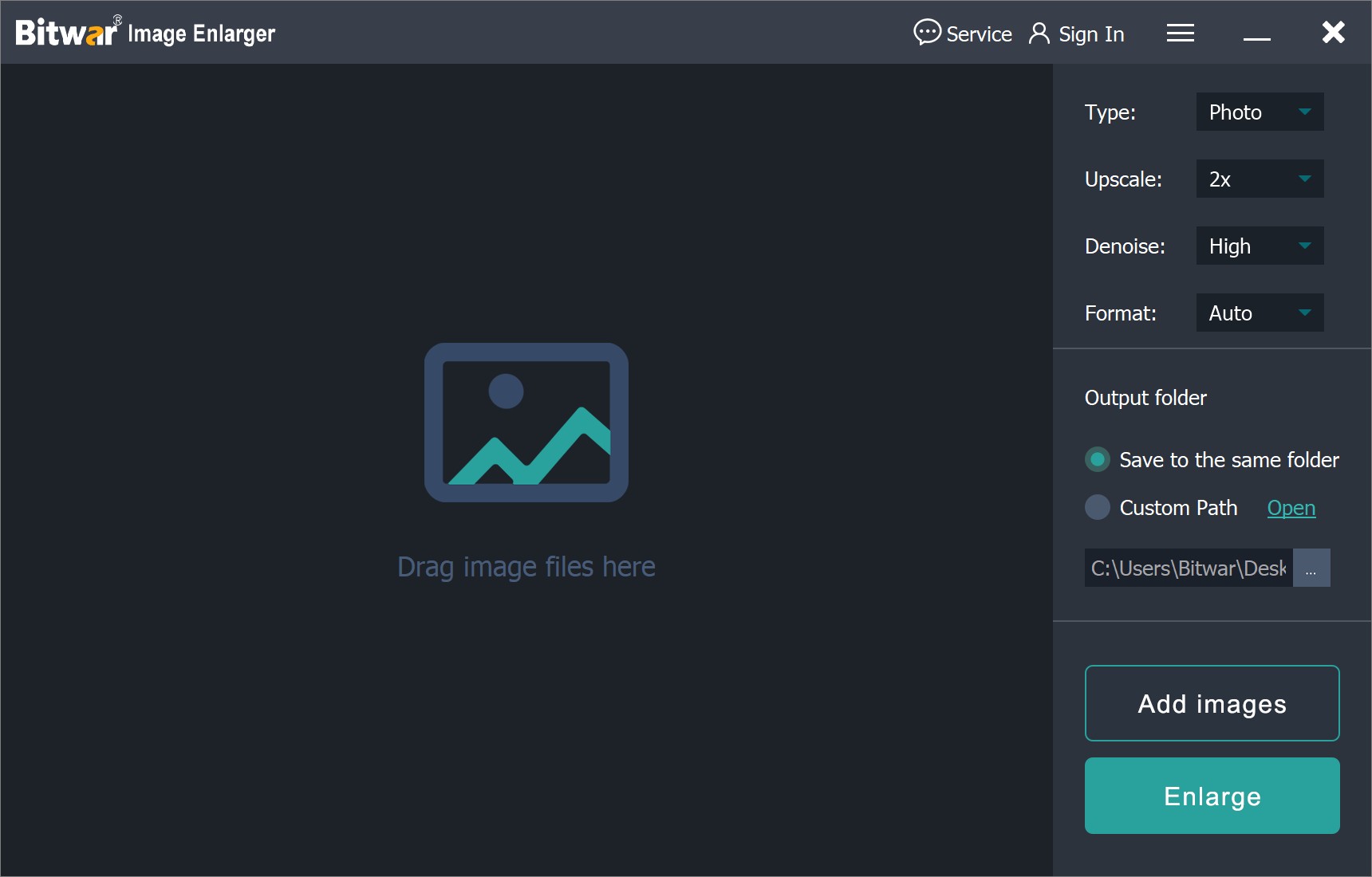
The workflow is as simple as it gets: you drag your image into the workspace, select your desired magnification level (whether that is a modest 2x or a massive 1024x), and let the software do its magic. There are no overly complicated sliders that require hours of fine-tuning to get right. The AI is smart enough to handle the optimization automatically. This makes it an essential tool for small business owners, social media managers, and hobbyists who don't have the time to master complex suites like Photoshop or GIMP.
Furthermore, the software is built for speed. Even though the AI is performing billions of calculations to reconstruct your image, the processing time is remarkably fast. This efficiency means you can process a batch of images in the time it would take to manually edit just one in a traditional program. In the modern world, time is our most valuable resource, and this tool is a massive time-saver.
4. Versatility Across All Media Types
One of the biggest pitfalls of many upscaling tools is that they are "one-trick ponies." Some are great at faces but terrible at landscapes. Others are good for text but ruin the texture of a photograph. Bitwar Image Enlarge stands out because of its incredible versatility. It is a multi-purpose tool that adapts to whatever you throw at it. Whether you are dealing with a photograph, a hand-drawn illustration, a logo, or a 3D render, the results are consistently high-quality.
Think about the different scenarios where this becomes useful:
- Legacy Photo Restoration: Take those 1-megapixel photos from your first digital camera and bring them into the modern era with enough resolution to print for a family album.
- Graphic Design: If a client sends you a low-res logo file that they "found on their website," you can upscale it to a high-resolution version suitable for print marketing materials without the need to manually trace it in a vector program.
- E-commerce: If you are selling products online and only have small manufacturer photos, you can upscale them to show off the fine details to your customers, which significantly boosts conversion rates.
- Digital Art: Artists can paint on smaller canvases to save on system resources and then use Bitwar to upscale the final piece for high-quality distribution.
The AI optimization ensures that the specific characteristics of each media type are preserved. It keeps the hard edges of a logo sharp and the soft gradients of a sunset smooth. This versatility means that once you download this giveaway, you will find yourself reaching for it constantly, regardless of the project you are working on.
5. Resource Efficiency and Value
Let's talk about the "giveaway" aspect of this. In the current software market, everything is moving toward a subscription model. You end up paying month after month for tools that you might only use a few times a week. Getting a powerful, AI-driven tool like Bitwar Image Enlarge as a giveaway is a massive "win" for your digital toolkit. You are gaining access to professional-grade technology without the professional-grade price tag.
Moreover, the software is surprisingly light on system resources. Many AI tools require a top-of-the-line graphics card (GPU) with massive amounts of VRAM to function at all. Bitwar has optimized their software to be accessible. You don't need a $3,000 gaming rig to upscale your images. It runs efficiently on standard consumer hardware, making the "power of the cloud" feel like it’s living right on your local machine. This optimization is a testament to the engineering behind the app; it’s not just about the AI "brain," but also about how that brain communicates with your computer’s hardware.
Conclusion: Why You Need To Act Now
In the tech world, we often talk about "essential" software. Usually, that list includes a browser, an office suite, and maybe a security tool. But in an age where visual communication is the primary way we share information, a high-quality image upscaler has moved into the "essential" category. Bitwar Image Enlarge offers a combination of power, ease of use, and versatility that is rare to find in a single package.
The ability to scale up to 1024x is a feature that sets this software apart from almost everything else on the market. It gives you the "safety net" of knowing that no matter how low-quality your source file is, you have the technology to save it. When you combine that with the AI's ability to optimize and clean up images as it enlarges them, you have a tool that essentially performs magic on your screen.
If you are a photographer, a designer, a student, or just someone who wants their old memories to look better on a modern 4K screen, this is the tool for you. Giveaways for software of this caliber do not happen every day. It is an opportunity to upgrade your digital workflow and ensure that you are never limited by pixel counts or resolution again. Don't let your images stay small and blurry. Download this tool, run a few of your favorite photos through it, and prepare to be amazed at the detail you never knew was there.
To summarize, Bitwar Image Enlarge is more than just a utility; it is a creative enabler. It removes the technical barriers of low-resolution files and lets your creativity—and your images—shine at any size. From 2x to 1024x, the quality is optimized, the process is simple, and the results are professional. Make sure you don't miss out on adding this powerhouse to your collection.

Reviews for Bitwar Image Enlarger [with AI]
Click Here to Read Reviews for Bitwar Image Enlarger [with AI] >> Click Here to Submit Reviews for Bitwar Image Enlarger [with AI] >>