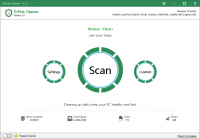
A Tool to clean and speed up your PC
Clean junk and temporary files from your PCs and optimize your performance to keep your PC fast and Clean. Automate both PC Cleaning and Memory optimizing to keep your PC clean at all time

A Tool to clean and speed up your PC
Clean junk and temporary files from your PCs and optimize your performance to keep your PC fast and Clean. Automate both PC Cleaning and Memory optimizing to keep your PC clean at all time
This software utility is designed to maintain Windows system health by targeting residual data and optimizing resource allocation. Users can deploy the tool to perform comprehensive scans that identify and remove junk files, temporary system logs, and browser cache data. By purging these unnecessary files, the application restores disk space and minimizes storage overhead that can lead to system lag.
The service focuses on two primary functions: system cleaning and memory management. Beyond manual cleanup, the tool features automation capabilities that allow users to schedule maintenance tasks. This ensures the operating system remains clear of digital clutter without requiring frequent manual intervention. Additionally, the software includes a memory optimization module that monitors RAM usage in real-time, clearing inactive processes to preserve system responsiveness.
Key features include:
By integrating these utilities into a single interface, the software provides a centralized solution for preventing the performance degradation typical of long-term PC usage. It serves as a maintenance layer intended to keep hardware running efficiently through systematic software hygiene and proactive resource management.
If you have ever felt the frustration of a computer that seems to get slower with every passing day, you are not alone. It is an inevitable part of the digital lifecycle: operating systems accumulate clutter, background processes hog resources, and eventually, that "new car smell" of your PC fades into a sluggish, stuttering experience. However, there is a solution that promises to restore your machine to its former glory. This giveaway offers a powerful utility designed by xSecuritas specifically to tackle these issues head-on. Before we dive into the technical details of why this software is a must-have, here are the top five reasons you need to download it today:
Every time you browse the web, install a program, or even just boot up your Windows machine, your system generates small bits of data. These are often labeled as temporary files, cache files, or system logs. In theory, these files are meant to help things run smoother in the short term, but in practice, they are rarely deleted by the OS once their purpose has been served. Over months and years, these files can grow from megabytes to tens of gigabytes, effectively choking your storage space and slowing down file indexing.
This software acts as a high-performance digital vacuum. It doesn't just look at the obvious folders; it scans deep within the system architecture to find obsolete registry entries, leftover installation fragments, and browser history that your typical "Disk Cleanup" tool often misses. When your hard drive is nearly full, it has to work harder to find space to write new data, which leads to fragmentation and lag. By clearing out the junk, you are giving your storage drive—whether it is an older HDD or a modern SSD—the room it needs to breathe and operate efficiently. This is not just about freeing up space for your photos and videos; it is about removing the weight that slows down every click and keystroke.
In the world of tech optimization, we often talk about efficiency ratios. A system burdened by 10GB of temporary files is inherently less efficient than a clean one. This tool ensures that your file system remains lean. For gamers, this means faster load times. For professionals, it means snappier responses in resource-heavy applications like photo editors or spreadsheets. It is the first and most critical step in any PC tune-up, and this tool handles it with surgical precision.
Random Access Memory (RAM) is the "short-term memory" of your computer. Every application you open takes a slice of that memory. The problem is that many applications are "memory-hungry" and do not always release the RAM they were using even after you close them. This is known as a memory leak. Furthermore, background processes that you didn't even know were running can slowly nibble away at your available resources until your PC starts to swap data to the much slower hard drive—a process called "paging" that results in massive slowdowns.
What sets this tool apart is its intelligent memory optimizer. Instead of just "flushing" the RAM (which can sometimes cause system instability), it intelligently monitors how memory is being used. It identifies processes that are idling or consuming more than their fair share and reclaims that space for the tasks you are actually focusing on. If you are a multitasker who keeps dozens of browser tabs open while trying to run a video call and a document editor, you have likely experienced the "stutter" that happens when your RAM hits its limit.
By using this tool, you are essentially giving your PC a virtual RAM boost. It ensures that your most important tasks always have the resources they need. As a tech reviewer, I have seen many "RAM boosters" that are nothing more than snake oil, but the logic used by xSecuritas focuses on optimizing the allocation of memory rather than just clearing it blindly. This leads to a much smoother user experience, fewer system crashes, and an overall feeling of responsiveness that makes your PC feel brand new again.
The biggest reason most computers slow down is not a lack of available software—it is a lack of consistent maintenance. Most users know they should clean their systems, but who has the time to run a manual scan every single day? We are all busy, and digital housekeeping usually falls to the bottom of the priority list. This is where the automation features of this tool truly shine.
With this giveaway, you are getting more than just a manual scanner; you are getting a silent digital assistant. You can configure the software to perform its cleaning and optimization routines automatically. Imagine waking up every morning to a PC that has already been scrubbed of the previous day's junk and had its memory optimized for the workday ahead. This "set it and forget it" mentality is exactly what modern users need. You don't have to be a tech expert to maintain a fast machine; you just need the right tools working in the background.
Automation also prevents the "snowball effect" of PC degradation. When you ignore maintenance for months, the problems become harder to fix. By automating the process, the software catches small issues before they turn into system-wide slowdowns. It keeps your PC in a state of constant readiness. For anyone who uses their computer for work, this level of reliability is priceless. You no longer have to worry about your computer deciding to "hang" right before a deadline because it finally ran out of resources.
One of the most common complaints I hear about system utility software is that the software itself is too "heavy." There is a certain irony in downloading a program to speed up your computer, only to have that very program consume 20% of your CPU power. Many competitors in the market are bloated with unnecessary features, advertisements, and "telemetry" that actually contributes to the very problem they claim to solve.
This tool from xSecuritas is a breath of fresh air in that regard. It has been engineered with a philosophy of minimalism and efficiency. When it is not actively cleaning or optimizing, it sips a negligible amount of power. It doesn't nag you with constant pop-ups or try to sell you additional services. It does exactly what it says on the tin: it cleans and it speeds up. This lightweight nature makes it an ideal choice for older laptops or budget desktops that don't have a lot of processing power to spare.
Being lean is a mark of high-quality software engineering. It shows that the developers prioritized the user's experience over adding "fluff." For power users, this is a major selling point. We want tools that are sharp, effective, and out of the way. This tool respects your system's resources, ensuring that every cycle of your CPU is dedicated to the tasks that matter to you, while the maintenance happens quietly and efficiently in the wings.
We often think of "speeding up a PC" as a purely software-based benefit, but the reality is that software health directly impacts hardware health. When a computer is cluttered and poorly optimized, the hardware has to work significantly harder. The CPU runs at higher temperatures because it is constantly processing "zombie" background tasks. The hard drive or SSD experiences more "read/write" cycles as it struggles with a fragmented or overfilled file system. The cooling fans have to spin faster and longer to dissipate the extra heat.
Heat is the number one enemy of electronic components. By using this tool to optimize your performance, you are effectively lowering the thermal stress on your machine. A clean PC is a cool PC. When your system isn't struggling to manage thousands of unnecessary temporary files or fighting over leaked memory, it generates less heat. Over the course of several years, this can significantly extend the lifespan of your motherboard, your processor, and your storage drives.
Think of it like regular oil changes for a car. You don't just do it so the car goes faster; you do it so the engine doesn't burn out. This giveaway is essentially a preventative maintenance kit for your hardware. In an era where new computers can cost thousands of dollars, spending a little time (or letting a tool spend that time for you) to protect your investment is common sense. This software helps you get the maximum ROI out of your current hardware, delaying the need for an expensive upgrade for as long as possible.
In the fast-paced world of technology, we often accept "slowness" as a natural consequence of aging. We assume that after two years, a laptop is just destined to be slower. But that is a myth. Most of the time, the hardware is still perfectly capable; it is simply buried under layers of digital grime. This tool provides you with the shovels and brushes needed to dig your PC out of that hole.
As a reviewer, I see hundreds of apps that claim to optimize your system, but few do it with the cleanliness and automation offered here. The fact that this is currently available as a giveaway makes it an absolute no-brainer. You are getting a premium utility that provides deep cleaning, intelligent RAM management, and automated maintenance—all without the bloat of traditional "optimization" suites.
Efficiency, speed, and reliability are the three pillars of a great computing experience. Whether you are a student trying to make an old laptop last through finals, a professional who needs every ounce of power for rendering, or a casual user who just wants to browse the web without the spinning wheel of death, this tool is designed for you. Don't wait until your system crashes or your hard drive reaches its breaking point. Take control of your digital environment now. Download this tool, run the optimization, and experience the satisfaction of a PC that finally works as fast as you do. It is time to stop fighting your computer and start enjoying it again.
In summary, the combination of junk removal, memory management, and automation creates a trifecta of performance that is hard to beat. When you add in the benefit of hardware protection and the lightweight design, it becomes clear why this is the top recommendation for anyone looking to refresh their Windows experience. This isn't just a download; it's a performance insurance policy for your most important tool. Get it today and see the difference for yourself.
You are allowed to use this product only within the laws of your country/region. SharewareOnSale and its staff are not responsible for any illegal activity. We did not develop this product; if you have an issue with this product, contact the developer. This product is offered "as is" without express or implied or any other type of warranty. The description and overview of this product on this page are not a recommendation, endorsement, or review; they are for marketing purposes. The quality and performance of this product is without guarantee. Download or use at your own risk. If you don't feel comfortable with this product, then don't download or use it.

Reviews for Drprot Cleaner
Click Here to Read Reviews for Drprot Cleaner >> Click Here to Submit Reviews for Drprot Cleaner >>