What Does Geekersoft PDF Converter Do?
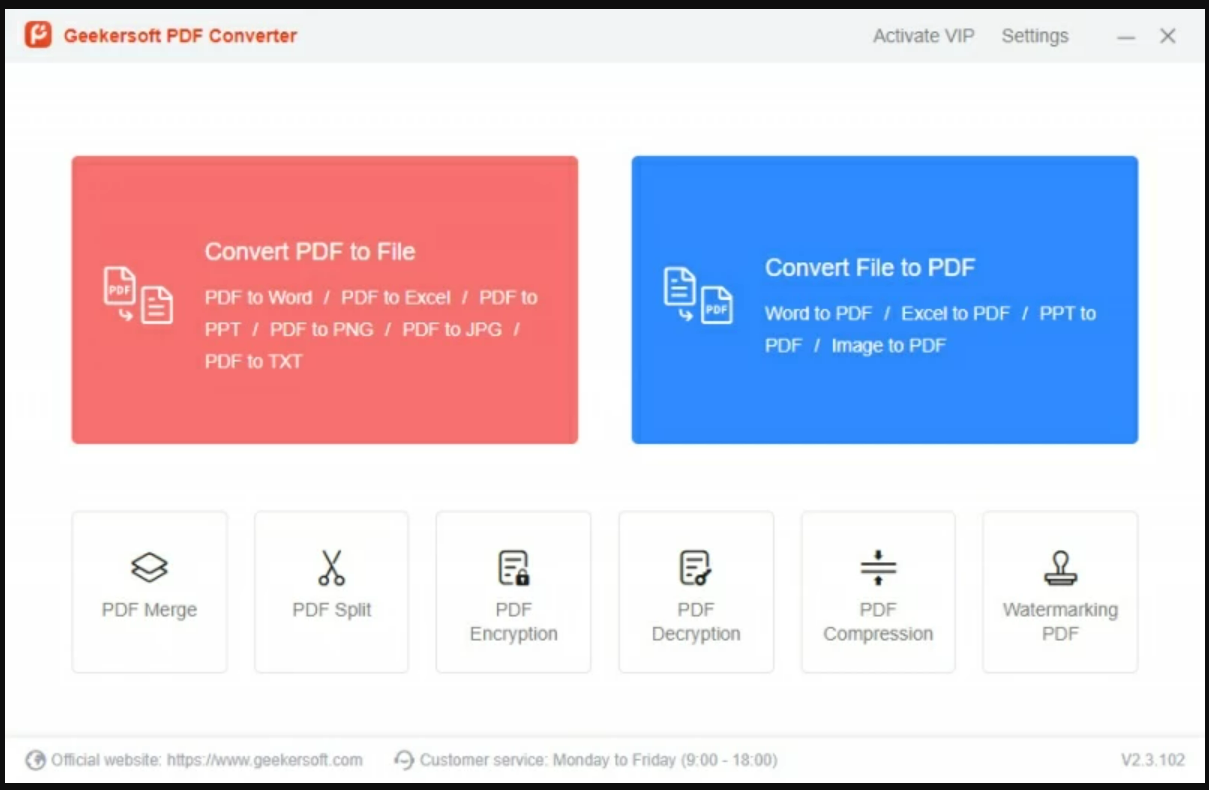
Geekersoft PDF Converter is a productivity suite designed to streamline the handling of PDF documents. The software provides a central hub for converting PDF files into various editable formats, including Microsoft Word, Excel, PowerPoint, and plain text. It also facilitates the reverse process, turning standard Office documents and images into PDFs with a single click.
A core feature of the utility is its focus on fidelity; the software maintains the original document's fonts, layouts, and formatting during the conversion process. Beyond simple file transformation, the toolkit includes several administrative features for PDF management:
- Merging and Segmentation: Combine multiple files into a single document or split large PDFs into smaller parts.
- Compression: Reduce file sizes for easier sharing while maintaining document integrity.
- Security: Manage document access through encryption and decryption tools.
- Watermarking: Add custom watermarks to files for branding or security purposes.
The application aims for efficiency and reliability, catering to users who need to process documents quickly. By integrating conversion, editing, and security functions into one interface, Geekersoft PDF Converter provides a comprehensive toolset for high-volume document workflows.
Top 5 Reasons To Download Geekersoft PDF Converter
- Seamless Multi-Format Bidirectional Conversion: Effortlessly switch between PDF and all Microsoft Office formats (Word, Excel, PPT) or images with a single click.
- Pixel-Perfect Layout Preservation: Retain every original font, table, image, and formatting element without the nightmare of manual restructuring.
- Comprehensive All-in-One PDF Management: A complete suite of tools including merging, splitting, compressing, and watermarking in one streamlined package.
- Advanced Document Security and Privacy: Take control of your sensitive data with high-level encryption, decryption, and professional-grade watermarking features.
- Unmatched Speed and User-Centric Efficiency: Join tens of millions of users who rely on its lightning-fast processing to eliminate workflow bottlenecks and boost productivity.
If you have ever spent your afternoon screaming at a computer screen because a PDF refused to let you edit a single typo, then listen up. We have all been there. You receive a critical document, and it is locked behind the digital fortress that is the Portable Document Format. You try to copy and paste, and the formatting explodes. You try to use a "free" online converter, and your data ends up on a server in a different hemisphere, or worse, the resulting Word document looks like a jigsaw puzzle put together by a toddler. This is why you need to pay attention to this giveaway. We are talking about Geekersoft PDF Converter, a tool that has quietly become a powerhouse for tens of millions of users globally. As someone who tests productivity software for a living, I can tell you that finding a reliable, fast, and comprehensive PDF solution is like finding a needle in a haystack. This giveaway is your chance to stop fighting your files and start mastering them.
1. Seamless Multi-Format Bidirectional Conversion
The core of any great PDF tool is its ability to translate data from one "language" to another without losing the meaning. Geekersoft PDF Converter excels here because it doesn't just do a "rough pass." It handles the heavy lifting of converting PDFs into editable Word documents, data-ready Excel spreadsheets, and presentation-ready PowerPoint decks. But it doesn't stop there. It also supports text and various image formats. The "bidirectional" aspect is what really sells it for me. Whether you are turning a PDF into an Office doc or taking an existing Office file and locking it down into a professional PDF, the process is handled with a level of sophistication that most lightweight apps simply cannot match.
Think about the time you waste trying to recreate a table in Excel that someone sent you as a PDF. Manually typing in those numbers is a recipe for disaster and human error. With this software, you can convert that PDF directly back into a functional spreadsheet. It recognizes the grid, the data points, and the structure. This isn't just a convenience; it is a massive productivity multiplier. In the fast-paced world of modern business, being the person who can "unlock" a document in seconds makes you an invaluable asset. This giveaway puts that power directly into your hands with a simple, one-click interface that removes the learning curve entirely.
2. Pixel-Perfect Layout Preservation
We need to talk about the "formatting headache." Most conversion tools are "content-aware" but "layout-blind." They see the text, but they have no idea where it is supposed to go. You end up with images overlapping paragraphs, fonts that have been swapped for basic Arial, and tables that have completely disintegrated. Geekersoft PDF Conversion has built its reputation on maintaining the integrity of the original file. When the developers say they preserve all fonts and formats, they aren't exaggerating. This is critical for professional environments where branding and document structure are non-negotiable.
Imagine you are working on a legal contract or a high-end marketing brochure. If the font changes or the margins shift even slightly, the entire document loses its professional sheen. By using this tool, you ensure that the italicized notes, the bolded headings, and the specific typeface choices remain exactly as the creator intended. It respects the visual hierarchy of the document. For a tech reviewer like me, this is the "gold standard" of conversion. If I have to spend thirty minutes fixing the formatting after the conversion is done, then the tool hasn't actually saved me any time. This software delivers a "ready-to-edit" file, not a "project-to-fix" file.
3. Comprehensive All-in-One PDF Management
Why download five different apps when one can do it all? One of the biggest mistakes users make is cluttering their systems with "one-trick pony" utilities—one for merging, one for compressing, one for watermarking. Geekersoft provides a holistic ecosystem. Beyond the conversion engine, you get a full suite of PDF tools that are "worry-free and efficient." Need to combine three different reports into one master file for a board meeting? Use the merging function. Have a 50MB file that is too big for an email attachment? The compression tool will shrink it down without making the text unreadable.
The segmentation or "splitting" feature is equally vital. Sometimes you only need pages 5 through 10 of a 200-page manual. Instead of sending the whole behemoth, you can cleanly extract exactly what you need. This level of control is what separates basic users from power users. Having all these tools under one roof means you don't have to worry about compatibility issues or learning different interfaces. It is a unified experience designed to get you in and out of your tasks as quickly as possible. This giveaway is essentially a "Swiss Army Knife" for your digital office, and once you have it, you will wonder how you ever managed without it.
4. Advanced Document Security and Privacy
In an era where data breaches are front-page news, you cannot afford to be lax with your document security. This is where Geekersoft PDF Conversion truly shines for the security-conscious professional. The software includes robust encryption and decryption capabilities. If you are handling sensitive financial data, medical records, or proprietary business plans, you can password-protect your PDFs directly within the app. This ensures that even if the file is intercepted, the contents remain unreadable to unauthorized parties.
Furthermore, the watermarking feature is a must-have for anyone dealing with intellectual property. Whether you are a photographer protecting your portfolio or a business owner marking a document as "Confidential" or "Draft," the ability to overlay custom watermarks is invaluable. It provides a layer of professional branding and security that discourages unauthorized sharing. And let’s not forget the "decryption" aspect—if you have the rights to a protected file but need to remove the password for easier access within your team, this tool handles it smoothly. By downloading this giveaway, you aren't just getting a converter; you are getting a digital vault and a branding tool all in one.
5. Unmatched Speed and User-Centric Efficiency
Time is the one resource we can’t get more of. The tech world is full of "bloatware" that takes forever to load and even longer to process a simple task. This software is the antithesis of that. It is designed for "fast and reliable" processing. When they mention "one-click" conversion, they mean it. The interface is stripped of unnecessary fluff, focusing instead on a streamlined workflow that respects the user's time. This is likely why tens of millions of users have flocked to it. When a tool works this quickly, it stops being a "task" and starts being a "reflex."
Efficiency isn't just about how fast the "export" bar moves; it's about how many steps it takes to get there. With Geekersoft, the path from "unusable PDF" to "editable Word doc" is the shortest line possible. For students facing tight deadlines, or employees dealing with a mountain of paperwork, this speed is a lifesaver. You can process batches of documents in the time it would take a web-based converter to upload a single file. Plus, because it is a local application, you aren't dependent on your internet upload speed or the stability of a website's server. It is reliable, consistent, and incredibly fast. You want this on your hard drive before the next time a "rush project" hits your desk.
Final Thoughts: Why You Should Grab This Now
We often overlook the tools we use the most until they fail us. We take for granted that we can "open" a file, but we feel the pain acutely when we can't "change" it. The reality of the modern workspace is that the PDF is the universal currency of information, yet it remains one of the most difficult formats to manipulate. This giveaway of Geekersoft PDF Conversion represents a rare opportunity to upgrade your digital toolkit with a professional-grade solution for free.
Think about the alternatives. You could pay for a monthly subscription to the "big name" Adobe products, which can cost hundreds of dollars a year. Or you could risk your privacy with "free" online tools that often embed malware or sell your data. This software offers a third path: a high-performance, secure, and comprehensive desktop application that respects your privacy and your wallet. It is built for the user who demands quality but values simplicity. The ability to maintain original layouts, the security of local encryption, and the sheer variety of tools (merging, splitting, watermarking) makes this a no-brainer.
In the world of tech reviews, we look for "frictionless" experiences. We want software that stays out of the way and just does the job it was hired to do. This software fits that description perfectly. It handles the complexities of PDF metadata and layout engines behind the scenes, leaving you with nothing but a perfect document on the other side. Whether you are a student, a freelancer, a small business owner, or a corporate executive, the "PDF problem" is universal. This is the universal solution. Don't wait until you are staring at a document you can't edit at 2:00 AM. Download this giveaway, install the tool, and give yourself the peace of mind that comes with knowing you can handle any file that comes your way. It is fast, it is reliable, and for a limited time, it is yours for the taking. This is the upgrade your workflow deserves.
To summarize, you are getting a world-class converter that handles Word, Excel, PPT, and Images; a layout engine that protects your fonts and formatting; a complete PDF toolbox for merging and compressing; top-tier security for your sensitive data; and the proven reliability that comes with a user base of tens of millions. There is simply no reason to pass this up. Make your digital life easier and grab this giveaway today.

Reviews for Geekersoft PDF Converter
Click Here to Read Reviews for Geekersoft PDF Converter >> Click Here to Submit Reviews for Geekersoft PDF Converter >>