What Does Lorien Cleaner PRO Do?
Lorien Cleaner is a comprehensive system utility suite designed to enhance Windows performance through deep cleaning and privacy management. The software targets common performance bottlenecks by identifying and removing redundant system files, temporary data, and cached items that accumulate over time. By streamlining background processes and maintaining disk health, the tool aims to mitigate system latency and improve overall responsiveness.
The application includes several specialized modules for hardware resource management and data security:
- System Maintenance: Users can repair registry issues and clean up drive space to reclaim storage capacity occupied by junk files.
- Privacy Protection: The tool eliminates digital footprints by clearing browser histories, cookies, and various privacy tracks left by system operations.
- Application Management: It features a built-in uninstaller for removing unwanted software and a startup manager to disable unnecessary programs that execute during the boot process.
- Data Security: A permanent file erasure utility is included to shred sensitive documents, ensuring they cannot be recovered by standard forensic software.
By consolidating these functions into a single interface, Lorien Cleaner provides a centralized hub for maintaining a computer's software environment. The utility is engineered to return a system to its peak operational state by addressing the core causes of software-induced slowdowns.
Top 5 Reasons To Download Lorien Cleaner PRO
- Complete System Revitalization: It restores your computer to its original, out-of-the-box speed by eliminating system bottlenecks.
- Advanced Deep Cleaning Technology: It goes beyond basic file deletion to recover gigabytes of wasted drive space hidden in system caches and temporary folders.
- Military-Grade Privacy Protection: The software wipes away your digital footprint and includes a permanent file erasure tool to ensure deleted data stays deleted.
- All-in-One Maintenance Toolkit: From managing startup applications to a powerful uninstaller, it replaces multiple utilities with a single, efficient interface.
- Proactive Problem Repair: It identifies and repairs underlying system issues that cause crashes, freezes, and annoying software lag.
If you have been using your computer for more than a few months, you have likely noticed a frustrating trend. That lightning-fast machine you unboxed with such excitement has probably started to feel a bit sluggish. Maybe it takes a few seconds longer to boot up, or perhaps you have noticed that spinning wheel of death appearing more frequently when you try to open your favorite applications. This isn’t just your imagination; it is the natural accumulation of digital "grime." Every time you browse the web, install a program, or even just move files around, your operating system leaves behind a trail of junk. This is exactly where Lorien Cleaner comes into play, and why this specific giveaway is the most important download you will make this year.
As a tech reviewer, I see hundreds of "system optimizers" every year. Most of them are nothing more than flashy interfaces that do what your built-in Disk Cleanup already does. However, Lorien Cleaner is a different breed of utility. It is a comprehensive suite designed to dig deep into the architecture of your OS to find the performance drains that standard tools miss. In this article, I am going to break down why this software is a game-changer for anyone looking to reclaim their PC’s performance.
1. Complete System Revitalization
The primary reason anyone looks for a cleaner is speed. We live in an era where we expect instant gratification from our technology. When your PC starts to lag, it doesn't just waste your time; it interrupts your workflow and ruins your entertainment experience. Lorien Cleaner is specifically engineered to make your computer run like brand new. But how does it actually achieve this without you having to perform a fresh installation of Windows?
The software looks at the system holistically. It identifies processes that are hogging CPU cycles and memory resources. Over time, Windows accumulates various background tasks and services that may have been necessary at one point but are now simply dead weight. By optimizing the way your system handles these processes, Lorien Cleaner effectively removes the "invisible weight" holding back your processor. Imagine your computer is a runner; over time, it has picked up heavy rocks in its pockets. Lorien Cleaner empties those pockets, allowing the system to sprint once again.
Furthermore, the software addresses the registry and system configuration files that often become bloated or corrupted. When these files are optimized, the communication between your hardware and software becomes more efficient. This results in snappier window transitions, faster application launches, and a significantly more responsive user interface. If you are tired of clicking an icon and waiting five seconds for something to happen, this is the solution you have been looking for.
2. Advanced Deep Cleaning Technology
One of the biggest headaches for modern PC users is the "Low Disk Space" warning. Even if you have a massive hard drive or a fast SSD, you would be shocked at how quickly it fills up with garbage. We aren't talking about your photos or documents; we are talking about system logs, temporary internet files, thumbnail caches, and leftover fragments from software you uninstalled months ago. Lorien Cleaner provides the most powerful junk cleaning available on the market today.
What sets it apart is its Deep Scan capability. Standard cleaners often only look at the surface-level temporary folders. Lorien Cleaner dives into the hidden directories where Windows stores update backups, error reports, and shader caches. These files can easily take up 10GB to 20GB of space on an average user's machine without them ever knowing. By clearing this drive space, you aren't just getting more room for your files; you are also improving the health of your drive. SSDs, in particular, perform better when they aren't pushed to their maximum capacity. By maintaining a healthy amount of free space, Lorien Cleaner actually helps extend the lifespan of your hardware.
The cleaning process is also incredibly safe. Many users are afraid that "cleaning" their PC will result in the loss of important data. Lorien Cleaner uses a sophisticated filtering system to ensure that only redundant, non-essential files are targeted. You get all the benefits of a cleared-out drive with none of the risks associated with manual file deletion.
3. Military-Grade Privacy Protection
In today's digital landscape, privacy is not a luxury; it is a necessity. Every time you use your computer, you are leaving a digital footprint. Your browser history, cookies, search queries, and even the list of recently opened documents can tell a very detailed story about your life, your work, and your interests. If you share a computer or use a laptop in public spaces, this data is a liability. Lorien Cleaner treats your privacy with the seriousness it deserves.
The software includes a dedicated suite for eliminating privacy tracks. It wipes your browsing history across all major browsers, clears out your download history, and empties the various caches that websites use to track your behavior. This doesn't just keep you safe from prying eyes; it also helps prevent targeted advertising from following you around the web. But the privacy protection goes even deeper than that.
One of the standout features of Lorien Cleaner is its Permanent File Erasure tool. Did you know that when you "delete" a file and empty the Recycle Bin, the data isn't actually gone? It stays on your hard drive until it is overwritten by new data, meaning anyone with basic recovery software can bring those files back to life. Lorien Cleaner’s shredding component uses advanced algorithms to overwrite the data multiple times, making it physically impossible to recover. Whether you are deleting sensitive financial documents or private photos, you can rest easy knowing that once they are gone, they are gone for good. This feature alone makes the giveaway worth the download for any security-conscious user.
4. All-in-One Maintenance Toolkit
Usually, to get a truly clean and optimized PC, you would need four or five different pieces of software. You would need a startup manager, a dedicated uninstaller, a disk cleaner, and a privacy tool. Lorien Cleaner consolidates all of these into a single, sleek package. This "Swiss Army Knife" approach to PC maintenance is exactly what the modern user needs. It reduces the clutter on your own machine by replacing multiple heavy applications with one lightweight utility.
The Startup Manager is particularly impressive. Many applications "sneak" into your startup routine when you install them, causing your PC to take forever to reach the desktop after you turn it on. Lorien Cleaner allows you to see exactly what is launching at boot and disable unnecessary programs with a single click. This can shave seconds, or even minutes, off your boot time.
Additionally, the Advanced Uninstaller is a lifesaver. When you use the default Windows "Add or Remove Programs" feature, it often leaves behind folders in your AppData directory and keys in your Registry. These "ghost files" accumulate over time and cause system instability. Lorien Cleaner’s uninstaller performs a secondary scan after the standard uninstallation to find and destroy these leftovers, ensuring that unwanted applications are completely purged from your system. It is this level of thoroughness that makes the software a professional-grade tool.
5. Proactive Problem Repair
We have all dealt with those mysterious Windows errors. Maybe a program won't open, or your icons look strange, or your system settings won't save correctly. Often, these issues are caused by minor corruptions in system files or incorrect permissions. Instead of spending hours searching for solutions on tech forums, Lorien Cleaner can help you identify and repair these common problems automatically.
The software acts as a digital mechanic for your PC. It scans for inconsistencies that could lead to crashes or "hangs." By fixing these problems before they become critical, Lorien Cleaner saves you from the potential heartbreak of data loss or the cost of taking your computer to a repair shop. It provides a level of system maintenance that usually requires an IT professional, but delivers it in a way that is accessible to anyone.
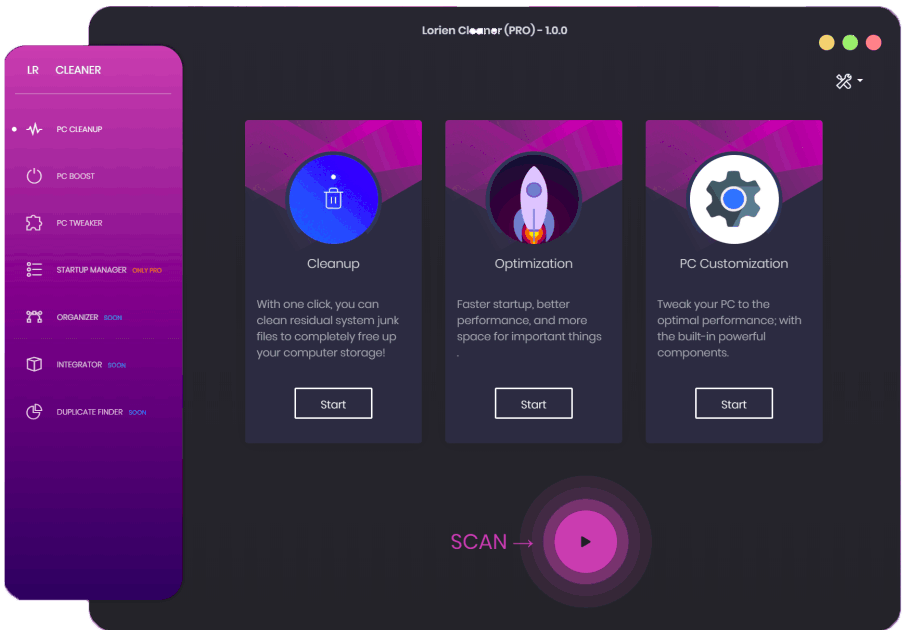
The software is designed with the user in mind. You don't need to be a "techie" to use it. The interface is intuitive, with clearly labeled buttons and automated processes that do the heavy lifting for you. You can choose to run a comprehensive scan with just one click, or you can dive into the advanced toolkits if you want more granular control over your optimization. It is this balance of power and simplicity that makes it the perfect choice for both casual users who just want their computer to work and power users who want to tweak every aspect of their system performance.
In conclusion, your computer is an investment. Whether you use it for work, gaming, or staying connected with loved ones, it deserves to be maintained. Don't let junk files, privacy leaks, and system lag turn your powerful machine into a paperweight. Lorien Cleaner provides you with the most powerful junk cleaning and privacy protection available, and it is the easiest way to make your computer run like brand new again.
Final Verdict: This giveaway is a rare opportunity to get a premium system utility for free. With its combination of deep cleaning, high-level privacy tools, and system-wide optimization, Lorien Cleaner is the ultimate "reset button" for your PC. Say goodbye to annoying lag and make your PC good as new by downloading this powerful software today. Your computer—and your patience—will thank you.
Key Features at a Glance:
- Full system optimization to eliminate lag.
- Deep junk cleaning to reclaim gigabytes of space.
- Privacy track removal for safer web browsing.
- Permanent file shredder for sensitive data.
- Startup management to speed up boot times.
- Thorough uninstaller to remove software leftovers.
- Repair tools for common Windows errors.
Don't wait until your computer crashes to start thinking about maintenance. Proactive care is the only way to ensure your hardware lasts for years to come. Lorien Cleaner makes that care simple, fast, and incredibly effective. If you want a faster, cleaner, and more private computing experience, this is the one tool you absolutely need in your digital arsenal.

Reviews for Lorien Cleaner PRO
Click Here to Read Reviews for Lorien Cleaner PRO >> Click Here to Submit Reviews for Lorien Cleaner PRO >>