What Does PlanetWheelShortcuts Do?
PlanetWheelShortcuts (PWS) is a productivity utility designed to accelerate command execution by replacing traditional keyboard hotkeys with a gesture-based selection system. The software maps operating system and application-specific shortcuts to visual selection wheels that center automatically on the user's mouse pointer. To execute a command, the user moves the pointer toward a designated "planet" on the interface wheel.
The application includes several management and navigation features to streamline workflow:
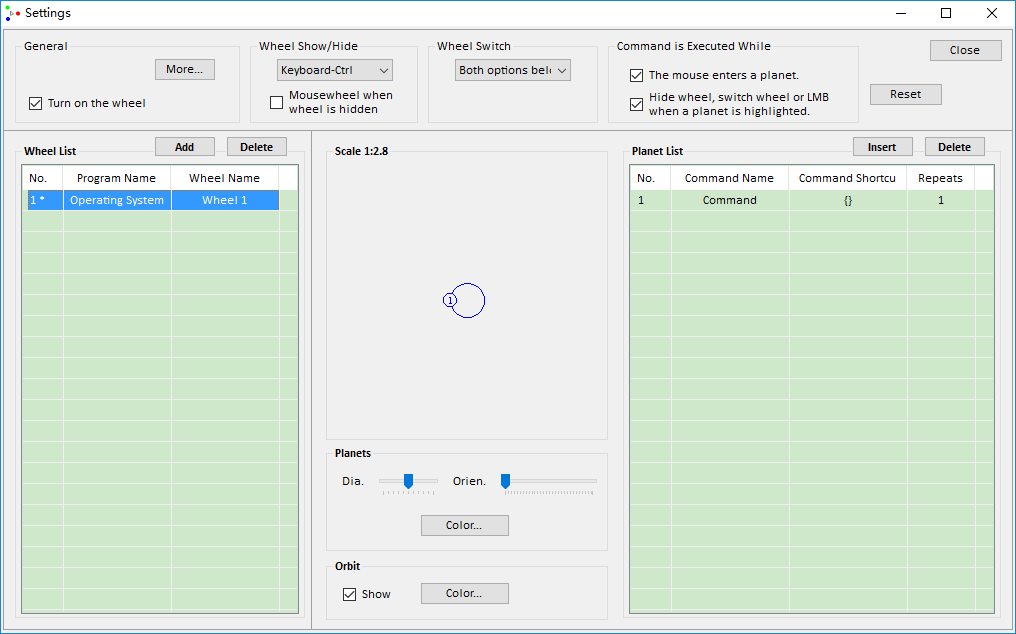
- Dynamic Customization: Users can edit, add, or delete planets directly on the wheel when the mouse pointer is in close proximity to a command entry.
- Wheel Navigation: Users can switch between different command sets within the same program using the mouse wheel or keyboard arrow keys.
- Inter-App Switching: By holding the Ctrl key, the software allows for rapid switching between shortcut wheels assigned to different active programs.
By localizing shortcut access to the cursor's current position, PWS aims to reduce the time spent navigating nested menus or recalling complex key combinations. The tool centralizes diverse system and software commands into a responsive radial interface, prioritizing speed for users who perform repetitive digital tasks. This functionality is designed for professional environments where rapid execution of software commands is required to meet production deadlines. The system minimizes the physical and mental effort typically required to manage numerous shortcuts across various platforms.
Top 5 Reasons To Download PlanetWheelShortcuts
- Eradication of Shortcut Fatigue: Say goodbye to the mental tax of memorizing hundreds of complex keyboard combinations for different applications.
- The Speed of Motion over Memory: Execute commands instantly through a revolutionary selection wheel centered directly on your mouse pointer.
- On-the-Fly Customization: Add, edit, or delete shortcuts (planets) in real-time without ever having to dive into deep, cumbersome settings menus.
- Seamless Contextual Switching: Effortlessly jump between sets of wheels for different tasks or different programs using intuitive mouse and keyboard triggers.
- Professional Grade Efficiency: Drastically reduce execution time for repetitive tasks, making it the ultimate tool for power users working under tight deadlines.
If you have ever found yourself staring blankly at your keyboard, trying to remember if the shortcut to flatten layers was Ctrl+Shift+E or Ctrl+Alt+Shift+F, then you already know the frustration that comes with modern computing. We are living in an era where software complexity has outpaced our biological ability to store "hotkeys." Every new program we install comes with its own proprietary set of commands, and keeping them all straight is a full-time job in itself. This is where PlanetWheelShortcuts (PWS) enters the frame, not just as a utility, but as a complete paradigm shift in how we interact with our digital environment. As a reviewer who has tested countless productivity hacks, I can tell you that this isn't just another launcher; it is a fundamental reimagining of the user interface.
1. Eradication of Shortcut Fatigue
The primary reason you need to download this giveaway immediately is the sheer relief it provides your brain. Cognitive load is a real thing in the tech world. When you are deep in a creative flow—whether you are editing a video, writing code, or designing a 3D model—your focus should be on the output, not the input. Every time you have to pause to remember a shortcut, you break that "flow state." PlanetWheelShortcuts removes this barrier entirely.
By binding system and application commands to visual "planets" on a wheel, PWS transforms an abstract memory task into a spatial awareness task. Humans are naturally better at remembering where things are located in space than they are at remembering arbitrary strings of characters. When you activate PWS, you aren't hunting for keys; you are simply moving your mouse toward a familiar visual target. This reduces the mental tax of your workday, leaving you with more energy for actual creative problem-solving. It acts as an external hard drive for your muscle memory, storing all those complex Ctrl+Alt+Shift combinations so you don't have to.
Furthermore, the "fatigue" we feel isn't just mental; it is physical. Reaching for awkward key combinations thousands of times a day contributes to repetitive strain injuries. PWS keeps your hand in a neutral, relaxed position on the mouse, executing commands with micro-movements rather than finger gymnastics. This is a massive win for ergonomics and long-term health for any professional who spends eight or more hours a day behind a monitor.
2. The Speed of Motion over Memory
Speed is the name of the game in the tech industry. In my years of reviewing software, I have found that the "fastest" tools are those that minimize "travel time." Standard menus require you to move your mouse to the top of the screen, click, find a sub-menu, and click again. Even traditional hotkeys require you to move your left hand into specific, sometimes awkward positions. PlanetWheelShortcuts solves this by centering the interface exactly where your focus already is: the mouse pointer.
The "selection wheel" system is a stroke of genius because it utilizes Fitts's Law—a model of human movement that essentially says the time required to move to a target is a function of the distance to the target and the size of the target. Because the wheel appears exactly where your cursor is located, the distance is effectively zero. Committing a command is as easy as a flick of the wrist. You don't have to look away from your work to find a key on the board or a button on a distant toolbar. You simply trigger the wheel, move to the "planet" representing your command, and you are done.
This "flick" motion becomes second nature within minutes of using the app. It is much faster than the "hunt and peck" method of finding icons, and it beats keyboard shortcuts because it doesn't require the hand-eye coordination of two separate limbs working in tandem. Everything is localized to your dominant hand’s movement. For power users, these saved milliseconds add up to hours of reclaimed time over the course of a month.
3. On-the-Fly Customization
One of the biggest complaints I have with most "shortcut manager" software is that they are a chore to set up. Usually, you have to open a separate configuration window, find the command you want, assign it a key, save it, and restart the app. PlanetWheelShortcuts realizes that a user’s needs change in real-time. This is why its ability to quickly edit, add, or delete planets is a game-changer.
When you are in the middle of a project, you might realize you are using a specific, obscure command every five minutes. With PWS, you don't have to stop your work to optimize your workflow. The software allows you to modify the wheel when the pointer moves close to a planet. This means you can refine your workspace while you work. If a certain "planet" isn't serving you, delete it. If you find a new command that you need frequently, add it to the wheel in seconds.
This level of dynamic customization ensures that your interface evolves alongside your skills. Most people only use about 10% of a software's features because the other 90% are buried in menus. PWS allows you to bring that hidden 90% to the surface, tailored specifically to the project you are working on right now. It makes the software feel like it was built specifically for you, rather than a generic "one-size-fits-all" interface. This is customization at the speed of thought, and once you experience it, going back to static menus feels like moving backward in time.
4. Seamless Contextual Switching
As professionals, we rarely stay in one app all day. We bounce from Chrome to Excel, from Slack to Photoshop, and from the terminal to the file explorer. A shortcut tool that only works for one program is only 20% useful. PlanetWheelShortcuts excels here because it is context-aware and incredibly easy to navigate across different environments.
PWS allows you to switch wheels using the mouse wheel or keyboard arrow keys. This is brilliant for complex applications that have different "modes." For instance, in a video editor, you might have one wheel for "Cutting/Trimming" and another wheel for "Color Grading." You can switch between these specific wheels instantly without moving your hand. But it goes deeper: when you hold the Ctrl key, PWS allows you to switch wheels between different programs entirely.
This means your "Global" wheel is always just a click away, but your "Excel-specific" wheel appears the moment you click into a spreadsheet. The intelligence behind this switching mechanism is what makes PWS a "must-have." It eliminates the "mode error" where you try to use a shortcut from one program in another, only to have something unexpected (and often destructive) happen. PWS ensures that the tools you need are always the ones currently under your thumb, regardless of which window is active. It creates a unified interface for your entire operating system, bringing order to the chaotic world of multi-tasking.
5. Professional Grade Efficiency
The final reason to download this giveaway is the impact it will have on your professional output. If your job involves working against a deadline, you know that the "crunch" is real. When the clock is ticking, every friction point in your workflow becomes a source of stress. PlanetWheelShortcuts is specifically designed to eliminate that friction. By reducing the time it takes to execute commands, it allows you to stay in the creative zone longer.
Think about the most repetitive tasks you do. Perhaps it’s renaming files, applying a specific filter, or toggling between layers. If PWS saves you just two seconds per execution, and you perform that task 100 times a day, that is nearly four minutes saved on just one task. Spread that across all your commands, and you are looking at gaining 30 to 60 minutes of pure productivity every single day. Over a work week, that’s an entire afternoon of time you’ve "bought back."
In a professional setting, speed isn't just about being fast; it’s about being accurate. Keyboard shortcuts can be fat-fingered. Menus can be misclicked. But the large, clear targets of the PlanetWheelShortcuts wheel reduce the margin for error. You hit the right command every time because the visual feedback is immediate and intuitive. This is the tool that separates the "pro" from the "amateur." It shows that you value your time and your cognitive energy. This giveaway is an opportunity to upgrade your digital toolkit with a piece of software that pays for itself in time-savings within the first few hours of use.
In conclusion, PlanetWheelShortcuts is more than just a utility; it is a necessity for the modern computer user. It tackles the three biggest hurdles of productivity: memory, speed, and customization. By transforming your mouse into a powerful, multi-layered command center, it allows you to navigate your PC with the grace of a pro gamer and the efficiency of a high-level developer. Whether you are a creative professional, an office worker, or just someone who wants to make their computing experience more fluid, PWS is the answer. Do not miss out on this giveaway. Download it, set up your first wheel, and watch as your workflow transforms from a series of disjointed clicks into a seamless, high-speed experience. Your brain (and your wrists) will thank you.
The beauty of PWS lies in its simplicity. While other "productivity" apps try to add more features you don't need, PWS focuses on making the features you already have easier to reach. It’s an additive layer that enhances everything else on your computer. It turns the complex into the simple and the slow into the instantaneous. This is the kind of tech that makes you wonder how you ever managed without it. Speed, precision, and ease of use—these are the hallmarks of great software, and PlanetWheelShortcuts delivers on all three in spades. Go get it now and start orbiting your way to a faster workflow.

Reviews for PlanetWheelShortcuts
Click Here to Read Reviews for PlanetWheelShortcuts >> Click Here to Submit Reviews for PlanetWheelShortcuts >>