
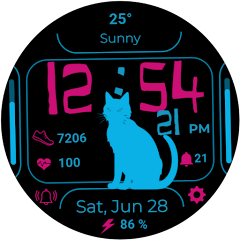
Light up your wrist with the Pet Cat Watch Face by GENZYNC! This vibrant and feature-rich digital watch face is the perfect companion for your Wear OS device. Centered around a cool, neon cat silhouette, it combines a fun, modern aesthetic with all the essential, at-a-glance information you need to conquer your day.
Whether you're a cat lover or just looking for a unique and functional watch face, Pet Cat brings style and utility right to your wrist.
🐾 KEY FEATURES:
Stylish Digital Time: Clear and easy-to-read time display (supports 12/24 hour format based on your phone settings) with a unique, eye-catching font.
Your Pet Cat Companion: A sleek, neon cat silhouette sits at the center of your watch.
Complete Date Information: Displays the current date and day, with a convenient shortcut to your calendar app.
Health & Fitness Tracking:
❤️ Heart Rate: Monitor your heart rate directly from the watch face.
👟 Steps Count: Keep track of your daily steps.
📊 Steps Goal Bar: A visual progress bar on the left shows you how close you are to reaching your daily step goal.
At-a-Glance System Info:
🔋 Battery Percentage & Bar: Instantly see your watch's remaining battery life with both a percentage and a progress bar on the right.
☀️ Weather: Check the current weather condition and temperature to plan your day accordingly.
Convenient Shortcuts:
Alarm: Quick access to your alarms.
Notifications: A shortcut to check your latest notifications.
Settings: Instantly open your watch settings.
Optimized for Battery Life: Designed to be vibrant and beautiful without draining your battery.
🎨 CUSTOMIZATION:
Color Themes: Choose from a variety of neon color palettes to match your style, mood, or outfit.
Customizable Shortcuts: Change the on-screen shortcuts to launch your most-used apps with a single tap.
⌚ INSTALLATION & COMPATIBILITY:
-This watch face is compatible with all Wear OS by Google (Wear OS 3.0 and above) devices.
-Make sure your watch is connected to your phone.
-From your phone's Play Store, select your watch as the target device for installation.
-Alternatively, open the Play Store on your watch and search for "Pet Cat Watch Face" by GENZYNC.
-Once installed, long-press on your current watch face, scroll through the available faces, and select Pet Cat.
-Click "Customize" to set up your preferred colors and shortcuts.
💌 SUPPORT & FEEDBACK:
We love hearing from you! If you have any questions, suggestions, or need support, please contact us at [email protected] .
Don't forget to leave a review if you love your new digital cat companion! Check out more unique watch faces by searching for GENZYNC on the Google Play Store.
Whether you're a cat lover or just looking for a unique and functional watch face, Pet Cat brings style and utility right to your wrist.
🐾 KEY FEATURES:
Stylish Digital Time: Clear and easy-to-read time display (supports 12/24 hour format based on your phone settings) with a unique, eye-catching font.
Your Pet Cat Companion: A sleek, neon cat silhouette sits at the center of your watch.
Complete Date Information: Displays the current date and day, with a convenient shortcut to your calendar app.
Health & Fitness Tracking:
❤️ Heart Rate: Monitor your heart rate directly from the watch face.
👟 Steps Count: Keep track of your daily steps.
📊 Steps Goal Bar: A visual progress bar on the left shows you how close you are to reaching your daily step goal.
At-a-Glance System Info:
🔋 Battery Percentage & Bar: Instantly see your watch's remaining battery life with both a percentage and a progress bar on the right.
☀️ Weather: Check the current weather condition and temperature to plan your day accordingly.
Convenient Shortcuts:
Alarm: Quick access to your alarms.
Notifications: A shortcut to check your latest notifications.
Settings: Instantly open your watch settings.
Optimized for Battery Life: Designed to be vibrant and beautiful without draining your battery.
🎨 CUSTOMIZATION:
Color Themes: Choose from a variety of neon color palettes to match your style, mood, or outfit.
Customizable Shortcuts: Change the on-screen shortcuts to launch your most-used apps with a single tap.
⌚ INSTALLATION & COMPATIBILITY:
-This watch face is compatible with all Wear OS by Google (Wear OS 3.0 and above) devices.
-Make sure your watch is connected to your phone.
-From your phone's Play Store, select your watch as the target device for installation.
-Alternatively, open the Play Store on your watch and search for "Pet Cat Watch Face" by GENZYNC.
-Once installed, long-press on your current watch face, scroll through the available faces, and select Pet Cat.
-Click "Customize" to set up your preferred colors and shortcuts.
💌 SUPPORT & FEEDBACK:
We love hearing from you! If you have any questions, suggestions, or need support, please contact us at [email protected] .
Don't forget to leave a review if you love your new digital cat companion! Check out more unique watch faces by searching for GENZYNC on the Google Play Store.
Reviews for Pet Cat Watch Face
Click Here to Read Reviews for Pet Cat Watch Face >> Click Here to Submit Reviews for Pet Cat Watch Face >>