
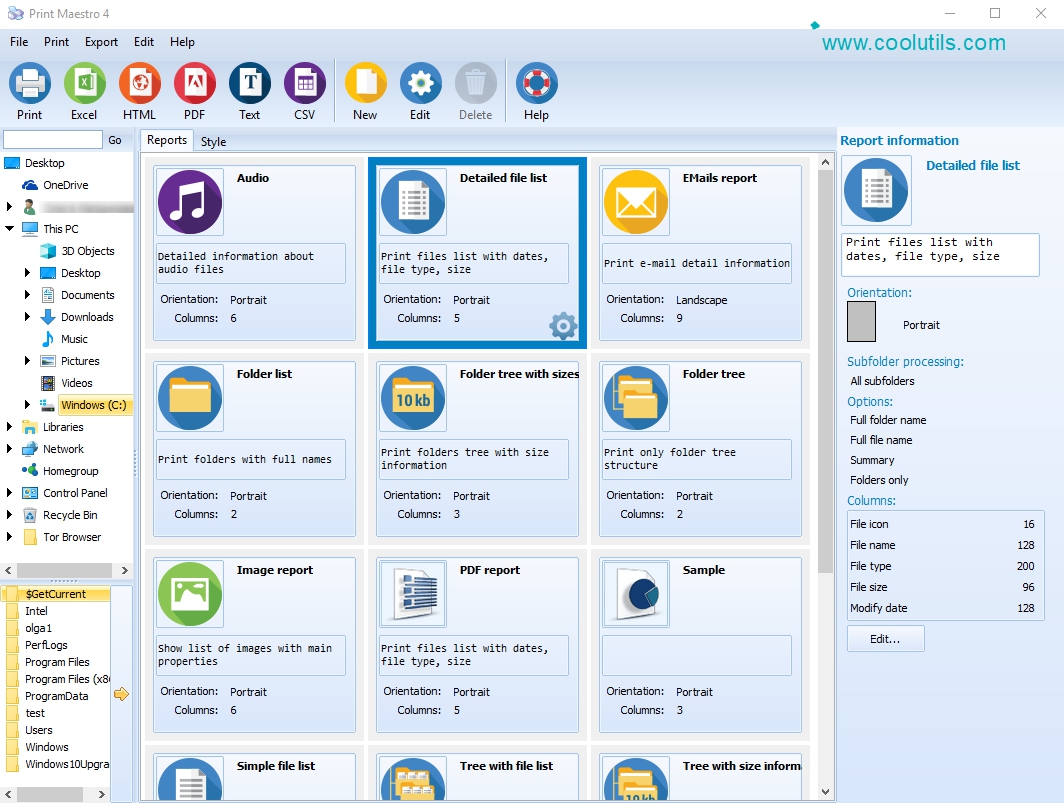
Print file tree and directory content in 1 click with Print Maestro. All is done by an intuitive graphical interface. Lots of printing templates are available: directory printing with sizes, lists of photo (date, exif info), audio (sample rate, bitrate, etc), list of videos (size, duration, width, height, codec). You may print file version info report (Company Name, Version Info, Copyright, Product version). PrintMaestro is very flexible. You can tune printing templates to your taste. It’s so easy to finally know what files you have on your hard drive. Download your free copy of PrintMaestro now and print folders with content.
Official Product Description
Overview
What Does Print Maestro Do?
Print Maestro is a directory management utility designed to automate the cataloging of file systems and folder structures. The software employs a graphical interface that allows users to generate detailed reports of hard drive contents with a single click. It serves as a specialized tool for users who need to document local storage or organize digital archives into readable, structured formats.
The application includes various templates tailored to different file categories. Users can print simple directory lists that include file sizes and timestamps, or utilize more complex reports for multimedia assets. These templates extract embedded metadata automatically:
- Photo reports display EXIF information and capture dates.
- Audio templates detail sample rates, bitrates, and durations.
- Video documentation includes codecs, frame dimensions, and file sizes.
Beyond media, the software can generate version info reports for executable files, capturing data such as company names, copyright status, and product versions. All templates within the interface are customizable, allowing users to adjust the output parameters to meet specific professional or personal requirements. By providing a streamlined method to visualize directory trees, Print Maestro facilitates easier file management and archival verification.
Top 5 Reasons To Download Print Maestro
If you have ever spent hours clicking through nested folders trying to find a specific file, or if you have struggled to document what is actually taking up space on your backup drives, then you already know the frustration of digital clutter. Modern operating systems are great at many things, but providing a clear, printable, and customizable overview of your directory structures is not one of them. That is where Print Maestro enters the frame. This tool is a literal game-changer for anyone who manages large volumes of data. Before we dive into the deep end, here are the top five reasons why you need to grab this download right now.
- Unrivaled Metadata Support for Specialized Files: Unlike basic system tools, it extracts deep data like EXIF info for photos, bitrates for audio, and codecs for video.
- One-Click Intuitive Graphical Interface: You do not need to be a command-line expert to generate complex file trees; the GUI makes it accessible for everyone.
- Fully Customizable Printing Templates: You have the power to tune every report to your specific needs, ensuring you only see the data that matters to you.
- Professional File Version Reporting: Essential for developers and IT professionals, it can generate reports including Company Name, Version Info, and Copyright data.
- Effortless Digital Inventory Management: It provides the ultimate solution for "knowing what you have," allowing you to audit hard drives and archives in seconds.
1. Unrivaled Metadata Support for Specialized Files
As a tech reviewer, I see a lot of "file manager" utilities, but most of them treat every file the same—just a name and a size. Print Maestro is different because it understands context. We live in a world where we aren't just storing text documents; we are storing massive libraries of high-resolution media. If you are a photographer, a simple list of filenames like "IMG_001.jpg" is useless. You need to know the date taken and the EXIF information. Print Maestro allows you to print lists of photos that include all that rich metadata directly on the report.
The same logic applies to audiophiles and music producers. If you are managing a massive library of samples or high-fidelity FLAC files, you need to know the sample rate and bitrate at a glance. Managing these through standard folder views is a nightmare. With this software, you can generate a printed or digital report that lists every audio track along with its technical specifications. It turns a chaotic folder of music into an organized, professional catalog.
For video editors and content creators, the challenge is even greater. Video files are massive, and knowing the duration, width, height, and specific codec used is vital for project management. Instead of right-clicking "Properties" on a hundred different files, you can use Print Maestro to generate a comprehensive list of videos with all these technical details included. This level of detail is usually reserved for high-end asset management software, but here it is, integrated into a simple, printable interface.
2. One-Click Intuitive Graphical Interface
We have all been there: trying to remember the specific syntax for the "tree" command in a terminal or command prompt just to get a basic list of folders. It is clunky, it is prone to errors, and the output is usually a mess of plain text that is hard to read. Print Maestro eliminates this friction entirely. The interface is designed with the user in mind, prioritizing ease of use without sacrificing power.
The "one-click" philosophy is not just marketing speak; it is the core of the user experience. You open the program, select the directory you want to analyze, and choose your template. The software does the heavy lifting of scanning the subdirectories and formatting the data. Because it uses a graphical interface, you can see exactly what your report will look like before you ever hit the print button. This "What You See Is What You Get" (WYSIWYG) approach saves time and prevents the wasted paper of incorrect printouts.
Furthermore, the navigation within the app feels familiar. It mimics the folder structures you are already used to in your native file explorer, making the learning curve almost non-existent. For users who aren't "tech-savvy" but still need to organize their digital lives—like small business owners or home archivists—this accessibility is a breath of fresh air. You get professional-grade results without needing a computer science degree.
3. Fully Customizable Printing Templates
One size rarely fits all when it comes to data reporting. Sometimes you just need a quick list of folder names to see where your storage is going. Other times, you need a detailed audit for a client or a legal record. Print Maestro shines because of its flexibility. It comes packed with a wide variety of pre-set templates, ranging from simple directory trees with file sizes to highly specific reports for different media types.
But the real power lies in the ability to tune these templates. You can adjust the columns, change the sorting order, and decide exactly which pieces of information are included. If you don't care about the file creation date but you absolutely need the "Product Version" info, you can swap them out in seconds. This flexibility makes it an essential tool for project managers who need to provide documentation to stakeholders.
Imagine you are handing off a hard drive full of assets to a collaborator. Instead of letting them guess what is on there, you can include a beautifully formatted PDF report generated by Print Maestro. It looks professional, it is easy to read, and it reflects well on your organization skills. You can even adjust the visual style to make sure the printed lists are legible, using different fonts or layouts that suit your personal taste or corporate branding.
4. Professional File Version Reporting
This is a feature that many casual users might overlook, but for power users, developers, and IT administrators, it is worth the download alone. When you are managing software installations or a repository of executable files, knowing the specific versioning information is critical for security and compatibility. Print Maestro can extract and report on file version info, including the Company Name, Version Number, Copyright details, and Product Version.
This is incredibly useful when you are performing a system audit. If you need to know if all the workstations in an office are running the same version of a specific piece of software, you can generate a report in seconds. It allows you to identify outdated files or unauthorized software versions that might be lurking in deep subdirectories. It turns a manual, tedious task into an automated process.
Even for the average user, this can be helpful. Have you ever had multiple versions of a driver or a utility saved in different folders and couldn't remember which one was the latest? Instead of checking them one by one, you can run a quick report and see the version numbers side-by-side. It brings a level of transparency to your file system that standard tools simply cannot match.
5. Effortless Digital Inventory Management
We are currently living in an era of "digital hoarding." With multi-terabyte hard drives becoming affordable, we tend to just throw everything into folders and forget about them. Years later, we find ourselves with dozens of external drives, cloud storage accounts, and USB sticks, with no clear idea of what is where. Print Maestro is the ultimate cure for this digital amnesia.
By using this tool to print or save directory contents, you are essentially creating an inventory of your digital life. You can print a list of every file on an old backup drive, tape it to the outside of the drive casing, and never have to plug it in again just to see what is on it. It is the digital equivalent of labeling your moving boxes. The peace of mind that comes from finally knowing exactly what files you have on your hard drive is immense.
This software helps you identify "dead weight" on your system. When you see a printed list of directories sorted by size, it becomes immediately obvious where the space-hogs are hiding. You might find a forgotten folder of raw video footage from five years ago that is taking up 200GB. Without the clear overview provided by Print Maestro, that data might have stayed there forever, wasting space. It empowers you to take control of your storage, clean up your drives, and stay organized for the long haul.
Conclusion: Why You Should Act Now
In the world of utility software, there are tools that are "nice to have" and tools that are "essential." Print Maestro firmly falls into the essential category. It bridges the gap between the raw data stored on your platters and the actionable information you need to manage your life or business. Whether you are using it for specialized media metadata, professional version auditing, or just to get a handle on your personal photo collection, it delivers results with an ease of use that is rare in this category.
The ability to transform a convoluted mess of folders into a clean, professional, and customizable report with just one click is something every computer user can benefit from. Don't wait until you are drowning in a sea of nameless files and mystery folders. Download your copy of Print Maestro today, take advantage of this giveaway, and finally see your file system for what it really is. It is time to stop guessing and start knowing what is on your hard drive. This is one download that will pay for itself in saved time and reduced stress within the first five minutes of use. Grab it now and experience the clarity of a perfectly organized directory tree.
Reviews for Print Maestro
Click Here to Read Reviews for Print Maestro >> Click Here to Submit Reviews for Print Maestro >>