What Does TweakMASTER Do?
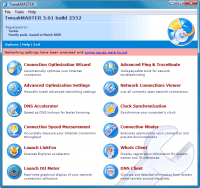
TweakMASTER is an Internet optimization utility designed to enhance download speeds and overall connectivity performance on Windows systems. The software functions by modifying specific network settings tailored to various connection types, including DSL, cable, wireless, and dial-up. Unlike standard registry editors, this tool provides a comprehensive suite of utilities aimed at reducing latency and improving data throughput.
Users can utilize the following features to manage and improve their network environment:
- Optimization Wizard: A step-by-step tool that allows non-technical users to apply recommended settings for their specific connection type.
- DNS Accelerator: A specialized module that increases website loading speeds by optimizing domain name resolution.
- Network Diagnostic Tools: Integrated versions of Ping, Traceroute, and Whois for troubleshooting connectivity issues.
- ISP Disconnect Prevention: A utility designed to keep connections active by simulating user activity to prevent idle timeouts.
- Network Connections Viewer: A real-time monitor that displays active connections and current data flow.
Advanced users have access to detailed manual configuration options for specific TCP/IP parameters, making it a highly configurable optimizer. Additionally, the software includes a PC clock synchronization utility to ensure system time accuracy. By consolidating these networking tools into a single interface, TweakMASTER provides a more responsive browsing and downloading experience across various service providers.
Top 5 Reasons To Download TweakMASTER
1. Instant and Substantial Speed Optimization: TweakMASTER intelligently adjusts hidden Windows network settings to maximize your bandwidth potential regardless of your connection type.
2. Innovative DNS Acceleration: Beyond simple registry tweaks, the built-in DNS Accelerator speeds up the actual loading time of websites by resolving addresses more efficiently.
3. A Complete Suite of Network Utilities: It is not just an optimizer; it includes a full toolbox of professional-grade utilities like Ping, Traceroute, Whois, and a Network Connections Viewer.
4. Unmatched Accessibility for All Skill Levels: With a simple, guided Wizard for beginners and deep configuration options for power users, it caters to everyone from novices to tech enthusiasts.
5. Enhanced Connection Stability and Reliability: Features like ISP Disconnect Prevention ensure that your connection stays active and robust, even during long download sessions or intensive browsing.
The Need for Speed in a Modern Digital World
We have all been there—staring at a spinning loading icon while a critical file sits at 99 percent, or waiting for a webpage to render while the seconds tick away. In the modern era, internet speed is not just a luxury; it is the lifeblood of our professional and personal lives. Whether you are gaming, streaming 4K content, or trying to hop on a video conference call, the efficiency of your connection dictates your productivity and your sanity. While we often blame our Internet Service Providers for slow speeds, the bottleneck is frequently much closer to home. It is often hidden within the very operating system you use every day. This is where TweakMASTER comes into play, acting as the ultimate digital mechanic for your internet connection.
Windows is designed to be a "one size fits all" operating system. Out of the box, its network settings are configured to work "well enough" for millions of users across thousands of different hardware configurations. However, "well enough" is a far cry from "optimal." Most users are leaving a significant amount of performance on the table simply because their system is not tuned for their specific type of connection—be it cable, DSL, wireless, or even legacy dial-up. TweakMASTER is a revolutionary tool that takes the guesswork out of network optimization, and in this article, I am going to break down exactly why this software is a must-download for anyone looking to squeeze every last drop of performance out of their hardware.
1. Instant and Substantial Speed Optimization
The core promise of TweakMASTER is its ability to provide faster internet download speeds, and it delivers on this promise by going deep into the Windows architecture. Most users do not realize that there are dozens of hidden registry settings and system parameters that govern how your computer handles data packets. Settings like the Maximum Transmission Unit (MTU), Receive Window (RWIN), and Time to Live (TTL) are critical factors that determine how efficiently your computer communicates with servers across the globe. If these are set incorrectly, you experience data fragmentation, unnecessary retransmissions, and overall sluggishness.
TweakMASTER does not just blindly change these numbers. It intelligently analyzes your connection type and applies settings that are mathematically optimized for your specific environment. The software is designed to work with everything from high-speed fiber optics and cable to satellite and wireless connections. The beauty of this tool is that it acts as a force multiplier. If you have a fast connection, TweakMASTER makes it feel instantaneous. If you have a slower or more unstable connection, TweakMASTER helps stabilize it and ensures you are getting the absolute maximum throughput possible. It is quite literally like upgrading your hardware without spending a dime on new routers or cables.
The guarantee offered by the developers—that nothing will provide a faster internet connection—is a bold claim, but it is backed by years of refinement. Many other "optimizers" on the market are little more than "snake oil," changing a single registry key and calling it a day. TweakMASTER is a comprehensive engine that looks at the entire data pipeline. For anyone who has ever felt that their internet should be faster than it currently is, this software provides the definitive answer to that frustration.
2. Innovative DNS Acceleration
While raw download speed is important, the "snappiness" of your browsing experience is largely determined by something called DNS (Domain Name System). Think of DNS as the phonebook of the internet. Every time you type a website name into your browser, your computer has to look up the corresponding IP address. If this lookup process is slow, there is a perceptible lag before the site even begins to load, regardless of how fast your download speed is. This is a common bottleneck that most "internet boosters" completely ignore.
TweakMASTER includes an innovative DNS Accelerator that is a total game-changer for daily web surfing. By caching and optimizing how your system handles these lookups, it significantly reduces the time it takes for your browser to find and connect to websites. This means that pages start rendering almost the moment you hit Enter. It makes the entire web feel more responsive. This is particularly noticeable on modern websites that pull data from dozens of different sources (images, scripts, ads, etc.), as each of those sources requires its own DNS lookup. By accelerating this process, TweakMASTER provides a smoother, more fluid experience that makes "Surfing the Internet" genuinely enjoyable again.
Furthermore, this acceleration is not just about speed; it is about efficiency. By streamlining the way your computer interacts with DNS servers, it reduces unnecessary overhead on your network. This is the kind of thoughtful engineering that separates a professional-grade tool from a basic utility. It addresses the "last mile" of the user experience, ensuring that the initial handshake between your computer and the server is as fast as the data transfer that follows.
3. A Complete Suite of Network Utilities
One of the most impressive aspects of TweakMASTER is that it is not merely a "set and forget" optimizer; it is a full-featured network management suite. When you download this giveaway, you are getting a toolbox that would normally require several different standalone applications. For tech enthusiasts and power users, this is where the software really shines. It includes essential tools like Ping, Traceroute, and Whois, all integrated into a clean, easy-to-use interface.
The Network Connections Viewer is a particularly valuable feature. It allows you to see exactly which applications on your computer are communicating with the internet in real-time. This is not only useful for troubleshooting network congestion but also serves as a vital security check. If you see a program you don't recognize sending data to a strange IP address, you can catch potential malware or "phone-home" telemetry that you never authorized. Having this level of visibility into your network traffic is empowering and provides a sense of control over your digital environment.
In addition to these diagnostic tools, TweakMASTER includes a handy PC clock synchronization utility. While this might seem like a small addition, maintaining an accurate system clock is crucial for everything from security certificate validation to file syncing. It is these "extra" features that demonstrate the developers' commitment to providing a holistic solution for the user's online experience. You aren't just downloading an optimizer; you are downloading a command center for your internet connection.
4. Unmatched Accessibility for All Skill Levels
A common fear when dealing with "system optimization" software is the complexity. Many people are rightfully hesitant to mess with registry settings or network protocols for fear of breaking their connection. TweakMASTER solves this problem brilliantly by offering a simple Wizard. This Wizard walks the user through a series of easy-to-understand questions about their connection. Even a total computer novice who doesn't know the difference between a packet and a port can successfully optimize their system in just a few clicks. The software does the heavy lifting, applying the best configurations automatically based on the user's input.
However, TweakMASTER does not sacrifice depth for simplicity. For the power users, the "tinkers," and the IT professionals, the software offers an unprecedented level of configurability. You can go "under the hood" and manually adjust every parameter if you choose. This dual-natured approach is rare in the software world. It respects the beginner by providing safety and ease of use, while respecting the expert by providing granular control. It is the most configurable and effective internet optimizer available because it scales with the user's knowledge.
The interface is intuitive and avoids the cluttered "technobabble" that plagues many utility programs. Everything is clearly labeled, and the impact of each setting is explained. This transparency builds trust. You aren't just clicking buttons and hoping for the best; you are making informed decisions about how your computer operates. Whether you want to "click and go" or spend an hour fine-tuning your settings, TweakMASTER accommodates your style perfectly.
5. Enhanced Connection Stability and Reliability
Speed is fantastic, but it means very little if your connection is unstable. We have all experienced the frustration of a download failing at 90 percent because of a brief ISP hiccup or a "timed out" connection. TweakMASTER addresses this head-on with features like ISP Disconnect Prevention. This is a lifesaver for users on connections that tend to drop after periods of inactivity or those dealing with less reliable providers. By keeping the connection "alive" and managing the handshake process more effectively, TweakMASTER ensures that your online sessions remain uninterrupted.
This stability extends to all connection types, including those notoriously difficult environments like AOL or satellite internet. The fact that TweakMASTER can significantly improve the experience for AOL users—a group often left behind by modern optimization tools—is a testament to its robust design. It optimizes the way Windows handles the "overhead" of these specific connection protocols, reducing lag and preventing the dreaded "connection lost" dialog boxes.
Furthermore, in an era where wireless connectivity is the norm, TweakMASTER’s intelligent tweaking helps mitigate the inherent instabilities of Wi-Fi. By optimizing packet size and retransmission settings, it can help compensate for signal interference and distance from the router. The result is a more consistent, reliable stream of data. When you use TweakMASTER, you aren't just getting a faster internet; you are getting a better internet. It provides a level of polish to your connection that makes everything from scrolling through social media to intensive online gaming feel significantly more robust.
Conclusion: Why You Need To Download This Today
In the world of tech utilities, it is rare to find a tool that is both powerful enough for the expert and simple enough for the beginner. TweakMASTER occupies this sweet spot perfectly. It is a mature, refined, and highly effective piece of software that addresses one of the most common pain points of the modern era: sub-optimal internet performance. By combining deep system optimization, innovative DNS acceleration, a suite of professional utilities, and rock-solid stability features, it offers a value proposition that is hard to ignore.
Think of it this way: You pay for your internet subscription every month. Why would you not want to ensure you are getting 100 percent of the performance you are paying for? TweakMASTER is the key to unlocking that hidden potential. It transforms your computer from a generic device into a finely-tuned machine optimized for the digital age. The "guaranteed" faster speeds are not just marketing fluff; they are the result of intelligent engineering and a deep understanding of how networking works.
Don't settle for the "default" experience. Don't let your operating system's conservative settings hold back your hardware. Whether you are looking to double your download speeds, stop annoying disconnects, or simply make your web browsing feel snappier, TweakMASTER is the solution you have been looking for. This is one of those rare downloads that provides immediate, tangible benefits from the moment you finish the installation. Download it, run the Wizard, and experience the internet the way it was meant to be: fast, stable, and completely under your control. You have nothing to lose and a world of speed to gain.
Final Verdict: If you use the internet—and let's face it, we all do—TweakMASTER is an essential addition to your software library. It is the ultimate "set it and forget it" tool that works tirelessly in the background to ensure your digital life is as fast and smooth as possible. Don't miss out on this opportunity to optimize your connection with the best in the business.


Reviews for TweakMASTER
Click Here to Read Reviews for TweakMASTER >> Click Here to Submit Reviews for TweakMASTER >>