What Does UniPDF Pro Expert Do?
UniPDF is a specialized desktop utility designed to facilitate the conversion of PDF documents into various editable formats. The software primarily targets workflow efficiency by allowing users to process files in batch, converting multiple documents simultaneously into Microsoft Word, image, text, or HTML formats. This eliminates the manual labor typically associated with extracting content from static PDF files.
The application is engineered to preserve the original design, layout, and formatting of the source PDF. This feature ensures that the resulting Word documents mirror the original file structure, reducing the need for extensive manual re-editing. Beyond full document conversion, the software offers a selective page range tool, enabling users to extract specific sections from a larger file rather than processing the entire document.
Key technical features include:
- Multi-format output: Support for Microsoft Word, JPEG, plain text, and HTML files.
- Batch processing: The ability to convert multiple PDF files in a single session.
- Layout retention: Preservation of the original document’s visual structure and formatting.
- User interface: A drag-and-drop system designed for rapid file selection and ease of use.
- Language support: Localization for 20 different UI languages.
- Conversion speed: High-speed processing engines designed to minimize wait times.
UniPDF provides a functional solution for users needing to repurpose PDF content into manageable, editable data while maintaining visual integrity across different file types.
Top 5 Reasons To Download UniPDF Pro Expert
- Unrivaled Layout and Design Retention: Unlike basic converters that strip your document of its soul, UniPDF ensures that every table, image, and font choice remains exactly where it belongs.
- High-Efficiency Batch Processing: Stop wasting time converting files one by one; UniPDF allows you to process entire folders of documents in a single session, turning hours of work into seconds.
- Versatile Multi-Format Export Options: Whether you need an editable Word document, a high-quality JPEG, a clean HTML file for the web, or a simple text file, this tool handles it all with professional precision.
- Blazing Fast Conversion Speeds: Built with a core focus on performance, the engine behind UniPDF delivers lightning-fast results that put sluggish online converters to shame.
- Granular Control and User-Centric Design: With a simple drag-and-drop interface and the ability to select specific page ranges for conversion, you have total control over your workflow without any steep learning curve.
In the modern digital landscape, the PDF is both a blessing and a curse. It is the universal language of business documents, academic papers, and digital brochures because it looks exactly the same on every device. However, the moment you need to change a single sentence, extract an image, or repurpose that content for a presentation, the PDF becomes a fortress. We have all experienced the frustration of trying to copy and paste text from a PDF only to find the formatting destroyed, the words jumbled, and the layout completely vanished. This is where UniPDF enters the frame, and if you are looking for a reason to jump on this giveaway, you have come to the right place. As a tech reviewer who has tested dozens of these utilities, I can tell you that UniPDF is the secret weapon your productivity suite has been missing.
1. Unrivaled Layout and Design Retention
The biggest hurdle in the world of PDF conversion is the "messy export." You know exactly what I am talking about: you convert a beautiful three-column newsletter into a Word document, and suddenly the text is overlapping, the images are at the bottom of the page, and the fonts have defaulted to something unrecognizable. It is often more work to fix the converted document than it would have been to re-type the whole thing from scratch. This is the primary problem that UniPDF was designed to solve.
UniPDF is built on a sophisticated reconstruction engine. Instead of just "scraping" the text from the file, it analyzes the geometric metadata of the PDF. It looks at where the lines are, how the images are anchored, and how the padding around text blocks is structured. When you hit that convert button, the software works to reproduce the document rather than just translate it. For professionals who work with complex layouts—think legal contracts with specific margins, marketing flyers with integrated graphics, or technical manuals with intricate tables—this feature is a lifesaver. You get an editable Word file that actually looks like the original PDF. This means you can get straight to editing the content instead of playing "digital janitor" and cleaning up a formatting disaster. It is about preserving the integrity of your work, and in my testing, UniPDF handles this better than almost any other mid-tier software on the market.
2. High-Efficiency Batch Processing
Time is the only resource we cannot buy more of, and yet we often waste it on repetitive digital tasks. If you have a folder full of fifty PDF invoices that need to be converted into text files for data entry, doing them one by one is a recipe for burnout. The "batch processing" feature in UniPDF is not just a "nice-to-have" addition; it is the core of the software’s value proposition for power users. This is where the "Hours not Minutes" claim truly comes to life.
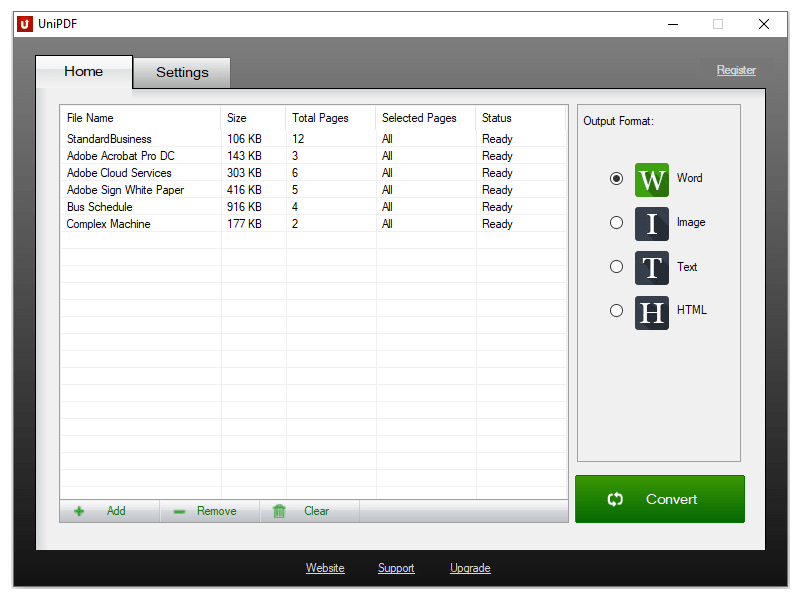
The workflow is elegantly simple. You grab a handful of files—or even an entire directory—and drag them into the software interface. You select your desired output format and click "Convert." While you go grab a cup of coffee, UniPDF systematically crunches through the queue. This is particularly vital for researchers, students, and office administrators who deal with high volumes of documentation. Imagine being able to convert an entire semester’s worth of lecture slides into editable Word documents in the time it takes to check your email. By automating the "busy work," UniPDF allows you to focus on the high-level tasks that actually matter. If you value your time, the batch processing capability alone makes this giveaway a mandatory download.
3. Versatile Multi-Format Export Options
One of the mistakes people make is thinking they only need a PDF-to-Word converter. While Word is the "Gold Standard" for editing, real-world workflows are often much more varied. UniPDF understands this by providing four distinct conversion paths: Word, Image, HTML, and Text. Each of these serves a unique and essential purpose in a tech-savvy user's toolkit.
The Image conversion is a hidden gem. Sometimes you don't need to edit the text; you just need to post a page of a PDF onto social media or embed it into a PowerPoint presentation as a high-quality JPEG. UniPDF handles this flawlessly, ensuring the visual fidelity remains sharp. The HTML export is a godsend for web developers and content creators. If you have a document that needs to go live on a website, converting it to clean HTML code saves you the hassle of manual tagging and CSS alignment. Then there is the Text (TXT) export, which is the ultimate tool for data miners. When you just need the raw data without any of the visual "noise" to import into a database or a specialized software tool, the text conversion is fast and remarkably clean. Having all four of these tools housed within a single, lightweight application means you can declutter your desktop and stop searching for four different websites to handle these tasks.
4. Blazing Fast Conversion Speeds
We live in an age of instant gratification, and there is nothing more frustrating than a "loading" bar that seems to move in slow motion. Many online conversion services are throttled by your internet upload speed or their own server limitations. Because UniPDF is a dedicated desktop application, it utilizes the full raw power of your computer’s processor to handle the heavy lifting. The conversion engine is optimized for speed, which the developers rightly describe as "lightning fast."
In a head-to-head comparison with web-based alternatives, the difference is night and day. Because UniPDF doesn't have to upload your sensitive documents to a remote server (which is also a massive win for your privacy and security), the conversion begins the millisecond you click the button. For large files—those 100-page plus technical whitepapers—this speed advantage becomes even more apparent. You aren't just saving time on the conversion itself; you are saving time by avoiding the "upload-wait-convert-wait-download" loop that defines the online experience. When you are under a deadline and need that document now, UniPDF’s performance is exactly what you need.
5. Granular Control and User-Centric Design
A tool is only useful if you can actually figure out how to use it. I have seen plenty of powerful software ruined by interfaces that look like the cockpit of a fighter jet. UniPDF takes the opposite approach. It is built with a "User First" philosophy that makes it accessible to everyone, from the tech-illiterate grandparent to the power-user IT professional. The drag-and-drop interface is intuitive; there are no hidden menus or complex configurations required to get a professional result.
But "simple" doesn't mean "basic." UniPDF offers granular control that many other converters overlook, specifically the Selected Page Range feature. Often, you don't need to convert a 500-page manual just to get the information on pages 45 through 52. With UniPDF, you can specify exactly which pages you want to extract. This saves even more time and keeps your output files small and manageable. Furthermore, with support for 20 UI languages, it is a truly global tool designed to be used by anyone, anywhere. This combination of ease-of-use and specific control makes it a joy to use rather than a chore. It feels like a tool that was designed by people who actually use PDF converters in their daily lives.
Final Thoughts from the Reviewer: Every once in a while, a piece of software comes along that does exactly what it says on the tin, without any of the bloat or headache. UniPDF is that software. It addresses the fundamental pain points of document management—formatting loss, slow speeds, and lack of flexibility—and wraps them in a package that is incredibly easy to navigate. Whether you are a student trying to organize your notes, a professional managing a mountain of paperwork, or just someone who wants a more efficient way to handle digital files, this giveaway is a no-brainer. Download it, install it, and watch your "PDF stress" disappear. You won't realize how much you needed it until you see it in action.
In a world where we are constantly forced to adapt to rigid file formats, UniPDF gives the power back to the user. It turns the "read-only" nature of the PDF into a flexible, editable, and versatile asset. Don't miss the chance to add this to your digital arsenal. It is fast, it is reliable, and most importantly, it respects the hard work you put into the original design of your documents. This is a must-have download for anyone who spends more than ten minutes a day in front of a computer screen.

Reviews for UniPDF Pro Expert
Click Here to Read Reviews for UniPDF Pro Expert >> Click Here to Submit Reviews for UniPDF Pro Expert >>