What Does HistogramPlus Do?
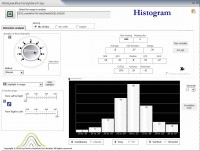
While standard spreadsheet software provides basic data visualization, the static nature of these charts often limits deep statistical analysis. HistogramPlus is an Excel-based utility designed to transform raw numerical data into interactive histograms. Unlike built-in tools, this software allows users to manipulate data visualizations in real-time through a system of sliders and knobs.
The tool streamlines the binning process, allowing for immediate adjustments to how data is grouped. It includes four distinct normality tests and P-P plots for eight different distributions, enabling researchers to evaluate the theoretical shape of their datasets without leaving the Excel environment. Users simply select a data range to generate a histogram and a comprehensive set of statistics.
Key technical capabilities of the software include:
- Interactive data truncation to assess the impact of outliers.
- Specialized handling for discrete values, particularly adapted for survey data.
- Automated statistical reporting displayed alongside the visual histogram.
- High-speed processing requiring minimal data entry.
- Tools for evaluating the theoretical shape of various distributions.
By focusing exclusively on Excel-based histogram generation rather than acting as a general-purpose statistical suite, HistogramPlus provides a specialized workflow for data analysts seeking a more dynamic and responsive approach to distribution modeling.
Top 5 Reasons To Download HistogramPlus
If you are looking to elevate your data analysis game and transform raw numbers into actionable insights, look no further. HistogramPlus is the tool you have been waiting for. Here are the top five reasons why you need to download this giveaway today:
- Revolutionary Dynamic Interactivity: Unlike static charts, HistogramPlus uses innovative sliders and knobs to let you manipulate your data views in real-time.
- Comprehensive Statistical Power: With four normality tests and P-P plots for eight different distributions, it provides the depth of high-end statistical suites within Excel.
- Specialized Handling for Discrete and Survey Data: It is specifically designed to handle the nuances of survey results and discrete values that standard tools often ignore.
- Instant Outlier Truncation and Impact Analysis: You can interactively truncate data to immediately see how outliers are affecting your overall statistical distribution.
- The "Swiss Knife" of Excel Integration: It lives within the universal platform of Microsoft Excel, offering a lightning-fast workflow with almost zero data entry required.
As a tech reviewer who has spent years digging through various data visualization and statistical software, I have seen it all. From the overly complex, multi-thousand-dollar enterprise suites to the bare-bones, frustratingly limited charts built into basic spreadsheet programs. Every once in a while, a tool comes along that hits the "Goldilocks" zone—it is powerful enough for professional analysts but intuitive enough for someone who just wants to understand their data better. HistogramPlus is exactly that tool. It bridges the gap between basic Excel charting and high-level statistical analysis. Let’s dive deep into why this specific giveaway is a must-have for your digital toolkit.
1. Revolutionary Dynamic Interactivity
The biggest frustration I have with standard data visualization tools—including the native histogram features in Microsoft Excel—is that they are static. You feed them data, you click a button, and you get a picture. If you want to see how the distribution changes with different bin widths or different intervals, you usually have to go back into the settings, change the numbers, and re-generate the chart. It is a slow, iterative process that kills your analytical flow.
HistogramPlus changes the game by introducing what I call "the DJ booth approach" to data. Instead of menus and dialogue boxes, you get sliders and knobs. This is an innovative approach that I haven’t seen implemented this effectively in any other Excel add-in. When you move a slider, the histogram reacts instantly. You can watch the bins grow, shrink, and shift in real-time. This isn't just about looking cool; it’s about feeling the data. By interacting dynamically, you notice patterns—small clusters, gaps, or shifts in the mean—that you would completely miss if you were looking at a static image. It turns data analysis from a chore into a tactile, exploratory experience.
For the visual learner, this interactivity is a breakthrough. You can experiment with different "what-if" scenarios on the fly. How does the shape change if I change the binning strategy? What happens to the bell curve if I adjust the scale? HistogramPlus gives you the controls to answer these questions as fast as you can move your mouse.
2. Comprehensive Statistical Power
Most people think a histogram is just a bunch of bars on a graph. But for a data scientist or a serious analyst, a histogram is a gateway to understanding the mathematical nature of a dataset. One of the most common questions we ask is: "Is this data normally distributed?" Usually, to answer that, you’d have to export your data into a heavy-duty program like SPSS or SAS, or write some complex scripts in R.
HistogramPlus brings that high-end power directly into your spreadsheet. It features four different normality tests. This is crucial because different tests are better suited for different sample sizes and types of data. Having all four at your fingertips means you can cross-validate your findings without leaving Excel. But it doesn't stop there. It also provides P-P plots (Probability-Probability plots) for eight different distributions. This allows you to compare your actual data against theoretical distributions to see where the deviations occur.
Whether you are working with Gaussian, Log-normal, or other specific distributions, HistogramPlus provides the visual and mathematical tools to verify your assumptions. This level of rigor is rarely found in an "affordable" tool, making this giveaway an incredible value for anyone who needs to back up their visual observations with hard statistical proof. It’s like having a PhD in statistics sitting right there in your Excel ribbon.
3. Specialized Handling for Discrete and Survey Data
If you have ever tried to create a histogram from survey data—like 1 to 5 ratings or "yes/no" responses—you know it can be a nightmare. Standard histogram tools treat every number as a continuous variable on a scale. They don't understand that in a survey, a "4" is a distinct category, not just a point between 3.9 and 4.1. This often results in messy, misleading charts where the bins don't align with the actual values being measured.
HistogramPlus was built with a specific understanding of discrete values. It recognizes the special nature of survey data and adapts the binning process accordingly. This means your "1 to 5" scale actually looks like a "1 to 5" scale. For marketers, social scientists, and HR professionals, this feature alone is worth the download. It ensures that your presentation of survey results is both mathematically accurate and easy for your audience to read. You no longer have to spend hours manually formatting Excel charts to make them represent categorical data correctly; HistogramPlus does the heavy lifting for you.
This attention to detail shows that the developers didn't just build a "generic" chart tool. They built a tool that understands the context of the data you are analyzing. Whether you are looking at manufacturing tolerances or customer satisfaction scores, the software speaks the language of your data.
4. Instant Outlier Truncation and Impact Analysis
We’ve all been there: you have a beautiful dataset, but one or two extreme "outliers" are stretching your histogram so wide that the rest of the data looks like a tiny, unreadable lump in the corner. In standard software, dealing with outliers involves finding the offending rows in your spreadsheet, deleting them (which is dangerous for data integrity), or setting up complex filters.
With HistogramPlus, you handle outliers interactively. You can truncate the data on the fly to see how the removal of extreme values impacts your statistics. As you slide the truncation bar, you can watch the mean, median, and standard deviation update in real-time. This is "Impact Analysis" at its finest. It allows you to ask: "If we ignore these three anomalies, what does our core business actually look like?"
Being able to interactively evaluate the impact of outliers is a massive time-saver. It allows you to clean your view without permanently destroying your source data. You get the best of both worlds: a clean, readable visual and the integrity of the original dataset. It's a professional-grade feature that simplifies one of the most tedious parts of data cleaning.
5. The Power of a Universal Platform (Excel) without the Complexity
Let’s be honest: we all use Excel. It is the universal language of business. However, Excel's built-in statistical tools are often buried under layers of menus, or they require the "Analysis Toolpak," which produces static, ugly tables and charts that look like they were designed in 1995. The alternative is learning a whole new software language, which most of us don't have time for.
HistogramPlus is the "Swiss Knife" because it stays within the Excel ecosystem while bypassing its limitations. It requires almost no data entry. You just select your range of data, and the histogram and statistics pop up instantly. It is incredibly fast, even with large datasets. Because it lives in Excel, you don't have to worry about importing or exporting files, or whether your colleagues can open your work. You are using a tool that enhances the software you already use every day.
In my experience, the best tech tools are the ones that remove friction. HistogramPlus removes the friction between "having data" and "understanding data." It’s designed to be fast, affordable, and incredibly powerful. This giveaway is an opportunity to grab a professional utility that will pay for itself in saved time and better insights within the first hour of use.
Final Thoughts: Why You Should Download It Now
In the world of tech, we often talk about "value-adds." HistogramPlus isn't just an add-on; it’s a force multiplier for anyone who works with numbers. It takes the most comprehensive way of understanding data—the visual histogram—and gives it the modern, interactive interface it deserves. From the sliders and knobs that give you tactile control to the normality tests that provide scientific validity, this software is a masterclass in utility design.
Think about your current workflow. How much time do you spend fiddling with chart settings? How often do you guess at whether a distribution is normal? How many times have you been frustrated by outliers ruining your visuals? HistogramPlus solves all of these problems in a single, elegant package. It was designed specifically for Excel users who need more than what standard Excel provides but don't want the overhead of a massive statistical package.
As a reviewer, I look for tools that solve specific problems with innovative solutions. HistogramPlus’s approach to interactive binning and outlier truncation is exactly the kind of innovation that makes a tool indispensable. It turns a static chart into a living, breathing laboratory where you can poke, prod, and analyze your data until its secrets are revealed.
Don’t miss out on this giveaway. Whether you are a student, a professional researcher, a business analyst, or just someone who loves a well-organized spreadsheet, HistogramPlus is a tool that belongs in your arsenal. It is fast, it is thorough, and most importantly, it makes data analysis actually fun. Download it, run your most complex dataset through it, and prepare to see your data in a whole new light. You’ll wonder how you ever managed with the old, static way of doing things.
The Verdict: This is a must-download. It's rare to find a tool that balances deep statistical rigor with such an intuitive, interactive interface. Grab it while it’s available and start making sense of your data today!


Reviews for HistogramPlus
Click Here to Read Reviews for HistogramPlus >> Click Here to Submit Reviews for HistogramPlus >>