What Does Inspiration Library Do?
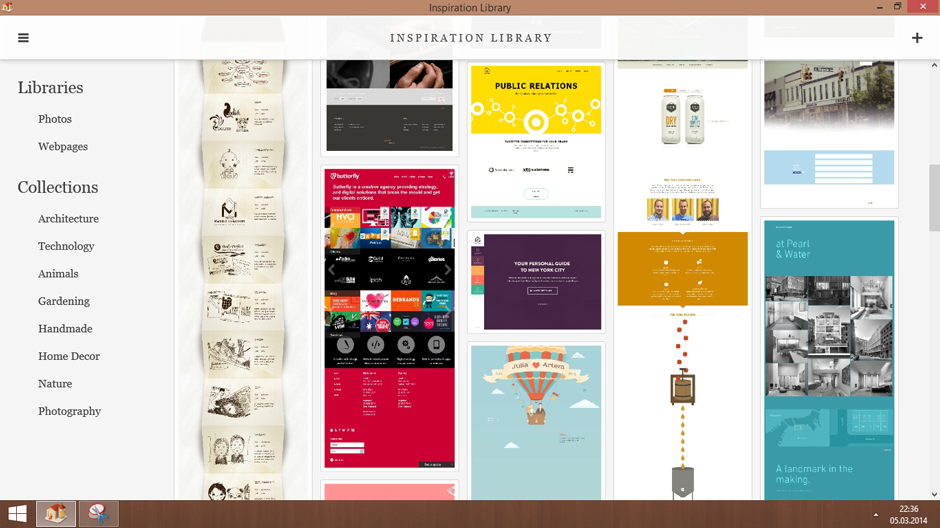
Inspiration Library is a digital asset management application designed for the curation and organization of visual concepts. The software serves as a central repository for photos, illustrations, and design elements, allowing users to aggregate files that serve as creative catalysts. Users can categorize their saved items into distinct collections and broader libraries, facilitating a structured workflow for various design projects.
A primary feature of the service is its dedicated Chrome web browser extension. This tool enhances the software's functionality by allowing users to "snap" entire web pages directly from their browser. These captures are then automatically synced and saved into the local library, preserving the layout and visual data of the original source for future reference.
The application is built to handle the systematic storage of high volumes of visual media. Key capabilities include:
- Direct File Import: Save local images and designs directly into categorized folders.
- Structured Organization: Use libraries to manage broad themes and collections for specific tasks.
- Web Capturing: Archive full web pages to maintain visual context without leaving the browser.
By providing a unified interface for gathering and sorting visual data, Inspiration Library assists professionals and hobbyists in maintaining an organized archive of creative references. The software focuses on utility and accessibility, ensuring that disparate ideas are kept in a single, searchable location.
Top 5 Reasons To Download Inspiration Library
Before we dive into the nitty-gritty details of why this application is currently dominating my daily workflow, let me give you the highlight reel. If you are a creative, a designer, or simply someone who finds themselves constantly saving "cool things" on the internet only to lose them in a sea of bookmarks, here are the top 5 reasons you need to download Inspiration Library today:
- The Ultimate Full-Page "Snap" Extension: Capture entire web pages exactly as they appear, preserving the context and layout of your inspiration without losing a single pixel.
- A Masterclass in Hierarchical Organization: Move beyond messy folders and into a structured ecosystem of Libraries and Collections that mirror the way your brain actually categorizes ideas.
- A Unified Visual Repository: Harmonize your local design files and photos with web-based captures, creating a single, beautiful dashboard for every creative spark.
- Elimination of "Tab Fatigue": Stop hoarding open tabs that slow down your computer and drain your mental energy; save the content and close the tab with total confidence.
- Frictionless Creative Momentum: Streamline the transition from research to creation by having a curated, high-quality reference library ready the second you open your design software.
Now, let’s get into the heart of why Inspiration Library is the tool you didn't know you were missing, and why this giveaway is an absolute "must-grab" for anyone living in the digital workspace.
1. The Power of the "Snap": Beyond Simple Bookmarking
We have all been there. You are browsing a design gallery, a fashion blog, or a complex UI kit, and you see something that makes you stop scrolling. Your first instinct is to bookmark it. But six months later, when you actually need that reference, you click the link only to find the page has been updated, the domain has expired, or the specific image you loved has been moved. Inspiration Library solves this once and for all with its revolutionary Chrome extension.
The "Snap" feature isn't just a simple screenshot tool. It allows you to capture the entirety of a web page in high resolution. This is a game-changer for web designers and digital artists. Often, the "inspiration" isn't just one single image; it is the way the header interacts with the navigation, the specific font pairings used in the body copy, or the way the color palette shifts as you scroll down the page. By "snapping" the whole page, you are effectively "freezing" that creative moment in time.
When you use the Chrome extension, the process is incredibly fluid. There is no clunky interface to navigate. You find what you love, you snap it, and it is instantly categorized into your Inspiration Library. This removes the "friction" of curation. In the world of tech and design, friction is the enemy of productivity. The easier it is to save an idea, the more ideas you will save, and the richer your creative well will become. This extension is, quite frankly, the best implementation of web-capturing I have seen in years.
2. Hierarchical Organization: Libraries and Collections
The biggest problem with most "inspiration" apps is that they eventually become as cluttered as the desktops they were meant to replace. You end up with a giant "bucket" of images that becomes impossible to search through. Inspiration Library approaches this with a professional-grade organizational logic. It uses a dual-layer system: Libraries and Collections.
Think of a Library as your high-level archive. You might have one Library for "Professional Client Work," another for "Personal Photography Projects," and a third for "Home Interior Ideas." Within those Libraries, you can create specific Collections. Under your "Professional" library, you could have collections for "Minimalist UI," "Bold Typography," "Bento Grid Layouts," or "Dark Mode Palettes."
This hierarchy is vital because it allows for thematic browsing. As a reviewer who looks at dozens of productivity tools, I can tell you that the ability to "drill down" into a specific niche without seeing the noise of your other projects is what separates a "toy" app from a "professional" tool. Inspiration Library understands that a graphic designer doesn't want to see landscape photography references while they are trying to design a corporate logo. This separation of concerns allows for a cleaner mental state and a more focused creative process. It turns your scattered thoughts into a curated museum of your own taste.
3. A Unified Visual Workspace for Local and Web Files
One of the most frustrating aspects of the modern creative workflow is the "split" between the files on your hard drive and the things you find online. You have your own sketches and photos sitting in a "Downloads" or "Projects" folder, and then you have your web-based inspiration sitting in a browser or a cloud-based app. Inspiration Library bridges this gap perfectly.
This application allows you to drag and drop your own local files—photos, designs, PDF mockups, and more—directly into the same Collections where you store your web "snaps." This creates a unified visual language for your project. If you are working on a new branding project, you can have your client’s current assets right next to the web designs that are inspiring the new direction. Seeing these items side-by-side is where the magic happens. It allows for visual comparison, mood-boarding, and pattern recognition that simply isn't possible when your files are scattered across different platforms.
Furthermore, the visual interface of the app is designed to get out of your way. It prioritizes the content. The images are displayed in a clean, high-fidelity grid that makes browsing feel like flipping through a premium art book. For someone like me, who values aesthetics as much as functionality, the way Inspiration Library presents your data is a huge selling point. It makes the act of "organizing" feel like an act of "creating."
4. Ending Tab Fatigue and Cognitive Load
Let’s talk about the "Tab Problem." We all do it. We have 45 tabs open because we don't want to forget that one specific layout on page three of a portfolio site. But every open tab is a tiny tax on your computer’s RAM and a massive tax on your brain’s "working memory." Each tab represents an "open loop"—an unfinished task or a piece of information you are afraid of losing.
Inspiration Library acts as the ultimate "closing tool." Because the Chrome extension is so reliable and the organizational system is so robust, you can finally feel the sweet relief of clicking that "X" on your browser tabs. You know that the content is safely stored, high-res, and correctly categorized in your library. This drastically reduces cognitive load. When your browser is clean, your mind is clear.
As a tech reviewer, I am constantly looking for tools that improve digital hygiene. Inspiration Library is a primary tool for this. It transforms the internet from a chaotic, overwhelming stream of information into a structured resource that you can dip into whenever you need. It changes your relationship with the web; you are no longer a passive consumer drowning in tabs, but an active curator building a valuable asset. The performance boost your computer will get from having fewer tabs open is just a nice side effect of the mental clarity you'll gain.
5. Seamless Creative Momentum: From Inspiration to Execution
The most critical part of any creative project is the "starting" phase. That moment when you stare at a blank canvas or an empty code editor. This is where most people get stuck. They spend three hours "looking for inspiration" and by the time they find it, their creative energy is spent. Inspiration Library is designed to bypass this "search fatigue."
Because you have been curating your Inspiration Library during your "passive" time—those moments when you are just browsing or researching—the work is already done for you when it comes time to actually create. You don't go to the internet to find ideas; you go to your Library. You open the specific Collection you built for this project, and you are immediately greeted by a concentrated, high-quality blast of exactly what you need.
This "priming" of the creative pump is invaluable. It keeps you in the flow state. Instead of jumping between a search engine, Pinterest, and your file explorer, you have a single source of truth. The application becomes a springboard. You see a "snap" you saved two weeks ago, you notice the specific color interaction, and you immediately start applying it to your work. This is how professional-level work gets done: by having the right references at the right time. Inspiration Library isn't just a place to store things; it’s an engine for your creativity.
Why This Giveaway Is a Game-Changer
In the current tech landscape, we are being "subscription-ed" to death. Every little utility wants $10 a month. That is why finding a robust, professional-grade application like Inspiration Library through a giveaway is such a massive win for the user. This is an opportunity to grab a tool that will fundamentally change how you interact with visual data without adding another recurring charge to your credit card.
I’ve tested countless "bookmark managers" and "asset organizers," and most of them feel like they were designed by people who don't actually create anything. They are often too text-heavy or too restrictive in how they handle files. Inspiration Library feels different. It feels like it was built for designers, by designers. It understands that visual context is king. The ability to snap a whole page, categorize it deeply, and mix it with your own files is a combination of features that you usually only find in very expensive enterprise software.
By downloading this giveaway, you are essentially building your own private Pinterest—one that is faster, more organized, and contains exactly what you need without the distractions of social media algorithms. You are taking control of your creative inputs. In an age where we are bombarded with "content," the most valuable skill you can have is curation. This tool gives you the infrastructure to be a master curator.
Final Thoughts for the Creative Professional
If you are serious about your craft—whether that is web design, digital art, architecture, or even content creation—you need to treat your inspiration with respect. Saving images to a random folder on your desktop is not respect; it’s a graveyard. Inspiration Library gives your ideas a home. It treats every "snap" and every photo as a building block for your next big project.
The tech is solid, the UI is beautiful, and the workflow benefits are immediate. As a reviewer, I don't say this often, but this is one of those rare applications that actually delivers on its promise to make your digital life easier. Don't let your best ideas disappear into the digital void. Use the Chrome extension to capture them, use the Libraries to organize them, and use the entire application to fuel your next creative breakthrough.
Inspiration Library is more than just a storage app; it’s a productivity powerhouse that turns the chaos of the internet into a structured, visual playground. If you are looking to level up your organization and give your creative brain the support it deserves, you need to download this giveaway immediately. Your future self—the one who isn't hunting through 50 tabs for that one specific design—will thank you.
Stop searching and start creating. The tools are here, the giveaway is live, and your inspiration is waiting to be organized. This is an easy five-star recommendation from me. Get it, install the extension, and start "snapping" your way to a better creative process today.


Reviews for Inspiration Library
Click Here to Read Reviews for Inspiration Library >> Click Here to Submit Reviews for Inspiration Library >>