What Does iPixSoft SWF to Video Converter Do?
iPixSoft SWF to Video Converter is a specialized utility designed to transform Flash SWF files into a variety of standard video formats. The software supports conversion to AVI, MPEG, HTML5-compatible video, MOV, MKV, WMV, and GIF, as well as MP4 profiles optimized for mobile devices such as the iPod and PSP. Unlike many standard conversion tools, this application is engineered to process complex SWF files that incorporate ActionScript, including music-driven animations or interactive flash games that require user participation to progress.
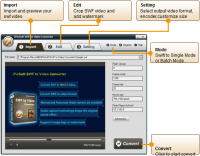
The converter also manages SWF files that link to external video sources or contain high-definition internal video data. Beyond simple file transformation, the software provides a suite of integrated editing functions. Users can crop video frames and add watermarks to their output files for branding or security purposes. For those managing large libraries of legacy Flash content, the application features a batch conversion mode to process multiple files simultaneously.
By providing a bridge between legacy Flash content and modern video standards, iPixSoft SWF to Video Converter ensures that interactive animations and complex media files remain accessible on contemporary hardware and web platforms. The tool focuses on maintaining the integrity of the original source material while ensuring compatibility across a wide range of digital players.
Top 5 Reasons To Download iPixSoft SWF to Video Converter
- Seamless Conversion of Complex ActionScript and Interactive Content
- Extensive Format Support for Modern Web and Mobile Devices
- Advanced Professional Editing and Watermarking Tools
- High-Efficiency Batch Processing for Large Libraries
- Superior Handling of External Assets and High-Definition Embedded Video
If you have been around the internet long enough, you know the heartbreak that came with the official retirement of Adobe Flash. For decades, Flash was the heartbeat of the web, powering everything from the legendary animations we shared on forums to the addictive browser games that consumed our lunch breaks. When the industry shifted toward newer standards, a massive library of digital history was suddenly at risk of becoming unplayable. While many converters have attempted to bridge the gap between the old SWF format and modern video standards, most of them fall short when things get complicated. That is exactly where iPixSoft SWF to Video Converter steps in to save the day. This isn't just another utility tool; it is a specialized powerhouse designed to rescue your most complex interactive content from the digital graveyard.
As a tech reviewer, I have seen dozens of tools claim to offer "perfect" conversion, only to crash when they encounter a script or a game that requires user input. iPixSoft is different. It treats your Flash files with the respect they deserve, ensuring that the final video looks and feels exactly like the original interactive experience. Whether you are a content creator looking to archive your portfolio, a gamer wanting to preserve a piece of your childhood, or a business professional needing to update legacy web assets, this software is the definitive solution. Let’s dive deep into the five primary reasons why you need to grab this giveaway right now.
1. Seamless Conversion of Complex ActionScript and Interactive Content
The biggest Achilles' heel of standard SWF converters is ActionScript. Most basic tools work by simply "reading" the frames of a Flash file. This works fine for a simple linear animation, but the moment you introduce a music SWF controlled by complex scripts, or an "endless" game that requires a user to click buttons to progress, the standard converters fail. They either loop indefinitely, skip the interactive segments, or simply output a black screen. iPixSoft SWF to Video Converter solves this through a sophisticated capture engine that understands the logic behind the file.
When you use this software, you aren't just converting a file; you are capturing an experience. It is specifically designed to handle those "no end" game files that need human interaction to play. This means you can actually engage with the Flash content during the conversion process, ensuring that the final video reflects the actual gameplay or the specific path through an interactive menu that you want to showcase. For anyone who has ever tried to record a Flash game using screen capture software only to deal with lag and dropped frames, you will appreciate how much more stable and professional this dedicated conversion method is. It bridges the gap between interactive code and linear video with surgical precision.
2. Extensive Format Support for Modern Web and Mobile Devices
Converting a file is only useful if the end result can actually be played on the devices you use today. One of the most compelling reasons to download this tool is its massive library of output profiles. iPixSoft doesn't just stop at basic AVI files; it offers a comprehensive suite of formats including MPEG, MOV, MKV, WMV, and the universally compatible MP4. This makes it incredibly easy to move your old Flash animations onto an iPhone, iPad, or PSP without having to worry about third-party transcoding apps.
Furthermore, for web developers and modern content creators, the support for HTML5 video is a game-changer. If you have an old Flash-based website element that you aren't ready to let go of, you can convert it to a modern HTML5-compliant video format that will play perfectly in any modern browser on both desktop and mobile. Additionally, the ability to convert SWF to GIF is a fantastic feature for social media managers and meme-makers. Taking a snippet of a classic Flash animation and turning it into a high-quality GIF for Twitter or Discord is a seamless process with this tool. It transforms your outdated files into versatile assets ready for the 2024 digital landscape.
3. Advanced Professional Editing and Watermarking Tools
Most converters are "one-trick ponies" that give you very little control over the final look of your video. This software, however, functions more like a mini-production suite. Once you have loaded your SWF file, you aren't stuck with the original dimensions or branding. The crop function is particularly useful for cleaning up old Flash files that might have "off-stage" assets or messy borders that were never meant to be seen by the viewer. You can frame your video perfectly, ensuring it fits modern 16:9 or 4:3 aspect ratios without unnecessary letterboxing.
Perhaps even more important for professionals is the watermarking feature. If you are an animator or a business owner archiving your intellectual property, you want to ensure your work is protected. iPixSoft SWF to Video Converter allows you to overlay your own logos or text watermarks directly onto the video during the conversion process. You can adjust the transparency, position, and size, giving your archived content a polished, professional look that screams quality. It allows you to reclaim your legacy content and brand it for a new generation of viewers.
4. High-Efficiency Batch Processing for Large Libraries
We have all been there: you find an old hard drive or a backup folder containing hundreds of Flash files you collected over a decade. The thought of converting them one by one is enough to make anyone give up before they start. This is where the batch conversion feature becomes your best friend. This software is built for volume. You can simply drag and drop an entire folder of SWF files into the interface, select your desired output format, and let the software do the heavy lifting while you grab a coffee.
The batch processing engine is optimized for stability. While other programs might crash after three or four files, iPixSoft is designed to handle a heavy queue without breaking a sweat. It maintains consistent quality across every file in the list, ensuring that your entire collection is preserved in one fell swoop. For digital archivists or anyone who spent their youth hoarding Flash "e-cards" and animations, this feature alone makes the download worth it. It turns a week-long project into a few clicks of a button.
5. Superior Handling of External Assets and High-Definition Embedded Video
Flash files are often more than they seem on the surface. Many professional-grade SWFs act as "containers" that pull in external video files or link to assets hosted elsewhere. When a standard converter encounters these, it usually fails to find the external data, resulting in a video that is missing half of its content. iPixSoft is specifically engineered to recognize and incorporate these external video links. It ensures that the "connected" nature of the Flash file is preserved in the final, flat video output.
Moreover, some Flash files contain high-definition video embedded internally within the SWF wrapper. This creates a technical challenge because the converter has to extract that high-clear video without losing resolution or introducing compression artifacts. This software excels at maintaining the fidelity of the original source. It doesn't just "record" the screen; it decodes the internal data to ensure that the output video is as crisp and clear as the original creator intended. If you are working with high-quality Flash content that was ahead of its time, you need a tool that can actually output that quality into a modern container like MKV or MP4. iPixSoft delivers that level of professional precision.
In conclusion, the era of Flash may be over, but your content doesn't have to die with it. iPixSoft SWF to Video Converter is the ultimate bridge between the past and the future. It tackles the technical hurdles—ActionScript, interactivity, external links—that make other converters useless. Whether you are looking for the efficiency of batch processing or the creative control of its editing suite, this tool is an absolute must-have for your digital toolkit. Don't let your interactive history fade away; download this giveaway and ensure your Flash files are ready for the modern age. You won't find a more robust or reliable way to bring your SWFs into the world of high-definition video. This is the professional solution you have been waiting for, and there has never been a better time to add it to your arsenal.
Final Verdict: If you have even a single SWF file that means something to you, this is a download you cannot afford to skip. It is fast, it is powerful, and it handles the "unconvertible" files that leave other software in the dust. Embrace the nostalgia, protect your work, and modernize your library today.


Reviews for iPixSoft SWF to Video Converter
Click Here to Read Reviews for iPixSoft SWF to Video Converter >> Click Here to Submit Reviews for iPixSoft SWF to Video Converter >>