What Does Leawo Blu-ray Ripper Do?
Leawo Blu-ray Ripper functions as a professional utility for decrypting and converting Blu-ray and DVD media into digital formats. The software processes physical discs and internal folders into common video containers, including MKV, MP4, and MOV. These files are formatted for compatibility with a wide range of hardware, such as Apple and Android mobile devices, tablets, and Windows-based media players.
The application includes several functional features for media management and customization. Users can perform 2D-to-3D conversions to create depth-enhanced video for 3D-capable hardware. It also provides tools for basic video editing, allowing for the adjustment of output parameters and the merging of multiple titles or chapters into a single file. Users have the ability to select specific subtitles and audio tracks prior to the conversion process.
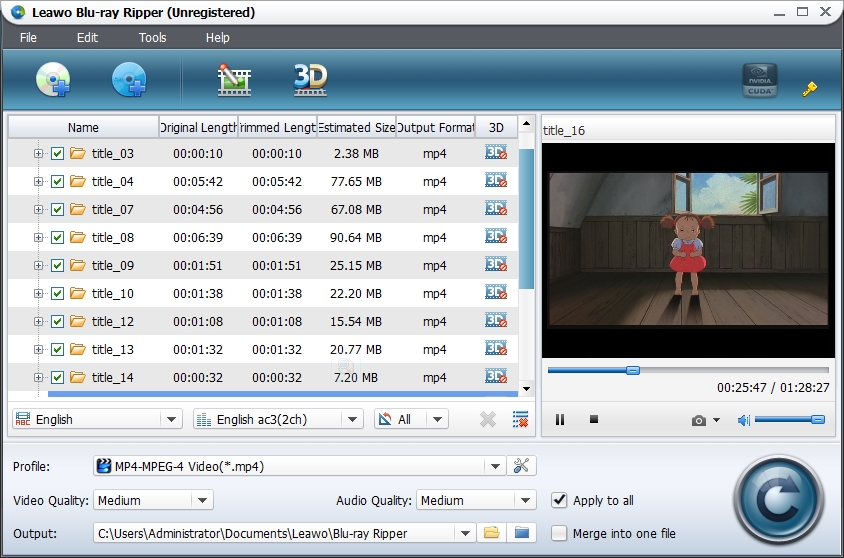
Performance is managed through NVIDIA CUDA acceleration technology, designed to decrease the time required for high-definition processing. The interface includes a built-in player for content previewing and a quick profile search to expedite the selection of output settings. Key features available in this tool include:
- Support for converting Blu-ray/DVD discs and folders to various audio/video formats.
- 2D-to-3D conversion engine for specialized playback.
- Hardware acceleration for optimized processing speeds.
- Customizable subtitle and audio track selection.
- Built-in video editor and preview player.
- Capability to merge multiple chapters into a single output file.
Top 5 Reasons To Download Leawo Blu-ray Ripper
If you are a physical media collector or someone who simply values the high-fidelity experience of a Blu-ray disc but hates the inconvenience of being tethered to a living room player, you have likely searched for a solution to digitize your library. The market is flooded with tools that promise the world but often deliver corrupted files, out-of-sync audio, or simply fail to bypass the complex encryption found on modern discs. Enter the Leawo Blu-ray Ripper. This is not just another utility; it is a comprehensive powerhouse designed to liberate your media from the constraints of plastic and lasers. As a tech enthusiast who has tested nearly every ripping tool available, I can confidently say that this specific software stands out for its reliability and feature set. Below are the five most compelling reasons why you need to grab this giveaway immediately.
- Industry-Leading Decryption and Format Versatility: The ability to bypass the latest AACS, BD+, and MKB protections means you can rip virtually any disc in your collection into high-quality digital formats like MKV, MP4, and MOV.
- Tailor-Made Profiles for Every Device: Whether you are using an iPhone, an Android tablet, or a Windows-based media server, the software includes pre-optimized profiles that ensure your video looks perfect on your specific hardware without manual tinkering.
- Advanced 2D to 3D Conversion Technology: This is a rare gem in the ripping world, allowing you to breathe new life into your standard 2D collection by converting them into immersive 3D movies for playback on VR headsets or 3D-capable displays.
- High-Octane Performance via Hardware Acceleration: Leveraging NVIDIA CUDA and other GPU acceleration technologies, this software slashes conversion times significantly, ensuring you spend more time watching and less time waiting.
- Full Creative Control and Editing Suite: Beyond simple conversion, you get a built-in editor to trim, crop, watermark, and adjust parameters, along with the ability to selectively choose audio tracks and subtitles for a truly custom viewing experience.
1. Industry-Leading Decryption and Format Versatility
Let’s get technical for a moment. The biggest hurdle any movie enthusiast faces when trying to digitize their Blu-ray collection is encryption. Studios use incredibly sophisticated layers of protection—AACS (Advanced Access Content System), BD+, and the ever-evolving MKB (Media Key Block)—to prevent discs from being copied. Many free or open-source tools simply cannot keep up with these updates, leaving you with a "failed to read disc" error. Leawo Blu-ray Ripper is engineered specifically to dismantle these hurdles. It is regularly updated to handle the latest protection schemes, meaning those boutique labels and major studio releases that usually cause headaches will rip smoothly and without error.
But decryption is only half the battle; the other half is what happens after the "handshake." Once the disc is unlocked, you need the video to be wrapped in a container that suits your needs. This software offers an incredible array of output formats. If you are a purist who wants every pixel of detail, you can opt for MKV Lossless, which retains the original quality of the Blu-ray. If you are looking to save space while maintaining high definition, you can choose H.264 or H.265 (HEVC) MP4. The flexibility here is staggering. It doesn't just stop at video, either; you can extract high-fidelity audio in formats like FLAC, ALAC, or MP3 if you just want the soundtrack or a specific clip of dialogue. This level of versatility ensures that your digital library is as robust and high-quality as your physical one.
2. Tailor-Made Profiles for Every Device
One of the most frustrating aspects of digital video is the fragmentation of hardware. What plays perfectly on a high-end PC might stutter on an iPad, or the aspect ratio might be completely skewed on a widescreen Android smartphone. A "one-size-fits-all" approach to video conversion usually results in a mediocre experience. Leawo Blu-ray Ripper solves this by providing a massive library of pre-configured device profiles. When you use this software, you don't need to be an expert in bitrates, resolutions, or frame rates. You simply select your device from a list—Apple, Samsung, Sony, Microsoft, and many others—and the software automatically adjusts the settings to provide the best possible visual fidelity for that specific screen.
Think about the convenience this offers. Imagine you are preparing for a long flight and want to take your favorite trilogy with you on your tablet. In most other programs, you would have to guess which resolution won't drain your battery or which codec the tablet supports. With this tool, you click the "Android Tablet" or "iPhone" profile, and it handles the heavy lifting. It optimizes the file size so it doesn't eat up all your storage while ensuring the image is crisp and the audio is perfectly synced. It takes the guesswork out of the equation, making it an essential tool for the modern, mobile movie fan who refuses to compromise on quality.
3. Advanced 2D to 3D Conversion Technology
This is where Leawo Blu-ray Ripper really separates itself from the "basic" converters you might find elsewhere. We are currently seeing a massive resurgence in 3D interest, largely driven by the advancement of Virtual Reality (VR) headsets like the Meta Quest or the Apple Vision Pro. Watching a movie in a virtual cinema is an incredible experience, but finding 3D content can be difficult and expensive. This software includes a built-in 2D to 3D converter that is surprisingly sophisticated. It offers six different 3D effects, including Red/Cyan, Red/Blue, Red/Green, Blue/Yellow, Interleaved, and Side-by-Side.
You can take a standard 2D Blu-ray of an action movie and, within the software, apply a 3D effect that adds genuine depth to the image. You can even adjust the 3D Depth settings to suit your personal preference, ensuring the effect isn't too jarring for your eyes. For tech reviewers and home cinema enthusiasts, this feature is a total game-changer. It allows you to "remaster" your own collection for a more immersive experience. Whether you have a dedicated 3D TV that you still love or you are looking to populate your VR headset with content that feels like a theatrical experience, this feature alone makes the software worth the download. It’s about taking your existing media and making it do something it was never originally designed to do.
4. High-Octane Performance via Hardware Acceleration
We have all used software that takes six hours to convert a single movie. It’s a frustrating experience that ties up your computer’s CPU, making it nearly impossible to do anything else while the "magic" is happening. Leawo Blu-ray Ripper addresses this bottleneck with full support for hardware acceleration. By utilizing the power of your graphics card—specifically NVIDIA CUDA, AMD APP, and Intel Quick Sync technologies—the software offloads the heavy processing from your CPU to your GPU. The result is a conversion process that can be up to 6 times faster than standard software.
In a real-world scenario, this means a full-length Blu-ray that might take several hours on a standard converter can be finished in a fraction of that time. This efficiency is vital if you are trying to digitize a large collection of discs. No one wants their PC to be a space heater for three days straight just to rip a season of a TV show. With the acceleration features turned on, the program glides through data, maintaining high frame rates and ensuring the integrity of the video stream. It is "pro-sumer" grade performance packaged in a user-friendly interface, allowing you to build your digital library at a pace that matches your lifestyle.
5. Full Creative Control and Editing Suite
Finally, let’s talk about customization. Most rippers are "black boxes"—you put a disc in, you get a file out, and you have no say in how that file looks or behaves. Leawo Blu-ray Ripper empowers the user by including a suite of editing tools and parameter controls that allow you to put your own "patent" on the converted files. Do you hate those black bars at the top and bottom of the screen? Use the Crop tool to remove them. Is the movie a bit too dark for your phone’s screen? Adjust the brightness and contrast before you hit convert. You can even add watermarks or trim the video to keep only your favorite scenes.
Beyond the visual edits, the control over audio and subtitles is top-tier. Many Blu-rays come with dozens of audio tracks—commentaries, foreign languages, descriptive audio—and just as many subtitle tracks. This software lets you preview the movie in a built-in player so you can hear exactly which track is which. You can then selectively choose to keep only the 5.1 Surround Sound English track and the English subtitles, stripping away the "bloat" and making the final file smaller and cleaner. Furthermore, you can merge multiple titles or chapters into one continuous file, which is perfect for TV shows where you want to watch an entire arc without interruption. It is this level of granular control that makes you feel like an editor rather than just a passive user.
In conclusion, the Leawo Blu-ray Ripper is a must-have tool for anyone who takes their media seriously. It bridges the gap between the high-quality world of physical discs and the convenience of the digital age. By combining powerful decryption, device-specific optimization, 3D conversion, blazing fast speeds, and deep customization, it offers a total solution for your home theater needs. This giveaway is a rare opportunity to secure a professional-grade tool that will change the way you interact with your movie collection. Don't let your discs gather dust on a shelf; download this software, unlock your media, and enjoy your movies wherever and however you want. It is, quite simply, the best way to future-proof your library.


Reviews for Leawo Blu-ray Ripper
Click Here to Read Reviews for Leawo Blu-ray Ripper >> Click Here to Submit Reviews for Leawo Blu-ray Ripper >>