What Does Leawo iTransfer Do?
Leawo iTransfer is a specialized data management utility designed to facilitate file transfers between iOS devices, iTunes, and Windows PCs. Positioned as a functional alternative to Apple’s native synchronization software, this tool allows users to migrate content across different platforms without the standard constraints or automated processes of an iTunes sync.
The application supports a wide range of media and data types, including music, movies, photos, and documents. Beyond simple file movement, iTransfer enables users to back up their iPhone, iPad, or iPod data directly to a computer’s local storage. This ensures that media libraries and essential files are preserved independently of cloud services or proprietary ecosystem backups. The software is built to handle the latest versions of both iTunes and the Windows operating system, maintaining compatibility with modern hardware.
A significant feature of the software is its ability to treat iOS devices as external USB flash drives. This allows for the storage and transport of various file formats that are not typically recognized or accessible by the standard iOS media player.
Core Capabilities Include:
- Multi-Directional Transfer: Move files seamlessly between iOS hardware, iTunes libraries, and PC directories.
- Data Backup: Create local copies of mobile device content to prevent data loss.
- Disk Mode: Utilize mobile devices as portable storage units for non-media file types.
- Simplified Management: Organize media libraries through a user interface that bypasses automatic synchronization protocols.
Top 5 Reasons To Download Leawo iTransfer
If you have ever felt the frustration of the "Apple walled garden," you know exactly how difficult it can be to move your own files between your devices and your computer. Whether you are trying to rescue music from an old iPod or move photos from your iPhone to a new PC, the official methods often feel clunky, restrictive, and unnecessarily complicated. That is where a professional-grade tool like Leawo iTransfer comes into play. This software is designed to strip away the limitations of the standard iOS ecosystem, giving you total control over your data. If you are looking for a reason to jump on this giveaway, look no further. Here are the top five reasons why you need to download this tool today.
- Complete Freedom from iTunes Synchronization: Skip the risk of data loss and manage your files directly without the restrictive "sync" process that often overwrites your existing library.
- Seamless Multi-Directional Transfers: Effortlessly move music, videos, photos, and contacts between iOS devices, iTunes libraries, and your PC with a few simple clicks.
- Full Data Backup and Safety: Protect your most precious memories and important documents by creating local backups that are easy to access and restore whenever you need them.
- Convert Your iOS Device into a Portable Flash Drive: Unlock the hidden storage potential of your iPhone or iPad, allowing you to carry any file type as if it were a standard USB drive.
- Universal Compatibility and Intuitive Design: Enjoy a user-friendly interface that supports the latest versions of Windows and iOS, ensuring a smooth experience regardless of your technical skill level.
1. Complete Freedom from iTunes Synchronization
For years, iTunes has been the primary gatekeeper for iOS devices. While it serves its purpose for media consumption, as a file management tool, it leaves much to be desired. The biggest headache for any long-term iPhone user is the dreaded "Synchronization" process. We have all been there: you plug your phone into a friend's computer or a new laptop, and iTunes asks if you want to "Erase and Sync." One wrong click, and your carefully curated music collection or your precious photos could be wiped in an instant because they weren't already in that specific computer's library. This is where Leawo iTransfer changes the game entirely.
By downloading this software, you are effectively opting out of the "all or nothing" mentality of iTunes. This tool operates as a standalone manager that does not require the synchronization logic that Apple enforces. Instead of the software telling the phone what it should have based on the computer's library, iTransfer allows you to look inside the phone and decide exactly what you want to move. It treats your iPhone, iPad, or iPod like an independent entity. You can add one song, delete one video, or move a single playlist without the software trying to reformat your entire device.
This freedom is essential for users who manage multiple devices or share computers with family members. You no longer have to worry about your spouse's contact list merging with yours or your child's games overwriting your work documents. Leawo iTransfer gives you the granular control that tech enthusiasts crave. It is a "no-risk" environment; you can explore your folders, see exactly what is taking up space, and make changes with the confidence that the software will only do exactly what you tell it to do. In the world of data management, that peace of mind is worth the download alone.
2. Seamless Multi-Directional Transfers
Most basic transfer tools are a one-way street—they might let you put music onto a phone, but they won't let you take it back off. This is a common limitation built into the Apple ecosystem to prevent piracy, but it often ends up hurting the legitimate user. For example, what happens if your computer crashes and you lose your entire music library, but all those songs are still sitting on your iPod? Under normal circumstances, getting those files back onto your computer is a nightmare. Leawo iTransfer solves this by offering true multi-directional transfer capabilities.
With this software, you can move data in three distinct ways: from PC to iOS device, from iOS device to PC, and even between two different iOS devices. This "three-way" bridge is incredibly powerful. Imagine you just bought a new iPad and you want to move the movies from your iPhone directly to the tablet without uploading everything to the cloud and waiting for a slow download. With iTransfer, you can simply plug both in and facilitate the move. It supports a massive variety of file types, including music, movies, TV shows, ringtones, e-books, photos, and even your contacts and SMS messages.
The efficiency here cannot be overstated. As a tech reviewer, I often see "bloatware" that claims to do these things but fails when it comes to large file batches. Leawo iTransfer handles bulk transfers with impressive speed. It utilizes advanced scanning technology to quickly index the files on your device so you aren't sitting around for twenty minutes just waiting for the file list to load. Whether you are moving a single PDF or a 4K feature-length film, the process is streamlined and stable. This makes it an essential tool for anyone who treats their mobile device as a primary media hub.
3. Full Data Backup and Safety
We live our lives on our mobile devices. Our phones hold our family photos, our work schedules, our private messages, and our entertainment. Yet, many people neglect to back up their devices because the cloud can be expensive and iTunes backups can be slow and difficult to navigate. Leawo iTransfer provides a robust alternative for local backups that is both faster and more transparent than the official options. When you use this giveaway, you are essentially getting a premium insurance policy for your digital life.
One of the best features of this tool is its ability to selectively back up data. You don't always need to back up the entire 128GB of your phone if you only care about your photos and contacts. iTransfer allows you to pick and choose. You can create a dedicated folder on your PC and export your most important data there in seconds. This is particularly useful for people who are running out of iCloud storage and don't want to pay a monthly subscription fee just to keep their photos safe. By moving your photos and videos to your PC using iTransfer, you can clear space on your phone while knowing your memories are backed up on your own hardware.
Furthermore, the software acts as a safety net for "legacy" data. If you have an old iPod Classic or an iPhone 4 sitting in a drawer with old photos or voice memos that you can't seem to access anymore, this tool is often the "key" that unlocks them. It can read older file structures and help you bridge the gap between your old hardware and your modern PC. This ability to "rescue" data is a major reason why this software is a staple in the toolkit of many IT professionals and tech-savvy users.
4. Convert Your iOS Device into a Portable Flash Drive
This is perhaps the coolest "under the hood" feature of Leawo iTransfer. Ordinarily, an iPhone or iPad is a very "closed" system. You can't just drag a random Word document or a ZIP file into the phone's storage and expect to carry it around like a USB stick. Apple limits the file system to only recognizable media types that fit into their specific apps. However, iTransfer features a powerful "USB Storage" mode that effectively turns your mobile device into a high-capacity portable flash drive.
When you enable this mode through the software, you can store any kind of file on your device's internal memory. This is a game-changer for students and professionals. Imagine you are heading to a meeting and you need to bring a large presentation file, a few software installers, and some high-resolution design assets. Instead of hunting for a physical thumb drive, you can just use the extra space on your iPhone. Your phone is always with you, it's rarely lost, and it likely has more storage than most cheap flash drives you find at the store.
The beauty of this feature is that it doesn't interfere with the normal operation of your phone. Your music and photos remain untouched, and the "hidden" files you store on the device won't take up space in your Photo library or clutter your apps. They sit in a dedicated storage area that only you can access via the iTransfer software on another computer. It essentially gives your iPhone a "secret compartment" for data. This functionality adds a whole new layer of utility to the hardware you already own, making your expensive smartphone work even harder for you.
5. Universal Compatibility and Intuitive Design
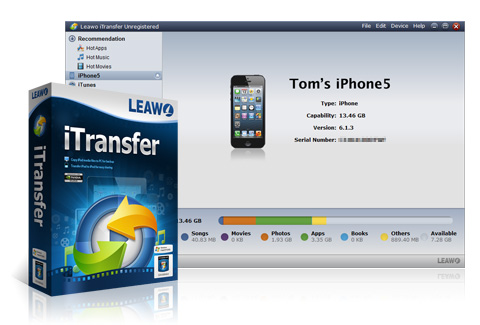
A tool is only useful if it is easy to use. Many third-party iOS managers look like they were designed in the 1990s, with confusing menus and cryptic error messages. Leawo iTransfer stands out because it prioritizes the user experience. The interface is clean, modern, and highly visual. When you plug in your device, you see a clear breakdown of your storage—how much is taken up by music, how much by video, and how much is free. This visual representation makes it easy to manage your storage at a glance.
Beyond the look and feel, the software is built for the modern tech landscape. It is fully compatible with the latest versions of Windows and supports the most recent updates to iTunes and iOS. This is critical because Apple frequently updates its software to block third-party tools. The team at Leawo is diligent about keeping their software updated so that when you update your iPhone to the latest version of iOS, your transfer tool doesn't suddenly stop working. It is a "future-proof" investment for your digital toolkit.
Additionally, the "drag and drop" functionality is as intuitive as it gets. You don't need to be an engineer to use this software. If you can move a file from one folder to another on your desktop, you can use iTransfer. This simplicity is emblematic of what good software should be: it solves a complex problem (iOS data management) with a simple solution. It removes the stress of dealing with Apple's proprietary restrictions and replaces it with a straightforward, empowering experience. For anyone who has ever felt "stuck" by their technology, this software is the ultimate "get out of jail free" card.
In conclusion, Leawo iTransfer is more than just a simple utility; it is a comprehensive management suite that respects the user's ownership of their data. By downloading this giveaway, you are gaining the ability to bypass the frustrations of iTunes, move your files with total freedom, secure your data against loss, and even use your device in ways Apple never intended. It is efficient, user-friendly, and highly versatile. Whether you are a casual user who just wants to save some photos or a power user looking to manage a massive media library, this is one download you do not want to miss. Take control of your devices today and experience the freedom of a truly open mobile ecosystem.

Reviews for Leawo iTransfer
Click Here to Read Reviews for Leawo iTransfer >> Click Here to Submit Reviews for Leawo iTransfer >>