What Does LogonExpert Do?
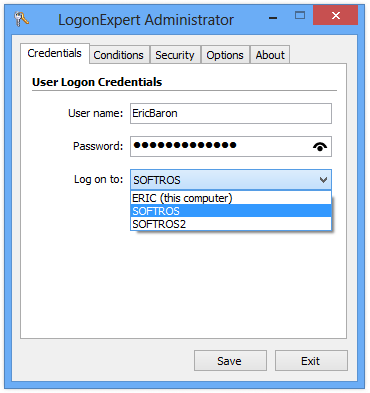
Standard Windows automatic logon solutions typically rely on storing credentials in the system registry or Local Security Authority storage. These methods remain vulnerable to unauthorized retrieval via tools like RegEdit or network-based access. LogonExpert addresses these security risks by encrypting logon data using the AES 256 algorithm and interacting directly with WinLogon to prevent credential interception by third-party applications.
This software provides granular control over the authentication process. Users can schedule delayed logons, set up automatic logoffs, or ensure a workstation remains logged in by automatically re-authenticating after a session ends. It includes command-line support for managing multi-user logons simultaneously and allows administrators to restrict configuration rights for limited users. These command-line tools also enable remote management of logon credentials and system states, such as locking or unlocking the computer.
Beyond security, LogonExpert automates common system barriers. It can bypass Ctrl+Alt+Del prompts, legal notices, and boot Windows 8 or Server 2012 environments directly to the desktop. Additional features include automatic workstation locking after a successful logon and the ability to maintain functionality even when the system is booted in Safe Mode. The tool is compatible with all modern versions of the operating system, ranging from Windows XP to Windows 10 and various Windows Server iterations.
Top 5 Reasons To Download LogonExpert
1. Military-Grade Security Protocols: Unlike standard Windows workarounds, this tool uses AES 256 encryption and direct WinLogon interaction to keep your credentials invisible to hackers and unauthorized software.
2. Advanced Multi-User and Command Line Control: This isn't just for one account; it allows for complex scripting and simultaneous multi-user logons, making it a powerhouse for system administrators and power users.
3. Intelligent Barrier Bypass: Tired of "Ctrl+Alt+Del" prompts or legal notices stalling your boot sequence? This software clears those hurdles automatically, ensuring your system gets to work without human intervention.
4. Robust Scheduling and Automatic Workstation Locking: You can schedule logons, logoffs, and even set the system to lock immediately after an automatic logon, providing a perfect balance between accessibility and high-level security.
5. Universal Windows Compatibility and Safe Mode Support: From the legacy days of Windows XP to the modern infrastructure of Windows 10 and Server 2012, this tool works across the board, even providing functionality within Safe Mode.
The Problem With Standard Auto-Logon
In the world of tech, we often find ourselves caught between two extremes: convenience and security. For years, Windows users who needed their machines to boot up and log in automatically—perhaps for a home media server, a public kiosk, or a remote workstation—had to rely on some pretty sketchy methods. If you have ever looked up how to enable automatic logon in Windows, you probably found tutorials telling you to poke around in the System Registry. Alternatively, you might have found tools that store your password in the Local Security Authority storage (LSASecret).
As a reviewer who has seen every security exploit in the book, I have to tell you: those methods are a nightmare. Using RegEdit to store your password means anyone with basic access to your machine (even remotely over a network) can pull your password in plain text. LSASecret isn't much better; dozens of free programs can reveal those passwords in seconds. You are essentially leaving your front door wide open with a sign that says "The Key is Under the Mat." This is where LogonExpert steps in to change the game. It is a sophisticated, professional-grade solution that fixes the inherent flaws of the Windows logon process.
1. Military-Grade Security Protocols
The first and most important reason you need to download this giveaway is the security architecture. When we talk about automatic logon, the biggest fear is always credential theft. LogonExpert addresses this by ditching the insecure registry and LSA storage methods entirely. Instead, it utilizes the AES 256 encryption algorithm. For those who aren't tech-obsessed, AES 256 is the same standard used by governments and financial institutions to protect top-secret data. By encrypting your logon credentials with this level of sophistication, the software ensures that even if someone manages to access your system files, they won't find anything but a wall of unreadable code.
But encryption is only half the battle. The real genius here is how the software interacts with the operating system. Standard logon tools are essentially just "typing" your password into a box. This leaves the data vulnerable to interception by keyloggers or malicious background applications. LogonExpert interacts directly with WinLogon, the core part of the Windows OS responsible for the logon process. By establishing this direct line of communication, it bypasses the "UI layer" where most interceptions happen. This means your password never actually "floats" around in the system memory where it could be grabbed. It is a secure, direct injection of credentials that makes it virtually impossible for other applications to interfere with the process.
2. Advanced Multi-User and Command Line Control
If you are a sysadmin, a developer, or just someone who likes to automate their entire life, the command line features of this software are going to be your favorite part. Most auto-logon tools are very basic: you pick one user, you save the password, and you're done. That's fine for a home PC, but what if you're managing a server? What if you have a workstation that needs to cycle through different user profiles for different tasks? This is where the Advanced Command Line Control becomes a lifesaver.
With LogonExpert, you aren't limited to a simple GUI. You can log on any number of users to a single computer simultaneously using scripts, batch files, or third-party scheduling tools. Imagine a scenario where you need to run specific maintenance tasks under an Admin account at 2:00 AM, but then you need a standard User account logged in by 8:00 AM for the daily shift. You can script this entire process. You can even lock or unlock the computer remotely through the command line. This level of flexibility is something you usually only find in expensive enterprise management suites, yet it’s all right here in this package.
3. Intelligent Barrier Bypass
We’ve all experienced the frustration of restarting a computer remotely, only to have it get stuck on a "Press Ctrl+Alt+Del to Log In" screen or a "Legal Notice" popup that requires a manual click of the "OK" button. If you aren't physically at the machine, your computer is essentially a brick until you can get to it. One of the most practical reasons to download this tool is its ability to bypass auto-logon barriers with ease.
This software is designed to be "smarter" than the standard Windows logon sequence. It recognizes when the system is asking for a secure attention sequence (the Ctrl+Alt+Del requirement) and handles it automatically. It sees those annoying legal banners or system messages that pop up before the desktop loads and clears them out of the way. If you are running a Windows 8 or Server 2012 machine, it even has a specific feature to ensure you boot straight to the desktop, bypassing the "Start Screen" tiles entirely. For anyone running a server or a kiosk, this means 100% uptime and no more "stuck" reboots.
4. Robust Scheduling and Automatic Workstation Locking
One of the coolest features—and something I think is criminally underrated—is the ability to automatically lock the computer after logon. You might be asking, "Why would I want to log in automatically just to lock the screen?" The answer lies in how Windows handles background processes. Many applications, cloud sync services, and server tasks only start running once a user profile is actually loaded. If your computer reboots after an update and stays at the logon screen, those apps aren't running.
With LogonExpert, you can have the system log in automatically so that all your startup apps, servers, and scripts begin to run, but then immediately lock the workstation. This keeps your desktop private and secure from anyone walking by the physical machine, while still ensuring that your background tasks are operating at full capacity. Furthermore, the built-in scheduler allows for delayed logons. This is incredibly useful if your computer is older or if you have a lot of system services that need a few seconds to "breathe" and initialize before the user profile tries to load. By setting a 30-second delay, you prevent the system-lag "choke" that often happens during a cold boot.
5. Universal Windows Compatibility and Safe Mode Support
In the tech world, we often see great software that only works on the latest version of an OS, or legacy software that hasn't been updated since the Bush administration. This tool is a rare exception that bridges the gap. It supports everything from Windows XP and Windows Server 2003 all the way up to Windows 10 and Server 2012. Whether you are maintaining a legacy machine for specialized industrial equipment or running a modern gaming rig, this software has you covered.
Even more impressive is the Windows Safe Mode support. Most third-party logon tools break the moment you boot into Safe Mode, leaving you stranded if you don't remember your manual password or if the system settings are messed up. This software is built to be robust; it can be configured to work even in Safe Mode, ensuring that your automation isn't broken just because you're doing system maintenance. Plus, for the power users among us, it includes User Rights Control, allowing administrators to decide exactly who is allowed to change the auto-logon settings. It’s a professional tool that treats you like a professional.
The Final Verdict: Why You Need This Now
As a reviewer, I see a lot of "utilities" that are really just glorified shortcuts for settings that already exist in Windows. LogonExpert is not one of those tools. It is a fundamental upgrade to one of the most vulnerable and annoying parts of the Windows operating system. It takes the "lazy" (but necessary) act of automatic logon and turns it into a high-security, highly-automated workflow.
If you have a home media center (HTPC), you need this so your movies are ready the moment you turn on the TV. If you are a developer, you need this to ensure your local server environments are up and running after every forced Windows update. If you are a business owner running digital signage or kiosks, you need this to ensure your displays never show a "Press Ctrl+Alt+Del" screen to your customers. And if you are a security-conscious user who just wants the convenience of a fast boot without the risk of storing passwords in the registry, this is the only way to go.
The combination of AES 256 encryption, direct WinLogon interaction, and the sheer depth of command-line customization makes this a "must-download" for any serious PC user. We spend so much time waiting for our computers to be ready for us; it’s time we used a tool that ensures our computers are waiting for us instead. Don't settle for the insecure, built-in "hacks" that leave your data at risk. Upgrade your system's intelligence and security today with this giveaway. It is stable, it is reliable, and most importantly, it is secure.
In conclusion, the peace of mind that comes with knowing your credentials are encrypted while enjoying the luxury of a fully automated boot sequence is worth every penny—and getting it as a giveaway is an absolute steal. LogonExpert is the gold standard for Windows logon management, and once you’ve integrated it into your workflow, you’ll wonder how you ever managed without it. Stop wasting time with legal notices and manual passwords, and start enjoying the most seamless Windows experience possible.


Reviews for LogonExpert
Click Here to Read Reviews for LogonExpert >> Click Here to Submit Reviews for LogonExpert >>