What Does My Suite Do?
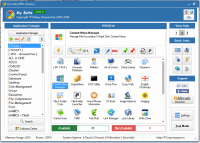
My Suite is a management utility designed to organize and streamline access to software collections. The primary function of the tool is to allow users to build a custom Application Suite. This is achieved by placing portable software into the same directory as the utility and adding them to the interface via the Application Manager or a standard drag-and-drop action.
The software includes a My Quick Launch integration feature. If a system already utilizes a file or folder launcher, My Suite can sync with it to provide faster access to managed programs. This integration aims to reduce the number of steps required to execute frequently used applications by consolidating them into a single accessible point.
Additionally, the utility serves as a desktop organization tool. Users can import existing shortcuts and programs directly from their desktop into the My Suite interface. This functionality is intended to clear icons from the workspace, consolidating software into a centralized hub without losing accessibility. The service provides a structured environment for those who utilize multiple portable tools and wish to maintain a minimal desktop footprint through centralized file management.
Top 5 Reasons To Download My Suite
If you have ever looked at your computer desktop and felt a sudden wave of anxiety, you are not alone. We live in an era of digital hoarding where every new utility, game, and productivity tool wants a piece of our screen real estate. Between the shortcuts, the temporary files, and the various software suites, our workstations often become cluttered messes that hinder rather than help our productivity. This is exactly why My Suite is the utility you didn't know you needed, but won't be able to live without. As a tech reviewer who has seen thousands of "optimization" tools come and go, I can tell you that this giveaway is a rare gem that focuses on simplicity, portability, and organization.
Before we dive deep into the technical specifications and the workflow benefits, let’s look at the core reasons why you should grab this software right now. Here are the Top 5 Reasons To Download My Suite:
- Complete Customization through Portable Software Integration: Build a bespoke toolkit that moves with you.
- Seamless "My Quick Launch" Integration: Bridge the gap between your existing file launchers and your managed applications for instant access.
- Drastic Desktop De-cluttering: Reclaim your visual workspace by importing and organizing desktop icons into a single, sleek interface.
- Effortless Management with Drag n Drop: No complex configurations—just pull your software in and let the Application Manager do the heavy lifting.
- Enhanced System Performance and Portability: By focusing on portable software, you keep your system registry clean and your tools ready for any machine.
1. Complete Customization through Portable Software Integration
The first and perhaps most compelling reason to jump on this giveaway is the sheer level of freedom it provides. Most application suites are "closed" systems; you buy a package from a developer, and you are stuck with whatever tools they decide to include. If you don't like their text editor or their image compressor, you are out of luck. My Suite flips the script entirely by allowing you to build your own custom suite from the ground up.
The magic happens through the use of portable software. For those who might not be familiar, portable software is a category of applications that do not require a formal installation process. They don't scatter files across your "Program Files" folder or bloat your Windows Registry. Instead, they run entirely from their own folder. My Suite acts as the ultimate curator for these apps. By placing your favorite portable tools into the same folder as My Suite, you can effectively create a "super-app" that contains every specific tool you need for your job, hobby, or daily tasks.
Imagine having a specialized "Design Suite" that contains only the lightweight image editors, color pickers, and font managers you prefer. Or perhaps a "Developer Suite" with your favorite IDEs and FTP clients. Because these are managed within My Suite, you can take that entire folder, put it on a USB drive, and plug it into any computer. Your custom suite is there, exactly as you configured it. This level of portability and personalization is something you rarely find in standard application managers.
2. Seamless "My Quick Launch" Integration
Efficiency is the name of the game in modern computing. We spend far too much time clicking through menus, searching the Start bar, or navigating through nested folders to find the tool we need. This is where the "My Quick Launch" feature becomes a total game-changer. If you are already using a "File/Folder Launcher" on your PC—those handy utilities that allow you to summon files with a keystroke—My Suite is designed to play nice with them.
By integrating your managed programs into the "My Quick Launch" ecosystem, you are essentially creating a high-speed bypass for your workflow. You no longer have to open My Suite, find the icon, and double-click. Instead, the software integrates with your existing system-wide launcher to ensure that your managed programs are always just a flick of the wrist away. This integrated approach is what separates a simple folder of shortcuts from a professional-grade application manager.
As a reviewer, I often see apps that try to "take over" your computer, demanding that you use their specific interface for everything. My Suite is refreshing because it understands that you might already have a preferred way of launching files. It doesn't try to replace your workflow; it enhances it. It fills the gap between your raw files and your launching utility, ensuring that your custom-built suite is always at the tip of your fingers. It’s about speed, synergy, and streamlining your digital life.
3. Drastic Desktop De-cluttering
We need to talk about the "Desktop Mess." You know exactly what I’m talking about—that sea of icons that covers your beautiful wallpaper, making it impossible to find the one document you actually need. Most users treat the desktop as a "catch-all" because it’s the easiest place to put things. But over time, this convenience turns into a productivity nightmare. A cluttered desktop leads to a cluttered mind, and studies have shown that visual clutter can actually increase stress levels during the workday.
My Suite offers an elegant solution to this problem by allowing you to import programs directly from your desktop into the suite interface. Instead of having thirty different icons for thirty different tools, you have one icon: My Suite. When you open it, you find all your imported programs neatly organized and ready to go. This isn't just about hiding the mess; it’s about organizing it.
When you use the "Save Some Space" feature, you aren't just deleting shortcuts; you are migrating them into a managed environment. This means your desktop can return to what it was meant to be: a clean, inspiring workspace. For those of us who use our computers for creative work, the psychological benefit of a clean screen cannot be overstated. By downloading this giveaway, you are essentially giving yourself a fresh start and a more professional workstation environment. It is the digital equivalent of cleaning off your physical desk and putting everything into a well-labeled filing cabinet.
4. Effortless Management with Drag n Drop
One of the biggest hurdles with any new software is the learning curve. Nobody wants to spend three hours reading a manual just to figure out how to add a shortcut. This is an area where My Suite truly shines. The developers have prioritized user experience (UX) by implementing a dead-simple "Drag n Drop" mechanic alongside a robust "Application Manager."
If you want to add a new tool to your suite, you don't need to navigate through complex file paths within a clunky menu. You simply grab the executable file or the folder and drop it right into the My Suite window. The software handles the rest. This intuitive design makes it accessible to everyone, from the hardcore tech enthusiast to the casual home user who just wants a bit more organization.
For those who want a bit more control, the "Application Manager" provides a centralized hub to oversee everything you've added. You can categorize your tools, manage how they launch, and keep your suite perfectly tuned to your needs. The beauty of this system is its flexibility. It doesn't matter if you're adding a complex portable development environment or just a simple calculator app; the process is identical. The software removes the friction between "having a tool" and "organizing a tool," which is exactly what a good utility should do. It stays out of your way until you need it.
5. Enhanced System Performance and Portability
Finally, we have to look at the long-term health of your computer. Every time you install a traditional piece of software, you are adding entries to the Windows Registry, installing background services, and potentially slowing down your boot times. Over a year or two, this "software rot" can make even a high-end PC feel sluggish. My Suite encourages a healthier way of computing by focusing on portable software.
Because you are building a suite of portable apps, your main operating system remains "clean." You can have hundreds of tools managed within My Suite, and none of them are digging their hooks into your system files. This leads to better system performance over time. Furthermore, if you ever need to reinstall Windows or move to a new computer, you don't have to spend a full day reinstalling all your utilities. You simply move your "My Suite" folder, and you are back in business immediately. This is the ultimate "insurance policy" for your productivity.
In conclusion, My Suite is more than just a folder for your apps; it is a philosophy of organized, efficient, and portable computing. By downloading this giveaway, you are taking control of your digital workspace. You are choosing to work faster, stay more organized, and keep your system running at peak performance. Whether you are a power user looking to bridge your launchers or a casual user tired of a messy desktop, this is a tool that delivers immediate, tangible value. Don't let this giveaway pass you by—your desktop (and your sanity) will thank you.
In the fast-paced world of tech, we often look for the "next big thing" in hardware, but sometimes the most significant upgrades come from the clever software that changes how we interact with what we already have. My Suite is exactly that kind of upgrade. It is simple, it is effective, and most importantly, it puts the user back in the driver's seat. If you value your time and your digital organization, this download is a no-brainer.
Summary of the Experience: After testing the integration features and the drag-and-drop functionality, I can confidently say that the "My Quick Launch" feature is the standout for power users. However, for the average user, the "Save Space on your Desktop" feature will be the most immediate benefit. The ability to "Make Your Own Application Suite" is the long-term win, providing a level of portability that traditional software just can't match. This giveaway is a must-have for anyone looking to optimize their Windows experience.
Final Thought: Why settle for a cluttered, disorganized computer when a solution this simple is available? Grab My Suite while this giveaway lasts and start building your perfect, portable digital toolkit today. It's time to stop searching for your apps and start using them.


Reviews for My Suite
Click Here to Read Reviews for My Suite >> Click Here to Submit Reviews for My Suite >>