What Does Smart Auto Typer and Talker Do?
Smart Auto Typer and Talker is a productivity utility designed to automate text entry and vocalization through user-defined hotkeys. The software operates in two primary modes: Auto Typer and Auto Talker, providing a simplified workflow for repetitive digital tasks.
The Auto Typer feature allows users to input specific text blocks and assign them to a keyboard shortcut. Users can specify the typing speed for each entry, making it an efficient tool for auto-filling forms or software windows that require consistent, fixed values. By automating these sequences, the utility minimizes the manual effort required for data entry and administrative reporting.
Alternatively, the Auto Talker mode converts programmed text into speech. This functionality is intended for content creators on platforms such as YouTube and Facebook, allowing them to generate narrations or simulate typing sequences automatically rather than performing them manually during recording.
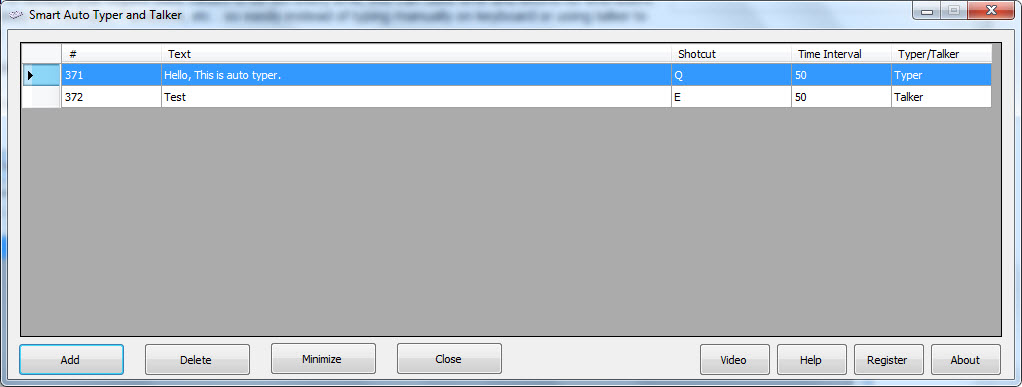
The application focuses on a streamlined user interface. To deploy a task, the user enters the desired text, configures the trigger shortcut, and selects whether the output should be typed or spoken. Once these parameters are set, the software remains active in the background, executing commands immediately upon the detection of the assigned hotkey.
Top 5 Reasons To Download Smart Auto Typer and Talker
1. Drastic Increase in Workflow Efficiency: Automate repetitive typing tasks and form-filling to save hours of manual labor every week.
2. Streamlined Content Creation for Video Platforms: Generate professional-looking tutorials and social media content for YouTube and Facebook without the fatigue of manual typing.
3. Integrated Text-to-Speech "Talker" Functionality: Transform written text into spoken word instantly, providing a powerful tool for narration and accessibility.
4. Fully Customizable Hotkeys and Speed Controls: Tailor the software to your specific needs by mapping triggers to any key and adjusting the typing pace to match your system’s requirements.
5. Zero Learning Curve with a User-Friendly Interface: Start optimizing your digital life immediately thanks to a clean, intuitive design that prioritizes ease of use over complex configurations.
In the fast-paced world of digital productivity, time is the one resource we can never get back. As tech enthusiasts and power users, we are constantly on the lookout for tools that don't just "help" us work, but fundamentally change the way we interact with our operating systems. Every once in a while, a utility comes along that is so simple, yet so profoundly effective, that it becomes an essential part of our toolkit. Smart Auto Typer and Talker is exactly that kind of software. If you have ever felt the soul-crushing weight of repetitive data entry or the tediousness of narrating a video, this giveaway is your golden ticket to a more efficient life.
I have spent years reviewing productivity suites, automation scripts, and macro recorders. Often, these programs are either too simple to be useful or so complex that you need a degree in computer science just to set up a basic command. This utility hits the sweet spot. It provides a robust set of features wrapped in a package that anyone can master in minutes. Let’s dive deep into why you need to download this software right now.
1. Drastic Increase in Workflow Efficiency
We have all been there: you are staring at a massive online form or a legacy database window that requires the exact same set of information over and over again. Maybe it is your business address, a standard legal disclaimer, or a complex string of code that you use fifty times a day. Manually typing these details is not just a waste of time; it is an invitation for human error. One typo in a product SKU or a billing address can lead to hours of corrections later down the line.
The Smart Auto Typer functionality solves this problem by allowing you to store these "fixed values" and assign them to specific hotkeys. Imagine pressing a single key combination and watching as a twenty-line paragraph or a complex data set populates the screen instantly. This isn't just about speed; it's about precision. When the software types for you, it is perfect every single time. For professionals in data entry, customer support, or software testing, this tool can effectively double or triple your output. By automating the mundane, you free up your mental bandwidth to focus on tasks that actually require human creativity and problem-solving.
Furthermore, the software allows you to set the speed for each text entry. This is a subtle but brilliant feature. Some older software interfaces or web forms cannot handle "instant" text pasting—they lag or crash if the input is too fast. With this tool, you can simulate natural typing at a speed the receiving window can handle, ensuring that your automation never breaks the system it is trying to help.
2. Streamlined Content Creation for Video Platforms
If you are a content creator for platforms like YouTube, Facebook, or TikTok, you know that the "production" phase is often the most grueling. Creating tutorials, in particular, requires a high level of coordination. You have to record your screen, type out commands or explanations, and often narrate simultaneously. It is easy to make a mistake, leading to endless retakes and hours of editing.
Smart Auto Typer and Talker serves as a "silent partner" in the recording studio. Instead of fumbling with your keyboard while trying to maintain a steady mouse cursor for a tutorial, you can pre-set all your typing sequences. When it’s time to show the viewer how to enter a command or fill out a form, you simply hit your hotkey. The software types the text smoothly and professionally, making your video look polished and high-end. This is especially useful for "faceless" channels where the visual of the typing process is a key part of the instructional value.
Beyond just the typing, the integration of the "Talker" feature means you can automate the auditory side of your content as well. If you are shy on camera or don't have a high-quality microphone setup, you can use the Talker to speak the text for you. This allows for the creation of consistent, clear, and professional-sounding voiceovers without the need for multiple takes. It’s a complete solution for the modern digital storyteller who wants to maximize quality while minimizing the time spent in the "recording" chair.
3. Integrated Text-to-Speech "Talker" Functionality
While the "Auto Typer" side of this app is a powerhouse for productivity, the "Talker" component is what truly sets it apart from standard macro recorders. Text-to-speech technology has come a long way, and having it integrated directly into a hotkey-driven utility is a game-changer for several reasons.
First, let's talk about accessibility. For users who may have difficulty speaking or for those with motor impairments that make typing and speaking simultaneously a challenge, this tool provides a voice. You can pre-program common phrases or long explanations and have the computer speak them aloud at the press of a button. In a professional setting, this can facilitate smoother communication during presentations or video calls.
Second, from a tech reviewer’s perspective, the "Talker" is an incredible proofreading tool. We often become "blind" to our own writing after staring at it for hours. By using the Talker to read your text back to you, you can hear grammatical errors, awkward phrasing, and tone shifts that your eyes might have missed. It provides a fresh perspective on your work. Whether you are a student writing an essay or a developer documenting your code, hearing your words spoken aloud is one of the fastest ways to ensure quality.
Finally, the "Talker" is just plain fun and versatile. You can use it to create unique alerts, system notifications, or even to add a specific "techy" vibe to your live streams. The ability to toggle between "Typer" and "Talker" for the same piece of text gives you a level of flexibility that most other automation tools simply don't offer.
4. Fully Customizable Hotkeys and Speed Controls
The hallmark of a great utility is how well it fits into your existing environment. Some software tries to take over your whole system, forcing you to learn new shortcuts that conflict with your favorite apps. Smart Auto Typer and Talker takes the opposite approach. It is designed to be a background assistant that follows your rules.
The customization options are deep. You can set a unique hotkey for every single snippet of text you create. Whether you prefer using the Function keys, a combination of Ctrl+Alt, or something more obscure, the choice is yours. This means you can build a massive library of automated responses and triggers without ever having to take your hands off the keyboard or navigate a complex menu. Your most-used phrases are always just a finger-flick away.
I also want to emphasize the importance of the variable speed control. In the world of automation, speed is often the enemy of stability. By allowing the user to specify the typing speed for each individual entry, the developers have ensured that this tool works across all platforms. You might want your signature to type out at lightning speed in an email, but you might need a slower, more deliberate pace when filling out a sensitive financial spreadsheet or a web-based portal that has a slow refresh rate. This level of granular control is usually reserved for expensive enterprise-level automation software, but here, it is presented in an easy-to-use interface that anyone can understand.
5. Zero Learning Curve with a User-Friendly Interface
As a reviewer, the biggest complaint I hear from readers is about "bloatware" and overly complicated "UI" (user interfaces). We don't want to spend three days reading a manual just to learn how to automate a greeting. We want a tool that "just works."
Smart Auto Typer and Talker is the definition of user-friendly. The workflow is refreshingly linear: you open the app, you set your text, you choose your shortcut, you decide if it should be a "Typer" or a "Talker," and you hit start. That is it. There are no hidden menus, no confusing jargon, and no unnecessary "fluff" to slow you down. The interface is clean and utilitarian, focusing entirely on the task at hand.
This simplicity makes it the perfect download for everyone from the casual home user to the high-level executive. If you are a parent helping your kids with repetitive school registrations, a gamer who wants to automate chat commands, or a professional looking to optimize your office workflow, you can pick up this tool and be productive within sixty seconds of installation. In an era where software seems to be getting more complicated for no reason, this app's commitment to simplicity is a breath of fresh air.
The value of this giveaway cannot be overstated. Usually, to get this level of automation and text-to-speech integration, you would have to purchase two or three different apps. By downloading this tool now, you are essentially getting a full productivity suite for free. It is a lightweight program that won't bog down your system resources, but the impact it will have on your daily digital life is massive.
Final Thoughts from the Reviewer:
We often talk about "life hacks," but most of them are just minor adjustments. Smart Auto Typer and Talker is a genuine "workflow hack." It addresses the two most common ways we interact with our computers—typing and communicating—and makes them both faster, easier, and more reliable. Whether you're looking to save your wrists from the strain of repetitive typing (RSI is a real concern, folks!), or you want to elevate your video content to a professional level, this is the software you've been waiting for.
Don't let the simplicity of the name fool you. Under the hood, this is a robust engine of efficiency. It's the kind of tool that, once you use it for a week, you'll wonder how you ever managed without it. It turns your keyboard into a programmable command center and your PC into a more capable communicator. This is a must-download for anyone who spends more than an hour a day in front of a screen.
The ability to automate the "fixed values" in our lives allows us to spend more time on the "variable values"—the creative, unpredictable, and exciting parts of our work and hobbies. So, take advantage of this giveaway. Download the software, set up your first few hotkeys, and start reclaiming your time. Your future, more productive self will thank you for it. This is a five-star utility that delivers exactly what it promises without any of the headache. Get it while you can!

Reviews for Smart Auto Typer and Talker
Click Here to Read Reviews for Smart Auto Typer and Talker >> Click Here to Submit Reviews for Smart Auto Typer and Talker >>